Webinar platform comparison
EasyWebinar vs WebinarNinja. Which webinar platform is right for you?
WebinarNinja runs live and automated webinars and bundles a course portal. EasyWebinar is the webinar platform built for conversions: attendees join from any browser with nothing to download, the session that converts live keeps selling on autopilot, buyers pay inside the room, and follow-up runs in your CRM or ours. Automation starts at Growth.
7-day full access. Cancel anytime.



Rated a G2 LeaderSOC 2 Type II · GDPR-aligned
WebinarNinjaPlus your other tools
- Live & automatedWebinarNinja
- CheckoutOffer links out
- CRM & follow-upHubSpot, Zapier or API
- MultistreamingNone found
One account
- Live & automatedOne account
- CheckoutInside the room
- CRM & follow-upEasyCRM or yours
- Multistreaming10+ platforms
What actually differs
Both run live and automated webinars. Only one keeps the sale in the room.
The differences show up at the moment of intent: where the buyer pays, where the lead goes next, and how far the session reaches beyond the room.
Where WebinarNinja's setup stops
1external link for the offer
The timed offer button sends the buyer to another site to pay, away from what they just watched.
0native sales CRM
Leads leave through HubSpot, Zapier or the API for a CRM you buy and run yourself.
0multistream destinations found
No native streaming to YouTube, LinkedIn or Facebook appears on WebinarNinja's pages.
With EasyWebinar it's one platform, one login, one subscription. Run it live, then let that exact session run every day, take payment inside the room, follow up on what each attendee did, and stream it to 10+ platforms with EasyCast — all from Growth.
7-day full access. Cancel anytime.
“I personally use EasyWebinar and they are the best. I moved from using other platforms and nothing compares to their reliability and customer support!”
 Amy PorterfieldOnline marketing expertVideo testimonial
At a glance
EasyWebinar vs WebinarNinja at a glance
EasyWebinar and WebinarNinja both run live and automated webinars in the browser. WebinarNinja adds a bundled course portal and leaves the CRM and checkout to other tools; EasyWebinar keeps checkout inside the room, EasyCRM, behavior follow-up and EasyCast multistreaming in one account.
WebinarNinja wins on a bundled course portal, 8-hour sessions and unlimited automated attendance; everything that turns a webinar into revenue is where EasyWebinar leads.
| Topic | WebinarNinja | |
|---|---|---|
| Checkout | Inside the room | Offer button links out |
| CRM & follow-up | EasyCRM, or keep yours | HubSpot, Zapier or the API |
| Evergreen funnel | Just-in-Time, checkout and follow-up attached | Automated sessions; funnel built elsewhere |
| AI | Builds the funnel; Moderator from Pro | Copy, coaching, live FAQ, repurposing |
| Multistreaming | EasyCast to 10+ platforms | None found |
| Security | Own SOC 2 Type II report | Points to its hosts' SOC 2 reports |
| Course portal | Paid and gated webinars | CourseNinja bundled |
Better fit for EasyWebinar Better fit for WebinarNinja
Which should you choose?
Choose by the job, not the feature list.
Buy WebinarNinja when the session is the lesson and a bundled course portal is the point. Buy EasyWebinar when the webinar has to sell — in the room, on autopilot and in the follow-up.
- Best for
- Webinars built for conversions — live and automated, on one subscription.
- Standout
- Checkout inside the room, and the live session that becomes your automated webinar.
- Not ideal for
- Courses with lessons and certificates — pair it with a course platform.
WebinarNinja
- Best for
- Teaching and course delivery, with unlimited webinar volume.
- Standout
- CourseNinja course portal and 8-hour sessions in the same subscription.
- Not ideal for
- Taking payment inside the room, or follow-up without a separate CRM.
Plans and CRM
Your CRM or ours
Keep the CRM you already use; EasyWebinar connects to it. Or start with EasyCRM, built in from Growth.
- HubSpot
- Salesforce Pardot (Account Engagement)
- ActiveCampaign
- Kit (formerly ConvertKit)
- GoHighLevel
- EasyCRM, built in
Flat monthly plans
No per-attendee fees within your plan.
- Every planLive webinars, browser join and the AI Webinar Builder
- From GrowthAutomated webinars, EasyCRM, checkout in the room and EasyCast
- From ProThe AI Moderator answers attendee questions in the chat
7-day full access. Cancel anytime.
Results
Webinars that keep selling after the live hour.
$5Mfrom one evergreen webinar funnel
 Carla BiesingerCourse creator
$2Mfrom one automated webinar funnel
 Ryan FennCEO of ChiirP
$750Kfrom a single webinar funnel
 Kim ConstableFounder of The Sculpted Vegan
“With EasyWebinar I sold 25 courses within 3 weeks of my evergreen "launch". Any time I needed support the response time was quick.”
 Laura K. ConnellFounder, lauraconnell.comG2 review
Go deeper
The detailed comparison, topic by topic.
Every figure behind the table, for buyers who want the full picture before they decide. Open any topic.
The full scorecardEleven decision factors, and who each one favours.
| Decision factor | WebinarNinja | Better fit | |
|---|---|---|---|
| Checkout inside the room | Native in-room checkout from Growth, no redirect | Payment at registration, or an offer button that links out | EasyWebinar |
| Built-in CRM | EasyCRM from Growth; native HubSpot and Salesforce Pardot (Account Engagement) sync on Pro | External CRM via HubSpot, Zapier or the API | EasyWebinaryour CRM or ours |
| Behavior-based follow-up | Six triggers, each with its own sequence, from Growth | Built by hand in the CRM you connect | EasyWebinar |
| Evergreen and Just-in-Time funnels | Simulive, evergreen, on-demand and Just-in-Time from Growth | Automated sessions without a published Just-in-Time start | EasyWebinarfor evergreen funnel strategy |
| AI before and during the webinar | AI Webinar Builder on every plan; AI Moderator from Pro | Registration copy, pitch coaching, live FAQ and repurposing — not funnel creation | EasyWebinarfor building the funnel |
| Multistreaming | EasyCast to 10+ platforms plus any RTMP destination, from Growth | No native social multistreaming found | EasyWebinar |
| Security certification | SOC 2 Type II report held; GDPR-aligned data practices, with a DPA | Points to SOC 2 reports held by its AWS and IBM hosting providers | EasyWebinarfor procurement |
| Automated attendance volume | 1,000 Growth · 2,500 Pro · 5,000 Scale, per session | Unlimited automated attendance advertised | WebinarNinjafor raw volume |
| Course portal | Paid and gated webinars, delivered on demand | CourseNinja bundles courses and a student portal | WebinarNinjafor a course catalogue |
| Very long single sessions | 4-hour sessions from Growth; 2 hours on Launch | 8-hour sessions by default | WebinarNinjafor full training days |
| Trial | 7 days free with full access | 14 days free | Tieboth free; WebinarNinja's window is longer |
| What matters | WebinarNinja | |
|---|---|---|
| Best for | Webinars that sell — launches, evergreen funnels, demos and paid workshops | Teaching, course delivery and high webinar volume |
| Live and automated webinars | Live on every plan; simulive, automated, evergreen and on-demand from Growth | Live, automated, on-demand, recurring, series and hybrid sessions |
| Just-in-Time scheduling | Included — visitors enter the next session on their own timing, in their own time zone | No published Just-in-Time or next-available start |
| Checkout inside the webinar | Native in-room checkout from Growth — no redirect | The in-webinar offer button links out to an external page |
| Paid registration | Native from Growth, through Stripe and PayPal | Stripe at registration, with no added platform fee; no PayPal |
| Built-in CRM | EasyCRM from Growth — or keep the CRM you already use | No native sales CRM; HubSpot, Zapier and an API connect an external one |
| Behavior-based follow-up | Six triggers — registered, attended, no-show, watched replay, clicked offer, purchased — each start their own sequence, from Growth | Handled in the CRM you connect |
| AI webinar funnel creation | AI Webinar Builder writes the script, pages, emails, polls and offer from one prompt, on every plan | AI improves registration copy, coaches the pitch, answers live FAQs and repurposes content — it does not build the funnel |
| Live-room toolkit | AI Moderator from Pro, reactions, polls, Q&A, chat, handouts, timed offers with checkout, A/B split testing on registration pages | Offers, handouts and timed sales offers; the offer button links out |
| Multistreaming | EasyCast from Growth streams to 10+ platforms at once — YouTube, LinkedIn, Facebook, Instagram, X and more — plus any RTMP destination | No native social multistreaming found |
| Streaming quality & latency | Sub-second latency on Dolby OptiView (formerly Millicast) WebRTC, joined from any browser with nothing to download | Browser-based WebRTC with zero-download attendance, marketed as low delay |
| Presenters on stage | A host plus up to 4 presenters, with TrueVoice audio | Up to 10 simultaneous guest presenters, depending on plan |
| Complete funnels you can build | 5 to 20 AI-built funnels a month by plan — each a full script, pages, emails, polls and offer, not an empty room | Unlimited webinars and registrants advertised — each one built by hand |
| Automated viewer capacity | Published per session, at 5× the live limit: 1,000 Growth · 2,500 Pro · 5,000 Scale | Unlimited automated attendance advertised — more than our allowances |
| Course delivery | Paid and gated webinars — charge per session or per series and deliver it on demand | CourseNinja is bundled — a dedicated course portal, deeper than ours |
| Session length | 2 hours on Launch, 4 hours from Growth | 8 hours by default — better for full training days |
| Support | Dedicated account manager from Pro; dedicated setup and Slack support on Scale | 24/7 email, phone and chat, with 1-on-1 onboarding and a Success Manager |
| Security & compliance | SOC 2 Type II and GDPR-aligned data practices, with a published DPA | Public trust documentation points to SOC 2 reports held by its AWS and IBM hosting providers |
| Trial | 7 days free with full access | 14 days free |
Facts checked August 31, 2026 against vendor documentation; WebinarNinja's trial, session length and payment details rechecked October 14, 2026. Live and automated allowances are separate session types and are not added together.
After the live sessionBoth automate webinars. Only one automates what happens next.
WebinarNinja automates delivery at high volume: automated, on-demand, recurring, series and hybrid sessions, with unlimited automated attendance, simulated chat and prewritten host Q&A. EasyWebinar carries the automation further — into Just-in-Time starts, the offer, checkout inside the room and follow-up on what each attendee did.
Automated revenue funnel
The webinar keeps converting and following up.
- Live on every plan; automated, simulive, evergreen, on-demand and Just-in-Time from Growth, from one funnel
- 1,000 / 2,500 / 5,000 automated viewers per session, already included
- Timed offers and checkout inside the room
- Six behavior triggers start the follow-up in EasyCRM, or in the CRM you already use
- AI Moderator (Pro and above) answers attendee questions in the chat from the PDFs and files you upload, in live, simulive and automated webinars
WebinarNinja
Automated webinar
High-volume automated sessions, with the funnel assembled outside.
- Unlimited automated webinars and unlimited automated attendance advertised
- Simulated attendee count and chat, plus prewritten host Q&A
- Timed offers in the room, and offers can appear in the replay
- No native checkout or CRM: the offer button links out, and follow-up needs an external CRM you buy and connect
| The plain question | WebinarNinja | |
|---|---|---|
| Can a pre-recorded session run automatically? | Yes — automated, simulive and evergreen from Growth | Yes — unlimited automated webinars advertised |
| Can someone watch whenever they arrive? | Yes — on-demand and Just-in-Time, in their own time zone | On demand yes; no published Just-in-Time start |
| Can the automated webinar still make an offer? | Timed offers and checkout inside the experience | Timed offers present in the room, and in the replay |
| Can the sale happen inside the webinar? | Yes — native in-room checkout, no redirect | The offer button links out; payment completes elsewhere |
| What happens after someone shows buying intent? | A behavior trigger starts its own sequence — clicked offer, watched replay, purchased and more | An external CRM workflow through HubSpot, Zapier or the API |
| Who builds the pages, emails, polls and offer around the webinar? | The AI Webinar Builder generates the whole set from one prompt | Built by hand; its AI writes registration copy rather than the funnel |
Automation verdict
WebinarNinja automates the delivery, and at higher published volume than ours. EasyWebinar automates what happens next — the start time, the offer, the payment and the follow-up — so the session you proved live keeps selling every day.
Conversion & revenuePresenting an offer and taking the payment are two different things.
Both register attendees and present offers in the room. The difference is where the payment happens and where the lead goes afterwards: on WebinarNinja the offer button links out and the pipeline lives in another tool; on EasyWebinar the buyer pays inside the room and the follow-up starts on its own.
| Revenue workflow | WebinarNinja | |
|---|---|---|
| Checkout inside the webinar | Native in-room checkout from Growth | The offer button links out; the transaction sits outside the room |
| Paid registration | Native from Growth — Stripe and PayPal | Stripe payments at registration, with no added platform fee |
| Sale tied to watch behavior | Revenue reporting on Pro links each sale to in-session behavior | An external checkout breaks the link between what they watched and what they bought |
| Attendee data | Attendance, watch time, questions, poll answers, offer clicks and purchases, per attendee | Webinar statistics and attendance reporting |
| CRM included | EasyCRM from Growth | No built-in sales CRM; connect an external one |
| Behavior-based follow-up | Six triggers, each with its own sequence, from Growth | Email follow-up in-platform; conditional workflows via integrations |
| HubSpot / Salesforce Pardot | Native HubSpot and Salesforce Pardot (Account Engagement) sync from Pro | Direct HubSpot integration; other CRMs through Zapier or the API |
| What you still buy around it | Nothing — registration, offer, payment and follow-up run in one system | A CRM subscription, a checkout destination, and the connector work between them |
Revenue verdict
WebinarNinja passes webinar data to your stack and does it cleanly. EasyWebinar includes the stack — paid registration, in-room checkout, EasyCRM and behavior follow-up — so nothing sits between the offer and the pipeline. Already run a CRM? Keep it: your CRM or ours.
AI & the platform around itAI that builds the funnel, and answers while you present.
WebinarNinja's AI writes registration copy, coaches your pitch, answers live FAQs and repurposes the recording — useful work around a funnel you still build by hand. EasyWebinar's AI Webinar Builder builds the funnel itself on every plan, and from Pro the AI Moderator answers attendee questions in the chat from the PDFs and files you upload.
| Who builds each part of the funnel | WebinarNinja | |
|---|---|---|
| Webinar script | AI writes the hook, teaching blocks and close in running order | You write it; AI can coach the pitch afterwards |
| Registration page | Generated on your brand, headline and form included | Template you fill in; AI writes the registration copy |
| Reminder and follow-up emails | Full sequence written — before the session and after it | Written and scheduled by you |
| Polls and engagement moments | Drafted and timed to the moments that hold attention | Created manually per session |
| Timed offer and checkout | Offer assets generated and wired to in-room checkout through Stripe or PayPal | Offer built by hand, pointing at a checkout page you host |
| Questions during the webinar | AI Moderator (Pro and above) answers in the chat from the files you upload | Live FAQ AI handles repeated questions in chat |
| Content after the event | The AI Webinar Builder drafts the next campaign's pages and emails | AI drafts blog, email and social content from the recording |
01 · Build
AI builds the funnel end to end
One prompt generates the script, registration and thank-you pages, the email sequence, the polls and the offer — as one connected funnel. Allowances are published per plan: 2 funnels a month on Launch, 5 on Growth, 10 on Pro and 20 on Scale.
02 · Convert
The sale stays inside the room
Timed offers and native checkout are connected from Growth, so an attendee buys without leaving the session — and the sale stays tied to what they watched.
03 · Follow up
Six triggers, six sequences
Registered, attended, no-show, watched replay, clicked offer, purchased: each starts its own sequence from Growth, in EasyCRM or in the CRM you already use.
04 · Reach
EasyCast takes the room to 10+ platforms
From Growth, stream to YouTube, LinkedIn, Facebook, Instagram, X, Vimeo, Twitch, TikTok, Kick, Rumble and Dailymotion at once, plus any RTMP destination, while timed offers, polls and Q&A keep running for attendees.
AI verdict
Before the webinar, the difference is AI that helps you present versus AI that builds the thing that sells. During it, both answer attendee questions in chat. After it, WebinarNinja repurposes the recording, and EasyWebinar's follow-up acts on what each attendee did.
Reach & growthStream to 10+ platforms without rebuying your stack.
EasyCast, from Growth, streams one webinar to YouTube, LinkedIn, Facebook, Instagram, X, Vimeo, Twitch, TikTok, Kick, Rumble and Dailymotion at once, plus any RTMP destination, while timed offers, polls and Q&A keep running for attendees. No native social multistreaming was found on WebinarNinja's published pages.
| As your audience grows | WebinarNinja | |
|---|---|---|
| Multistreaming to other platforms | EasyCast from Growth — 10+ platforms at once, plus any RTMP destination | No native social multistreaming found |
| Offers for streamed viewers | Timed offers, polls and Q&A keep running for attendees while the stream goes out | Not applicable — no native restream |
| Automated viewer allowance | 1,000 on Growth · 2,500 on Pro · 5,000 on Scale, per automated session | Unlimited automated attendance advertised — the volume advantage is theirs |
| Adding another webinar | Generate a new funnel with AI — 5 a month on Growth, 10 on Pro, 20 on Scale, each complete and ready to run | Unlimited in count, but every funnel around them is yours to build |
| What else you add as you grow | Nothing extra for the CRM, checkout or multistreaming — they are in the plan from Growth | A CRM stays external at every tier, and the checkout destination is yours to host |
Reach verdict
WebinarNinja's unlimited automated attendance is a real volume advantage, and we say so. EasyWebinar wins on reach: one stream to 10+ platforms, with the CRM, checkout and multistreaming already in the plan from Growth.
Courses & long sessionsDeliver a course, or sell one with a webinar.
WebinarNinja bundles a real course platform, CourseNinja, and runs single sessions up to eight hours. EasyWebinar is not a course platform: it is the conversion layer in front of one, selling the course with paid and gated webinars, checkout inside the room and follow-up that reacts.
The conversion layer
Sell the course with the webinar; keep the course where it lives.
- Paid and gated webinars — charge per session or per series and deliver it on demand
- Keep your course on Kajabi, Teachable or Thinkific; EasyWebinar is the conversion layer in front of it
- Checkout inside the room, then six behavior triggers for the follow-up
- 4-hour live sessions from Growth; 2 hours on Launch
- A host plus up to 4 presenters with TrueVoice audio, built for up to five people speaking at once
WebinarNinja
Course portal bundled
A real course platform in the same subscription.
- CourseNinja: live and on-demand courses, a multi-session curriculum, a student portal, coupons and course payments
- Single webinars up to 8 hours by default
- Up to 10 simultaneous guest presenters, depending on plan
- 24/7 email, phone and live chat support, with 1-on-1 onboarding and a Success Manager
Course verdict
If the catalogue and the student portal are the product, WebinarNinja is the honest pick. If your course already lives on Kajabi, Teachable or Thinkific, you are shopping for the webinar that fills it — that is the job EasyWebinar is built for.
Security & complianceEnterprise-grade security, independently audited.
EasyWebinar holds SOC 2 Type II and follows GDPR-aligned data practices, with a published Data Processing Agreement, encrypted data and per-attendee consent records. WebinarNinja's public trust documentation points to SOC 2 reports held by its AWS and IBM hosting providers rather than its own product-level report.
Security summary
SOC 2 Type II · GDPR-aligned · Published Data Processing Agreement · Encrypted data · SSO/SAML and API on Scale and Enterprise. We do not hold ISO 27001, PCI-DSS or HIPAA, because those are separate audits we have not done. Confirm current certifications with either vendor during procurement.
Try before you decideStart free for 7 days, with full access to every feature.
EasyWebinar gives you 7 days free with full access. WebinarNinja offers a 14-day free trial. What matters most is what each window lets you validate.
7 days freewith full access
The complete app at full plan capacity: AI funnel creation, live and simulive sessions, evergreen and Just-in-Time funnels, paid registration, in-room checkout, EasyCRM and EasyCast.
You can rehearse the entire revenue workflow before you pay.
WebinarNinja
Free trial14 daysfree
Two weeks on the webinar and CourseNinja feature set — automated sessions, course delivery and the AI that assists during and after the event.
Good for judging the teaching and course experience.
Trial verdict
WebinarNinja's free window is longer. Use EasyWebinar's to run a real campaign end to end — build it with AI, sell inside the room and trigger the follow-up — because a longer trial cannot show you checkout or a CRM that are not in the product.
Trial terms checked October 14, 2026 against each vendor's published pages. Confirm current trial terms with each vendor before evaluating.
Run the session. Take the payment. Keep the recording selling.
Build it with AI, run it live, then let the session that converts sell on autopilot.
7-day full access. Cancel anytime.
4.5/5 on G2 · 100+ reviews · 7-day full access · SOC 2 Type II · GDPR-aligned
Complete buyer's guide
Continue with the full research behind the comparison.
Written by Casey Zeman, Founder & CEO at EasyWebinar, on August 19, 2026. Plan capacity, session length, trial and payment details were rechecked against WebinarNinja's public pricing page on October 14, 2026 and fact-checked throughout the article below.
In this guide
EasyWebinar vs WebinarNinja: Course Delivery, Ease of Setup and Automation Compared
Casey Zeman · CEO, EasyWebinar · published August 19, 2026 · revised October 14, 2026 · 11 min read
TL;DR
- WebinarNinja bundles CourseNinja, unlimited webinars and registrants, and unlimited automated attendance. EasyWebinar is not a course platform, so a bundled curriculum and student portal is a genuine gap on the EasyWebinar side.
- EasyWebinar runs live webinars on every plan and turns the session that converts into a simulive, automated or evergreen webinar on the same account from Growth. Attendees join from any browser with nothing to download.
- WebinarNinja has no native sales CRM, takes paid registration through Stripe only, and its in-webinar offer button links out. EasyWebinar ships EasyCRM from Growth plus checkout inside the room with Stripe and PayPal, alongside the CRM a buyer already uses.
- EasyCast, from Growth, streams one EasyWebinar session to 10+ platforms at once — YouTube, LinkedIn, Facebook, Instagram, X and more — plus any RTMP destination. No native social multistreaming was found on WebinarNinja.
- Security is not parity. EasyWebinar holds its own SOC 2 Type II report; WebinarNinja's public trust documentation points to SOC 2 reports held by its AWS and IBM hosting providers.
- Casey's operating rule, not a law: run the webinar live until show rate and close rate hold steady, then clone it into automated modes. Automating a weak webinar only scales the weakness.
Buy WebinarNinja if you deliver structured courses alongside webinars, run very high webinar volume, or need long sessions. It bundles CourseNinja and advertises unlimited webinars, registrants and automated attendance. Buy EasyWebinar if the webinar itself has to sell: from Growth it runs the session live and on autopilot, takes payment inside the room and includes EasyCRM, and neither checkout in the room nor a native CRM ships with WebinarNinja.
EasyWebinar is built around one observation: a webinar that sells moves revenue where a better landing page or a nicer template does not.
That is why this comparison judges both platforms on what happens when the webinar has to sell, not on the length of the feature list.
The two costs this comparison usually hides
Most buyers compare inclusion lists. That is the wrong axis, and it is why people re-platform twice in two years.
The first hidden cost is the tools each platform leaves you buying. The second is what happens to the customer record after the sale. EasyWebinar's read is that the standard "which one includes more" question gets this backwards, which is why the EasyWebinar compare webinar platforms view is built around outcomes rather than checklists.
What WebinarNinja genuinely gives you
Concede this in full, because the list is real and it got longer in 2026. WebinarNinja advertises unlimited webinars, unlimited registrants, unlimited automated webinars, unlimited replays, unlimited cloud storage and unlimited practice sessions, alongside landing pages, series and hybrid formats.
Its documentation describes up to 1,000 live attendees and unlimited attendees on automated webinars. That is a legitimate volume advantage over EasyWebinar's standard plan limits.
Then it adds CourseNinja: unlimited live and on-demand courses, multi-session experiences, a student portal, coupons, on-camera learners and course payments.
And it ships four AI capability areas, not two: registration-copy AI, sales-coaching AI, live FAQ AI that answers repeat questions in chat, and post-event repurposing AI that turns the recording into blog, email and social drafts.
Lack of base functionality. Poor execution. Product instability. Poor value.
What is not on that list
No native sales CRM. WebinarNinja publishes a HubSpot integration, other email and marketing integrations, Zapier and API access, so the pipeline can live in HubSpot or another external system. It just does not live inside the webinar platform.
No checkout inside the live room. Paid registration runs through Stripe, and its page states that PayPal is not accepted. Its timed in-webinar offer does exist, but the button links to an external URL, so the buyer finishes the transaction somewhere else.
| Criterion | WebinarNinja | EasyWebinar |
|---|---|---|
| Course delivery | CourseNinja bundled | Paid and gated webinars, delivered on demand — no student portal |
| Native sales CRM | None; HubSpot, Zapier, API | EasyCRM from Growth |
| Payments | Stripe only, no PayPal | Stripe and PayPal, with checkout inside the room |
| Multistreaming | None found | EasyCast to 10+ platforms from Growth |
| Webinar volume | Unlimited webinars and automated attendance | 5 to 20 AI-built funnels by plan |
The honest test, in one question
Do you need to deliver a course, or convert people into one? Deliver a course, buy WebinarNinja. Convert into one, keep reading, because using webinars to sell online courses is a different job entirely.
Carla Biesinger built $5M from a single evergreen funnel on this model, as her course creator case study lays out. That outcome came from one webinar that sold, not from a bigger feature list.
WebinarNinja was acquired on 22 January 2024, terms undisclosed. Founders Omar Zenhom and Nicole Baldinu announced the sale themselves on 19 January, citing more than 30,000 users. The product is now bundled with CourseNinja and sold alongside a learning and training suite. Development continues: four AI capability areas have shipped since.
Almost no comparison article on this keyword mentions the acquisition. That is a two-year-old fact hiding in plain sight, and it changes the product context you are buying into.
The facts, dated
The corporate announcement described WebinarNinja as an addition to an online learning and training suite, and the vendor's own About page confirms it. If you see 19 January quoted as the date, that is the founders' personal announcement rather than the corporate one. Both are real; they are different events, and the earlier version of this article blurred them.
Omar Zenhom posted it himself on X: he and Nicole Baldinu had bootstrapped the product for roughly nine years before selling. That is a primary source, not a rumour.
What the branding tells you, and what it does not
Read a pricing page like a roadmap document. WebinarNinja's page leads with webinars, then bundles CourseNinja, then cross-sells the parent company's suites.
That is a learning-and-training company selling a webinar tool as an entry point. EasyWebinar's read — an interpretation, not a finding — is that suite-owned tools get funded for breadth rather than depth. Course delivery and training features come first; conversion mechanics come later.
The fair counter, stated properly
An acquisition is not abandonment. Four AI capabilities have shipped since the sale, which is exactly what continued investment looks like. A larger parent can bring infrastructure, support resources and engineering capacity that two founders could not fund.
What to watch for after an acquisition
What it changes is roadmap ownership. You are not only buying today's feature list; you are buying whose roadmap you sit on for the next three years. That is equally true of EasyWebinar, and buyers should apply the same test to EasyWebinar.
Stated as an interpretation that may be too strong: suite-owned tools get funded for breadth across the suite, while single-product companies get funded for depth in the one thing they sell.
Do this before you commit
Three checks, none of which take longer than twenty minutes:
- Read the last twelve months of release notes and count how many touched conversion versus content delivery.
- Ask support one direct question in writing: which product line owns the webinar roadmap now.
- Check whether the features you are buying also appear on the parent company's suite pages. Shared features get shared priorities.
Why founder-led matters here, and where it does not
Founder-led is not automatically better. Small teams ship slower on infrastructure, and that has cost EasyWebinar at times. Where it does matter is focus: every EasyWebinar release in 2026 pushed on selling rather than curriculum delivery — the AI webinar builder in February, in-room checkout and native video hosting in March, multi-language live rooms in May.
If your business delivers a structured course — cohorts, a curriculum and a student portal — buy WebinarNinja. CourseNinja ships unlimited live and on-demand courses, multi-session events, coupons, a student portal and course payments. EasyWebinar takes a different route to the same revenue: paid and gated webinars let you charge for access per session or per series and deliver it on demand, with the checkout and the CRM in the same platform.
This is the section where some buyers should stop reading and choose WebinarNinja. A clear answer here beats a mismatch discovered in month two.
The concession, stated in full
WebinarNinja bundles a real course platform. That is not a marketing line: it is a second product, included in the same subscription, solving a problem EasyWebinar does not solve — a catalogue and a student portal — because EasyWebinar's feature set is built around conversion instead of curriculum.
The other places EasyWebinar loses this comparison
- Webinar and automated volume. Unlimited webinars, registrants, automated webinars and automated attendance, against EasyWebinar's 5 to 20 AI-built funnels a month and 1,000 to 5,000 automated viewers per session.
- Session length. Eight hours by default, against 2 hours on Launch and 4 hours on Growth and above.
- Presenters. WebinarNinja advertises no per-seat co-presenter limit, and its help documentation describes up to 10 simultaneous guest presenters depending on plan. EasyWebinar documents a host plus up to 4 presenters.
- AI across the lifecycle. Its AI also writes registration copy, coaches the pitch and repurposes the finished webinar. Both platforms now answer attendee questions in chat with AI: its live FAQ AI handles repeat questions, and EasyWebinar's AI Moderator (Pro and above) answers from the files you upload.
- Support. Its pricing page advertises 24/7 email, phone and chat, plus 1-on-1 onboarding and a dedicated Success Manager.
Why EasyWebinar does not claim the course category
Vendors often bolt a community, a CRM and a course player onto one product. Once a platform promises to be your course player, your CRM and your community, one of the three is usually thin. EasyWebinar's read is that course delivery and conversion mechanics pull engineering in opposite directions. Buyers are free to disagree, and WebinarNinja's bundle is a reasonable counter-example if it holds up for them.
I've been using EasyWebinar to automate my webinars and drive course sales. The integration with my email service provider was seamless, allowing me to automate a follow-up sales sequence once someone watches the webinar.
The fork, in one question
Where does your course already live? If the answer is Kajabi, Teachable, Thinkific or a members area you built, you are not shopping for delivery. You are shopping for the thing that fills it. Those are two different purchases.
If the answer is "nowhere yet," and you want one bill for both, WebinarNinja is the more sensible buy.
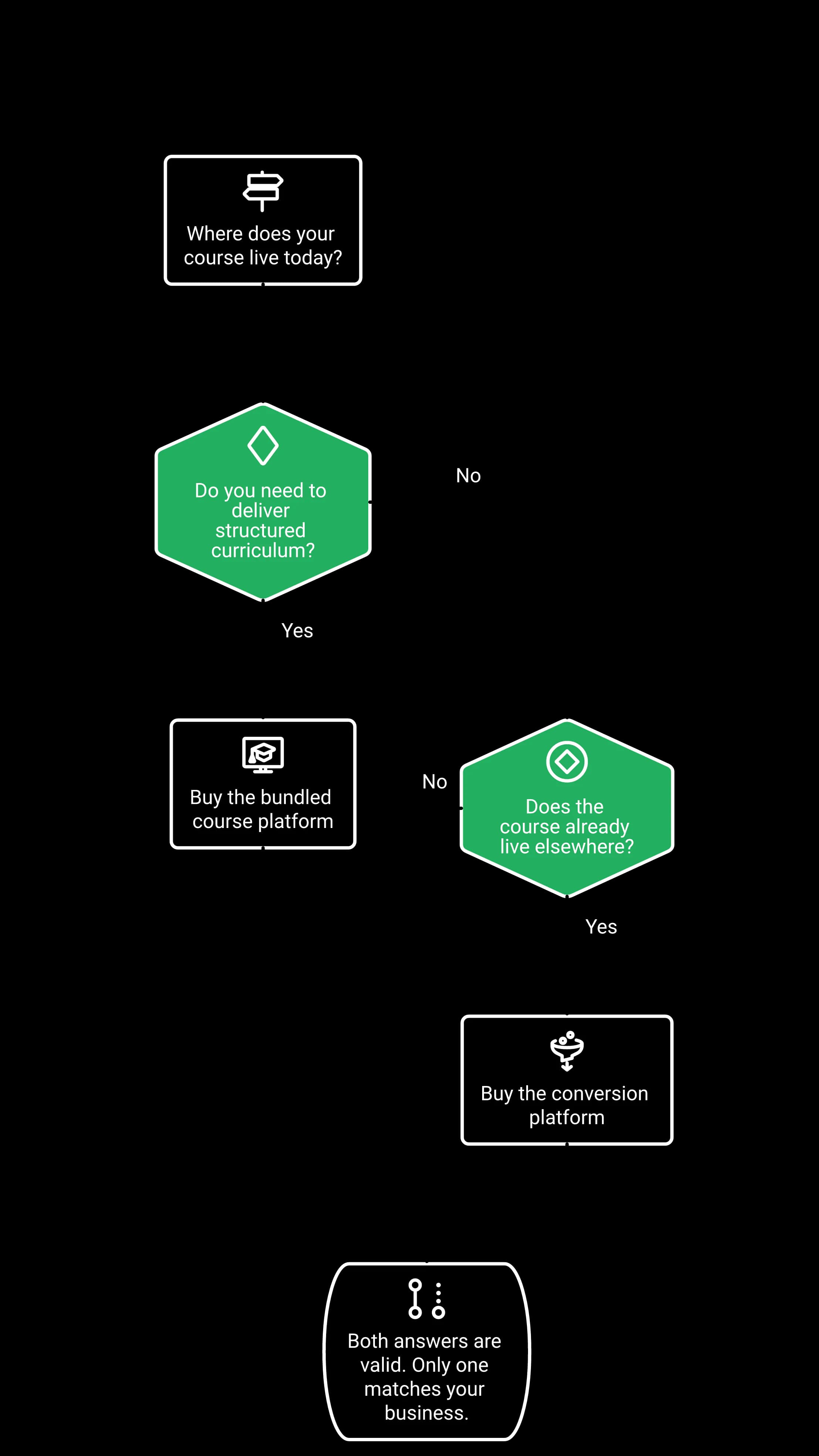
The qualification fork. Both answers are valid; only one matches your business.
Neither vendor publishes a setup-time benchmark, so discount any article quoting one. WebinarNinja answers the worry with people: no downloads for hosts or attendees, practice sessions, 24/7 support, 1-on-1 onboarding and a dedicated Success Manager. EasyWebinar answers it with generation — the AI Webinar Builder produces the script, registration and thank-you pages, reminder emails, polls and offer assets from one prompt.
Neither vendor's pricing page publishes a time-to-launch number. A "live in 12 minutes" figure is not sourced from either vendor.
WebinarNinja's path: a human answers your question
Nothing to install, for you or your attendees. You upload slides, run a practice session and go. Then, if something breaks, a person picks up. That is a legitimate answer to setup anxiety, and for a first-time host it may be the better one.
EasyWebinar's path: the build gets generated
Ask the AI Webinar Builder for the funnel and it returns the script, the registration page, the thank-you page, the reminder emails, the polls and the offer assets in one pass. Native MP4 upload for live and automated sessions shipped in March 2026.
That changes the shape of the work. You are editing a first draft instead of staring at an empty page builder.
I love how easy to use EasyWebinar is. It didn't take long to get set-up. I'm going live with my first webinar in just a few hours.
As the presenter, if you try to enter the studio 1 second after the time of the scheduled webinar... the system blocks you out, while the viewers can still enter.
The honest friction on the EasyWebinar side
The biggest challenge is around setting up automated webinars, and needing the presentation uploaded first in order to set it up.
The four-step build, so a VA can run it
Four steps, roughly thirty minutes total:
- Write the offer and the promise in one sentence before opening either tool.
- Generate or pick the registration page, and do not redesign it.
- Record or upload the presentation, then set the reminder sequence.
- Run one practice session with a real phone on cellular data.
That last step catches the failure nobody talks about: a registration button that quietly breaks on mobile.
Simple scales, fancy fails. Every template on every platform in this category is ugly. Pick one, because they are all finished, and finished beats beautiful. A branching email funnel with segmentation everywhere can take months to build and still not work. What decides the outcome is the presentation, not the page.
Both platforms run real automation, and the decision is volume versus connected selling. WebinarNinja advertises unlimited automated webinars and unlimited automated attendance, with simulated attendee count and chat, prewritten host Q&A, timed offers and replay engagement. EasyWebinar's differentiation is Just-in-Time and timezone-aware scheduling, in-room checkout, EasyCRM and behavior-triggered follow-up attached to the automated session.
Mode by mode
| Capability | WebinarNinja | EasyWebinar |
|---|---|---|
| Automated webinars | Unlimited advertised | Included from Growth, within plan limits |
| Automated attendee allowance | Unlimited advertised | 1,000 Growth · 2,500 Pro · 5,000 Scale |
| Series and hybrid formats | Published | Simulive, evergreen and recurring next-available |
| Just-in-Time start | Not published | Minutes after the visitor lands |
| Local-timezone scheduling | Not published | Published |
| Checkout inside the session | Offer button links out | Native in-room checkout |
| Max session length | 8 hours by default | 2 hours Launch, 4 hours Growth and above |
What Just-in-Time actually does
Jargon first. Just-in-Time means the next session starts shortly after someone lands on the page instead of days later. In EasyWebinar it is a toggle, and the gap is short by design: somebody arrives at 11:04 on a Tuesday and watches at 11:09, while the ad that sent them is still in their head. The mechanics of each mode sit on the automated webinar page.
Does the engagement survive the recording?
This is the question comparison articles skip. A recorded session with dead chat, a poll nobody sees and an offer button that fires at minute one is not a funnel. Both vendors document engagement in the replay, and both have reviewers reporting replay and stats problems, so check this in trial rather than in a feature grid.
Statistics were not helpful. You can not see how many of the attendees were actually attended the full webinar or when they leave.
Pretty much once I have run one webinar, I can clone and setup multiple in a breeze. We have run close to 30 since we started running it this new year.
The contrarian part: automate second, not first
In EasyWebinar's experience, automated sessions convert below the live version of the same webinar: webinars that close well live often lose ground once automated. So run it live until the show rate and close rate hold, then clone it. Reversing that order is how people end up automating a webinar that never worked.
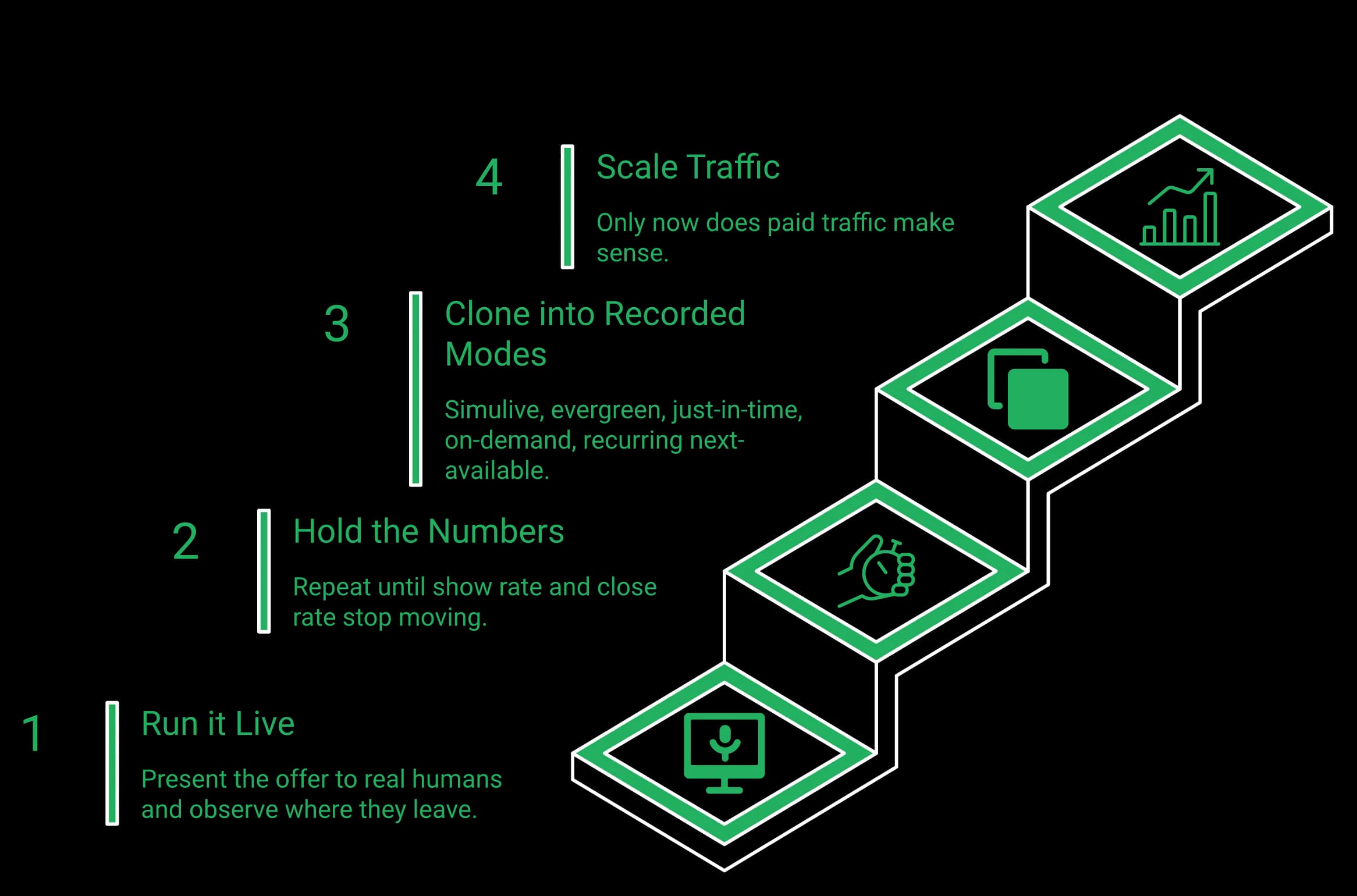
Casey's operating sequence, not an industry law. Prove it live, then automate, then buy traffic.
Where operators genuinely disagree
Plenty of smart creators build evergreen from day one and argue live workshops burn you out for nothing. That position is real, and for a tiny list it can be right. EasyWebinar's read, open to challenge, is that a host learns where the drop-off sits only by watching real humans leave in real time. Waiting is still worse than either choice: an automated funnel with no traffic behind it is a billboard in the desert.
EasyWebinar's AI builds the funnel before the webinar exists, returning script, pages, emails, polls and offer assets from one prompt, and, on Pro and above, its AI Moderator answers attendee questions in chat from the files you upload. WebinarNinja's AI works at four points in the lifecycle: registration copy, pitch coaching, live FAQ handling in chat, and post-webinar content repurposing. Neither is "the one with AI." Pick by which part of your workflow is the bottleneck.
Four AI jobs on their side, conceded
- Registration-copy AI generates registration and headline copy designed to increase sign-ups.
- Sales-coaching AI reviews the webinar and pitch against conversion frameworks and suggests improvements.
- Live FAQ AI handles repeated questions in live chat while the session runs.
- Repurposing AI turns a finished webinar into blog, email and social drafts.
If content repurposing is a job you currently pay a freelancer for, that fourth one is money back. For questions in chat, compare its live FAQ assistant with EasyWebinar's AI Moderator on your own attendees' questions.
What "builds the funnel" means in practice
The AI Webinar Builder runs a short question flow, then returns the script, the registration and thank-you pages, the reminder emails, the polls and the offer assets. The allowance is published per tier: 2 funnels a month on Launch, 5 on Growth, 10 on Pro and 20 on Scale.
You are assembling, not writing. It is closer to flat-pack furniture than to a blank document, and the pieces arrive labelled.
Why generation changes the math, not just the mood
When a launch costs two hours instead of six weeks, you stop betting everything on one offer. Run three funnels at three price points against three promises, kill the two that lose, scale the one that works. That mechanism only exists when build cost is low.
Repurposing AI makes a finished webinar travel further. Building AI decides how many webinars you get to test at all. Both are real, and a team with a working webinar and no content engine should weigh the first one higher than this guide does.
The honest limit on both sides
No AI here writes a webinar that sells by itself. The hook, the story and the close still come from you. What AI removes is the blank-page tax and the six-week build. What it cannot remove is a weak offer, and good tools routinely fail against bad offers.
WebinarNinja has no native sales CRM. Follow-up is handled in its own email tooling or through an external system: HubSpot, other integrations, Zapier or the API. EasyWebinar ships EasyCRM natively from Growth, with sequences and follow-up on six behavior triggers: registered, attended, no-show, watched replay, clicked offer and purchased. Pro adds revenue reporting and native HubSpot and Salesforce Pardot (Account Engagement) sync.
Here is the pain in the words operators actually use. Building pages, sending reminders, tracking attendance, following up by hand, then trying to work out what the numbers mean.
The cost that never shows up on a pricing page
If you do not already run a CRM, the missing one is invisible at checkout. It appears on Monday, when you have 380 registrants, 95 attendees and no idea which 12 to call. If you do already run one, keep it: EasyWebinar connects to the CRM you already use, just as WebinarNinja's handoff does.
What behavioural follow-up actually needs
Follow-up that converts is not "email everyone the replay." It needs a few data points per person, routed somewhere a human can act on them. EasyWebinar records these for each attendee, and its follow-up acts on them:
- Watch duration. Who stayed to the offer, and who left at minute nine.
- Poll answers. What they said they wanted, in their words.
- Offer clicks. Intent, recorded, with a timestamp.
- No-show status. A different message entirely, not the same email.
Without a system holding those signals, you export a CSV, sort it by hand, then guess. Follow-up in the same record removes all three steps.
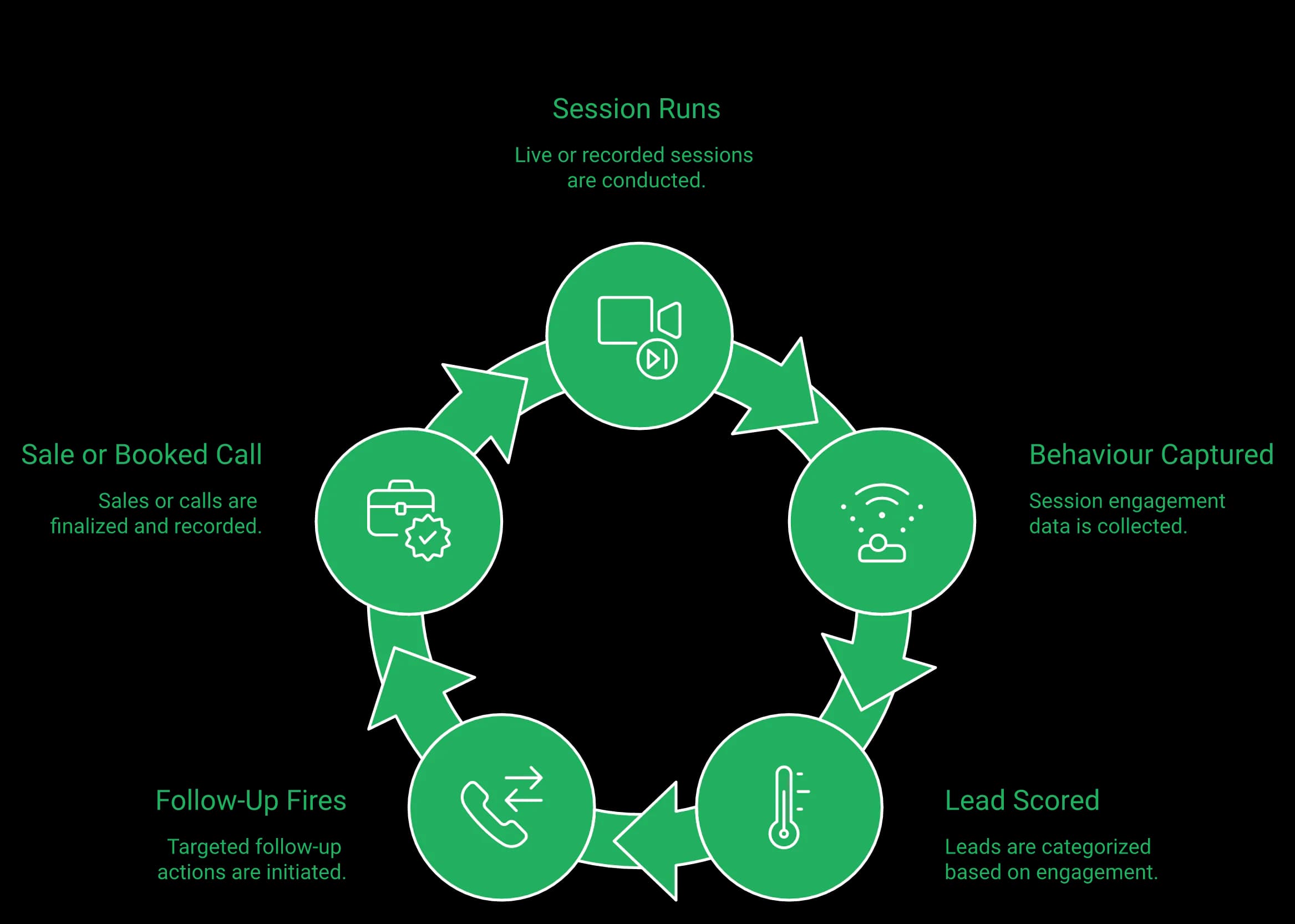
The loop only closes when the platform keeps the behaviour and the follow-up in the same record.
The three-day replay campaign, which needs the record
Day one: "Just checking you got my message. The replay is up, and it comes down tomorrow." Day three: "Final chance, it comes down in a few hours."
That sequence works well, and it only works when the system knows who watched, for how long, and whether they clicked the offer. A related example: one team put the join link directly into its text-message sequence, and its show rate rose while the booking rate fell hard.
Where EasyWebinar still falls short here
I do use other email systems to send post-webinar email sequences because I can't track open and click rates on EasyWebinar.
Three honest limits, because the rest of this section is a win and that gets suspicious. Open and click tracking inside EasyWebinar is thinner than a dedicated email platform's. SMS reminders run through Twilio rather than natively, and WhatsApp follow-up is not available. And the expanded analytics released in March 2026 is still labelled Beta. Check all three against current release notes before you count on them.
The stack math nobody runs
Compare the whole stack, not line items. A webinar plan plus a separate CRM subscription and the connector work between them is two systems and a seam where leads go missing. Engagement is not cash: a room full of happy attendees with no pipeline behind them pays nobody.
WebinarNinja does show timed offers during the webinar, and the button links to an external URL. Its native paid-webinar flow takes payment through Stripe at registration, explicitly without PayPal, and it states it charges no service fee of its own. EasyWebinar takes paid registration through Stripe or PayPal and completes checkout inside the webinar itself, shipped March 2026.
The concession, and it is a real one
WebinarNinja's own FAQ says you can charge at registration through Stripe "without any service fees of its own." Keeping the full payment less processor fees is a genuine advantage. EasyWebinar publishes no equivalent platform-fee statement, so this guide does not claim parity there; check it in your own trial.
"At registration" and "at the close" are different products
Payment at registration means you are selling a ticket to the session. That is excellent for ticketed workshops, paid courses and events where the buyer has already decided before attending.
Selling the offer at minute 47 is a different mechanic. That buyer is warm right now, and every extra click between the decision and the card form loses some of them. That gap is what paid webinars with in-room checkout closes.
| Payment capability | WebinarNinja | EasyWebinar |
|---|---|---|
| Timed offer inside the webinar | Yes, and available in the replay | Yes |
| Where the offer button goes | External URL | Checkout inside the webinar |
| Paid registration | Stripe only | Stripe and PayPal |
| PayPal accepted | No | Yes |
| Platform fee statement | None charged | Not published |
Why payment-method coverage is not a small detail
If your buyers sit in Europe, Latin America or India, card-only checkout can cost you sales — not because the offer failed, but because the payment method was missing. A coach can lose sales in a single session for exactly that reason, and nobody logs it in analytics as a payment problem.
The close mechanic that in-room checkout exists to serve
Here is a proven transition, almost word for word: "I have a paid offer that goes deeper on this. Is it okay if I walk you through it? Drop a 1 in the chat."
You earn permission first. Then the buy has to happen without leaving the room, because a redirect at that moment breaks the state you just built. One more mechanic pairs with it: promise a bonus for the people who stay through to the pitch, then deliver it.
I love that we can have a poll, offer and countdown right in the event. That's going to be so great for sales and interactions.
The number that decides this row
Do the arithmetic on your own offer. On a high-ticket offer, one sale recovered per session is worth more than the redirect ever saved you. On a low-priced offer, a webinar is often not required at all — sell that with a sales page instead and keep your evenings.
Both platforms run WebRTC in the browser, and both publish security information, but the public assurance claims are not identical. EasyWebinar holds its own SOC 2 Type II report; WebinarNinja's public trust documentation points to SOC 2 reports held by its AWS and IBM hosting providers. It caps a single webinar at eight hours by default and publishes 24/7 support. What breaks on the day is usually the automation between tools.
A near-miss that shows what breaks on webinar day
Four hours before one host's webinar, the Zapier account hit its plan limit on total tasks fired. The automation had quietly stopped passing opt-ins, leaving a discrepancy of a couple hundred registrants between the pages and the CRM. Found any later, the session would have run to a half-empty room with no explanation.
The pre-flight audit that came out of it
Six checks, twenty minutes, done the day before every session:
- Reconcile registrant counts across the registration page, the email tool and the CRM.
- Open the registration page on a phone, on cellular data, and complete a signup.
- Confirm the reminder emails actually sent, not just that they are scheduled.
- Check your automation plan limits, including task and Zap ceilings.
- Run one practice session and load the attendee view in a second browser.
- Test the offer button and the checkout with a real card.
EasyWebinar records every session automatically and stores video in-house, so a broken third-party storage link cannot take your replay down. WebinarNinja advertises unlimited cloud storage, automated recording and unlimited practice sessions, which serves the same operational purpose from a different direction.
What reviewers report going wrong
I had an upcoming webinar for 1700 subscriptions, I upgraded my plan to the max, 1000 viewers, many hours before the webinar. But when the webinar started... there was a bug and I was not upgraded.
Stability is the risk that actually costs money, and reviews are the honest source. These are examples from verified reviews, not a sampling methodology — one reliability complaint is not a universal verdict about either product.
They decided to perform server maintenance 2 days before a webinar I had been planning for 2 months with 600+ registrants. Their servers failed... nearly 400+ people couldn't log in.
The video quality came and went when I switched from the slides as the main screen back to me. It was pixelated and then cleared.
On latency claims, on both sides
A blanket latency promise cannot be proven, so this guide names the stack instead: EasyWebinar's live layer runs on Dolby OptiView (formerly Millicast) over WebRTC, with vendor-published sub-second latency. WebinarNinja is browser-based WebRTC with zero-download attendance, marketed on low delay. Both figures are vendor-published rather than independently benchmarked.
Support is a real WebinarNinja win
Its pricing page advertises 24/7 email, phone and live chat, plus 1-on-1 onboarding and a dedicated Success Manager. For a solo host at 11pm, that is a better answer than EasyWebinar's. EasyWebinar includes a dedicated account manager from Pro, dedicated setup and Slack support on Scale, and enterprise support terms above that.
Decide in three steps. Name whether you deliver a course or convert people into one. List what the webinar has to do after the live hour. Then build one funnel end to end on a trial before migrating anything. Choose WebinarNinja for a bundled course portal, unlimited volume, long sessions and human onboarding. Choose EasyWebinar from Growth when the webinar you already have needs to sell better — live, on autopilot and in the follow-up.
The three-step decision, in order
Step one takes thirty seconds: write down where your course lives today, or write "nowhere." Step two takes twenty minutes: list what has to happen after the session — checkout, CRM, follow-up, replay, multistreaming — and check which EasyWebinar plan includes it on the pricing page. Step three takes an afternoon: build one complete funnel, registration through follow-up, before you move anything else.
Six operator profiles, six conclusive answers
- The cohort teacher. Curriculum, student portal, weekly sessions. Buy WebinarNinja and stop reading here.
- Existing LMS plus a sales funnel. Course already on Kajabi, Teachable or Thinkific. Buy EasyWebinar; you are shopping for the session that fills it.
- The coach selling internationally. PayPal alongside Stripe decides it, because card-only checkout costs you sales.
- The agency running client launches. Fast branded builds and reporting a client will read — AI funnel generation is the lever.
- The solo host running free teaching sessions. If the session never sells anything, WebinarNinja's volume and course portal fit; the moment it has to sell, EasyWebinar.
- The B2B demand-gen team. Native CRM behavior, HubSpot and Salesforce Pardot (Account Engagement) sync and revenue reporting. Buy EasyWebinar, usually Pro.
The migration sequence that does not cost you a month
If you want the most, make it easy; if you want the best, make it hard — and that applies to who you let into your programs as much as to how you migrate. Do not rebuild everything. Rebuild one funnel, the one that already sells. Run it live two or three times until show rate and close rate hold steady. Then clone it into automated modes, and only then move the rest. EasyWebinar's 7-day free trial with full access is long enough to run that first live session, which is the test that tells you the most. WebinarNinja's 14 days give you longer to evaluate, which is a fair reason to start there if evaluation time is your constraint.
What one working funnel is worth
Carla Biesinger built $5M from a single evergreen funnel. Not five funnels. One that sold, then ran.
I convert really well with live webinars, but I can't be everywhere at once. EasyWebinar gives me the ability to multiply my efforts and offer a human touch.
What may shift by 2027
EasyWebinar's read is that live workshops come back as audiences get tired of obviously synthetic content. Automation stays, but the live sprint in front of it becomes the differentiator again. The timing is uncertain. For anyone running both live and evergreen right now, the number to watch is which one is holding its conversion rate.
Before you commit
Build one funnel end to end on a 7-day free trial with full access: run it live, sell inside the room and trigger the follow-up. If in-room checkout is your deciding factor, see how paid offers work inside the live room.
EasyWebinar vs WebinarNinja FAQ
Both run reliable browser-based webinars; the difference is what surrounds the session. EasyWebinar is the webinar platform built for conversions: live, automated, evergreen and Just-in-Time webinars connected to AI funnel creation, EasyCRM, in-room checkout, behavior-based follow-up and EasyCast multistreaming. WebinarNinja is a teaching and volume platform: live and automated webinars with unlimited webinar and automated-attendee volume, eight-hour sessions and CourseNinja course delivery bundled in, with your CRM and checkout living elsewhere. Every plan is listed on our pricing page.
EasyWebinar is better for automated webinars used as a funnel; WebinarNinja is better for automated volume. WebinarNinja advertises unlimited automated webinars and unlimited automated attendance, which is more raw volume than EasyWebinar's published allowances of 1,000 automated viewers on Growth, 2,500 on Pro and 5,000 on Scale — though every one of those webinars is a funnel you build yourself. EasyWebinar goes further in two ways that matter commercially: it publishes Just-in-Time and timezone-aware scheduling so a visitor enters the next session on their own timing, and the automated session can present a timed offer, take payment in the room and hand the attendee to EasyCRM for follow-up on what they did.
EasyWebinar includes one; WebinarNinja does not. EasyCRM is included from the Growth plan, with six behavior triggers — registered, attended, no-show, watched replay, clicked offer and purchased — that each start their own follow-up sequence without a separate CRM subscription. If you already run HubSpot, Salesforce Pardot (Account Engagement), ActiveCampaign or Kit (formerly ConvertKit), keep it: your CRM or ours. WebinarNinja has no native sales CRM: it connects to external systems through a direct HubSpot integration, Zapier and an API. Integrating with a CRM is not the same buying experience as including one.
Only on EasyWebinar. EasyWebinar supports native paid registration through Stripe and PayPal, and checkout inside the webinar room from the Growth plan, so an offer made mid-session can be paid for without a redirect. WebinarNinja supports paid registration through Stripe with no added platform fee, which means the transaction happens before the session; its in-webinar offer button links out to an external page, so the purchase completes on another site. Our paid webinars page shows how the checkout is configured.
EasyWebinar can. EasyCast, from the Growth plan, streams one webinar to 10+ platforms at once — YouTube, LinkedIn, Facebook, Instagram, X, Vimeo, Twitch, TikTok, Kick, Rumble and Dailymotion — plus any RTMP destination, while timed offers, polls and Q&A keep running for the attendees in the room. No native social multistreaming was found on WebinarNinja's published pages. See how it works on the multistreaming page.
WebinarNinja, if you specifically want a bundled course portal. CourseNinja is included in the WebinarNinja subscription and covers live and on-demand courses, a multi-session curriculum, a student portal, coupons and course payments — and it supports eight-hour sessions and up to 10 simultaneous guest presenters for full training days. EasyWebinar takes a different route to the same revenue: paid and gated webinars let you charge for access per session or per series and deliver it on demand through evergreen, simulive and Just-in-Time sessions, with the checkout and the CRM in the same platform. If the catalogue and the student portal are the product, WebinarNinja deserves serious consideration. Our own most-repeated complaint is that an automated webinar expects the presentation uploaded before you can build the funnel.
EasyWebinar. SaaS demos and demand generation depend on what happens after the session: the attendee has to become a qualified lead, a booked call, a trial or a customer. EasyWebinar connects the demo to EasyCRM records, behavior-based follow-up and native HubSpot and Salesforce Pardot (Account Engagement) sync from the Pro plan, and its AI Webinar Builder generates the registration page, emails, polls and offer for each campaign. On WebinarNinja that pipeline work is handled by tools you buy and connect separately.
EasyWebinar is built for security reviews: SOC 2 Type II and GDPR-aligned data practices, with a published Data Processing Agreement, an encrypted database, consent stored per attendee, and SSO/SAML and API access on Scale and Enterprise. We do not hold ISO 27001, PCI-DSS or HIPAA and will not imply otherwise. WebinarNinja's public trust documentation points to SOC 2 reports held by its AWS and IBM hosting providers rather than to its own product-level attestation, and its pricing page routes 1,000+ attendees and enterprise requirements to sales. Confirm current certifications and hosting regions with either vendor during procurement. Our GDPR terms are published for exactly this review.
WebinarNinja, at 14 days free against EasyWebinar's 7 days free with full access; a card is required to start it. The more useful question is what each trial lets you validate. EasyWebinar's 7 days run at full plan capacity, so you can rehearse the entire workflow — live session, automation, AI funnel creation, in-room checkout and EasyCRM follow-up — before you commit. WebinarNinja's longer window suits evaluating the teaching experience, the course portal and its AI assistance.
Choose WebinarNinja when the deciding requirement is teaching, volume or delivery rather than conversion: a bundled course portal and student catalogue are central, unlimited webinar count or unlimited automated attendance is a hard requirement, sessions regularly run longer than four hours, or you want AI that coaches your pitch and repurposes the recording. Both platforms use AI to answer attendee questions in chat. Choose EasyWebinar when webinars have to generate leads, demos, customers or revenue — when you need live plus automated and evergreen funnels, follow-up tied to webinar behavior, checkout inside the room, AI that builds the funnel and, on Pro and above, an AI Moderator that answers from your own files, and multistreaming to 10+ platforms in one platform.
Yes, on Pro and above. Upload your context, such as PDFs and other files, and the AI Moderator answers attendee questions in the chat from that material during live, simulive and automated webinars. It is not included on Launch or Growth.