Webinar platform comparison
EasyWebinar vs Livestorm. Which webinar platform is right for you?
Livestorm and EasyWebinar both let attendees join from any browser with nothing to download. The difference starts when the live hour ends: EasyWebinar turns the session that converts into an evergreen or Just-in-Time webinar that runs every day, takes payment with checkout inside the room, and follows up in your CRM or ours. Live and automated, on one subscription; automation starts at Growth.
7-day full access. Cancel anytime.


Rated a G2 LeaderSOC 2 Type II · GDPR-aligned
LivestormRoom first
- Live webinarLivestorm
- Evergreen funnelNot published
- CheckoutExternal page
- Follow-upExternal CRM
One account
- Live webinarEvery plan
- Evergreen & Just-in-TimeFrom Growth
- CheckoutInside the room
- Follow-upEasyCRM or yours
What actually differs
Same browser join. Different job after the live hour.
Livestorm runs a polished room. The differences show up after it closes: whether the session runs again on its own, where the buyer pays, and how the pipeline reaches your CRM.
Where Livestorm's setup stops
0evergreen or Just-in-Time modes
Replays run on demand; no session starts minutes after a visitor lands.
0payment tools at any tier
No paid registration and no checkout inside the room, so the sale leaves the session.
Enterprisefor CRM sync beyond HubSpot
Pro connects to HubSpot and Zapier; every other CRM sync waits for an Enterprise contract.
With EasyWebinar it's one platform, one login, one subscription. Attendees join from the same browser link, then the session that converts runs every day as an evergreen or Just-in-Time webinar, takes payment inside the room, and feeds pipeline to your CRM or ours — HubSpot and Salesforce Pardot (Account Engagement) on Pro, or EasyCRM from Growth.
7-day full access. Cancel anytime.
“I personally use EasyWebinar and they are the best. I moved from using other platforms and nothing compares to their reliability and customer support!”
 Amy PorterfieldOnline marketing expertVideo testimonial
At a glance
EasyWebinar vs Livestorm at a glance
EasyWebinar and Livestorm both run browser-based webinars with nothing to download. Livestorm is a meeting and webinar room for the live hour; EasyWebinar runs live, evergreen and Just-in-Time webinars, checkout inside the room and your CRM or ours from one account.
Joining is a tie and Livestorm seats bigger panels; everything after the live hour favours EasyWebinar.
| Topic | Livestorm | |
|---|---|---|
| Joining | Any browser, nothing to download | Any browser, nothing to download |
| Automated webinars | Evergreen and Just-in-Time, from Growth | On-demand replays; no evergreen funnel |
| Checkout | Inside the room, plus paid registration | No payment tools published |
| CRM & follow-up | EasyCRM, or keep yours; HubSpot and Pardot on Pro | HubSpot and Zapier on Pro; no native CRM |
| AI | Builder; Moderator from Pro | Post-event clips |
| Multistreaming | EasyCast to 10+ platforms, from Growth | Restreaming add-on |
| Panels | A host plus up to 4 presenters | Up to 25 speakers |
| Trial | 7 days free with full access | Free plan: 20 min, 30 attendees |
Better fit for EasyWebinar Better fit for Livestorm
Which should you choose?
Choose by the job, not the feature list.
Buy Livestorm when the meeting or the live panel is the job. Buy EasyWebinar when the webinar has to keep producing pipeline and revenue after the live hour.
- Best for
- Webinars built for conversions — live and automated, on one subscription.
- Standout
- The live session that becomes an evergreen webinar, with checkout inside the room.
- Not ideal for
- Courses with lessons and certificates — pair it with a course platform.
Livestorm
- Best for
- Meetings and webinars in one tool.
- Standout
- Up to 25 simultaneous speakers, question upvotes and 24 languages in the room.
- Not ideal for
- Evergreen funnels, or taking payment inside the room.
Plans and CRM
Your CRM or ours
Keep the CRM you already use; EasyWebinar connects to it. Or start with EasyCRM, built in from Growth.
- HubSpot
- Salesforce Pardot (Account Engagement)
- ActiveCampaign
- Kit (formerly ConvertKit)
- GoHighLevel
- EasyCRM, built in
Flat monthly plans
No per-attendee fees within your plan.
- Every planLive webinars, browser join and the AI Webinar Builder
- From GrowthAutomated webinars, EasyCRM, checkout in the room and EasyCast
- From ProThe AI Moderator answers attendee questions in the chat
7-day full access. Cancel anytime.
Results
Webinars that keep selling after the live hour.
$5Mfrom one evergreen webinar funnel
 Carla BiesingerCourse creator
$2Mfrom one automated webinar funnel
 Ryan FennCEO of ChiirP
$750Kfrom a single webinar funnel
 Kim ConstableFounder of The Sculpted Vegan
“With EasyWebinar I sold 25 courses within 3 weeks of my evergreen "launch". Any time I needed support the response time was quick.”
 Laura K. ConnellFounder, lauraconnell.comG2 review
Go deeper
The detailed comparison, topic by topic.
Every figure behind the table, for buyers who want the full picture before they decide. Open any topic.
The full scorecardTen decision factors, and who each one favours.
| Decision factor | Livestorm | Better fit | |
|---|---|---|---|
| Evergreen and Just-in-Time | Simulive, evergreen, on-demand and Just-in-Time from Growth | On-demand replays only; no evergreen funnel published | EasyWebinarfor the replay window |
| Checkout inside the room | Paid registration and in-room checkout | No payment tools published | EasyWebinar |
| CRM and follow-up | EasyCRM from Growth, six behaviour triggers; HubSpot and Pardot sync on Pro | HubSpot and Zapier on Pro; no native CRM | EasyWebinaryour CRM or ours |
| AI before and during the webinar | AI Webinar Builder on every plan; AI Moderator from Pro | AI aimed at post-event clips | EasyWebinarbefore and during the session |
| Multistreaming | EasyCast to 10+ platforms plus RTMP, from Growth | Restreaming, a paid add-on | EasyWebinar |
| Browser join | Any browser, nothing to download | Any browser, nothing to download | Tiesame attendee experience at the door |
| Live room | AI Moderator from Pro, reactions, polls, Q&A, timed offers with checkout | Upvotes, reactions, polls, Q&A, 24 languages | EasyWebinarthe room that answers and sells |
| Panels and stage size | A host plus up to 4 presenters | Up to 25 simultaneous speakers | Livestormfor large panels |
| Security paperwork | SOC 2 Type II, GDPR-aligned with a DPA | ISO 27001, EU or USA hosting add-on | TieLivestorm for an ISO or EU-residency mandate |
| Trial | 7 days free with full access | Free plan: 20 minutes, 30 attendees | EasyWebinartests the whole funnel |
| What matters | Livestorm | |
|---|---|---|
| Best for | Webinars that keep producing pipeline and revenue after the live hour — live and automated, on one subscription | Meetings and webinars in one tool |
| Attendee joining | Any browser, desktop or mobile, nothing to download | Any browser, nothing to download |
| Automated & evergreen | Simulive, scheduled evergreen, on-demand and Just-in-Time, from Growth | On-demand replays and in-session auto-play; no evergreen funnel or Just-in-Time published |
| Automated viewer capacity | 1,000 per session on Growth · 2,500 on Pro · 5,000 on Scale | Every replay or on-demand viewer counts toward the same attendee quota |
| Paid webinars & checkout | Paid registration and checkout inside the room, from Growth | No payment tools published at any tier |
| Built-in CRM | EasyCRM from Growth — or keep the CRM you already use | No native CRM |
| Behaviour-based follow-up | Six triggers — registered, attended, no-show, watched replay, clicked offer, purchased — each start their own sequence | Built by hand in the CRM you connect |
| CRM sync | Native HubSpot and Salesforce Pardot (Account Engagement) sync on Pro | HubSpot and Zapier on Pro; other CRM sync on Enterprise |
| AI | AI Webinar Builder on every plan; AI Moderator from Pro answers attendee questions from your files | Post-event AI: clip generation (waitlisted) and repurposing |
| Multistreaming | EasyCast to 10+ platforms plus any RTMP destination, from Growth | Restreaming add-on: LinkedIn, YouTube, X and more |
| Speakers on stage | A host plus up to 4 presenters, TrueVoice audio | Up to 25 simultaneous speakers |
| Security | SOC 2 Type II, GDPR-aligned data practices with a DPA, SSO/SAML on Scale | ISO 27001, SAML add-on, EU or USA video-hosting option |
| Trial | 7 days free with full access | Free plan capped at 20 minutes and 30 attendees |
Comparison facts checked against each vendor's published features, plans and documentation on August 28, 2026. Vendor features can change; verify before procurement. Live and automated allowances are separate session types and are not added together.
After the session endsBoth can replay a webinar. Only one runs it as a funnel.
Livestorm automates inside a session — it can start, end and play a video on its own, and it hosts on-demand replays. EasyWebinar automates the funnel: the session that converted live runs as simulive, scheduled evergreen or Just-in-Time from Growth, starting minutes after a visitor registers, in their own time zone, with the offer and checkout still in the room.
Automated funnel
The automated room keeps selling and following up.
- Simulive, scheduled evergreen, on-demand and Just-in-Time in the visitor's own time zone, from Growth
- 1,000 automated viewers per session on Growth, 2,500 on Pro, 5,000 on Scale
- Timed offers and checkout inside the room, so the automated session still sells
- AI Moderator, from Pro: answers attendee questions in the chat from the PDFs and files you upload, in live, simulive and automated webinars
- The recording never changes platforms, so the session that converted on Tuesday runs at 2am on Sunday
Livestorm
Automated playback
A replay on demand, and a sale that happens somewhere else.
- On-demand events and in-session automation on paid plans
- No scheduled evergreen funnel and no Just-in-Time start published
- Polls and CTAs can be pre-loaded; payment happens outside the room
- Automated sessions are passive; follow-up is manual or via an external CRM
| The plain question | Livestorm | |
|---|---|---|
| Can you schedule a pre-recorded session to run like a live one? | Yes — simulive and scheduled evergreen | Yes — automated start, end and video playback inside a session |
| Can people watch whenever they land on the page? | Yes — on demand and Just-in-Time, in the visitor's own time zone | On demand yes; no published Just-in-Time or next-available start |
| Can the automated room still sell? | Timed offers and checkout inside the room | Polls and CTAs can be pre-loaded; payment happens outside |
| Who answers a question asked at 2am? | From Pro, the AI Moderator answers from your files; behaviour-based follow-up runs after | Automated sessions are passive; follow-up is manual or via an external CRM |
| Who builds the pages, emails, polls and offer? | The AI Webinar Builder drafts the whole set, on every plan | Built by hand; Livestorm's AI is aimed at post-event repurposing |
Automation verdict
Run 5 to 10 live sessions and clear a 10% attendee-to-buyer rate before you automate anything. Then the platform has to automate the session you just proved: on EasyWebinar that is a schedule change on the same recording; on Livestorm there is no evergreen or Just-in-Time mode to move it into.
Revenue, CRM & pipelinePipeline after the live hour — in your CRM or ours.
Livestorm's B2B strength is HubSpot data on Pro. EasyWebinar matches HubSpot on Pro, adds native Salesforce Pardot (Account Engagement) sync on the same plan, includes EasyCRM from Growth, and takes the payment inside the room — so the sale, the behaviour behind it and the follow-up stay in one record.
| Revenue workflow | Livestorm | |
|---|---|---|
| Paid registration | Native, through Stripe and PayPal | External payment and Zapier workflow |
| Checkout inside the webinar | Timed offers with checkout completed in the room | No native in-room checkout found |
| CRM included | EasyCRM from Growth | No native CRM |
| Behaviour follow-up | Six triggers, each with its own sequence, from Growth; SMS reminders through Twilio | Through an external CRM or integrations |
| HubSpot | Native sync on Pro | Native on Pro |
| Salesforce Pardot (Account Engagement) | Native sync on Pro | Enterprise only |
| Other CRMs and email tools | GoHighLevel, ActiveCampaign, Keap, Mailchimp, Kit (formerly ConvertKit), Ontraport, or via Zapier and webhooks | Zapier on Pro; Marketo and Dynamics on Enterprise |
Revenue verdict
If your VP asks which sessions produced pipeline, the answer should not take four spreadsheets. EasyWebinar records what each attendee watched, asked, clicked and bought, starts the right sequence on six behaviour triggers, and syncs it to HubSpot, Pardot or EasyCRM. Livestorm passes attendance to HubSpot on Pro and leaves payment and follow-up to other tools.
Integration tiers checked on both vendor pages, August 17, 2026.
The live roomOne room seats a bigger panel. The other answers questions and takes the payment.
Both rooms run polls, Q&A, chat and reactions from a browser link. Livestorm seats up to 25 simultaneous speakers and runs in 24 languages. EasyWebinar adds what moves revenue: an AI Moderator from Pro that answers attendee questions from your files, and timed offers with checkout inside the room. Both include moderator controls; EasyWebinar also runs A/B split testing on registration pages.
| Live room capability | Livestorm | |
|---|---|---|
| AI Moderator answering attendee questions | From Pro, answering from the files you upload | Not published |
| Timed offers with checkout in the room | Included, from Growth | CTAs only; payment outside |
| Polls, Q&A, chat, handouts | Included | Included |
| Attendee reactions | Included | Emoji reactions, plus question upvotes and raise hand |
| Moderator controls | Included | Unlimited moderators |
| Speakers on stage | A host plus up to 4 presenters, TrueVoice audio | Up to 25 simultaneous speakers |
| Streaming | Sub-second latency on Dolby OptiView (formerly Millicast) WebRTC | Browser-based, nothing to download |
Live room verdict
If you regularly run panels bigger than a host plus 4 presenters, Livestorm's stage is the better fit. For a webinar that has to convert, judge the room by the close: the AI Moderator answers the question that stalls a buyer, and the in-room checkout takes the card while the offer is still on screen.
AI & reachAI on both sides of the webinar, and one session on 10+ platforms.
Livestorm's AI works on the recording after the event, through AI Studio clip generation (waitlisted) and repurposing. EasyWebinar uses AI before and during the session, and EasyCast carries the same session to 10+ platforms from Growth instead of a paid Restreaming add-on.
Before · Build
AI drafts the whole funnel from one prompt
Answer a few questions and the AI Webinar Builder writes the script, registration pages, emails, polls, offer and follow-up in about 10–15 minutes, on every plan. Livestorm points its AI at the recording after the event.
During · Answer
The AI Moderator answers while you present
From Pro, upload your PDFs and other files and the AI Moderator answers attendee questions in the chat from them, in live, simulive and automated webinars.
Reach · EasyCast
One session, 10+ platforms at once
From Growth, EasyCast streams to YouTube, LinkedIn, Facebook, Instagram, X, Vimeo, Twitch, TikTok, Kick, Rumble, Dailymotion and any RTMP destination, while timed offers, polls and Q&A keep running for attendees. Livestorm sells Restreaming as an add-on.
After · Follow up
Every attendee becomes first-party intent data
What each person watched, asked, clicked and bought feeds six behaviour triggers — registered, attended, no-show, watched replay, clicked offer, purchased — in EasyCRM or the CRM you already use.
AI and reach verdict
Post-event clips are useful, but they do not shorten the build or answer a buyer mid-session. EasyWebinar's AI drafts the funnel before you go live and answers attendee questions while it runs, and EasyCast takes the session to every platform your audience already watches — with the offer still live.
Seats, session limits & capacityFour-hour sessions, an unlimited team, and no hard stop at the plan limit.
Both give the whole team a seat and both run 4-hour sessions on their mid-tier plans. Livestorm publishes larger events — 3,000 live attendees and 12-hour sessions on Enterprise — and its FAQ says new attendees cannot join once your quota is reached until you upgrade. EasyWebinar never stops your webinar at the plan limit.
No hard cutoff
The room stays open when the webinar outperforms the plan.
- 4-hour sessions on Growth, Pro and Scale; 2 hours on Launch
- Up to 4 co-hosts and unlimited team members
- 200 live on Growth, 500 on Pro, 1,000 on Scale; larger events on Enterprise, by quote
- Your webinar never stops at the plan limit — attendees beyond it are billed as overage under our Terms
- 99.9% uptime guarantee for Enterprise customers, with service credits
Livestorm
Quota-based
Bigger published events, with a stop at the quota.
- 4-hour events on Pro, 12 hours on Enterprise
- Unlimited team members and moderators
- 3,000 live attendees per event
- Its FAQ: “If you fully reach your quota, new attendees will not be able to join sessions until you upgrade”
- VIP support with an SLA and a dedicated success manager on Enterprise
Limits verdict
For conferences above 1,000 live attendees or sessions longer than four hours, Livestorm Enterprise publishes the bigger numbers. For marketing and sales webinars, the limit that hurts is the one that turns away the buyer who arrives late: EasyWebinar keeps the room open past the plan limit.
Security & complianceAudited security on both sides — choose by the paperwork your policy names.
EasyWebinar holds SOC 2 Type II and follows GDPR-aligned data practices, with a published Data Processing Agreement and SSO/SAML on Scale. Livestorm holds ISO 27001 and sells EU or USA video hosting as an add-on. Many procurement teams accept either credential; some accept only one.
| Requirement | Livestorm | |
|---|---|---|
| Independent security audit | SOC 2 Type II (report held) | ISO 27001 certified |
| GDPR | GDPR-aligned data practices, with a DPA | Yes |
| SAML SSO | Scale and Enterprise | Add-on |
| Data residency choice | Not published | EU or USA video hosting, add-on |
Security verdict
SOC 2 Type II, a DPA and SSO/SAML clear most B2B security reviews. If your policy names ISO 27001 or a contractual EU-only hosting clause, choose Livestorm. We do not hold ISO 27001, PCI-DSS, HIPAA or CCPA, because those are separate audits we have not done.
Try before you decideStart free for 7 days, with full access to every feature.
Livestorm's free plan tests the room. EasyWebinar's trial tests the whole funnel: live, evergreen and Just-in-Time scheduling, in-room checkout, EasyCRM and the follow-up.
7 days freewith full access
The complete app at full plan capacity: AI funnel creation, live and simulive sessions, evergreen and Just-in-Time funnels, paid registration, in-room checkout and EasyCRM.
You can rehearse the live session and its automated version before you pay.
Livestorm
Free plan20 minutesand 30 attendees per session
Enough to judge the browser join and the room. Evergreen scheduling, checkout and a CRM are not there to test.
Good for judging the room, not the funnel around it.
Trial verdict
Run the same session in each room, then try to schedule it to run tomorrow on its own and take a payment inside it. The trial that lets you test that is the one that answers the expensive question — and on EasyWebinar the first 7 days cost nothing.
Trial conditions taken from published vendor documentation, August 2026. Confirm current trial terms with each vendor before evaluating.
Run the session. Take the payment. Keep the recording selling.
Build it with AI, run it live, then let the session that converts sell on autopilot.
7-day full access. Cancel anytime.
4.5/5 on G2 · 100+ reviews · 7-day full access · SOC 2 Type II · GDPR-aligned
Complete buyer's guide
Continue with the full research behind the comparison.
Written by Pranav Sharma, Chief Business Officer at EasyWebinar, on August 27, 2026. Automation, revenue, security and review evidence were fact-checked against published vendor documentation.
In this guide
EasyWebinar vs Livestorm: Automation, Revenue & Attendee Experience Compared
Verified August 28, 2026
TL;DR
- Both platforms let attendees join from any browser with nothing to download. The deciding question is what happens after the live hour: whether webinars are scheduled occasions or an acquisition asset that keeps producing pipeline.
- EasyWebinar runs live, simulive, scheduled evergreen, on demand and just in time webinars on one subscription, from Growth. Livestorm publishes on demand events and event automation, but no scheduled evergreen funnel and no just in time scheduling.
- EasyWebinar shipped in room checkout and paid registration in March 2026, includes EasyCRM from Growth, and syncs natively with HubSpot and Salesforce Pardot (Account Engagement) on Pro. Livestorm publishes no payment tools and keeps CRM sync beyond HubSpot for Enterprise.
- AI works on both sides of an EasyWebinar session: the AI Webinar Builder drafts the funnel on every plan, and from Pro the AI Moderator answers attendee questions from the files you upload. Livestorm's AI works on the recording afterwards.
- Livestorm seats bigger panels, with 25 simultaneous speakers and 24 languages, and holds ISO 27001. EasyWebinar holds SOC 2 Type II, with GDPR-aligned data practices and a DPA.
- EasyWebinar offers a 7-day free trial with full access. Livestorm's free plan caps sessions at 20 minutes and 30 attendees.
Livestorm is the better built event product. EasyWebinar is the better built funnel product. Both let attendees join from any browser with nothing to download. If your sessions are large panels or meetings, Livestorm fits, with 25 simultaneous speakers and question upvotes. If every lead currently costs a live session someone has to run, EasyWebinar wins, because Livestorm publishes no scheduled evergreen funnel, no just in time start, and no checkout inside the room.
The moment this comparison usually starts
A marketing manager opens her webinar dashboard on a Wednesday. Registrations look fine. Attendance looks fine. Her VP asks which sessions produced pipeline, and the answer takes four spreadsheets.
That is the real question behind this search. It is not "which tool runs a nicer webinar." It is "why does a working webinar platform programme produce no revenue?"
Where Livestorm genuinely wins
Livestorm seats a bigger stage than EasyWebinar. It ships 25 simultaneous speakers, unlimited moderators, question upvotes, noise cancellation, and 24 languages with right to left support, and it is built to run meetings and webinars in one tool.
It also carries review volume EasyWebinar does not match yet. Capterra lists 398 reviews at 4.7, with 385 positive. Its customer list includes Equifax, Abbott, Zapier, and Intercom.
What I liked most about Livestorm was how easy it was to host webinars without requiring anyone to download software. Everything ran directly in the browser, the interface was clean, and attendees could join instantly.
What polish does not do
Polish does not run the session at 2am while you sleep. Polish does not take the payment while the offer is still on screen.
EasyWebinar matches the browser join and then keeps going. The session that converted live runs every day as an evergreen or just in time webinar, the AI Moderator answers questions from your files from Pro, and the follow-up starts on what each attendee did.
The scoring question to use
Ask yourself one thing before you compare webinar platforms. Is the webinar a meeting you host, or a session that has to keep producing pipeline after the live hour?
If it is a meeting or a large panel, Livestorm fits and Q3 explains why. If it has to keep producing pipeline, keep going, because automation in Q2 and revenue in Q4 decide this purchase.
Why this guide reads the category through revenue
Many operators arrive at webinars through a bad year rather than a strategy, after an existing income channel stops paying.
A typical case is a course that took six months to build and sold zero copies until a webinar finally sold it. That is why this guide reads the category through revenue, not through interface design.
EasyWebinar's read is that the standard advice gets this backwards, though the data behind that read is still limited. Engagement metrics feel like progress. They are not cash.
EasyWebinar is built so one recorded session keeps selling after the calendar invite expires. Live, simulive, evergreen, on demand, and just in time run from one funnel, with checkout inside the room and your CRM or EasyCRM. Live runs on every plan; automation starts at Growth.
No. Livestorm ships on demand events and event automation, described in its own words as "automate the start and end, or automatically play a video for an experience that's just like live". That is session level automation. It publishes no scheduled evergreen funnel, and no just in time session that starts minutes after a visitor lands.
The narrow claim, said precisely
"Livestorm has no automation" is too strong, and this guide does not use it. It automates the start, the end, and the playback of a video inside a session.
What it does not publish is funnel level automation. That distinction is the whole article.
The two terms, defined once
An evergreen webinar is a recorded session that runs on a published schedule, over and over, without a presenter. Registration, reminders, chat, offers, and follow up all fire automatically.
A just in time webinar is stricter. The next session starts between roughly one and fifteen minutes after the visitor hits the page. Nobody waits three days for Thursday at 11am, so intent does not cool.
The ladder, rung by rung
Recorded sessions can run in six modes. Live, simulive, scheduled evergreen, on demand, just in time, and instant replay.
| Mode | Livestorm | EasyWebinar |
|---|---|---|
| Live | Yes | Yes |
| Auto play inside a session | Yes | Yes |
| On demand | Yes | Yes |
| Scheduled evergreen funnel | Not published | Yes |
| Just in time | Not published | Yes |
| Timezone adjusted delivery | Not published | Yes |
EasyWebinar runs all six from one funnel from Growth, with 1,000 automated viewers per session on Growth, 2,500 on Pro and 5,000 on Scale. The mechanics of each mode sit on the automated webinar page.
What the missing rungs cost you
Every missing rung converts into calendar time. On a platform with no evergreen mode, each new lead needs a live session, a presenter, and a slot.
Ten sessions a month is a part time job. Ask EasyWebinar to clone your best session instead, then let scheduling do the work you were doing manually, the way a simulated live webinar handles a fixed start time.
Do not automate too early
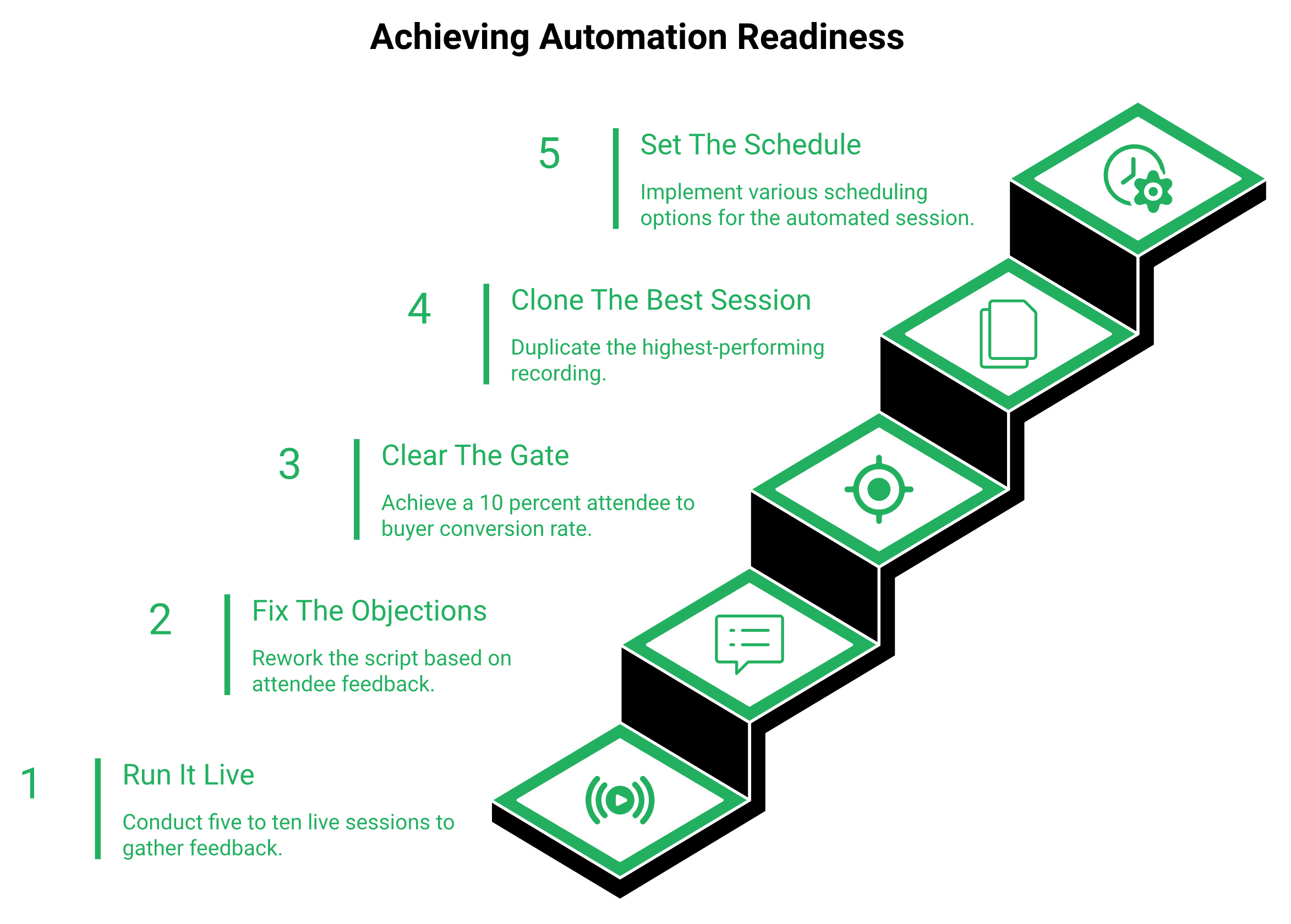
Here is where EasyWebinar's guidance breaks from the usual automation pitch. Run five to ten live sessions first. Hit at least a 10% attendee to buyer rate before you clone anything.
Automation copies whatever you feed it. A weak session at ten times the volume is just a louder weak session.
Automated versions often underperform their live originals badly, even when the original converted well. The usual cause is that operators clone the average session instead of the single best one, a trade covered in live vs automated webinars.
The honest disagreement
Not everyone agrees, and buyers should know that. Yuri Elkaim argues for evergreen from day one, because live show up rates are punishing.
Jeremy Haynes sits on the other side, as does EasyWebinar's guidance: prove it live, then let the machine repeat it. The 10% gate has held up across the funnels EasyWebinar sees, though that sample is EasyWebinar's own.
Your Monday action
Pull the recording of your best converting session. Check its attendee to buyer rate against 10%.
If it clears, it is ready to run as an evergreen sales funnel this week. If it does not, the platform is not your problem yet.
EasyWebinar runs the same recording as simulive, evergreen, on demand, or just in time from one funnel. A session that converted live on Tuesday keeps converting at 2am on Sunday.
It depends on what the room has to do. Both join from any browser with nothing to download, and both run polls, Q&A, chat and reactions. Livestorm seats a bigger stage, with 25 simultaneous speakers, unlimited moderators, question upvotes, raise hand, noise cancellation and 24 languages with right to left support. EasyWebinar runs a host plus up to 4 presenters with TrueVoice audio, and adds the AI Moderator from Pro, timed offers with checkout inside the room, handouts and A/B split testing on registration pages. For large panels, Livestorm. For a room that answers questions and closes the sale, EasyWebinar.
The concession, made properly
Livestorm's reputation for polish is earned, not marketed, and its stage is bigger than EasyWebinar's. If you run panels with more than five people speaking, that settles it.
Its browser first join flow is the part reviewers praise most. Nobody downloads anything, which removes the most common reason people quit before a session starts. EasyWebinar works the same way: attendees join from any browser, desktop or mobile, with nothing to download.
What reviewers actually praise
The engagement tools like chat, polls, and Q&A worked smoothly, which made our sessions more interactive and professional.
Capterra rates its ease of use 4.7 across 398 reviews. That is a strong signal.
Where the polish thins out
Reviewers are consistent about the limits. G2 clusters 21 reviews asking for more email and form customisation, and 13 flagging limited layout and design control.
Getting a webinar started is not super intuitive.
Customisation of interface is a bit basic with too many restrictions on layout.
The reframe to apply
Ask what in room depth actually moves. Reactions and upvotes change how a session feels, and they have real value.
They do not obviously move show up rate or booking rate. Those are decided before the room opens and after it closes, which is the argument behind most webinar engagement tools.
The risk that really breaks attendee experience
The most common failure is mechanical, not aesthetic. A button that does not work on mobile quietly eats registrations while you sleep.
One test put the join link directly in the SMS sequence. Show rate rose, and booking rate collapsed, because people joined from phones they could not act on.
Check the tech before you check the theme. That habit has saved more sessions than any reaction emoji ever will.
What EasyWebinar does ship in the room
EasyWebinar streams on the Dolby OptiView (formerly Millicast) WebRTC stack with sub-second latency, and puts polls, Q&A, reactions, handouts, timed offers, and checkout inside the session. From Pro, the AI Moderator answers attendee questions in the chat from the PDFs and files you upload, in live, simulive and automated webinars. That is a different kind of attendee experience, aimed at the buying decision rather than the vibe, and the full set sits under live webinar software.
EasyWebinar's own reviewers are not uncritical either.
I would love to have more screen display options, like where I place my screen compared to my slides. The video quality came and went when I switched from the slides as the main screen back to me.
I love that we can have a poll, offer and countdown right in the event. That's going to be so great for sales and interactions.
Buyers who need a stage bigger than a host plus 4 presenters, or right to left language coverage, should choose Livestorm here. What EasyWebinar wins is the moment after the value section, when the offer, the countdown, and the checkout appear without moving anyone to a new tab, which is how paid webinars are built.
EasyWebinar shipped paid registration through Stripe and PayPal plus in room checkout in March 2026, includes EasyCRM natively from Growth, and syncs with HubSpot and Salesforce Pardot (Account Engagement) on Pro. Your CRM or EasyCRM. Livestorm's published feature set shows no payment capability at any tier, and Pro connects only to HubSpot and Zapier, with its other CRM sync, Pardot included, on Enterprise.
The question that exposes the gap
Your VP asks which sessions produced pipeline. If your marketing team runs Pardot, Livestorm Pro cannot sync to it; Livestorm keeps every CRM sync beyond HubSpot for Enterprise.
So the reporting you need arrives after a sales call and a contract change. That is a procurement problem disguised as an analytics problem.
The integration tiers, side by side
Both vendor pages were checked on 17 August 2026. Nothing here is inferred.
| Capability | Livestorm Pro | Livestorm Enterprise | EasyWebinar Growth and Pro |
|---|---|---|---|
| Native CRM included | No | No | Yes, EasyCRM from Growth |
| HubSpot sync | Yes | Yes | Yes |
| Salesforce Pardot (Account Engagement) sync | No | Yes | Yes, on Pro |
| Marketo, Dynamics | No | Yes | Not native |
| Behaviour follow-up triggers | Through your CRM | Through your CRM | Six, from Growth |
| In room checkout | Not published | Not published | Yes, since March 2026 |
| Paid registration | Not published | Not published | Stripe, PayPal |
One caveat, stated plainly. Livestorm's feature comparison shows no payment tooling, and no help centre page found contradicts that. If you want the full list of what connects where, the integrations page carries it.
What paid registration changes
A ticketed workshop collects its revenue before anyone shows up, which funds the next round of ads before the session runs.
EasyWebinar collects that at registration through Stripe or PayPal. On a platform without paid registration, the same cash arrives weeks later through another tool, if at all.
Why the checkout belongs inside the room
The close is the highest leverage 90 seconds in any webinar. A strong transition is simple, and it asks for permission first.
The presenter says there is a paid offer that helps, then asks people to drop a one in the chat if it is fine to explain it. Sending them to a new tab at that exact moment breaks the moment you just built.
If the offer converts in the room, the checkout should open in the room.
Sell inside the session
Take the payment before the objection returns
Paid registration through Stripe or PayPal, plus timed offers with checkout inside the live room.
The follow up that actually earns money
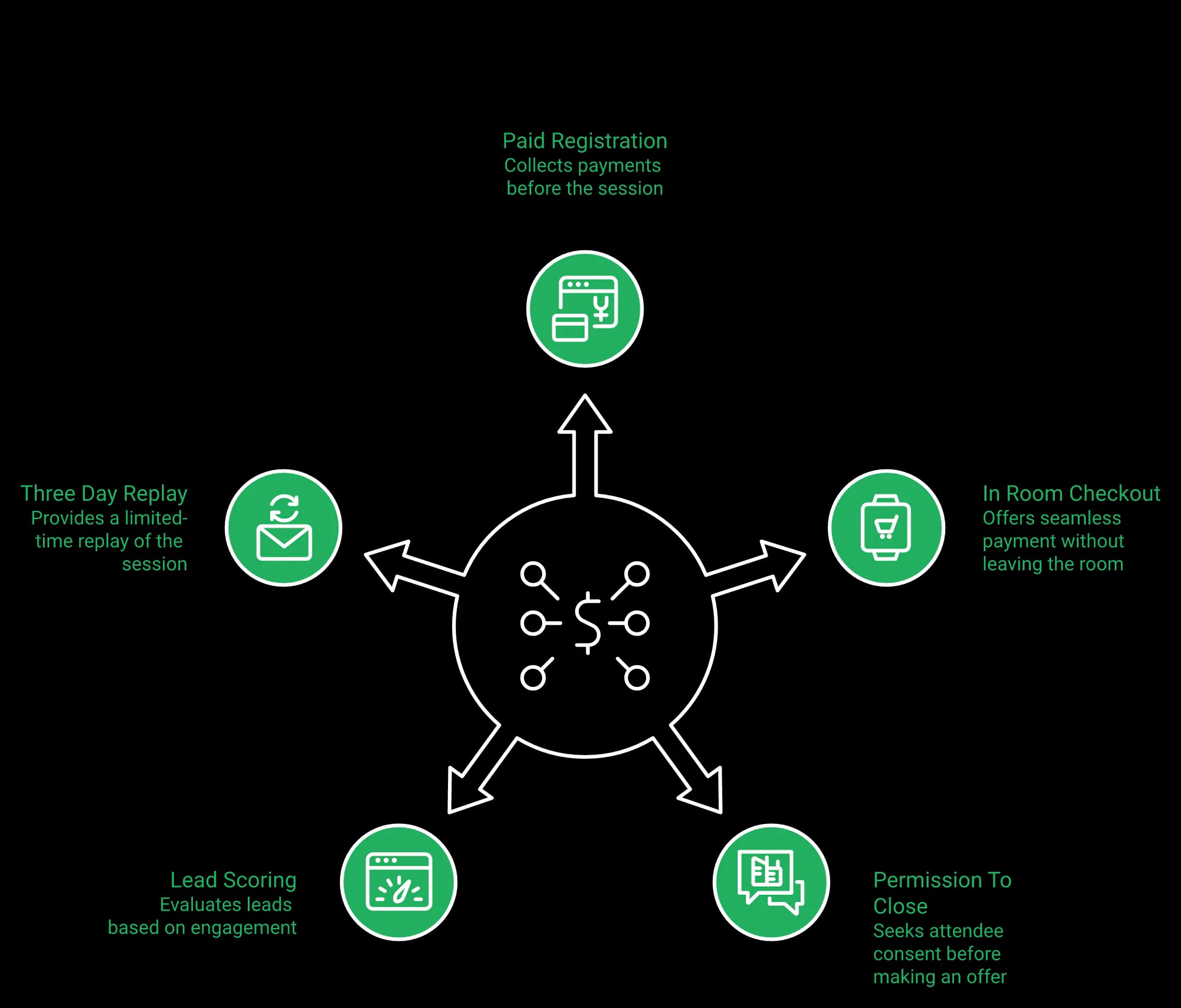
Most revenue lands after the session ends. A reliable replay sequence runs three days and stays boring on purpose.
Day one says the replay is available and comes down tomorrow. Day three says final chance, it comes down in a few hours. EasyWebinar starts that sequence on the watched replay trigger, one of six behaviour triggers in EasyCRM: registered, attended, no-show, watched replay, clicked offer, purchased.
Why EasyCRM stays deliberately narrow
Any tool claiming to be the CRM, the community, and the email service provider at once deserves caution. GoHighLevel is the obvious example, and those products usually end up thin everywhere.
EasyWebinar's team once built a branching email machine nicknamed the monster funnel. It took months, and it did not work. EasyCRM stays deliberately narrow, covering webinar behaviour, lead scoring, sequences, and, on Pro, revenue reporting, which is the same scope covered in webinar marketing automation.
Your Monday action
Map the path from attendee to opportunity in your current stack. Count every manual handoff, including exports and spreadsheet joins.
Three or more handoffs means the platform is not the bottleneck. The seams between platforms are, which is the argument behind running a webinar CRM in the same place the session runs.
EasyWebinar takes the payment where the decision happens and scores the lead in the same system. In room checkout plus sales CRM ships from Growth, and native HubSpot and Salesforce Pardot (Account Engagement) sync arrives on Pro.
EasyWebinar shipped the AI Webinar Builder in February 2026, producing the script, pages, emails, and polls from one prompt in about 10 to 15 minutes, and from Pro the AI Moderator answers attendee questions from the files you upload. EasyCast streams to 10 or more platforms at once, plus any RTMP destination, from Growth. Livestorm's AI is post event, covering AI Studio clip generation, currently waitlisted, plus content repurposing, and its Restreaming is a paid add on.
Build side AI versus post event AI
This is the cleanest difference in the whole comparison. One vendor points AI at the build. The other points it at the recording.
Both are useful. Only one shortens the gap between an idea and a live registration page.
Where the months actually go
Operators say the same thing in different words. It takes months and months to launch one webinar funnel.
The time never sits in the video. It sits in the script, the registration page, the reminder emails, the poll timing, and the follow up copy, which is exactly the sequence mapped out in this webinar funnel breakdown.
The five steps, in order
Here is the sequence to run this week.
- Write one prompt describing the offer, the audience, and the promise.
- Ask EasyWebinar to generate the funnel, which returns script, pages, emails, and polls in about 10 to 15 minutes.
- Edit the script only, because that is where conversion lives.
- Run it live, twice, and watch where people drop.
- Automate the version that converted, not the average of both.
Livestorm's path is different by design. You build the event, run it, then use AI Studio to cut clips afterwards, once you are off the waitlist.
How far one session travels
Reach is the second half of speed. Streaming the same session to YouTube, LinkedIn, and Facebook multiplies the audience without multiplying the work, and on EasyWebinar the timed offers, polls and Q&A keep running for attendees while it streams.
| Distribution | Livestorm | EasyWebinar |
|---|---|---|
| Multistream to social platforms | Restreaming, paid add on | EasyCast, included from Growth |
| Destinations | LinkedIn, YouTube, X and more | 10 or more: YouTube, LinkedIn, Facebook, Instagram, X, Vimeo, Twitch, TikTok, Kick, Rumble, Dailymotion |
| Custom RTMP destination | Paid add on | Supported |
Livestorm sells Restreaming as a separate add on. Every destination included with EasyCast multistreaming is listed on its own page instead.
The Ikea framing
Writing a webinar sounds creative. In practice it is assembly, closer to building Ikea furniture than composing music.
The hook, the pain, the shift, the proof, the offer, and the close are known parts. EasyWebinar's builder was trained on years of webinar funnel data, so it hands you the parts pre cut.
Speed is not permission to skip the sprint
Fast build times invite a bad habit. A funnel generated in 15 minutes is a draft, not a proven asset.
EasyWebinar's own data points toward the live sprint first, though that sample is EasyWebinar's own. Run it live, fix the objections you hear, then automate.
Your Monday action
Pick your best performing offer. Write a single prompt describing it, and generate one funnel.
Book two live sessions this month, not four. Two sessions give you enough objection data to fix the script.
EasyWebinar's AI Webinar Builder produces the script, registration pages, reminder emails, and polls from a single prompt in about 10 to 15 minutes, which is where the months usually go, and it is included on every plan.
Livestorm publishes unlimited team members and moderators, 3,000 live attendees per event, 4 hour events on Pro, and 12 hours on Enterprise, where it adds VIP support, an SLA and a dedicated customer success manager. EasyWebinar publishes up to 4 co-hosts with unlimited team members, 4 hour sessions on Growth, Pro and Scale, 200 to 1,000 live attendees by plan with larger events on Enterprise by quote, and no hard cutoff at the plan limit.
The limits table, side by side
Both vendors publish these numbers. Where Livestorm's is bigger, the table says so.
| Operational limit | Livestorm | EasyWebinar |
|---|---|---|
| Team seats | Unlimited | Unlimited team members, up to 4 co-hosts |
| Speakers on stage | Up to 25 | A host plus up to 4 presenters |
| Live attendees per event | 3,000 | 200 on Growth, 500 on Pro, 1,000 on Scale |
| Event duration | 4 hours Pro, 12 hours Enterprise | 2 hours Launch, 4 hours Growth, Pro and Scale |
| At the limit | New attendees blocked until you upgrade | No hard cutoff; overage under EasyWebinar's Terms |
| Larger events | Enterprise | Enterprise by quote |
| Support tiers | Standard, then VIP with SLA | Chat, email, and human onboarding |
Large events need an Enterprise conversation on both sides, and the live allowance for each EasyWebinar plan sits on the plans page. Livestorm's FAQ adds one warning worth reading twice: "If you fully reach your quota, new attendees will not be able to join sessions until you upgrade".
What these caps mean in real work
A 4 hour cap is irrelevant for a 60 minute demo. It matters for training days and multi session events.
Seats matter differently. If eight people touch a webinar, both platforms give every one of them a login, so seats do not separate these two.
The failure that actually costs money
Support quality decides whether you catch problems in time. A common near miss has nothing to do with attendee caps.
In one case, a Zapier account hit its plan limit for the number of automations that could fire. The team caught it four hours before the session and found a few hundred opt ins missing from the CRM.
Check the tech before every launch. Reconcile registrations in your CRM against the platform count, every single time, the way this host preparation guide lays out.
What operators say about support
It isn't delightful because Livestorm's support team doesn't always answer my questions or takes days to respond.
I love EasyWebinar's support team; they're responsive and helpful, providing peace of mind when I encounter problems. I do use other email systems to send post-webinar email sequences because I can't track open and click rates on EasyWebinar.
Rakesh was fantastic to work with, he helped set up everything from our email responses to our landing page seamlessly.
When Livestorm is the right buy
Livestorm is the better choice for internal all hands, multi speaker panels, and multi session conferences.
Those events need a big stage, moderators, and duration, not funnel automation. GetApp also lists mobile apps and 24/7 phone support against EasyWebinar's profile, which matters for distributed teams.
EasyWebinar runs 4 hour sessions from Growth, keeps the room open past the plan limit, and offers larger events on Enterprise by quote. Support runs through chat, email, and human onboarding sessions, and reviewers name individual team members by name in EasyWebinar's customer reviews.
Livestorm. It is ISO 27001 certified, offers EU or USA video hosting region selection, and supports SAML single sign on plus security review paperwork. EasyWebinar holds SOC 2 Type II with GDPR-aligned data practices and a published data processing agreement, and does not hold ISO 27001. With an ISO mandate or a strict EU residency requirement, Livestorm is the safer answer.
The concession, made without conditions
This is a straight loss for EasyWebinar. ISO 27001 is an internationally recognised certification for information security management, audited by an external body.
Livestorm holds it. EasyWebinar does not. If your policy names ISO 27001, the decision is already made.
What each vendor publishes
| Requirement | Livestorm | EasyWebinar |
|---|---|---|
| ISO 27001 certified | Yes | No |
| SOC 2 Type II | Not published | Yes |
| GDPR | Yes | GDPR-aligned, with published DPA |
| Data residency choice | EU or USA video hosting, add on | Not published |
| SAML SSO | Add on | Scale and Enterprise |
| Security review support | Yes, with MSA support | DPA on request |
SOC 2 Type II and ISO 27001 are not interchangeable. SOC 2 Type II is an attestation report against the AICPA Trust Services Criteria, tested over a period of time.
ISO 27001 certifies a management system against a standard. Many European procurement teams accept either. Some accept only one, and EasyWebinar's GDPR page states which documents it can produce.
Where the residency question really bites
Data residency means the country where recordings and personal data physically sit. For an EU buyer with a strict mandate, that is not negotiable.
Livestorm sells region selection as a paid add on, which is honest and specific. EasyWebinar publishes no equivalent region control, so buyers should flag that early rather than let procurement discover it in week six.
The four questions to ask before you sign
Send these to both vendors in one email. Written answers protect you later.
- Which certifications do you currently hold, and what is the report date?
- Where are recordings and attendee personal data stored?
- Is a data processing agreement available without a legal escalation?
- Is single sign on included, or priced as an add on?
EasyWebinar answers the second question with SOC 2 Type II controls and a GDPR aligned DPA, and claims no more than that. The signable version sits at EasyWebinar's data processing addendum.
What EasyWebinar does clear
Most B2B security reviews ask for SOC 2 Type II, a DPA, single sign on, and access controls. EasyWebinar clears that set, with SSO/SAML on Scale and a 99.9% uptime guarantee for Enterprise customers, with service credits.
What it does not clear is an ISO 27001 line item, or a contractual EU only hosting clause. That likely costs EasyWebinar some European enterprise deals until it holds ISO 27001.
EasyWebinar would rather lose a deal than have a legal reviewer catch a claim it cannot support. The same standard applies to the automation and revenue arguments in this guide.
EasyWebinar holds SOC 2 Type II with GDPR-aligned data practices and a published data processing agreement, which clears most B2B security reviews. It does not hold ISO 27001, and buyers with that requirement or a strict EU residency clause should choose Livestorm, a trade worth weighing beside every option on EasyWebinar's all features list.
Livestorm carries roughly 1,700 G2 reviews at 4.4, plus 398 Capterra and GetApp reviews at 4.7 with 385 positive. Its customer list names Equifax, Abbott, Zapier, Intercom, Chargebee, and ElevenLabs. One independent tester sample of 15 reviews averages 2.7, with 27% recommending. EasyWebinar holds 4.5 out of 5 from 100+ G2 reviews, a smaller base that leans heavily on automated and evergreen use.
Start with the number that goes against EasyWebinar
Livestorm wins this section, and by a wide margin. Nearly 1,700 G2 reviews is a decade of accumulated trust.
EasyWebinar's review base is a fraction of that size, at 4.5 out of 5 from 100+ G2 reviews, which is why EasyWebinar's customer reviews page names individual operators instead of leading with a badge.
What reviewers consistently praise
Three themes repeat across Livestorm's reviews. Browser based joining, ease of setup for standard events, and clean analytics.
The engagement tools like chat, polls, and Q&A worked smoothly, which made our sessions more interactive and professional.
Capterra rates its ease of use 4.7 across 398 reviews. That score is not marketing. It is thousands of hours of other people's events.
What reviewers consistently complain about
The complaints cluster just as tightly. G2 groups 21 reviews asking for better email and form customisation, and 13 citing limited design control.
Customisation of interface is a bit basic with too many restrictions on layout.
The sentiment spread nobody publishes
Aggregate ratings hide variance. A 4.4 average and a 2.7 sample can both be true, because they measure different populations.
The 4.4 reflects a broad base of event organisers. The 2.7 sample of 15 reviews skews toward people who hit quota walls or reliability trouble. Read both, then decide which group you resemble.
Why review scores mislead in this specific comparison
Here is the trap. Most Livestorm reviews rate an event product, and you are buying a funnel.
A five star review from a company running quarterly customer webinars tells you almost nothing about evergreen conversion. Ease of use and revenue per registrant are unrelated measurements, which is why webinar platform reviews are best read by workflow rather than by score.
How to read reviews for your own case
Filter by workflow, not by rating. Search reviews for the words "automated," "evergreen," "checkout," and "renewal."
Those four words surface the operators whose job resembles yours. EasyWebinar reviewers use that vocabulary often, which is a signal in itself.
I've been using EasyWebinar to automate my webinars and drive course sales. The integration with my email service provider was seamless, allowing me to automate a follow-up sales sequence once someone watches the webinar.
The biggest challenge is around setting up automated webinars, and needing the presentation uploaded first in order to set it up. Would love to be able to add the video later.
A rule for reading any vendor's numbers
The easiest gains come from adding results to a webinar that already works. A hundred small documented wins beat two spectacular ones.
The same rule applies to ratings. Volume of specific, boring, workflow level detail beats one glowing headline.
EasyWebinar's 4.5 out of 5 on G2 is a useful start, but judge it on the trial rather than the badge. A 7-day free trial with full access runs one real funnel end to end, which tells you more than any star count, and you can start that from sign up free.
Stay on Livestorm for meetings and webinars in one tool, multi speaker panels, internal all hands, multi session conferences, an ISO 27001 requirement, or EU data residency. Choose EasyWebinar if your webinars must generate pipeline continuously, take payment in the room, and keep converting without a presenter: live on every plan, automation, checkout and EasyCRM from Growth, and native HubSpot and Salesforce Pardot (Account Engagement) sync on Pro.
The fork, stated once
Livestorm is the better event product. EasyWebinar is the better funnel product.
Everything in this comparison reduces to that sentence. The rest is paperwork, and the same fork shows up when you compare webinar platforms across the rest of the category.
Who should buy Livestorm, with no hedging
The Livestorm buyer, named clearly:
- You run panels bigger than a host plus 4 presenters, since Livestorm supports 25 speakers.
- Your policy requires ISO 27001 certification.
- You need EU or US hosting region selection for data residency.
- Your webinars are scheduled occasions, not an acquisition channel.
- You want meetings and webinars in one tool.
If three of those apply, buy Livestorm and stop shopping.
Free plan versus full access trial
These two offers test different things. Livestorm's free plan caps sessions at 20 minutes and 30 attendees, which is enough to test the room.
EasyWebinar offers a 7-day free trial with full access instead, including evergreen scheduling and in room checkout. One tests the experience. The other tests the revenue path.
| Entry option | Livestorm | EasyWebinar |
|---|---|---|
| Free tier | Yes, 30 attendees, 20 minutes | No free plan |
| Trial | Free plan acts as trial | 7-day free trial with full access |
| Evergreen and checkout in the trial | Not available | Included |
| Plan for Pardot sync | Enterprise | Pro |
Every inclusion behind the EasyWebinar column sits on the plans page, so check the tier before you commit a quarter of budget.
The Monday action that settles this
You already have the recording. The open question is whether it can run without you.
Take your best converting session from the last quarter. Check its attendee to buyer rate, then rebuild it as an automated webinar, where a recorded session runs on a published schedule with no presenter.
Test it, don't buy it
Turn one recording into a funnel this week
7-day free trial with full access. Evergreen and just-in-time scheduling, EasyCRM and in-room checkout included.
A common mistake
Operators wait for a bigger list before automating anything. That order is backwards.
An automated funnel with no traffic is a billboard in the desert. Webinars grow the audience, so waiting is the actual mistake, and the fixes that move attendance sit in how to drive webinar attendance.
What may change by 2027
EasyWebinar's expectation is that AI built funnels stop being the differentiator within 18 months. Everyone will generate pages and emails from a prompt.
What will separate operators is the source session, the offer, and the honesty of the delivery. EasyWebinar's data already points that way, though that rests on one quarter of funnel results.
That leaves an open question. If the build cost drops to nearly zero, does the winning operator run more webinars, or fewer and better ones?
The answer is not settled yet. Buyers testing either side can bring their numbers to a request demo conversation with EasyWebinar's team.
EasyWebinar's 7-day free trial with full access is enough to run one recorded session as an evergreen funnel, with checkout inside the room. That answers the question that matters here, which is whether your webinars can sell while you sleep, and the all features list shows what runs during those seven days.
EasyWebinar vs Livestorm FAQ
Both let attendees join from any browser with nothing to download. Livestorm is a meeting and webinar room built around the live hour, with up to 25 simultaneous speakers, question upvotes and 24 languages. EasyWebinar is the webinar platform built for conversions: you run the session live, then turn the version that converts into a simulive, evergreen or Just-in-Time webinar on the same account from Growth, with checkout inside the room, behaviour-based follow-up and your CRM or ours. Livestorm publishes no scheduled evergreen funnel, no Just-in-Time start and no payment tools.
Yes, when your webinars have to keep producing pipeline after the live hour. EasyWebinar is best for webinars that run live and automated on one subscription: the same browser join, then an automated version of your best session that runs every day, a timed offer that takes payment in the room, and follow-up on what each attendee did, in EasyCRM or in HubSpot and Salesforce Pardot (Account Engagement) on Pro. Stay with Livestorm if you want meetings and webinars in one tool, or you regularly run panels larger than a host plus 4 presenters.
No. On both platforms attendees join from any browser, desktop or mobile, with nothing to install. Browser join is the strength reviewers praise most in Livestorm, and EasyWebinar matches it: one click from the link to the room, with real-time delivery on Dolby OptiView (formerly Millicast) WebRTC at sub-second latency.
No. Livestorm publishes on demand events and event automation, described in its own wording as automating the start and end, or automatically playing a video. That is session level automation, not funnel level automation. What its published feature set does not include: • A scheduled evergreen funnel that runs a recorded session repeatedly with no presenter. • Just in time scheduling, where the next session begins roughly one to fifteen minutes after a visitor lands on the page. • Timezone adjusted delivery for global audiences. EasyWebinar runs the same recording as live, simulive, scheduled evergreen, on demand, or just in time from a single funnel, and Growth includes 1,000 automated viewers per session. We built it that way because every missing scheduling mode converts into calendar time, and each new lead ends up costing a live session someone has to run. One caution we hold firmly. Automation copies whatever you feed it, so run five to ten live sessions and clear a 10% attendee to buyer rate before cloning anything. Then set the schedule on an automated webinar and let it repeat the session that already converted.
Only on EasyWebinar, based on what each vendor publishes. EasyWebinar shipped paid registration through Stripe and PayPal plus checkout inside the live room in March 2026, from Growth. Livestorm's published feature comparison shows no payment capability at any tier. Why the placement of the checkout matters: • Registration revenue on a ticketed workshop arrives before the session runs and can fund the next round of ads. • The close is the highest leverage ninety seconds in any webinar, and sending people to a new tab there costs conversions. • Paid registration filters the audience, so the people in the room have already committed something. Our own transition is deliberately simple. We ask permission before moving to the offer, then invite people to drop a one in the chat if it is fine to explain it. The offer, the countdown, and the payment then appear without anyone leaving the session. If you sell during sessions rather than after them, the mechanics behind paid webinars are the part of this comparison worth testing first.
Your CRM or ours. Livestorm Pro connects to HubSpot and Zapier, and keeps its other CRM sync for Enterprise; it has no CRM of its own. EasyWebinar syncs natively with HubSpot and Salesforce Pardot (Account Engagement) on Pro, connects to GoHighLevel, ActiveCampaign, Keap, Mailchimp, Kit (formerly ConvertKit) and Ontraport or via Zapier and webhooks, and includes EasyCRM from Growth for teams that do not have a CRM yet. Either way, six behaviour triggers — registered, attended, no-show, watched replay, clicked offer, purchased — each start their own follow-up sequence, so the pipeline keeps moving after the live hour.
It depends on what the room has to do. Both run polls, Q&A, chat and reactions, and both let attendees join from any browser with nothing to download. Where Livestorm goes further: • Up to 25 simultaneous speakers and unlimited moderators, against a host plus up to 4 presenters with TrueVoice audio on our side. • Question upvotes, raise hand, automatic picture in picture and noise cancellation. • 24 languages with right to left support. Where EasyWebinar goes further: • The AI Moderator, from Pro, answers attendee questions in the chat from the PDFs and files you upload, in live, simulive and automated webinars. • Timed offers with checkout inside the room, so the buyer pays without leaving. • Sub-second latency on Dolby OptiView (formerly Millicast) WebRTC, so polls and offers land while the point is still on screen. If the session is a large panel, Livestorm's stage is bigger. If the session has to answer questions and close a sale, EasyWebinar's room does more, and you can see the full set under our live webinar software.
Both can, packaged differently. Livestorm sells Restreaming to LinkedIn, YouTube, X and more as a paid add-on. EasyWebinar includes EasyCast from Growth, streaming one session to 10+ platforms at once — YouTube, LinkedIn, Facebook, Instagram, X, Vimeo, Twitch, TikTok, Kick, Rumble and Dailymotion — plus any RTMP destination, while timed offers, polls and Q&A keep running for the attendees in the room.
For an ISO 27001 mandate or a strict EU hosting clause, Livestorm, and we would rather state that than let procurement discover it in week six. What each vendor publishes: • Livestorm is ISO 27001 certified, offers EU or USA video hosting region selection as an add on, and supports SAML single sign on plus security review paperwork. • EasyWebinar holds SOC 2 Type II with GDPR-aligned data practices and a published data processing agreement, with SSO/SAML on Scale, and does not hold ISO 27001. The two credentials are not interchangeable. SOC 2 Type II is an attestation report tested over a period of time against the AICPA Trust Services Criteria. ISO 27001 certifies an information security management system against an international standard. Many procurement teams accept either, and some accept only one. Four questions we would send both vendors in a single email: which certifications do you hold and on what report date, where do recordings and attendee data physically sit, is a data processing agreement available without legal escalation, and is single sign on included or sold separately. Our answers to the second and third live on the GDPR page, and buyers with a hard ISO mandate should choose Livestorm.
Yes, on Pro and above. Upload your context, such as PDFs and other files, and the AI Moderator answers attendee questions in the chat from that material during live, simulive and automated webinars. It is not included on Launch or Growth.
EasyWebinar, if you want to test the whole funnel. EasyWebinar gives you 7 days free with full access; a card is required to start it. Full access means you can build the funnel with AI, run a live session, schedule it as an evergreen or Just-in-Time webinar, sell inside the room and trigger the follow-up. Livestorm's free plan needs no card but caps sessions at 20 minutes and 30 attendees, which is enough to judge the room and not enough to test a funnel, because evergreen scheduling and checkout are not part of it.
Choose Livestorm for meetings and webinars in one tool, for panels bigger than a host plus 4 presenters, for the 3,000-attendee and 12-hour events published on its Enterprise plan, or when your policy names ISO 27001 or EU data residency. Choose EasyWebinar when the session has to keep working after it ends — when the live webinar, the automated replay, the payment and the follow-up should run from one account, with your CRM or ours.