WebinarJam vs EverWebinar: Comparing Live and Automated Webinar Workflows for Revenue Growth

Casey Zeman
Published on Jun 30, 2026 • 29 min read
TL;DR
- WebinarJam hosts live webinars and EverWebinar replays recordings on schedules or just-in-time. Both come from Genesis Digital and were designed to be bought together, not to compete.
- The real question is whether your pitch has converted live yet. Run 5 to 10 live sessions and reach about a 10% attendee-to-buyer rate before automating the winning session.
- Automated webinars can convert on cold paid traffic, but only when behaviour-based follow-up surrounds the replay. The replay is rarely the problem; missing follow-up usually is.
- A two-product stack means two lead streams, two dashboards, and middleware that can fail quietly, like a Zapier cap found four hours before a paid launch.
- Price the whole funnel, not the sticker. Add email, CRM, checkout, and middleware, and verify every figure on each vendor's live pricing page the day you decide.
- Choose EasyWebinar to run live and automate the converting session on one subscription, WebinarJam for one-off live launches, and EverWebinar for fully pre-recorded sessions.
Q1. WebinarJam vs EverWebinar: what is each one actually built to do?
WebinarJam is a live webinar platform where the host presents in real time and every session is recorded. EverWebinar is an automated webinar platform that plays a recording on a schedule, on demand, or just-in-time (starting minutes after someone registers). Genesis Digital makes both products, and EverWebinar does not host live sessions. Many sellers run a pitch live in WebinarJam, then load that recording into EverWebinar.
Two pricing tabs, one coach, no clear answer
The question usually reaches me the same way. A coach has two pricing tabs open, a course ready to sell, and a list that has never bought anything. She wants to know which tool to buy first.
I've been building webinar funnels since before EasyWebinar launched in 2013, and my honest answer surprises people. These two tools were never designed to compete. They were designed to be bought together.
✅ What WebinarJam handles
- Live sessions with chat, polls, and offer pop-ups that appear during the pitch
- Automatic recording of every session, so each one can be reused later
- Attendee tiers from 100 to 5,000 people per session, depending on plan
⏰ What EverWebinar handles
- Recorded sessions on recurring schedules, on demand, or just-in-time
- Timed offers and reminder emails tied to each scheduled session
- No live hosting at all, so the recording has to come from WebinarJam or another tool
How the three options line up
EasyWebinar sits in the third column because most readers comparing these tools are really asking whether they need two products at all.
| Job | WebinarJam | EverWebinar | EasyWebinar |
|---|---|---|---|
| Live hosting | Yes | No | Yes |
| Automated and just-in-time sessions | No (needs EverWebinar) | Yes | Yes |
| Automatic recording | Yes | Not applicable | Yes, every session |
| Moving a live session to automation | Export the recording | Import the recording | Convert the same session in one switch |
| Products to manage for both stages | Two | Two | One |
Bundling is the messy part. Some third-party reviews report that EverWebinar access comes with mid-tier WebinarJam plans, while others price it as a separate subscription. Check both vendors' pricing pages on the day you decide.
⚠️ The question underneath the comparison
"Which one?" is the wrong first question. The better one is whether your pitch has already converted in front of a real audience.
If it hasn't, you need a live room. If it has, you need automation that runs that exact pitch every day. EasyWebinar's read, from watching operators make this choice for over a decade, is that most people buy the automation first and regret it. I could be overstating the pattern, but a replay only amplifies what the live version already did.
💰 Why the order matters for revenue
Buying in the wrong order costs more than a subscription. It costs the weeks you spend polishing a recording nobody has tested. The conversion threshold that tells you when to switch comes later in this article.
EasyWebinar runs both halves on one subscription. You host the webinar live, attendees join from any browser with nothing to download, and every session is recorded. When a version converts, you turn that exact session into an automated webinar (Just-in-Time, Evergreen, or On-Demand) under one login. The comparison stops being a second purchase and becomes a single workflow.
Q2. How does WebinarJam's live room hold up during a revenue launch?
WebinarJam is a live webinar platform built for sales presentations. It includes live chat, polls, offer pop-ups, automatic recording, and a panic button on Professional and Enterprise plans. Plans cap each session at 100, 500, 2,000, or 5,000 attendees and at 1 to 4 hours of running time, depending on tier. Automated replays require EverWebinar, a separate Genesis Digital product.
Forty minutes before the pitch
Picture a course creator 40 minutes before a launch webinar. Ads have been running for ten days. She is refreshing the registrant count and checking that the offer pop-up fires at minute 52.
That is the moment WebinarJam was built for, and it handles the room itself well. The trouble usually shows up in the limits and the plumbing around it.
✅ What the live room does well
- Offer pop-ups and live chat that keep the pitch and the buy button in the same window
- Automatic recording, so every launch session becomes raw material for later
- Default page templates that are plain but finished
Jason Fladlien's team ran a $57.9 million launch in 226 days, and he has said the early registration page was ugly but done. I agree with him. The presentation carries the sale, not the page design.
⚠️ Where the limits bite
| Limit | WebinarJam | EasyWebinar |
|---|---|---|
| Attendee ceiling | Fixed per plan (100 to 5,000) | No hard cutoff at the plan limit; overage billed per terms |
| Attendee join | Browser-based | Any browser, nothing to download |
| Recording | Automatic | Every session, stored in-house |
| Automation | Separate product (EverWebinar) | Same account and subscription |
Session length is capped too: 1 hour on Starter, rising to 4 hours on Enterprise. A 1-hour cap matters more than it looks. A pitch that runs long with good Q&A gets cut off at exactly the wrong minute.
What operators actually report
Reviews of WebinarJam split cleanly. People like the live selling tools and the price. They struggle with email and integrations.
"[WebinarJam] allowed me to add 3-10 sales each day on my evergreen webinar funnel." - GetApp reviewer, 5/5, WebinarJam GetApp - Verified Review
"found WebinarJam to provide overall better quality of audio, and it was less expensive." - Reviewer comparing GoToWebinar, WebinarJam TrustRadius - Verified Review
"The integrations with 3rd party software such as mailchimp is inconsistent on both the pushing the registrants over and the custom form field population." - Tara G., 0/5, June 23, 2023, WebinarJam G2 - Verified Review
💸 The hidden cost of inconsistent sync
Tara's complaint is the one I'd weigh most. When registrants fail to reach your email tool, the reminder sequence never fires, and show-up drops before anyone notices.
EasyWebinar's view, and I hold it loosely, is that launches rarely fail in the room. They fail in the handoff between the room and the follow-up. That is why the session cap and the sync deserve more attention than the template library.
EasyWebinar's live room is built for the same launch moment. Attendees join from any browser with nothing to download. Polls and offers land in real time on ultra-low latency streaming, sub-500ms via Dolby OptiView WebRTC. EasyWebinar carries a 99.9% uptime guarantee, and a session keeps running if more people join than your plan allows.
Q3. What does EverWebinar's just-in-time scheduling change for show-up and sales?
Just-in-time scheduling starts a webinar session a few minutes after a person registers, so there is no multi-day gap between sign-up and presentation. EverWebinar also runs recordings on recurring schedules, such as every 15 minutes or every hour, and on demand. Each session can carry timed offers and email or SMS reminders. EverWebinar does not host live sessions, so the recording must come from WebinarJam or another tool.
Why the wait was killing show-up
Think about a registrant who signs up on a Monday for a Thursday session. By Thursday, she has forgotten why she cared. Every day between sign-up and showtime leaks attendees.
Just-in-time fixes the leak by removing the wait. ON24's 2026 benchmarks show on-demand viewing now accounts for about half of all webinar attendees, so people clearly prefer watching on their own clock.
⏰ How operators set it up
Jon Penberthy runs just-in-time registration across multi-million-dollar funnels. His approach makes the page feel like a session is about to start the moment someone lands. The setup pattern looks like this:
- Upload a recording that has already converted live.
- Choose just-in-time and set the start window, usually a few minutes after registration.
- Add a recurring fallback time, such as every 15 minutes, for people who can't watch right away.
- Place the timed offer at the exact minute your pitch lands.
- Send reminders by email and SMS for anyone who registered for a later slot.
⚠️ Where setups go wrong
Step one is the one people skip. Automating a recording that never converted live only spreads a weak pitch across more time zones.
What EverWebinar users report
Reviews of EverWebinar are mixed. The core scheduling engine earns praise, while setup, cloning, and support draw complaints.
"a solid platform for automated webinars where you can add live interaction" - EverWebinar reviewer, EverWebinar Capterra - Verified Review
"They haven't added big features for a long time" - EverWebinar reviewer, 4.0/5, EverWebinar Capterra - Verified Review
"we were told that we should not have cloned webinars or changed their schedule, as there are known issues with this feature." - Kaylen M., 0/5, August 24, 2021, EverWebinar G2 - Verified Review
An older 2018 G2 review raised a different issue. The reviewer said a rating prompt and a WebinarJam link appeared on screen near the end, pulling attention from their own call to action. Treat that as dated, and test the end screen during your trial.
✅ How the scheduling options compare
| Format | EverWebinar | EasyWebinar |
|---|---|---|
| Just-in-time | Yes | Yes |
| Recurring schedule | Yes | Yes (Next Available dates) |
| On demand | Yes | Yes (On-Demand and Instant Replay) |
| Live sessions in the same account | No | Yes |
💰 What it means for your numbers
EasyWebinar's experience across years of evergreen funnels is that just-in-time lifts show-up only when the recording deserves an audience. My read could shift with more data, but scheduling is a multiplier, not a fix.
EasyWebinar's Just-in-Time sessions start minutes after registration, in the attendee's own time zone. They sit beside Right-on-Time sessions, recurring Next Available dates, and Wait For It scarcity dates that hold registration to set days. Because the same EasyWebinar account hosts live webinars, the recording you schedule is the one your live audience already responded to.
Q4. When is a live webinar ready to be automated?
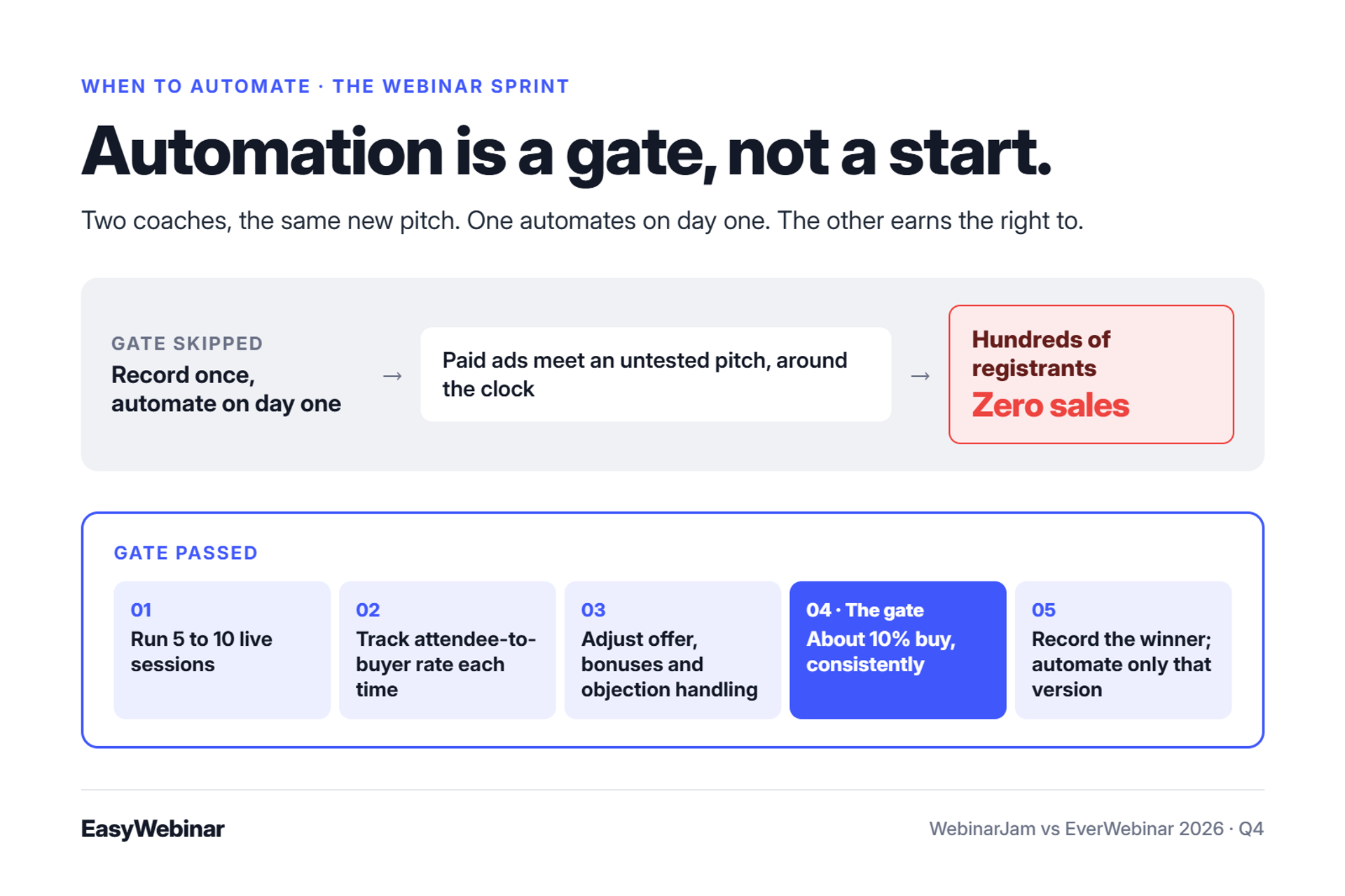
A live webinar is ready to automate when it converts consistently in front of real audiences. Casey Zeman's Webinar Sprint method requires 5 to 10 live sessions before automating. It also requires a 10% attendee-to-buyer rate, meaning one buyer for every ten attendees. EasyWebinar records every live session and converts the chosen session into an automated webinar on the same platform.
The coach who automated on day one
Here is a call I've had more times than I can count. A coach records a polished presentation in her home office, loads it into an automated tool, and points paid ads at it. Two weeks later, she has hundreds of registrants and zero sales.
Nothing broke. The software played a pitch that had never been tested, to strangers, around the clock.
❌ The old way: build the evergreen funnel first
This is the default playbook in most webinar courses. Record once, automate everything, and let the funnel run. It feels efficient because you only present once.
I learned the cost of that thinking the hard way. I spent six months building a YouTube course, launched it, and nobody bought it. I had never stood in front of buyers and learned what made them say yes.
✅ What changed
A webinar is now judged on revenue, not attendance. So the asset worth automating is not your best-produced recording. It is the session that already proved it sells.
Every live session teaches you something a recording can't. You see which objection comes up at minute 30, which bonus tips people into buying, and where attention drops.
The threshold, step by step
EasyWebinar's guidance to operators follows the same sequence I use myself:
- Run 5 to 10 live sessions on any live tool.
- Track your attendee-to-buyer rate on each one.
- Adjust the offer, bonuses, and objection handling between sessions.
- Wait until you hit about 10% consistently.
- Record the winning session and automate that version only.
⚠️ Where I'm still unsure
The 10% bar fits mid-priced coaching and course offers. High-ticket offers that end in a sales call may need a different metric, such as booked calls per attendee. EasyWebinar's read is that the principle holds even when the number moves: prove it live, then scale it.
What EasyWebinar does at the switch point
EasyWebinar is built around this handoff. You run your webinar live, find the version that converts, then turn that exact session into an automated webinar that runs every day. The same recording can run in several formats:
- Just-in-Time: starts minutes after registration, in the attendee's own time zone
- Evergreen: runs on a recurring daily schedule
- On-Demand: plays instantly for anyone who wants to watch now
- Instant Replay: gives live attendees the recording right after the session
💰 The proof that live comes first
Live webinars were the only thing that started my sales. In my first year running them, I built an email list of 14,000 people and sold $245,000 of that same course. The course didn't change. What changed was that I tested the pitch live until it worked, and only then let it run without me.
EasyWebinar keeps validation and scaling on one platform, so the session that proved your offer is the one that runs every day. Every live session is recorded automatically, and the winning version converts to Just-in-Time, Evergreen, or On-Demand under one login and one subscription. Lead scoring on the Pro plan then flags which automated attendees are worth a sales call first.
Q5. Do automated webinars still convert on cold paid traffic?
Automated webinars can convert on cold paid traffic when the pitch was proven live first and the funnel follows up around the session. Cold traffic means people who saw an ad but have never heard of you. Operators disagree here: some report automated replays underperforming on cold ads, while others report eight-figure evergreen results. EasyWebinar customer Rick Mulready reported 166% ROI on cold paid traffic, with a 30% registration rate.
A media buyer staring at two ad sets
Picture a media buyer on a Monday morning with two ad sets open. One sends traffic to a live webinar. The other sends the same traffic to an automated replay of that webinar. The live set is winning, and the client wants to know why.
Jeremy Haynes runs webinar ads for clients, including one that gets 10,000 to 15,000 registrants per monthly webinar. He says automated webinars now badly trail live ones on cold traffic. Yuri Elkaim makes the opposite case, crediting evergreen webinars recorded once with more than $217 million in results.
❌ The old way: point ads at a bare replay
The old playbook: record the webinar, buy cold traffic, and send it straight to the replay. No warm-up, no follow-up, and no plan for the people who leave early.
That works when the audience already trusts you. Cold traffic doesn't. A stranger who registers on impulse needs reasons to show up and reasons to come back.
✅ What changed: the follow-up does the selling
Haynes and Elkaim aren't really arguing about the recording. They're arguing about what surrounds it. Haynes notes that automated webinars only hold up on cold traffic when retargeting and email carry people before and after the session.
EasyWebinar's read, from years of watching evergreen funnels run on paid traffic, is that the replay is rarely the problem. The missing follow-up is. I might be reading our customers' results too generously, but the pattern holds across niches.
What EasyWebinar does for cold registrants
EasyWebinar gives each attendee the next message their behaviour earned. Instead of one generic sequence, the platform separates people by what they actually did:
- No-shows get a recovery sequence with the replay link
- Early leavers get a nudge back to the part they missed
- Offer-clickers who didn't buy get a follow-up on the offer
- Replay viewers get their own timing and reminders
Reminders run by email and by SMS through Twilio, inside the platform or through Mailchimp, ActiveCampaign, or Kit (formerly ConvertKit).
💰 What customers report
"With my live class I used to sell 10-12 courses. With EasyWebinar I sold 25 courses within 3 weeks of my evergreen 'launch'." - Laura C., 5/5, January 28, 2025, EasyWebinar G2 - Verified Review
"The integration with my email service provider was seamless, allowing me to automate a follow-up sales sequence once someone watches the webinar." - Jennifer B., 5/5, April 15, 2025, EasyWebinar G2 - Verified Review
Notice that Laura sold live first, then moved to evergreen.
⚠️ The traffic still has to show up
One thing I tell every operator: an automated webinar without traffic is like a billboard in the desert. Automation removes your need to present. It doesn't remove your need to buy or earn attention.
EasyWebinar gives no-shows, early leavers, offer-clickers, and replay viewers their own sequences, so cold registrants get a reason to return. On cold paid traffic, EasyWebinar customer Rick Mulready reported 166% ROI, a 30% registration rate, and $8 to $12 per lead.
Q6. How do you move a winning live session into automation without rebuilding it?
In the WebinarJam and EverWebinar stack, you record the live session in WebinarJam and import the video and chat log into EverWebinar. Then you set up pages, emails, and integrations in the second account. EasyWebinar converts the exact live session into an automated webinar on the same platform, under one login and one subscription. A replay sequence is a short series of emails that sends people back to the recording before it expires.
Sunday night, two dashboards open
A coach finishes her eighth live session on a Thursday. It's her best one yet, with a 10% close rate. By Sunday night, she is rebuilding the same registration page in a second dashboard and re-pasting her offer link into a new email template.
None of that work earns a dollar. It recreates something she already built.
❌ The old way: export, import, rebuild
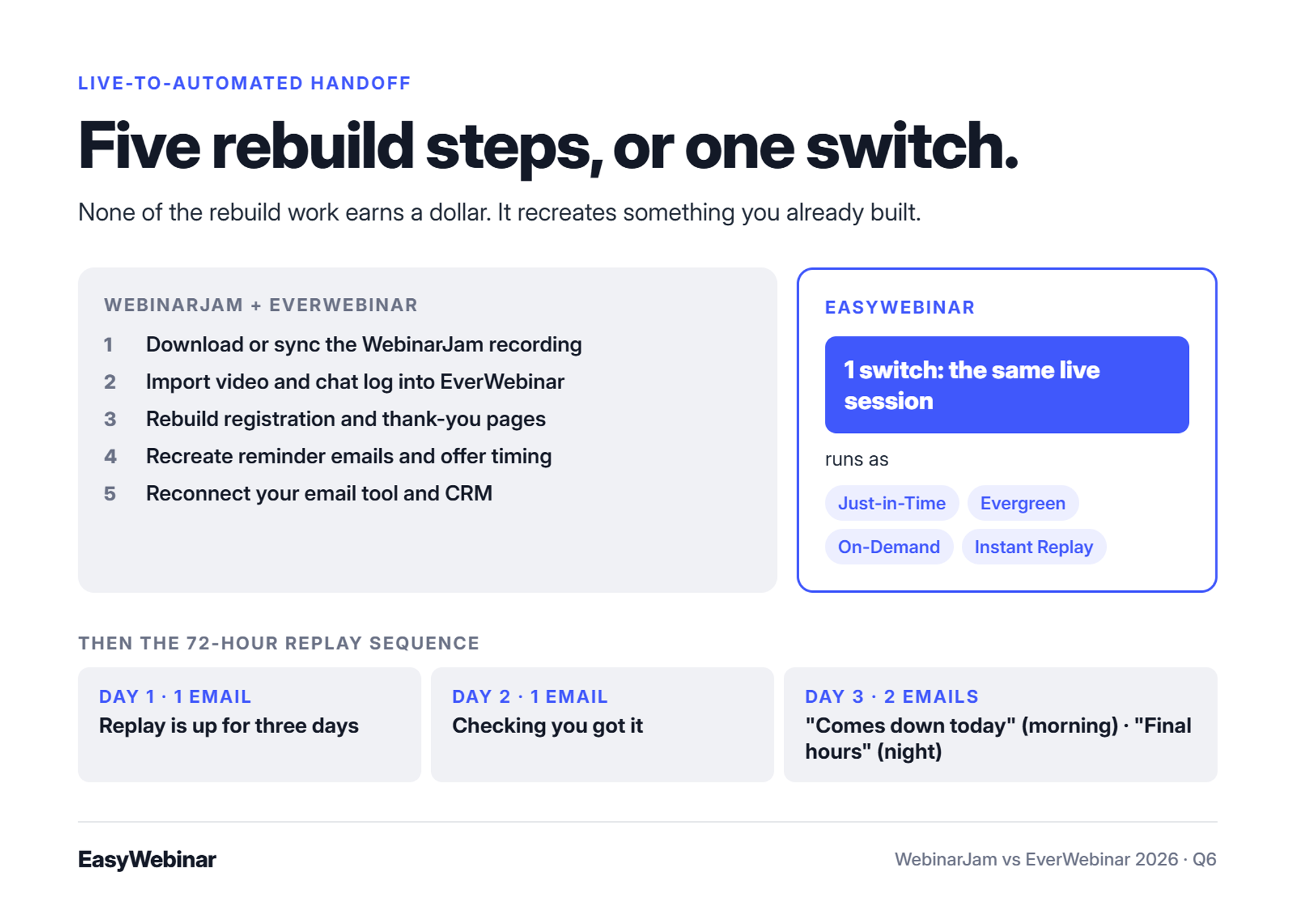
In a two-product stack, the handoff usually looks like this:
- Download or sync the WebinarJam recording.
- Import it into EverWebinar, along with the chat log if you want the original comments to replay.
- Rebuild the registration and thank-you pages.
- Recreate reminder emails and offer timing.
- Reconnect your email tool and CRM in the new account.
Every step is a chance to break a link or miss a tag. Kaylen M.'s team reported duplicate chat messages and unsent registrant emails after cloning EverWebinar sessions.
✅ What changed: speed of iteration
Operators don't automate once anymore. They test live, automate the winner, and test again. A weekend-long handoff kills that rhythm.
EasyWebinar customer Darrin B. reported running close to 30 webinars early in the year by cloning a proven setup.
Jon Penberthy learned the cost of complexity the hard way. His team mapped a "monster funnel" of branching email sequences across their office floor, and it took months to build and broke constantly. A simple linear replay sequence beat it.
How EasyWebinar handles the switch
EasyWebinar is built so you never rebuild a presentation that already works. You pick the live session that converted and turn it into an automated webinar in one switch. EasyWebinar then runs it as Just-in-Time, Evergreen, On-Demand, or Instant Replay, with expiring replay pages for urgency.
⏰ The 72-hour replay sequence
Pair the automated session with Penberthy's linear sequence:
- Day 1: one email saying the replay is available for three days
- Day 2: one email checking they got your message
- Day 3: two emails, "replay comes down today" in the morning and "final hours" at night
What operators say about the switch
"I've been going live every month since 2020 and I'm exhausted... I can see the end in sight!" - Verified User in Photography, 4.5/5, August 26, 2025, EasyWebinar G2 - Verified Review
"Pretty much once I have run one webinar, I can clone and setup multiple in a breeze." - Darrin B., 5/5, April 29, 2025, EasyWebinar G2 - Verified Review
"The biggest challenge is around setting up automated webinars, and needing the presentation uploaded first in order to set it up." - Ash A., 5/5, March 13, 2026, EasyWebinar G2 - Verified Review
Ash's point is fair. EasyWebinar's automated setup expects the recording first, which is one more reason to start live.
EasyWebinar keeps the handoff inside one account, so the live session that converted becomes the automated one without a rebuild. Carla Beisinger built $5M with one evergreen funnel, and Ryan Fenn of ChiirP built $2M from one automated funnel.
Q7. Is simulated live chat a conversion tool or a trust risk?
Simulated chat replays scripted or imported chat messages at set timestamps during an automated webinar, and some tools add changing attendee counts. Reviewers have described these features as staged or deceptive when they imply a session is happening in real time. EasyWebinar's standard is that an automated webinar is never presented as live. Sessions run in named formats such as Evergreen, Just-in-Time, and On-Demand.
The comment that gives it away
Picture a buyer halfway through an automated webinar. A chat message pops up: "Just bought, so excited!" She watched the same webinar last month and saw the same message at the same minute.
Her trust drops right there. She starts doubting the testimonials, the bonuses, and the price too.
❌ The old way: borrow the energy of a live room
For years, the automated webinar playbook leaned on theater. Operators scripted chat lines, imported old chat logs, and showed attendee counters that rose during the pitch. The goal was to make a recording feel like an event.
It worked when audiences hadn't seen it before. A 2026 review of EverWebinar called fake attendee counters and scripted chat a move from marketing into deception. Another 2026 profile noted that pre-set chat and fake "joined" alerts strike some audiences as inauthentic.
✅ What changed: buyers know the genre
Online buyers have sat through dozens of automated webinars and recognize the patterns. Once someone spots a staged moment, they question everything else in the presentation.
There's also a plain technical risk. Kaylen M.'s team reported duplicate chat messages after a cloning issue in EverWebinar. A doubled scripted comment is about the fastest way to expose the setup. EasyWebinar's drop-off heatmap points to a better fix: find the minute attention fades and improve that part of the pitch.
"Upon reporting our errors (duplicate chat messages, emails not being sent to registrants, pop-ups not working, etc.) we were told that we should not have cloned webinars." - Kaylen M., 0/5, August 24, 2021, EverWebinar G2 - Verified Review
How EasyWebinar handles automated sessions
EasyWebinar's rule, and mine, is simple: an automated webinar is never presented as live. You choose the format that matches the experience. Evergreen runs on a schedule, Just-in-Time starts minutes after registration, and On-Demand plays instantly.
⭐ What honest urgency looks like
Honest urgency doesn't need fake chat. EasyWebinar supports real deadlines that tell the truth:
- Expiring replay pages that close when you said they would
- Wait For It scarcity dates that limit registration to set days
- Timed offers that appear at the moment your pitch lands
EasyWebinar's read is that real scarcity converts longer than staged scarcity. I could be wrong on short-term numbers, since theater sometimes wins the first week. Over a year, though, I'd bet on the honest version every time.
✅ What a customer actually wants from automation
"I convert really well with live webinars... EasyWebinar gives me the ability to multiply my efforts and offer a human touch, without having to be everywhere at once." - Ash A., 5/5, March 13, 2026, EasyWebinar G2 - Verified Review
"The ability to automate webinars has allowed us to reach more people on a consistent basis without having to be available for every live session." - Jo K., 5/5, March 26, 2025, EasyWebinar G2 - Verified Review
EasyWebinar lets operators like Ash A. multiply a strong live performance without pretending to be everywhere at once. The automated session carries the pitch that already worked, labeled as the format it is.
Q8. What breaks when you wire WebinarJam, EverWebinar and your CRM together?
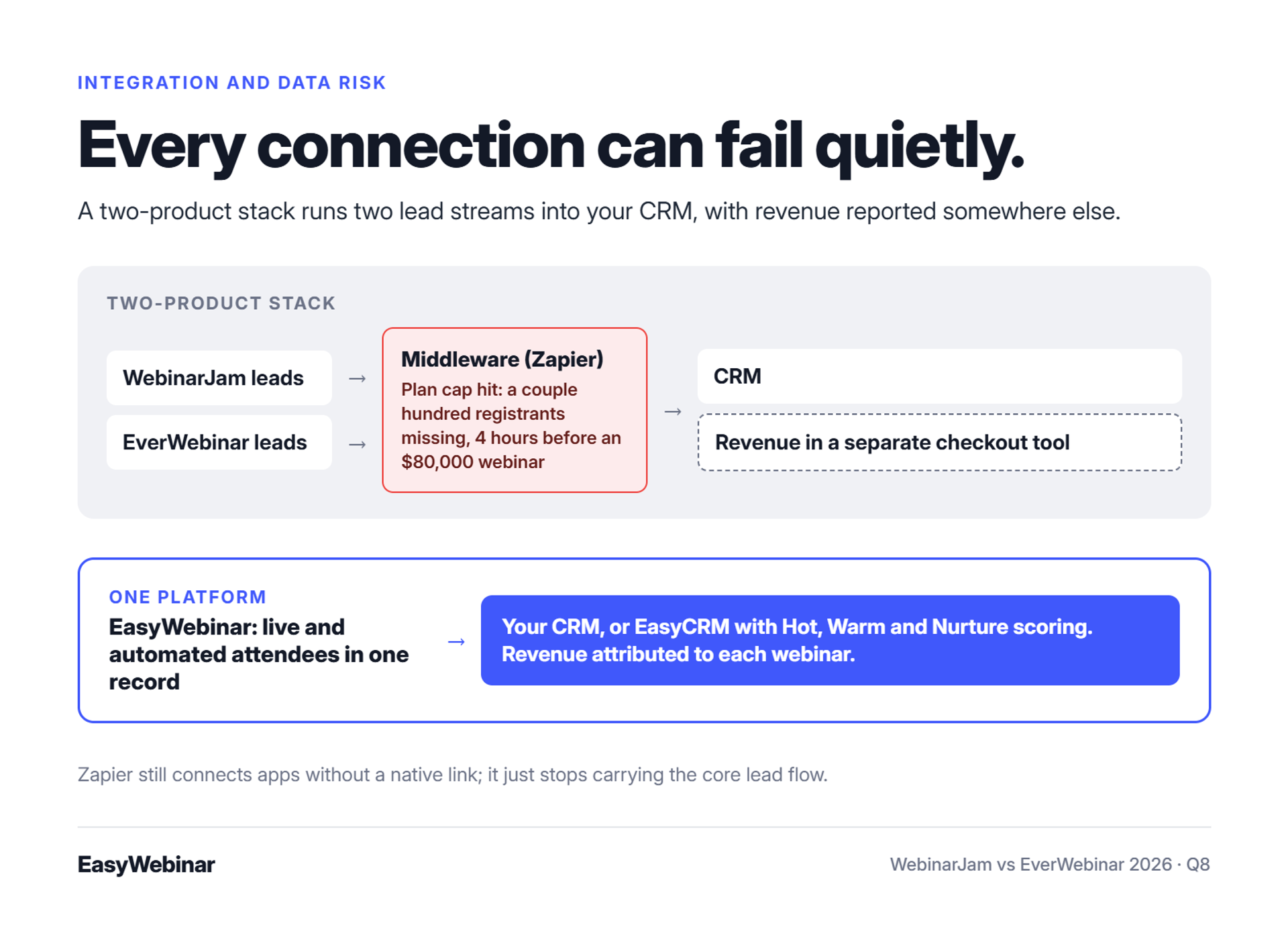
Running WebinarJam and EverWebinar together creates two lead streams and two reporting dashboards. These usually connect to a CRM through middleware, a tool like Zapier that passes data between apps. Jeremy Haynes reported a CRM gap of a couple hundred registrants, found four hours before a paid webinar, after his Zapier plan hit its limit. EasyWebinar keeps live and automated attendees in one platform and syncs them to an existing CRM or to EasyCRM.
Four hours before showtime
Haynes tells this one on himself. His team had an $80,000 ad budget behind a single webinar. Four hours before it started, someone noticed the opt-in count on the landing page didn't match the CRM.
A couple hundred registrants were missing, so the sales reps calling to raise show-up had never seen those names. The cause was a Zapier plan that had hit its cap on how many automations could fire.
❌ The old way: the tube-map stack
Jon Penberthy warns that sales funnels shouldn't look like a subway map. Yet a two-product webinar stack often does:
- WebinarJam registrations flow to email through one connection
- EverWebinar registrations flow through another
- Both feed the CRM, often through middleware
- Revenue is reported in a separate checkout tool
Every connection is a place to fail quietly. Tara G. reported that WebinarJam's Mailchimp sync was inconsistent for both registrants and custom fields.
⚠️ The attribution problem nobody budgets for
When live and automated attendees sit in different places, it gets hard to say which session earned the sale. That makes it hard to decide where the next ad dollar goes. EasyWebinar reports live and replay attendee insights separately for evergreen webinars, according to a 2024 G2 reviewer.
What changed: sales acts on attendee signals
Webinars now feed sales teams, not just email lists. A rep wants to know who watched to the pitch, who clicked the offer, and who left early. That data loses value every hour it sits in the wrong tool. EasyWebinar's drop-off heatmap shows the exact minute attendees leave, so the rep knows how far each person got.
My rule here is short: simple scales, fancy fails.
How EasyWebinar handles the data
EasyWebinar keeps live and automated attendees in one account, so there is one lead stream to sync. You can keep the CRM you already run or use EasyCRM, which is built in. EasyCRM adds lead scoring (Hot, Warm, and Nurture) and an auto-dialer for sales follow-up.
EasyWebinar also records attendance, watch time, questions, poll responses, offer clicks, and purchases for each attendee. Revenue is attributed back to the webinar that produced it.
⭐ Honest notes from users
"It also seamlessly integrated with our CRM." - Darrin B., 5/5, April 29, 2025, EasyWebinar G2 - Verified Review
"Intergration is somewhat limited, but if you are comfortable with Zapier you can easily update that." - Verified User in Professional Training & Coaching, 4.5/5, November 1, 2024, EasyWebinar G2 - Verified Review
"Their email service doesn't consistently send to registrants, or report emails that have been sent." - Tara G., 0/5, June 23, 2023, WebinarJam G2 - Verified Review
That second review is fair. EasyWebinar still supports Zapier for apps without a native connection, so middleware isn't gone entirely. It just stops carrying your core lead flow.
EasyWebinar lets you keep HubSpot, Salesforce Pardot (Account Engagement), ActiveCampaign, or Kit (formerly ConvertKit), or use EasyCRM with lead scoring and an auto-dialer. Live and automated attendees share one record, and revenue is attributed to each webinar.
Q9. What does running WebinarJam and EverWebinar really cost per year?
WebinarJam prices its plans by attendee tier, from 100 to 5,000 attendees per session. EverWebinar is a separate Genesis Digital product with its own annual or two-year plans. Third-party trackers disagree on whether mid-tier WebinarJam plans include EverWebinar access. A full funnel also needs email, a CRM, checkout, and often middleware, and total cost is the sum of every line.
The renewal email that starts the math
Picture an agency owner opening a renewal notice for his webinar tool. The number looks fine on its own. Then he adds the email platform, the CRM, the Zapier plan, and the checkout tool, and the real figure is two or three times higher.
That's why I tell operators to price the funnel, not the sticker.
⚠️ Why I'm not printing prices here
EasyWebinar's rule is to state a price only after checking the vendor's live pricing page that day. Third-party trackers I checked in 2026 disagree with each other on WebinarJam's monthly rates, billing options, and bundling (see Costbench and Toolradar). Prices that drift that much go stale fast, so use the worksheet below and fill it in from each vendor's own page.
The stack worksheet
| Stack line | WebinarJam plus EverWebinar | EasyWebinar |
|---|---|---|
| Live webinar room | WebinarJam plan, priced by attendee tier | Included on every plan |
| Automated and just-in-time sessions | EverWebinar subscription, or bundled on some WebinarJam plans | Starts at the Growth plan |
| Email and SMS follow-up | Built-in email; reviewers report delivery gaps | Built-in email, plus Twilio SMS |
| CRM | External CRM required | Your CRM, or EasyCRM from Growth |
| Checkout in the room | Check whether payment runs inside the room or redirects | Built-in checkout from Growth |
| Middleware | Often a Zapier plan sized to your task volume | Optional, for apps without a native connection |
| Billing terms | Annual billing widely reported; confirm monthly options | Monthly and annual plans available |
💸 The line most people forget
Middleware is the quiet cost. A Zapier plan is priced by how many tasks fire, so a bigger launch can push you into a higher tier. Jeremy Haynes found that out four hours before a webinar, when his plan hit its cap.
⏰ What to check on each pricing page
- Attendee cap per session, and what happens when you go over it.
- Session length limits on each tier.
- Whether automation is bundled or sold separately.
- Billing terms: monthly, annual, or two-year, and the refund window.
- What your email tool, CRM, checkout, and middleware cost at your real volume.
Reading the total honestly
The WebinarJam stack can still be the cheaper option. Maybe you already pay for a CRM and an email platform, and you only run occasional live launches. Then adding WebinarJam alone may cost less than switching everything.
EasyWebinar's read, from talking with operators who switched, is that the savings rarely come from the webinar line. They come from removing two or three tools around it. I could be overstating that for small sellers, so run your own numbers.
EasyWebinar uses flat monthly pricing with no per-attendee fees, and a webinar never stops at the plan limit. Every plan includes live webinars with browser join. Automation, EasyCRM, checkout, and EasyCast multistreaming start at the Growth plan. There is no free plan, and every plan starts with a 7-day trial.
Q10. Which should you choose: one platform for both, WebinarJam, or EverWebinar?
Choose EasyWebinar to run a webinar live, then turn the version that converts into an automated webinar on one subscription. Choose WebinarJam for one-off live launches where automation can sit in a separate product. Choose EverWebinar for fully pre-recorded sessions where live hosting is never needed. Teams that need course lessons and certificates should pair any of these with a course platform.
The decision on a sticky note
When a coach asks me to make this call for her, I ask one question first. "How do you sell today?" The answer usually picks the tool before we open a single pricing page.
EasyWebinar's view is that the tool should follow the sales motion, not the other way around. The entries below are written that way, each with a strength and an honest limit.
⭐ EasyWebinar
- Best for: turning a proven live session into an automated webinar on one subscription
- Not ideal for: courses with lessons and certificates (pair it with a course platform)
- Standout: live, Just-in-Time, Evergreen, and On-Demand formats in one account, with your CRM or EasyCRM
✅ WebinarJam
- Best for: one-off live launches, with automation in a separate product
- Not ideal for: sellers who want live and automated sessions in one dashboard
- Standout: live selling tools, including offer pop-ups and a panic button on higher plans
✅ EverWebinar
- Best for: fully pre-recorded sessions where live is never needed
- Not ideal for: anyone still testing a pitch, since it hosts no live sessions
- Standout: detailed scheduling, including just-in-time sessions that start minutes after registration
What reviewers say
On G2's comparison page, EverWebinar holds 3.9 out of 5 from 21 reviews, and WebinarJam holds 3.6 out of 5 from 58 reviews. Check the live page before quoting these, since counts change.
"I love the partner service, everwebinar, (which you have to pay more for) that allows the participant to watch the webinar and feel as though it's a live webinar." - Tara G., 0/5, June 23, 2023, WebinarJam G2 - Verified Review
"Live constraint to 3 hours only." - Verified User in Investment Management, 0/5, August 3, 2020, WebinarJam G2 - Verified Review
"I'm going to use it, once my webinar is perfected, to put the presentation on autopilot for more consistent sales." - Micaela S. B., 5/5, September 13, 2024, EasyWebinar G2 - Verified Review
Tara's review is the whole article in one line. She liked the automation and paid extra to get it.
⚠️ When none of these fit
EasyWebinar isn't the right fit for free hosting, self-hosted setups, accredited courses with certificates, internal all-hands, or investor-relations calls. WebinarJam and EverWebinar aren't built for those either. Pick a meeting tool, a course platform, or a regulated webcasting service instead.
💰 The quick decision path
- Still testing your pitch? Start live, on WebinarJam or EasyWebinar.
- Already converting live and want automation in the same account? EasyWebinar.
- Only live launches, never automation? WebinarJam alone.
- Only pre-recorded sessions, never live? EverWebinar alone.
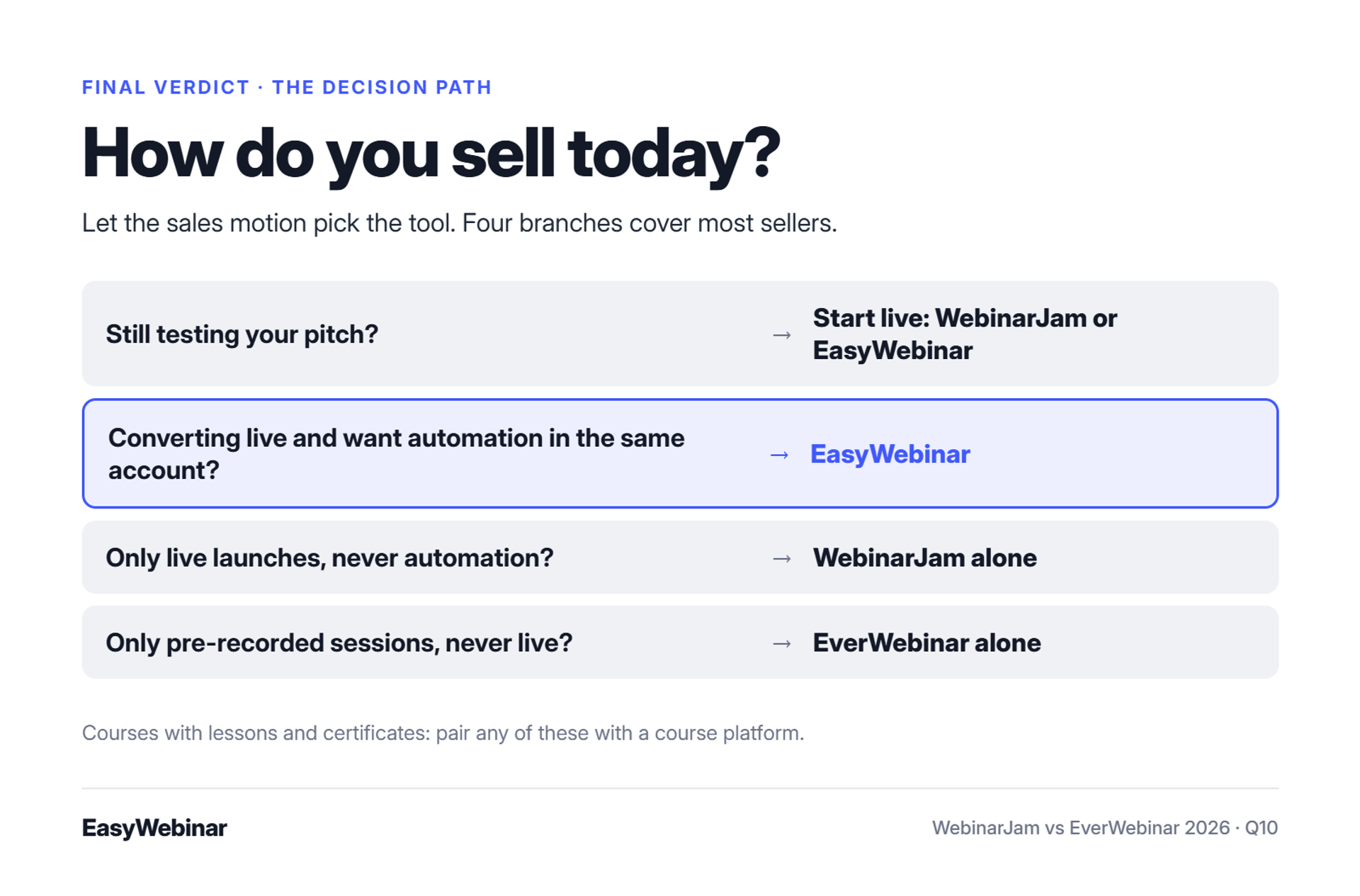
EasyWebinar's read is that most sellers land on path two within a year. I could be wrong for teams that only ever run launches, but that's the pattern Micaela describes above.
EasyWebinar is best for turning a proven live session into an automated webinar, with one login and one subscription. It is not ideal for courses with lessons and certificates, so pair it with your course platform. Attendees join from any browser with nothing to download, and the winning session runs every day.
Frequently Asked Questions

Casey Zeman
Founder of EasyWebinar
About Author
Over the past decade, I've helped thousands of entrepreneurs, coaches, and consultants turn webinars into a predictable, powerful way to grow their audience, build trust, and scale, without the constant hustle. I created EasyWebinar because I couldn't find a system that combined authenticity, engagement, and automation the way I needed. So, I built one.
Related Posts

10 Best Community Engagement Platforms in 2026
Compare the 10 best community engagement platforms in 2026. Course creators, evaluate live hosting, analytics, and replay to pick your winner today.

10 Best Online Coaching Tools in 2026: Live Session Quality, Scheduling, Recording, and Client Engagement Analytics
Compare the 10 best online coaching tools of 2026 on session quality, scheduling, and analytics. Discover the right fit for your coaching revenue model.

10 Best Webinar Hosting Platforms Ranked by Uptime, Streaming Quality & Cost
Compare 10 webinar hosting platforms ranked by uptime, streaming quality, and cost. Discover which tool actually turns attendees into revenue.
Turn every webinar into a revenue stream
Launch your first paid event in just a few clicks - and start monetizing your expertise.
Book a Call