WebinarGeek Reviews: Ease of Use, GDPR, Pricing, and Support

Casey Zeman
Published on Sep 8, 2026 • 32 min read

TL;DR
- WebinarGeek scores 4.5/5 on G2 (529 reviews), 4.6/5 on Capterra (217 reviews), and about 4.2/5 on Trustpilot (258 reviews), and the gap between those three numbers is the most useful signal in the whole evaluation.
- Ease of use rates 4.7/5 on Capterra, but G2 clusters 18 reviews around a steep learning curve, so the platform is fast to start and slower to master once automation enters the picture.
- Pricing runs 49 euro Basic, 69 euro Premium, and 349 euro Enterprise per month, with caps set on concurrent live viewers rather than registrants, and HubSpot plus Salesforce reserved for the top tier.
- Native integrations are the most consistent complaint, with 15 G2 reviews citing CRM friction and reviewers still falling back on Zapier after switching specifically to fix integrations.
- GDPR posture is genuinely strong, with EU only hosting in the Netherlands, a self serve DPA, and six week data deletion, though no SOC 2 Type II attestation appears on any public page.
- Support rates 4.8/5 on Capterra and runs weekday business hours on CET, which is a real gap for operators presenting from US time zones on launch day.
Q1. Is WebinarGeek actually good in 2026, and why do its ratings disagree?
WebinarGeek holds 4.5 out of 5 on G2 across 529 reviews, 4.6 out of 5 on Capterra across 217 reviews, and roughly 4.2 out of 5 on Trustpilot across 258 reviews. The gap between those numbers is not noise. G2 and Capterra collect product fit reviews from marketers who chose the tool. Trustpilot collects service and consent complaints, often from people who never bought it.
I built a YouTube course years ago. Six months of work, then crickets. The only thing that turned it into sales was a webinar.
That taught me something about software scores. A rating measures how happy people are with a tool. It does not measure whether the tool matches your sales motion, which is why webinar platform reviews need to be read against your own funnel.
⭐ What each rating platform is actually counting
Capterra's sub-scores are the most useful block on any WebinarGeek page. Ease of use sits at 4.7, customer service at 4.8, value for money at 4.6, and features at 4.4, with 90% likelihood to recommend. That shape describes a tool people find pleasant and slightly thin on depth.
G2's page tells a rougher story because it clusters dislikes. Reviewers there flag a steep learning curve, CRM integration friction, and limited customization of registration pages and analytics.
📊 The scorecard, side by side
EasyWebinar sits in that table with a much smaller review base, and that is worth saying plainly. A smaller sample is easier to keep high and harder to trust at scale. Anyone can check the raw customer reviews and judge the sample for themselves.
💬 Two reviews that show the split
"1. Excellent and fast support. 2. UX, the possibility to customize everything according to my brand. 3. All types of webinars in one platform at a reasonable price."- Verified User, WebinarGeek G2 - Verified Review, 5/5, Feb 2026
"There is a small delay in what I see as host and what the viewers see... If you have more presenters on different location the quality of the webinar will go down a lot."- Verified User in Management Consulting, WebinarGeek G2 - Verified Review, 2.5/5, Jun 2023
✅ How to weight the three scores for your own decision
If you run scheduled content sessions, weight Capterra highest. Those sub-scores track setup speed and support, which is most of your job.
If you run paid traffic into a funnel, weight the G2 dislike clusters highest. Integration and analytics gaps cost money every week, not once, and they show up first in your webinar analytics.
If your registrants are strangers on cold lists, read Trustpilot first. Consent complaints reach your brand, not the vendor's.
EasyWebinar publishes its own dislike clusters next to its wins, including reviewers who want deeper email tracking and more landing page design control. A review article that reports only the good numbers is a brochure, and buyers can smell one from the first paragraph.
Q2. How easy is WebinarGeek to use after your first webinar?
WebinarGeek scores 4.7 out of 5 for ease of use on Capterra, and reviewers describe a structured, step by step build that needs almost no training. The curve shows up later. G2 clusters 18 reviews around a steep learning curve, and one reviewer says advanced automation and integration options are "not explained well," so you have to guess what they do.
Two numbers, both true. They just measure different weeks of your life.
🚀 What is genuinely easy in week one
The platform runs in the browser. Nothing to download for you or your attendees, which removes the most common source of pre-session panic.
The build flow is linear. You create the webinar, then the registration page, then the emails, in a fixed order that is hard to get wrong. If you are new to the sequence, our guide on how to create webinars walks the same order.
⚠️ What gets harder in week four
Reviewers who stay past the first session describe navigation friction and unclear advanced settings. One four star reviewer names the exact pattern.
"It's not terrible, but it also isn't super intuitive, so it takes a bit of getting used to. Some parts, especially the CRM integration. It feels way more complicated than they need to be... tracking down keys and jumping between different sites."- Verified User, WebinarGeek G2 - Verified Review, 4/5, Nov 2025
The same reviewer flags in app surveys and pop ups that cannot always be dismissed. Small thing. Annoying on a launch morning.
🧪 Judge ease on the automated build, not the live one
Here is the reframe I would give any operator sitting in a trial. Building one live webinar proves almost nothing about a platform.
Anyone can run a live session. The question is whether the automated webinar version survives without you in the room.
My rule has not changed in fourteen years. Run five to ten live sessions, hit roughly 10% attendee to buyer, and only then automate.
🎨 The template trap that wastes two weeks
First time presenters lose the most time on design. They pick a template, hate it, and rebuild it twice.
Pick the ugly one. It is finished. The presentation is what converts, not the drop shadow on the opt in button, and the webinar landing page examples that convert best are rarely the prettiest.
That is where the two ease scores reconcile. WebinarGeek is fast to start and slower to master, and most buyers only test the fast half.
💬 The counterpoint worth reading
"What I like most is how focused the platform is on webinar. The workflow is structured, step by step... Advanced features are unclear, some options like automation and integrations are not explained well."- Verified User, WebinarGeek G2 - Verified Review, 3.5/5, Feb 2026
That single review contains both halves of the ease question. Praise for the guided path, frustration at the ceiling above it.
EasyWebinar reviewers report cloning a proven webinar into new sessions in minutes, with one operator running close to 30 sessions off a single cloned setup in a year. Cloning is the boring feature nobody demos, and it is the one that decides whether your second month costs you a weekend.
Q3. How reliable is WebinarGeek live, and what do low star reviews report?
Most reviewers call WebinarGeek stable, with strong mobile playback and replay quality one reviewer rated above Demio. The documented failures are specific. A one star G2 reviewer was "kicked out of the meeting, while presenting, several times," could not mute participants, and could not turn the camera off mid session. A Trustpilot reviewer lists broken dry runs and unavailable replays. It runs in the browser only, with no mobile or desktop app.
📺 What runs well, according to people who host weekly
Stability is the most repeated praise. Reviewers switching from Zoom, LiveWebinar, and Demio cite fewer connection complaints from attendees.
Mobile matters more every quarter. One reviewer chose WebinarGeek partly because attendees increasingly join from phones, which is the same pressure that shapes any live webinar software decision now.
"It's easy to set up and runs extremely stable... Another big plus is how well Webinargeek performs on mobile... It has significantly reduced my stress levels, and I've received far fewer complaints from participants about connection issues."- Verified User, WebinarGeek G2 - Verified Review, 4.5/5, Jan 2026
❌ The complaint clusters, with counts
- Steep learning curve on setup and navigation, 18 reviews
- CRM integration problems with HubSpot and Salesforce, 15 reviews
- Limited registration page and analytics customization, 12 reviews
- Browser only, with no mobile or desktop application
- Host controls missing mid session, including participant muting and camera toggle
⏰ The failure that actually costs money
Nobody cares about a bug at 11am on a Tuesday. They care at 2pm when 380 people registered and 95 showed up.
"1) Microphone sometimes does not work on Chrome. 2) The Dry Run does not work. 3) Some Replays are not available. 4) The Chatbot is not much help. 5) The Tech Support Team is mostly unavailable."- Not Happy, WebinarGeek Trustpilot - Verified Review, 2/5, Jun 2026
A broken dry run is the one I would flag hardest. Dry run is the rehearsal mode that lets you test audio and slides before attendees arrive.
⚖️ Fair context on the worst review
The one star host control review dates to November 2021. Platforms ship a lot in five years, and it would be lazy to treat it as current.
The Trustpilot reliability complaint is from June 2026. That one is recent, and it is a single voice, which is exactly how it should be weighted.
Live chaos is not really a software problem anyway. Anyone can walk behind you on camera, or a kid can throw ketchup on your face while you present. You cannot buy your way out of that.
What you can buy is a platform that does not add its own chaos on top. That distinction is why I ended up building automated Just in Time delivery, which means the session starts minutes after someone registers, from a recording, without pretending to be live. The mechanics sit closer to a simulated live webinar than to a stream.
EasyWebinar reviewers report the same category of friction with the same honesty, naming occasional bugs that get resolved fast and landing page design flexibility that feels limited. Any operator comparing the two should read both dislike columns before reading either feature page.
Q4. Is WebinarGeek GDPR compliant, and what does that not cover?
Yes. WebinarGeek is a Netherlands company that stores registrant data, recordings, and account data on EU infrastructure, with a self serve DPA inside the account, automatic account data deletion six weeks after a subscription ends, a last name field disabled by default, and exportable consent proof. An independent EU martech index rates its Schrems II transfer risk as low. No SOC 2 Type II attestation appears on any public WebinarGeek page.
DPA means Data Processing Agreement, the contract that governs how a vendor handles personal data on your behalf.
🔐 The four controls you can verify today
- EU only hosting, with data centres in the Netherlands.
- A DPA you can download yourself under Account, then Company account, then Agreements.
- Account data deleted automatically six weeks after the subscription ends.
- Consent capture at registration, exportable as proof.
That is a genuinely good posture for an EU buyer. Better than several US platforms that still route registrant data through a US subprocessor by default.
⚠️ GDPR is a privacy posture, not a security audit
Here is where most review pages stop, and where procurement starts. GDPR compliance describes how data is handled legally. SOC 2 Type II describes whether an auditor tested your controls over time.
They are different questions. A vendor can be fully GDPR compliant and still have no third party audit report to hand your security reviewer, which is why our own GDPR compliance page and audit status sit on separate documents.
📋 The compliance row, three ways
EasyWebinar carries SOC 2 Type II and GDPR with a published data processing addendum, and shares the audit report under NDA. That is the attestation layer a standard commercial security review asks for, and it is worth naming honestly that it does not include ISO 27001 or HIPAA.
📨 Consent hygiene is the part nobody audits
Two 2026 Trustpilot reviewers report unsolicited calendar invitations sent through the platform, and say abuse reports went unanswered.
"Spammers use webinar geek to send Calendar spam and put invitations to webinars on your calendar without permission. I have reported abusive behavior to their abuse channels and legal channels 4 separate times and there has yet to be a response."- Eric Knopf, WebinarGeek Trustpilot - Verified Review, 1/5, Apr 2026
"This company keeps spamming my calendar for events I have no interest in, did not sign up for and are unrelated to my work."- Patricia Brantley, WebinarGeek Trustpilot - Verified Review, 1/5, Apr 2026
Those are complaints about other operators' behaviour on the platform, not about hosting. Still, deliverability reputation travels, and your registrants see your name on the invite.
🇪🇺 The gap EU operators keep raising
One five star reviewer wants more EU based integrations, naming Make specifically, so data stops leaving the EU through middleware. That is the sharp version of the compliance question, and it is the first thing to check on any platform's integrations list.
"Not enough integrations, especially with EU-based tools like Make, to avoid sending data outside the EU."- Verified User, WebinarGeek G2 - Verified Review, 5/5, Feb 2026
EU operators comparing automated platforms on r/SaaS treat GDPR as the first filter, not the last. My read is that the real exposure is rarely the webinar host. It is the six downstream tools your automation chain pushes registrant data into.
"Anyone can share advice on automated webinar platforms? I am kinda lost and would love to hear about actual experience. Additionally, since I operate a business within the European Union, it's important that the platform is GDPR compliant."- r/SaaS, Reddit Thread, 25 Sep 2025
Obey the law, then check it again next quarter. Advertising and privacy rules tend to tighten, not loosen.
Ask any vendor these five things before signing: where is data stored, can I download the DPA without contacting sales, what is the deletion window, is there a SOC 2 Type II report, and which subprocessors touch registrant data.
EasyWebinar publishes its GDPR page and DPA openly, holds SOC 2 Type II, and supports SAML SSO on higher tiers, which covers both the privacy question and the audit question in one vendor review. For a solo coach that is overkill, and for an enterprise training team it is the difference between a signature and a six week security queue.
Q5. What does WebinarGeek cost once the CRM is connected?
WebinarGeek starts at 49 euro per month (Basic: 50 concurrent viewers, one presenter, two hour sessions), 69 euro per month for Premium (automated and on demand webinars, custom branding, API), and 349 euro per month for Enterprise (up to 5,000 viewers, HubSpot and Salesforce included). A 14 day trial runs with no credit card, and there is no free plan. The real jump is CRM access, not viewer count.
💰 The number that breaks launches is not the price
Read the Basic cap again. Fifty concurrent viewers means fifty people in the room at once, not fifty registrants.
Registration to attendance runs low on cold traffic, often 10% to 15%. So 400 registrants can still put 60 people in a room built for 50, which is why how to improve webinar attendance matters before you pick a tier.
💸 The integration tax nobody models
Here is where the sub 100 euro plan quietly becomes a four figure stack. HubSpot and Salesforce sit at the 349 euro Enterprise tier.
Capterra's pricing page notes costs roughly double when extra users are added. G2 clusters 15 reviews around CRM integration problems, which means most buyers pay for middleware anyway.
📊 What each plan actually gives you
EasyWebinar Growth prices at 116 dollars per month flat for 200 live attendees and 1,000 automated viewers, with the CRM in the plan rather than above it. That is not a better deal for everyone, and I will say so plainly. If you run one 40 person webinar a quarter, the 49 euro tier wins on math. Anyone can check the full webinar pricing ladder and run the comparison themselves.
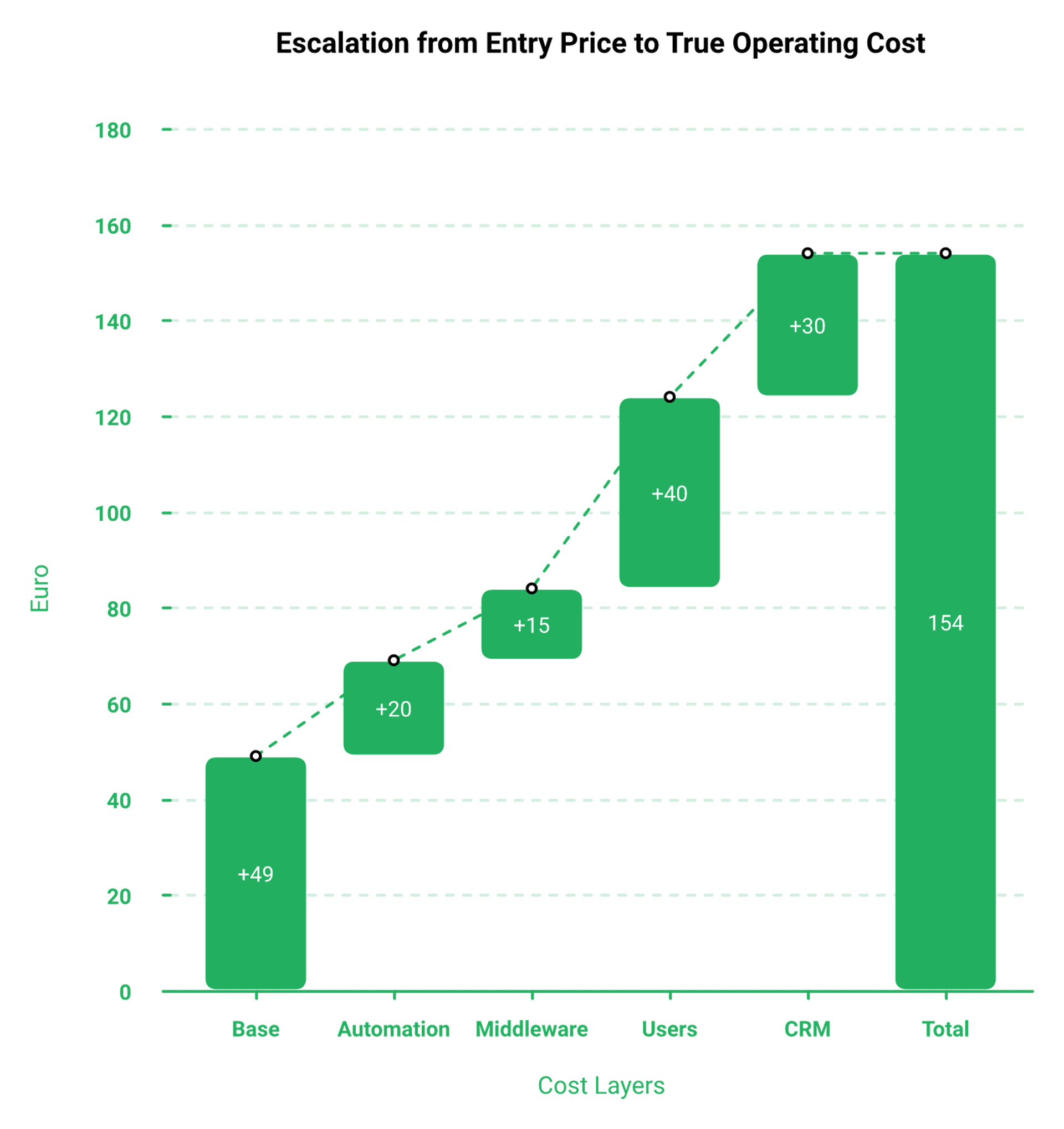
⚠️ The car rental lesson applied to software tiers
Alex Hormozi tells a story about walking into a rental office for a 19 dollar a day car. He walked out paying 100 dollars a day.
Software tiers work the same way. You come for the entry price and pay for the parts that make it function.
My rule: buy the tier that natively supports what your funnel does. Negotiating around a missing feature with fragile middleware costs more than the upgrade.
💬 What buyers say about value
"All types of webinars in one platform at a reasonable price."- Verified User, WebinarGeek G2 - Verified Review, 5/5, Feb 2026
"The only downside is that to have the 'just in time' feature you have to pay a premium that is about double the price of the basic subscription. However, it has been worth it for me to invest in that."- Laura C., EasyWebinar G2 - Verified Review, 5/5, Jan 2025
That second quote is a complaint about my own pricing. It stays in because it is the honest version of this whole section.
✅ Three lines that tell you the real cost
- Monthly platform fee, plus middleware fee, plus any per user add on.
- Divide by expected registrants per month.
- Compare that cost per registrant against your product price.
Below 200 dollars in product price, a webinar rarely earns its overhead. That math does not care which vendor you pick, and it is the same math behind how to make money with webinars.
EasyWebinar bundles evergreen scheduling, in webinar offers, and a native sales CRM into its core plans rather than gating revenue features behind a separate tier. Whether that saves you money depends entirely on whether you were going to buy those pieces anyway.
Q6. Where do WebinarGeek's integrations and automations break?
Native integrations are WebinarGeek's most consistent complaint. One reviewer who switched specifically to improve integrations still ends up relying on Zapier, because tag add and update actions are not supported natively. Another describes CRM setup as more complicated than it needs to be, with keys to track down across different sites. Every missing native connector becomes a Zap, and every Zap is a place your funnel can fail quietly.
🚇 The tube map test
Jon Penberthy has a warning I repeat to operators constantly. Your funnel diagram should not look like the London Underground map.
If it starts to, backtrack. Complexity does not fail loudly. It fails on the one Wednesday you were not watching, which is the same reason a single webinar funnel beats five stitched together.
❌ Where the connector gap shows up
- Tag add and update actions missing from native email integrations
- HubSpot and Salesforce reserved for the Enterprise tier
- CRM setup requiring API keys pulled from separate dashboards
- Fifteen G2 reviews grouped under integration problems
That last number is the one I would take to a buying meeting. Fifteen separate people is a pattern, not a bad week.
⏰ The failure that arrives four hours before showtime
One operator I know hit their Zapier plan limit mid launch. Their Zap quota ran out, and opt ins stopped syncing to the CRM.
They caught it four hours before the webinar. A few hundred registrants were missing from the list their sales team was dialing.
The fix was billing, not code. Upgrade the plan, done. The near miss is the point.
💬 Two reviewers describing the same ceiling
"The downside of Webinargeek is the limited functionality of its native integrations... As a result, I still have to rely on Zapier. I do see this as a real drawback, especially since improving integrations was one of the reasons I decided to switch."- Verified User, WebinarGeek G2 - Verified Review, 4.5/5, Jan 2026
"Intergration is somewhat limited, but if you are comfortable with Zapier you can easily update that."- Verified User in Professional Training and Coaching, EasyWebinar G2 - Verified Review, 4.5/5, Nov 2024
Same complaint, two vendors. Anyone telling you their platform has zero integration gaps is selling.
⚠️ Why this costs more than it looks
A missing connector does not feel expensive on setup day. It feels like ten minutes in Zapier.
The cost lands later. Every automation you add is a thing that needs an owner, a test, and a plan for when it silently stops.
My read, and I could be reading it too hard, is that integration depth predicts funnel survival better than any feature list. The platforms that lose operators rarely lose them on features.
✅ Count your Zaps before you count your features
Do this during the trial, not after. Write down every automation the funnel needs, then mark which ones are native. Our integrations list is the right place to run that check on any vendor.
Anything not native gets a name next to it. That person checks it before every launch.
If more than three automations are middleware, price the middleware into your monthly cost. It belongs there.
EasyWebinar ships a built in sales CRM, an auto dialer, and behavioral follow up, so the post webinar sequence runs inside the same system that hosted the session. That removes a category of failure rather than making it easier to monitor, which is a different kind of fix.
Q7. Can WebinarGeek run a real evergreen or just in time sales funnel?
WebinarGeek runs live, automated, and on demand webinars, with automation unlocked from the Premium tier upward, and reviewers rate its replays and mobile playback highly. Where direct response operators run short is behavioral depth. Just in time scheduling with timezone detection, timed in webinar offers, and follow up that branches on watch time instead of a flat registration tag are the mechanics that separate a recording from a revenue engine.
🎬 What automation actually means in practice
Automated webinar means a recording that plays on a schedule. Simulated live means the recording plays at set times so it feels scheduled, and the mechanics of a simulated live webinar are worth understanding before you buy.
Just in time means the session starts a few minutes after someone registers. No date picker, no waiting five days, no forgetting.
⏰ The four mechanics that decide evergreen revenue
- Just in time scheduling with timezone detection, so nobody lands on a 3am session.
- Timed offers inside the room, tied to the minute the pitch begins.
- Replay windows with a hard expiry, usually 72 hours.
- Follow up that fires on watch time, not just registration.
Most platforms ship one and two. Three and four are where evergreen funnels either print or leak.
⚖️ The argument nobody in this category settles
Some operators insist live still wins. Media buyer Jeremy Haynes argues automated webinars have lost ground against live for cold paid traffic, and that some buyers attend two or three live sessions before purchasing.
Others argue the opposite. Yuri Elkaim points out live show up rates are poor, and that one recording can run continuously. The trade offs are laid out in our breakdown of live versus automated webinars.
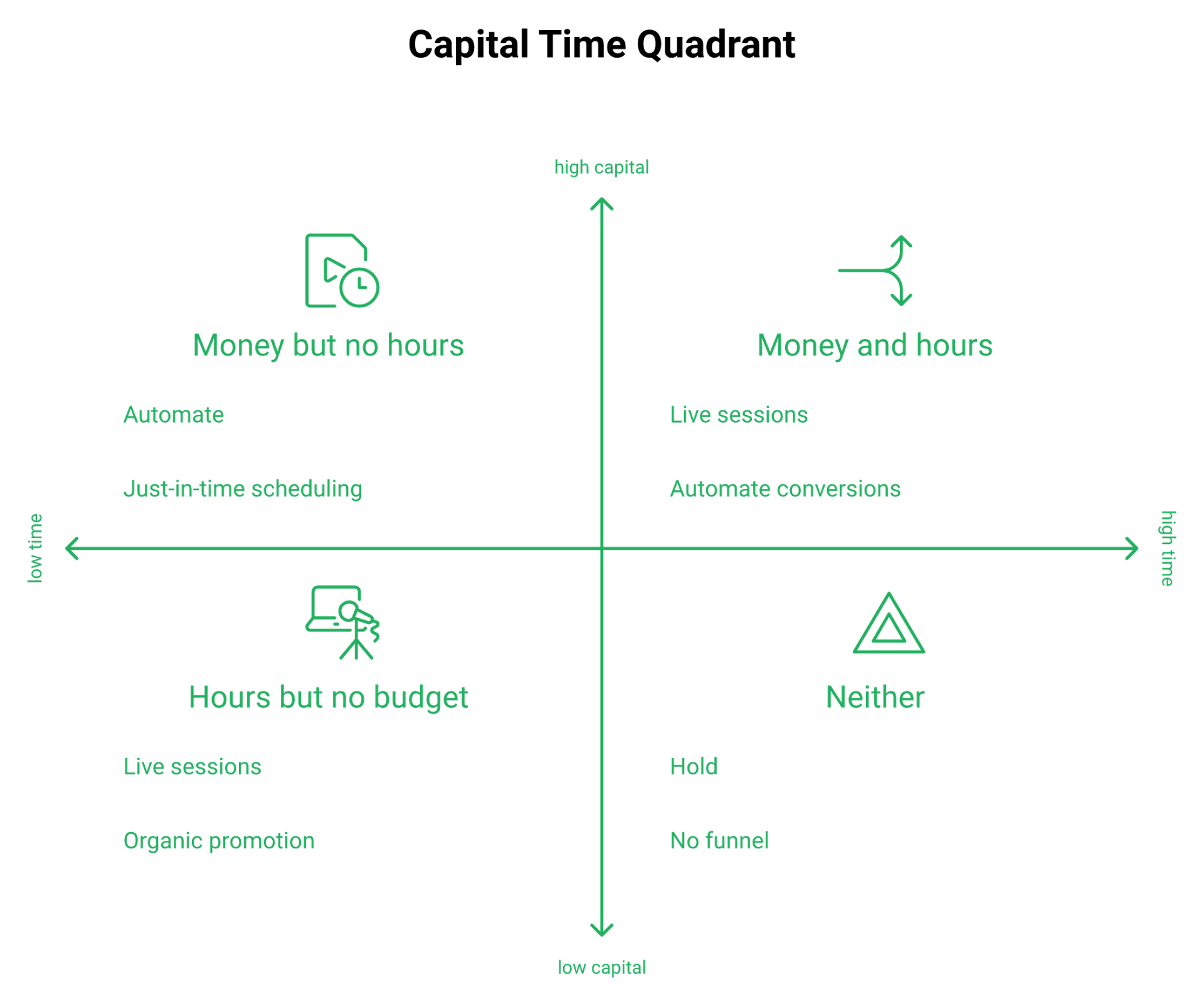
Sabri Suby's resolution is the one I use. If you have more time than money, run live. If you have more money than time, automate.
🎯 My honest position on the debate
Nail it live first, then automate. Five to ten live sessions, roughly 10% attendee to buyer, then you have something worth recording.
Automating a webinar that never converted live just scales a bad presentation. That is the mistake I see most often, and it is expensive in ad spend.
I will not call an automated session live. Never say it is live, never say it is not. That integrity line protects your refund rate more than any feature.
💬 What operators report on both sides
"The deciding factor for me was the replay quality, which I found to be just a bit better than Demio's... plenty of options such as on-demand and automated webinars."- Verified User, WebinarGeek G2 - Verified Review, 4.5/5, Jan 2026
"The biggest challenge is around setting up automated webinars, and needing the presentation uploaded first in order to set it up... Would love to be able to add the video later!"- Ash A., EasyWebinar G2 - Verified Review, 5/5, Mar 2026
The second one is a limitation on my own platform. It is real, and it annoys people who promote before they record.
✅ Two things to set this week
Set replay expiry to 72 hours. Long windows breed procrastination, and the final email should say the replay comes down in hours.
Bait the pitch. Tell attendees a bonus goes out after the session, and aim to hold roughly 80% of your peak audience through to the offer.
EasyWebinar was built around just in time and simulated live scheduling, which is why one course creator sold 25 courses in three weeks evergreen after averaging 10 to 12 per live class. One reviewer's result is not a benchmark, and I would not present it as one. The automated webinar mechanics behind it are documented in full.
Q8. How responsive is WebinarGeek support when a webinar is breaking?
WebinarGeek support rates 4.8 out of 5 on Capterra, and G2 reviewers praise fast chat replies plus an AI assistant that covers off hours. The limits are real. Live chat runs weekday business hours on Central European Time, and one Trustpilot reviewer states the tech support team is mostly unavailable after trying chat, email, and Facebook with no reply.
⏰ The only support test that matters
Nobody evaluates support on a calm Tuesday. You evaluate it at 2pm when 380 people registered, 95 showed up, and your microphone drops on Chrome.
That is the exact scenario one reviewer describes. Mic failing, dry run broken, replays missing, chatbot unhelpful, and no human answering. A pre flight pass through how to start a webinar catches most of those before attendees arrive.
🌍 The timezone problem for non EU operators
Business hours on CET is fine if you are in Amsterdam. It is a real gap if you present at 2pm Pacific.
Your launch window and their staffing window may not overlap. That is a scheduling fact, not a criticism of the team.
💬 The two sides, in reviewers' words
"Excellent and fast support."- Verified User, WebinarGeek G2 - Verified Review, 5/5, Feb 2026
"The Tech Support Team is mostly unavailable. I am also using this review to see if the Tech Team will respond to my messages on their chat. I have even tried to communicate with them via their Facebook account, to no avail."- Not Happy, WebinarGeek Trustpilot - Verified Review, 2/5, Jun 2026
Both are true at once. Fast when reachable, silent when not.
💰 Why response time is a revenue number
A 90 minute support reply on launch day can cost more than the annual plan. Ninety five people in a room, a broken audio feed, and a pitch that never lands.
Run the math on your own webinar. Attendees times close rate times price. That is your hourly cost of downtime.
✅ Three tests to run inside the trial
- Open a chat ticket at 6pm CET on a weekday and time the reply.
- Ask a specific automation question, not a generic one, and see if the answer is usable.
- Run a dry run on a phone over mobile data, then report any issue and time the response again.
Fourteen days is enough for all three. Most buyers never run any of them.
🤝 What good looks like from the other side
"What really sets EasyWebinar apart is the customer support. It's rare to find a platform where you can actually hop on a Zoom call with a real human."- Jennifer B., EasyWebinar G2 - Verified Review, 5/5, Apr 2025
That is one reviewer's experience, not a service level agreement. A service level agreement is a written response time commitment, and most platforms at this price point do not offer one.
EasyWebinar reviewers repeatedly describe live setup calls with a named rep during onboarding, which is the pattern behind its support scores rather than a faster ticket queue. For a solo coach that hand holding matters more than uptime charts, and for an enterprise buyer it matters less than a signed response window. Operators who want to see the setup call first can request a demo.
Q9. Who should choose WebinarGeek, and who should not?
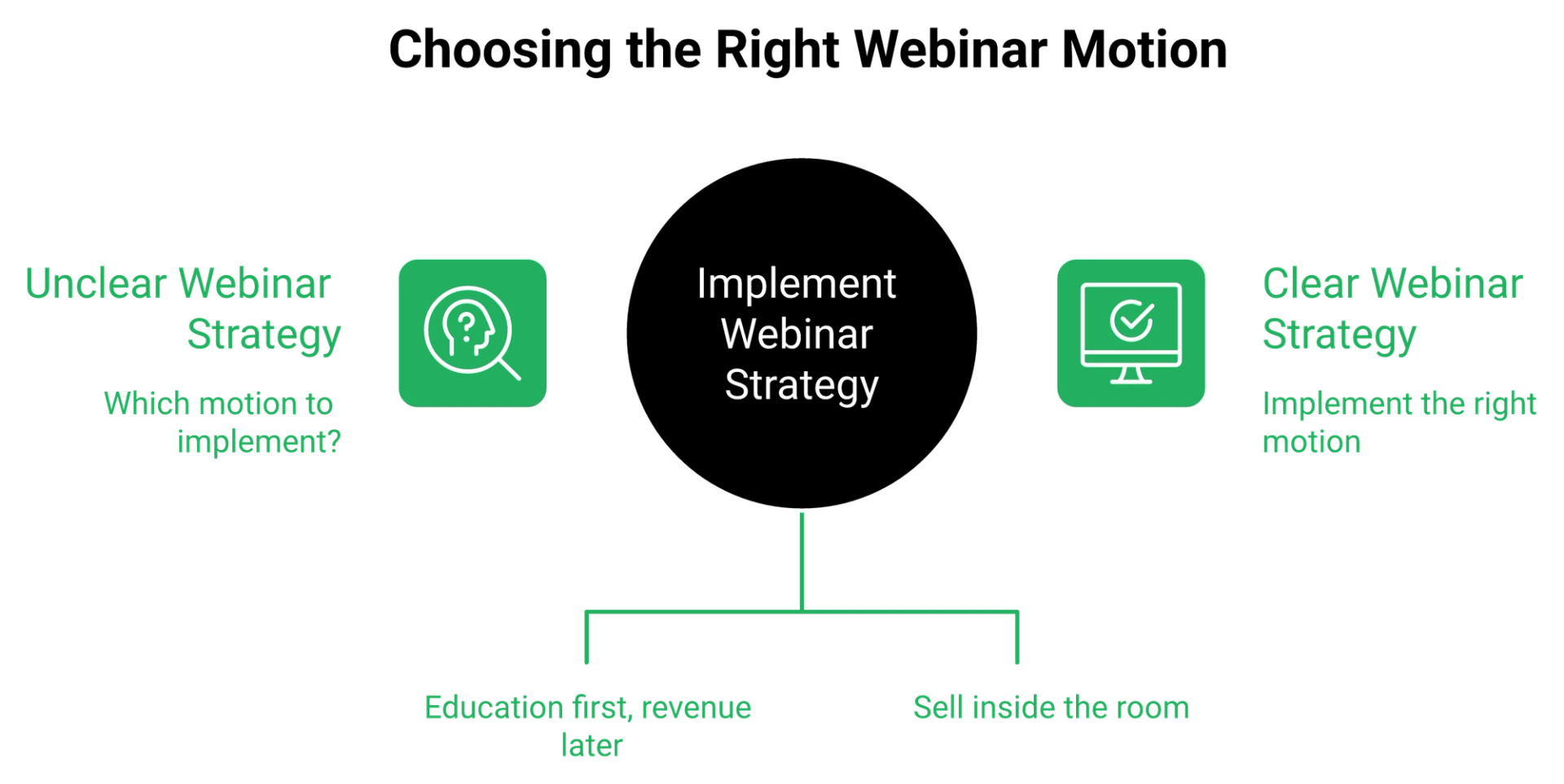
WebinarGeek fits EU teams running scheduled, content led webinars who value data residency, browser access, and fast setup over automation depth. It fits poorly for high ticket direct response operators who need behavioral follow up, native CRM sync, timed in room offers, and just in time scheduling as core infrastructure rather than tier upgrades.
🎯 Match the platform to your sales motion
Content led and revenue led webinars look identical on a feature grid. They fail in completely different ways.
A content webinar fails when the stream drops. A revenue webinar fails when the follow up does not fire on the people who watched to the pitch, which is the whole argument for a proper evergreen sales funnel.
📋 Four buyers, four verdicts
That table is not a scoreboard. It is a filter, and two of those rows say buy it.
⭐ The operator who fits best, in their own words
"WebinarGeek allows me to grow my online business by offering different types of webinars (live, automated, and on-demand) in one place. It simplifies my tech stack."- Verified User, WebinarGeek G2 - Verified Review, 5/5, Feb 2026
That is the profile. One vendor, several formats, EU data, reasonable price.
❌ Not recommended for these five situations
- Sub 200 dollar product prices, where webinar overhead never pays back.
- Funnels that need HubSpot or Salesforce sync below the 349 euro tier.
- Operators presenting from US time zones who need same hour support.
- Teams needing SOC 2 Type II documentation for a security review.
- Anyone whose follow up must branch on watch time, not registration.
I will hold that last one hardest. A flat registration tag treats a 40 minute viewer and a 2 minute bouncer the same, and they are not the same buyer. Watch time branching is the core of real webinar marketing automation.
💰 The question behind the question
Most buyers ask which platform is better. The useful question is which sales process you actually run.
You do not need a complicated funnel. You need a faster, simpler sales process, and the platform should shorten it.
A webinar's job is not teaching. It is shifting what someone believes about their problem, then making an offer.
🤝 The other side of the fit test
"Easy to set up live or evergreen webinars, including replay options. Analytics splits out live and replay attendee insights for evergreen webinars... Intergration is somewhat limited."- Verified User in Professional Training and Coaching, EasyWebinar G2 - Verified Review, 4.5/5, Nov 2024
Same honesty applies to my side. If you run one internal team meeting a month, no revenue platform is worth the money.
EasyWebinar is built for the revenue led motion, coaches, course creators, and agencies selling from inside the room, which is a different job than hosting a scheduled content session. For pure internal training with no offer attached, the cheaper scheduled tool is the right answer. Operators running the coaching motion can see the fit on our coaching sales funnel breakdown.
Q10. Which WebinarGeek alternatives are worth switching to?
Switching is almost always triggered by one of three things: automation depth, native CRM integration, or support responsiveness during a live event. EasyWebinar, Demio, Livestorm, WebinarJam, Zoom Webinars, and ON24 are the platforms operators compare most, and each wins on a different axis, from evergreen revenue to engagement polish to enterprise reporting.
1. EasyWebinar, for evergreen revenue funnels
EasyWebinar runs live, simulated live, evergreen, and just in time sessions on one account, with a native sales CRM and timed in room offers included in core plans. Just in time means the session starts minutes after registration, so nobody waits five days.
Honest limitation: automated setup requires the presentation uploaded first, which frustrates people who promote before recording. Price anchor: Growth at 116 dollars per month flat for 200 live attendees plus 1,000 automated viewers. The full feature set is documented publicly.
🔀 If integrations or automation are your blocker
That is the switching trigger for most WebinarGeek users I talk to. Compare the two systems side by side before you rebuild anything.
Switching because automation or CRM sync is the blocker?
See how EasyWebinar compares, side by side
Evergreen and just in time scheduling, a built in sales CRM, and timed in webinar offers, mapped against the platform you are leaving.
2. Demio, for engagement polish
Clean attendee experience, strong live feel. Thinner on evergreen depth and native CRM. Operators weighing this one should read the Demio alternatives comparison first.
3. Livestorm, for EU hosting with a modern interface
Attendee based pricing at 3 dollars per attendee per session, which scales badly past roughly 460 attendees a year.
4. WebinarJam with EverWebinar, for price
You buy and manage two products to get live plus evergreen, which is the trade. The split product math is laid out in our WebinarJam alternatives guide.
5. Zoom Webinars, for reliability at scale
Engagement reporting and funnel tooling are not there in the same way, so you add a stack around it.
6. ON24, for enterprise reporting
Heavy procurement, heavy price, built for demand gen teams, not solo operators.
📊 Where each one actually wins
⚠️ The all in one warning
Be careful with any tool claiming to be your community, your CRM, your email service, and your webinar host at once. Breadth usually costs depth in every one of those.
My claim is deliberately narrow. One webinar, turned into a repeatable revenue engine, is the whole job.
💬 What switchers say
"I've worked with several webinar platforms, including Zoom, LiveWebinar, and Demio. Although Demio comes very close to Webinargeek, I ultimately decided to go with Webinargeek."- Verified User, WebinarGeek G2 - Verified Review, 4.5/5, Jan 2026
"EasyWebinar is hands-down THE webinar platform for evergreen webinars, no contest... EasyWebinar makes it, well, easy to work smarter, not harder."- Ash A., EasyWebinar G2 - Verified Review, 5/5, Mar 2026
Two enthusiastic reviewers, two different platforms. Both were right for their own sales motion.
EasyWebinar leads this list for evergreen and just in time revenue funnels, with EasyCast multistreaming to YouTube, LinkedIn, and Facebook running from the same session. For live only enterprise events with no offer attached, Zoom or ON24 is the honest recommendation.
Q11. How should you run the 14 day trial so it actually tells you something?
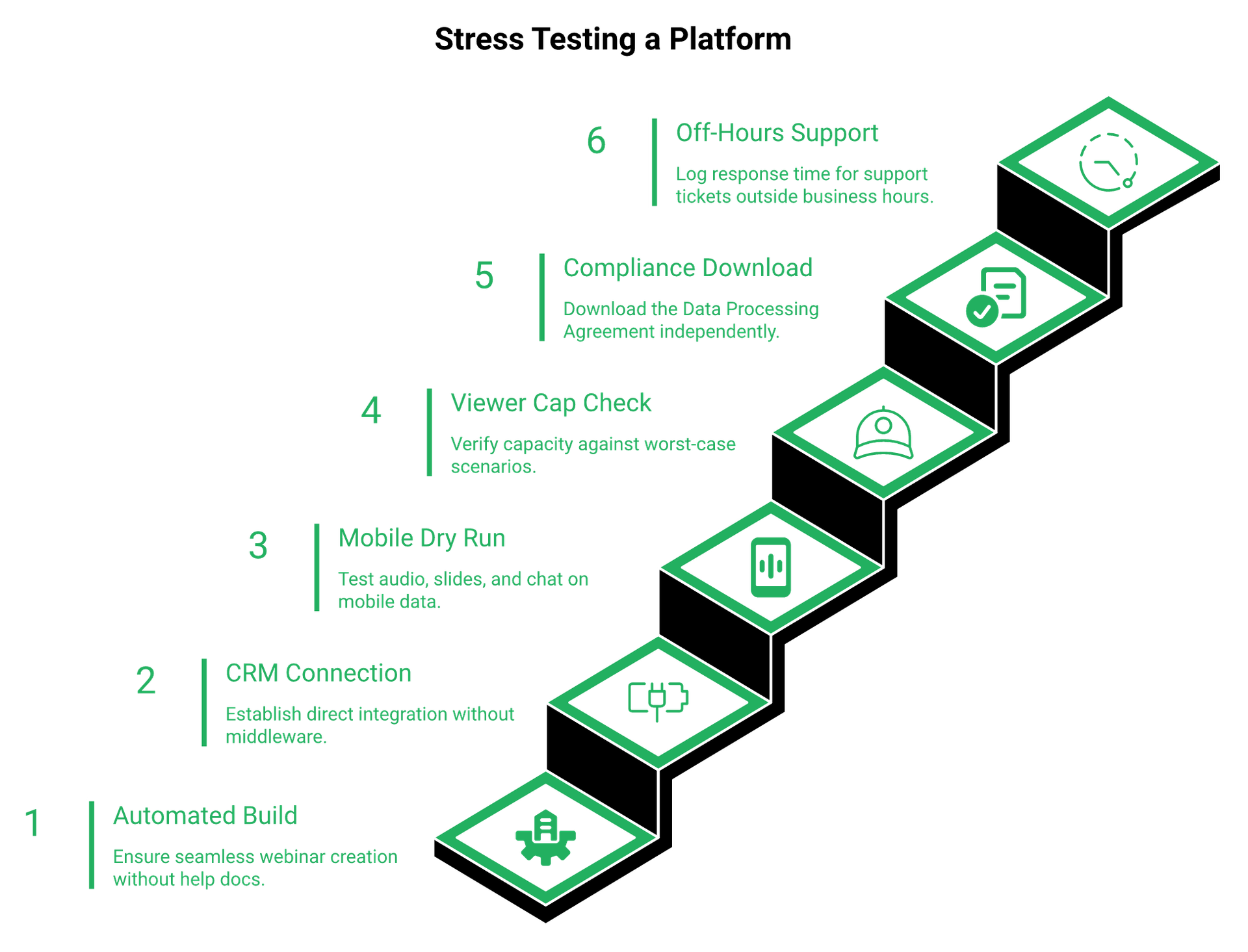
Do not test the live webinar first. Build one automated, just in time webinar end to end, connect your real CRM without Zapier, run a dry run on a phone over mobile data, and open a support ticket at 6pm CET to time the reply. WebinarGeek's trial runs 14 days with no credit card and no free plan afterward, which is enough time to surface every documented limitation.
🧪 Why the default trial path flatters every platform
Most people build a live webinar, invite a colleague, and call it a test. That proves the stream works.
It proves nothing about automation, CRM sync, replay behavior, or support hours. Those are the four things that break later.
✅ The seven step protocol
- Build one automated, just in time webinar. Pass if you finish without opening a help doc twice.
- Connect your real CRM natively. Pass if no Zapier step is required. Fail means budget for middleware.
- Run a dry run on a phone over mobile data. Pass if audio, slides, and chat hold for ten minutes.
- Check the concurrent viewer cap against your worst case. Registrants times 20% attendance is your planning number.
- Download the DPA yourself. Pass if you never email sales to get it.
- Open a support ticket at 6pm CET. Log the reply time in minutes, not impressions.
- Test replay expiry at 72 hours. Pass if the link actually dies on schedule.
📱 Judge the registration page on a phone first
Roughly 60% of visitors never scroll past the first screen, so the headline and the opt in button carry almost all the weight. That is also the fastest lever in webinar registration software.
More attendees now join from phones, and one WebinarGeek reviewer chose the platform specifically for mobile performance. Check your registration page on a phone before you check anything else.
⏰ One tactic that costs nothing
If you send SMS reminders, do not put the join link in the text. One media buying team found show rates rose while booking rates dropped, because phone viewers convert worse than desktop viewers.
Send the reminder, keep the link in email. Small change, measurable difference, and it stacks with everything in how to drive webinar attendance.
💬 What onboarding should feel like
"Immediately upon signing up, I received an email indicating I needed to follow up with them in order to activate my program. I was impressed a person actually wanted to follow up with me and help me get started."- Rebecca F., EasyWebinar G2 - Verified Review, 5/5, Jan 2025
"What I'm not a big fan of is the navigation. It's not terrible, but it also isn't super intuitive, so it takes a bit of getting used to."- Verified User, WebinarGeek G2 - Verified Review, 4/5, Nov 2025
Run your trial against both experiences. Notice how long it takes before a human appears.
🔮 What I think changes next
My read right now is that the trial itself becomes the product decision within 18 months. AI built funnels will compress setup to an afternoon, and the differentiator moves to what happens after the pitch. The direction is already visible in our AI funnel builder.
I could be reading that too strongly. Ask me again in two quarters.
EasyWebinar pairs new accounts with a named onboarding rep on a live call, which is why reviewers describe testing their funnel instead of decoding the interface. If you run this protocol on both platforms, tell me what your support reply times were. That data is more useful than any review score in this article, and you can start the clock when you sign up free.

Casey Zeman
Founder of EasyWebinar
About Author
Over the past decade, I've helped thousands of entrepreneurs, coaches, and consultants turn webinars into a predictable, powerful way to grow their audience, build trust, and scale, without the constant hustle. I created EasyWebinar because I couldn't find a system that combined authenticity, engagement, and automation the way I needed. So, I built one.
Related Posts

10 Best Community Engagement Platforms in 2026
Compare the 10 best community engagement platforms in 2026. Course creators, evaluate live hosting, analytics, and replay to pick your winner today.

10 Best Online Coaching Tools in 2026: Live Session Quality, Scheduling, Recording, and Client Engagement Analytics
Compare the 10 best online coaching tools of 2026 on session quality, scheduling, and analytics. Discover the right fit for your coaching revenue model.

10 Best Webinar Hosting Platforms Ranked by Uptime, Streaming Quality & Cost
Compare 10 webinar hosting platforms ranked by uptime, streaming quality, and cost. Discover which tool actually turns attendees into revenue.
Turn every webinar into a revenue stream
Launch your first paid event in just a few clicks - and start monetizing your expertise.
Book a Call