Webinar Best Practices 2026: How to Run Webinars That Convert

Casey Zeman
Published on May 8, 2026 • 29 min read
TL;DR
- Most webinars fail between the steps, not inside them. Registration, reminders, the pitch, and follow-up need to work as one connected system rather than four separate tools.
- Keep the registration headline, subheadline, and button above the fold, and keep the form to name and email. Doubling opt-ins from 15% to 30% doubles revenue if nothing else changes.
- Schedule mid-week, send reminders one week, one day, and one hour out, and keep the join link out of SMS. Phone viewers book far fewer sales calls.
- Aim for 30 to 45 minutes and add interaction every 4 to 5 minutes. A live-only bonus announced at the start helps hold about 80% of peak attendance to the pitch.
- Keep checkout inside the room, then run a three-day replay window with four emails. Behaviour-based follow-up for no-shows, early leavers, and offer-clickers sits on top of that simple sequence.
- Automate only what you have proven live. Run 5 to 10 live sessions, reach about 10% attendee-to-buyer conversion, then turn the winning recording into an automated webinar.
Q1: What are webinar best practices in 2026, and why do most webinars still fail to convert?
Webinar best practices in 2026 come down to seven steps:
- Pick one narrow topic phrased as an outcome.
- Keep the registration headline and button above the fold.
- Schedule mid-week, with reminders one week, one day, and one hour out.
- Aim for 30 to 45 minutes.
- Add audience interaction every 4 to 5 minutes.
- Make one clear offer, with checkout inside the room.
- Run a three-day replay deadline.
Most webinars fail between these steps, not inside them.
🎬 The Launch That Sold Zero Copies
Before I founded EasyWebinar in 2013, I spent six months building a YouTube course. I launched it, and the response was crickets. Not one buyer showed up.
A weekly webinar is what finally moved it. "Hands down, the only thing," as I still tell people. A typical week brought about 60 registrants, 30 attendees, and 3 buyers. That rhythm built a 14,000-person email list and $245,000 in course sales in my first year.
❌ How Most Teams Still Run Webinars
The usual setup looks familiar. Someone exports a sales deck, opens a meeting tool, and posts the link two days out. Registration, reminders, the pitch, and follow-up end up spread across four different tools that nobody owns.
The cost shows up in the funnel, not the room. A weak registration page shrinks your audience before day one, and a thin reminder sequence shrinks it again. A pitch that sends people to a separate sales page loses buyers at the moment they decide. EasyWebinar's view is that the leaks sit in these handoffs, not in the slides.
⚠️ What Changed in 2026
Two shifts make the old way expensive. First, live attendance is under pressure. One 412-webinar benchmark puts the 2026 median registration-to-attendance rate at 38.4%, down from 47% in 2020. Livestorm's 2026 benchmark reports a 51.3% average show-up rate across industries, so definitions and audiences matter.
Second, replays now do much of the work. ON24 reports 60% registration-to-attendee conversion when live and on-demand viewing are combined, with 52% of attendees watching on demand. I could be reading the gap between studies too strongly, since some count replay viewers and some don't. Still, EasyWebinar's read holds either way: a webinar built only for the live hour misses most of its audience.
✅ What a Working Webinar System Looks Like
EasyWebinar treats the webinar as one connected system, not a one-hour event. Registration pages, email and SMS reminders, and a live room that attendees join from any browser all sit under one login. Buyers pay through checkout inside the room, and follow-up reacts to what each attendee did.
EasyWebinar also turns a session that has proven it converts into an automated webinar that runs every day, on the same subscription. My read is simple: the seven steps above only work once the handoffs between them disappear.
Q2: How do you pick a webinar topic and drive registrations that convert at 30%+?
To drive webinar registrations that convert, start with one goal and one narrow topic phrased as an outcome. Promote it through email, social, and paid ads. Send that traffic to a page with the headline, subheadline, and register button above the fold, plus a short form. Benchmark data shows minimal forms converting at 44%, against 38% for longer lead-gen forms. Doubling opt-ins from 15% to 30% doubles revenue if nothing else changes.
🎯 Choose One Goal and One Narrow Topic
A webinar can sell a program, book calls, or onboard customers. It can't do all three well in 40 minutes. Pick one goal, then write the topic as the result your buyer wants.
"Email marketing tips" is a theme. "How to fill a coaching program from a 500-person list" is a promise. EasyWebinar's AI Webinar Builder asks about a dozen questions. It then drafts the script, registration page, thank-you page, and emails from your answers.
📣 Promote Where Your Buyers Already Are
Start with your own email list, because warm subscribers register fastest. Add social posts and a short video invite, then turn on paid ads once the page converts. Paid traffic punishes a weak page, since every visitor who bounces still costs money.
EasyWebinar customer Rick Mulready ran webinars on cold paid traffic at a 30% registration rate. His cost per lead (CPL, what you pay for each registrant) ran $8 to $12, with a 166% return on investment. More results like this sit in EasyWebinar's customer case studies.
⭐ Keep the Page Above the Fold
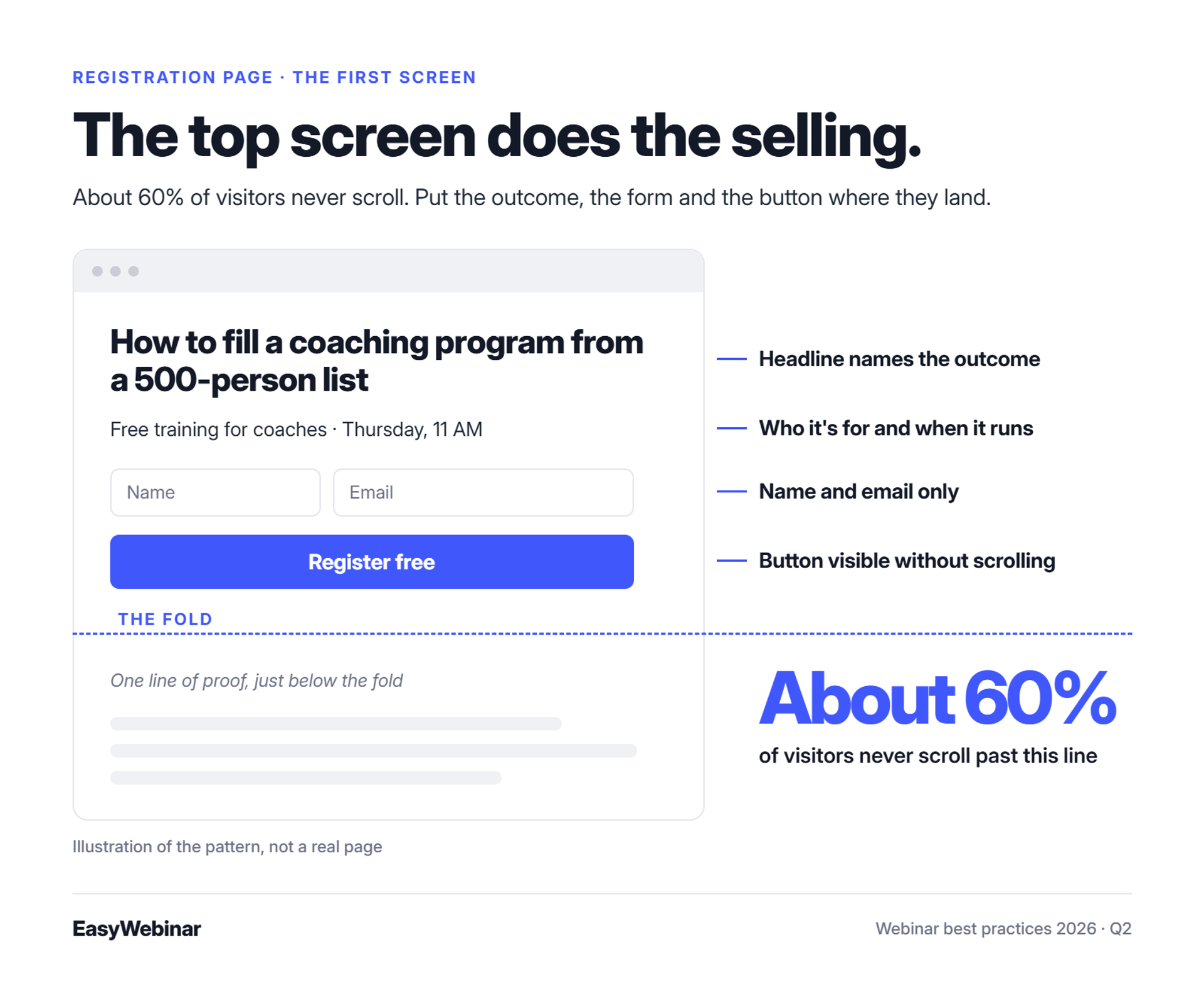
Most visitors never scroll, so the top screen does the selling. The operator transcripts behind this guide put that share at about 60%. Here is what belongs in that top screen, and these webinar landing page examples show it in practice:
- A headline that names the outcome
- A subheadline that says who it's for and when it runs
- A register button visible without scrolling
- A form asking for name and email only
- One line of proof, placed just below the fold
Design matters less than most teams think. Jason Fladlien's record $57.9 million launch started with a registration page he described as "ugly and it was done."
💸 The Math Behind 15% Versus 30%
Say 1,000 people visit your page. At 15%, you get 150 registrants. At 30%, you get 300, and every number after that doubles too. Jon Penberthy makes the point plainly: double the opt-in rate and, if everything else holds, you double the business.
Then put the thank-you page to work. Ask each registrant for their number one question. You collect Q&A material early, and people who wrote a question have a reason to come back for the answer.
"One area where we've experienced challenges is with the customization options for webinar landing pages. Sometimes it feels a bit limited in terms of design flexibility." - Jo K., EasyWebinar user, 5/5 rating, March 26, 2025, EasyWebinar G2 - Verified Review
"I like the options to modify the landing page and make it longer if needed. It's not the prettiest but at least you can play around with different fonts." - Saana K., Demio user, 4/5 rating, August 6, 2024, Demio G2 - Verified Review
EasyWebinar's AI Webinar Builder drafts the registration and thank-you pages along with the rest of the funnel, from about a dozen questions. Jo K.'s note is fair: page design is flexible, not unlimited. For an early launch, I'd trade design freedom for speed every time.
Q3: How do you get registrants to actually show up?
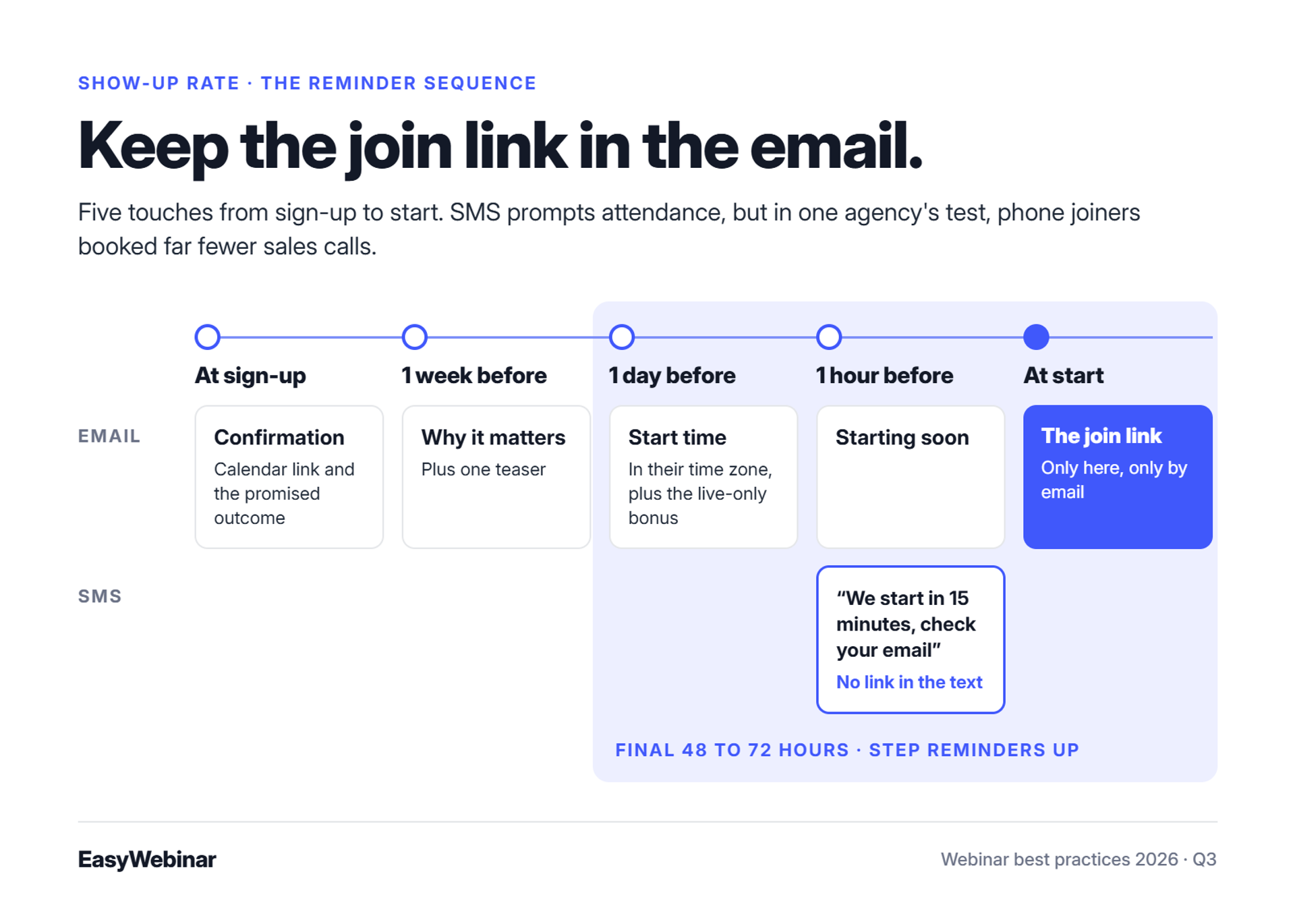
To get registrants to show up, schedule mid-week, late morning, in your audience's time zone. Send reminders one week, one day, and one hour before, and step them up in the final 48 to 72 hours. Use SMS to prompt attendance, but keep the join link in email. One agency's test found that phone viewers booked far fewer sales calls. Finally, remove every download between the link and the room.
⏰ Pick the Slot and Shorten the Wait
Zoom's 2026 roundup notes that most webinars run Tuesday through Thursday, and that Thursday shows the highest attendance rate. Kaltura's 2026 guide points to mid-week, late morning (10 to 11 AM) as the strongest window. Test inside that window before trying anything unusual, and use this guide to the best day and time to host a webinar as a starting point.
The gap between sign-up and start matters as much as the slot. In one operator thread, a host explained that the longer the wait between sign-up and the session, the fewer people attend, because early excitement fades. EasyWebinar's Just-in-Time format answers this directly. A session starts minutes after someone registers, in that person's own time zone.
📬 The Reminder Timeline
| When | Channel | What it says |
|---|---|---|
| At sign-up | Confirmation, calendar link, the promised outcome | |
| 1 week before | Why it matters, plus one teaser | |
| 1 day before | Start time in their zone, the live-only bonus | |
| 1 hour before | Email and SMS | "Starting soon" (no link in the text) |
| At start | The join link |
Some paid-traffic operators push much harder. They send up to six emails a day in the last 48 to 72 hours and report 40% to 60% open rates. I'd treat that as a ceiling for a warm list, not a default. EasyWebinar sends email reminders natively and SMS through Twilio.
❌ Keep the Join Link Out of the Text
Jeremy Haynes runs webinar ad budgets as high as $80,000 per event. When his team tested putting the Zoom link in SMS reminders, he said it "nuked our overall call booking rate." More people joined from their phones, but phone viewers showed weaker buying intent.
So the text should say "we start in 15 minutes, check your email," and the email carries the link. With EasyWebinar's SMS reminders, you write each message yourself. For more tactics, see this guide on how to drive webinar attendance.
✅ Remove Friction Between the Link and the Room
Livestorm reports that browser-based webinar platforms show a 53% higher attendance rate than traditional ones. Every app download is a reason to give up. EasyWebinar attendees join from any browser on desktop or mobile, with no app, plugin, or account.
"I would like my registrants to be able to see their own time zone when they register on the plan that I am paying for. I think it's important in improving the 'show-up' rate." - Jennifer B., EasyWebinar user, 5/5 rating, April 15, 2025, EasyWebinar G2 - Verified Review
"I also had many people connecting with me asking what time zone the event was in. The drop down feature didnt specify that the times were shown in their time zone which caused some confusion." - Trina P., Demio user, 3.5/5 rating, January 22, 2023, Demio G2 - Verified Review
"It also doesn't have automated texts able to go out to participants, just emails, and it seems like that would be a helpful function." - Verified User in Education Management, 4/5 rating, April 20, 2023, Demio G2 - Verified Review
EasyWebinar sends reminders by email and by SMS through Twilio, and attendees join from any browser with nothing to download. Just-in-Time sessions start minutes after registration, in the attendee's time zone. Jennifer B.'s review is a useful flag: confirm which time-zone display your plan includes before launch day.
Q4: How long should a webinar be, and how should you structure the teaching?
Most webinars should run 30 to 45 minutes. A 2026 study of 412 webinars found that halving a 60-minute session nearly doubled completion and lifted pipeline per attendee by 33%. High-ticket sales webinars can run 60 to 90 minutes, but only after the content has proven itself live. Structure the teaching as a story, your credibility, a promise of three secrets, and then the core content with interaction built in.
⏰ What the Length Data Says
The same 412-webinar study found that 30 minutes has replaced 60 minutes as the optimal length in 2026, and that completion drops sharply past 45 minutes. That doesn't mean every webinar should be 30 minutes. It means every extra minute needs a reason.
EasyWebinar's read is that length follows the job. These are my starting points, not rules:
| Webinar type | Starting length | Why |
|---|---|---|
| Lead-gen education | 30 to 45 min | Holds attention and leaves room for the offer |
| SaaS or product demo | About 30 min | Buyers want proof, fast |
| Customer onboarding | 20 to 30 min | One task per session |
| Validated high-ticket sales | 60 to 90 min | Complex offers need objections handled |
⚠️ The Three-Hour Deck
One real-estate presenter spent $20,000 on ads for a single webinar. He built a three-hour slide deck that nobody had tested. His energy crashed partway through, and the session produced one sale.
The lesson isn't that short always wins. Untested length burns ad spend. EasyWebinar's guidance is to run long only after a shorter version has converted live.
🧱 Structure the Teaching in Four Moves
Jono Bacon noticed that most sessions follow the same pattern: 45 minutes of teaching, then 15 minutes of Q&A. He asked why interaction gets saved for the end. His structure spreads it through the whole session. The first four moves cover the teaching:
- Story: a moment the audience recognises, told in under three minutes.
- Credibility: why you, shown through one or two proof points.
- Promise: the three secrets attendees will leave with.
- Teach: each secret as a belief shift, with a poll or question every 4 to 5 minutes.
The bridge to the offer and the call to action belong to the pitch, which Q6 covers. Keep the teaching about the "what" and the "why." That leaves attendees a reason to want the next step.
✅ Let Drop-Off Data Set the Length
Guessing at length is how three-hour decks happen. EasyWebinar's drop-off heatmap shows the exact minute attendees leave. Set a watch threshold, find the minute where the curve falls, and fix that segment first.
EasyWebinar's drop-off heatmap lets you cut the minute that loses people instead of guessing at total length. Watch time sits beside poll answers and offer clicks for each attendee. That way you can tell a dull teaching segment from a pitch that simply arrives too late.
Q5: How do you keep attendees engaged all the way to the pitch?
To keep attendees engaged until the pitch, add interaction every 4 to 5 minutes instead of saving it for a closing Q&A. Strong presenters ask about 20 questions and draw about 50 chat responses in a 60-minute session. A bonus announced at the start, and given only to people who stay for the pitch, helps hold about 80% of peak attendance. EasyWebinar runs polls, chat, Q&A, and timed offers in real time, at ultra-low latency (sub-500ms via Dolby OptiView WebRTC).
📉 Minute 22, and the Chat Goes Quiet
A coach is on slide 31 of 48. Her attendee count has slipped from 212 to 140, and the chat hasn't moved in six minutes. The offer is still twelve slides away.
I see this pattern often in the drop-off heatmaps I review with EasyWebinar customers. The slide rarely starts at the pitch. It starts in the middle of the teaching, when the audience has nothing to do but watch.
❌ The 45-Plus-15 Habit
Most sessions follow the same template: 45 minutes of teaching, then 15 minutes of Q&A. Jono Bacon noticed this pattern and asked a simple question: why save all the interaction for the end? Zoom's 2026 roundup reports that 31% of marketers name maximizing engagement as a top challenge in their webinar strategy.
The cost lands on your offer. If 200 people show up and half leave before the pitch, your offer reaches 100 people. Every attendee who drifts away is ad spend that never meets the close.
⚠️ What Changed: Interaction Is the Content
Attendees now expect to take part, not just watch. Bacon's fix is to spread polls and questions through the whole session. The operators in this guide's research aim for about 20 questions and 50 chat responses an hour. Here is how that looks in practice:
- Ask a one-word chat question in the first two minutes.
- Run a quick poll at the end of each teaching segment.
- Answer the questions people submitted on the thank-you page, by name.
- Announce a live-only bonus at the start, and deliver it at the pitch.
That last tactic does the most work, because people have a reason to stay.
✅ How EasyWebinar Keeps the Room in Real Time
EasyWebinar's live room runs chat, polls, Q&A, timed offers, and countdowns. Attendees join from any browser, and interactions land while the audience is still on the point you just made. Latency (the delay between you and the viewer) matters here. When the stream lags, a poll can arrive after you've moved on.
"I love that we can have a poll, offer and countdown right in the event! That's going to be so great for sales and interactions." - Verified User in Photography, 4.5/5 rating, August 26, 2025, EasyWebinar G2 - Verified Review
"It didn't fuly integrated with my CRM (Highlevel) and the replay didn't show the live polls and CTAs." - Ivanhoe S., 4/5 rating, August 5, 2024, Demio G2 - Verified Review
"The interactive items sometimes go haywire on my machine. Screen goes blank and have to rejoin the event." - Verified User in Industrial Automation, 3.5/5 rating, November 17, 2023, Demio G2 - Verified Review
EasyWebinar runs polls, chat, Q&A, timed offers, and countdowns on Dolby OptiView WebRTC, at ultra-low latency (sub-500ms). The same Photography reviewer saw video pixelate briefly when switching from slides back to camera, so rehearse those switches before launch day. More ideas live in this guide to webinar engagement tools.
Q6: How do you pitch on a webinar without losing the room?
To pitch on a webinar without losing the room, ask permission before the offer. Teach the what and the why, but hold back the full how. Re-ask for the order with a new reason each time, inside a defined urgency window. Then remove friction at the moment of decision, because redirects to long sales letters lower conversion. Well-structured sales webinars convert between 5% and 20% of attendees.
💬 Step 1: Ask Permission Before the Offer
The pitch fails when it ambushes people. Russell Brunson's bridge is simple. He tells the room he has a paid offer and asks: "can you just do me a favor can you drop a one in the chat?"
A chat full of 1s tells you who is ready. EasyWebinar shows chat in real time, so you can read the room's answer before you click to the offer slide.
🧠 Step 2: Teach the What, Hold the How
Yuri Elkaim puts it bluntly: "the more you give away the how the more you decrease tension." Tension is the gap between where attendees are and where they want to be. Close it entirely in the teaching, and the offer has nothing left to solve.
So share perspective and nuance, not full protocols. Show what is possible and why it works. Then leave the step-by-step for the paid program.
🔁 Step 3: Re-Ask With a New Reason
Operators in this guide's research say a typical webinar asks for the sale about 4 times, while top performers re-ask 10 to 26 times. Treat that range as contested, not as a target. My read is to count reasons, not asks.
Each re-ask should add something new: a bonus, a testimonial, or an answered objection. A new insight earns a new decision. Repeating the same ask just wears the room down.
⏰ Step 4: Set an Honest Urgency Window
ClickMeeting suggests offering a bonus or reduced price to attendees who buy during the webinar, possibly extended for 24 hours afterward. LearnyBox warns that a sales webinar without a defined sales window has no urgency. Whatever the deadline is, keep it. An urgency window you extend quietly teaches your list to wait.
💸 Step 5: Keep Checkout Inside the Room
Copyblogger's advice is to skip the long-form sales letter, since it lowers conversion, and send attendees straight to checkout. Every extra step costs buyers.
| Checkout setup | What happens at the decision | Where the data lives |
|---|---|---|
| Redirect to a sales page | Attendee leaves, reads again, decides again | Split between tools |
| Redirect to a checkout page | One extra page load and a new tab | Split between tools |
| EasyWebinar in-room checkout | Attendee pays without leaving the webinar | Same attendee record |
"they ask people to rate the webinar... they then, outrageously, have their OWN LINK on the screen to Webinarjam!!" - Verified User in Health, Wellness and Fitness, 0/5 rating, July 17, 2018, EverWebinar G2 - Verified Review
"Can upsell easily by using WebinarJam interface." - Verified User in Investment Management, 0/5 rating, August 3, 2020, WebinarJam G2 - Verified Review
"It is easy to set up call to actions and polls and easy to use them in both types of webinars. The analytics also show how many saw or clicked your offer." - Verified User in Professional Training & Coaching, 4.5/5 rating, November 1, 2024, EasyWebinar G2 - Verified Review
EasyWebinar puts offer overlays and checkout inside the room through Stripe, PayPal, or PayU, with SamCart and ThriveCart also supported. There is no redirect, so the sale and the attendee data stay in one place. See how this fits a full webinar platform for sales.
Q7: What should happen in the 72 hours after your webinar?
In the 72 hours after a webinar, run a strict three-day replay window with four emails: one on day one, one on day two, and two on day three. Keep that sequence linear for everyone, because heavily segmented "monster funnels" take months to build and often underperform. Then add behaviour-based messages on top. EasyWebinar sends no-shows, early leavers, offer-clickers, and replay viewers each their own sequence, through built-in email and SMS.
📬 Thursday, 9:14 AM
The webinar ended last night. A course creator opens her attendee report: 140 attended, 260 didn't, and 6 bought. The real question is what the other 394 people get next.
EasyWebinar's attendee report separates attendees from no-shows, along with watch time and offer clicks. That turns the next move into a choice rather than a guess. ON24 reports that 52% of attendees watched on demand, so much of the revenue still lies ahead.
❌ The Monster Funnel on the Office Floor
Jon Penberthy once mapped a funnel across his office floor, with dozens of email paths branching by segment and behaviour. It took months to build, broke constantly, and lost to a simple linear replay sequence. His conclusion was blunt: "everyone gets the replay... we just find this works so much better."
I've built a few of those myself before founding EasyWebinar. Connecting each funnel to the next turns into "a complex spaghetti funnel," and it takes six months to a year to get right. Simple scales. Fancy fails. Here's what a simpler webinar funnel looks like.
⚠️ What Changed: The Replay Became the Main Event
A 2026 benchmark study found on-demand views outpacing live attendance by 2.3 times per webinar. The replay page is no longer a courtesy. For many buyers, it's where the decision happens, and a deadline is what turns a replay into an event.
| Day | Emails | Message |
|---|---|---|
| Day 1 | 1 | The replay is up for three days |
| Day 2 | 1 | Checking you got it; the replay comes down tomorrow |
| Day 3, morning | 1 | The replay comes down today |
| Day 3, night | 1 | Final hours before it's removed |
This schedule comes from the operator transcripts behind this guide. When day three ends, actually take the replay down. A deadline you ignore is just noise.
✅ How EasyWebinar Handles the 72 Hours
EasyWebinar keeps one linear replay sequence for everyone and adds behaviour on top. Built-in email and SMS (through Twilio) send different messages to no-shows, early leavers, offer-clickers, and replay viewers. If you already run Mailchimp, ActiveCampaign, or Kit (formerly ConvertKit), the sequence can run there instead through EasyWebinar's integrations.
EasyWebinar's read is that the behaviour layer pays off most for offer-clickers, since they've already raised a hand. I could be weighting that too heavily, so test it against your own list. Either way, start with the linear sequence and add branches only when one earns its place.
EasyWebinar's built-in email and SMS automation splits attendees into separate sequences by behaviour, so a no-show and an offer-clicker never get the same message. Expiring replay pages enforce the three-day deadline, so nobody has to remember to unpublish a link.
Q8: When should you automate a webinar, and when should you stay live?
Automate a webinar only after it has proven itself live. Run 5 to 10 live sessions, and refine the message and offer until about 10% of attendees buy. Then automate the winning recording, because automating an unproven pitch only automates failure. EasyWebinar turns that exact session into a Simulive, Evergreen, Just-in-Time, or On-Demand webinar on the same platform and subscription. Automated sessions are never presented as live.
🥊 Two Operators, Two Opposite Answers
Jeremy Haynes argues that automated webinars on cold paid traffic have been "nerfed." He adds that up to half of his $10,000 buyers watch two or three live webinars before purchasing. Yuri Elkaim argues the opposite. To him, weekly live webinars are a time trap, and his evergreen funnels have generated over $217 million.
Both are right about their own funnels. The mistake is picking a side before you have data. This breakdown of live vs automated webinars covers the trade-offs in more depth.
❌ The Two Ways Operators Get This Wrong
The first mistake is burnout. Operators go live every week for years because they never trusted a recording. One EasyWebinar reviewer put it plainly: "I've been going live every month since 2020 and I'm exhausted." (Verified User in Photography, August 26, 2025, EasyWebinar G2 Verified Review.)
The second mistake is automating too early. Operators record one untested session, put ad money behind it, and wonder why nothing sells. As I tell people, "An automated webinar without traffic is like a billboard in the desert." An unproven pitch is the same billboard, with the wrong message on it.
⚠️ What Changed: The Webinar Sprint Method
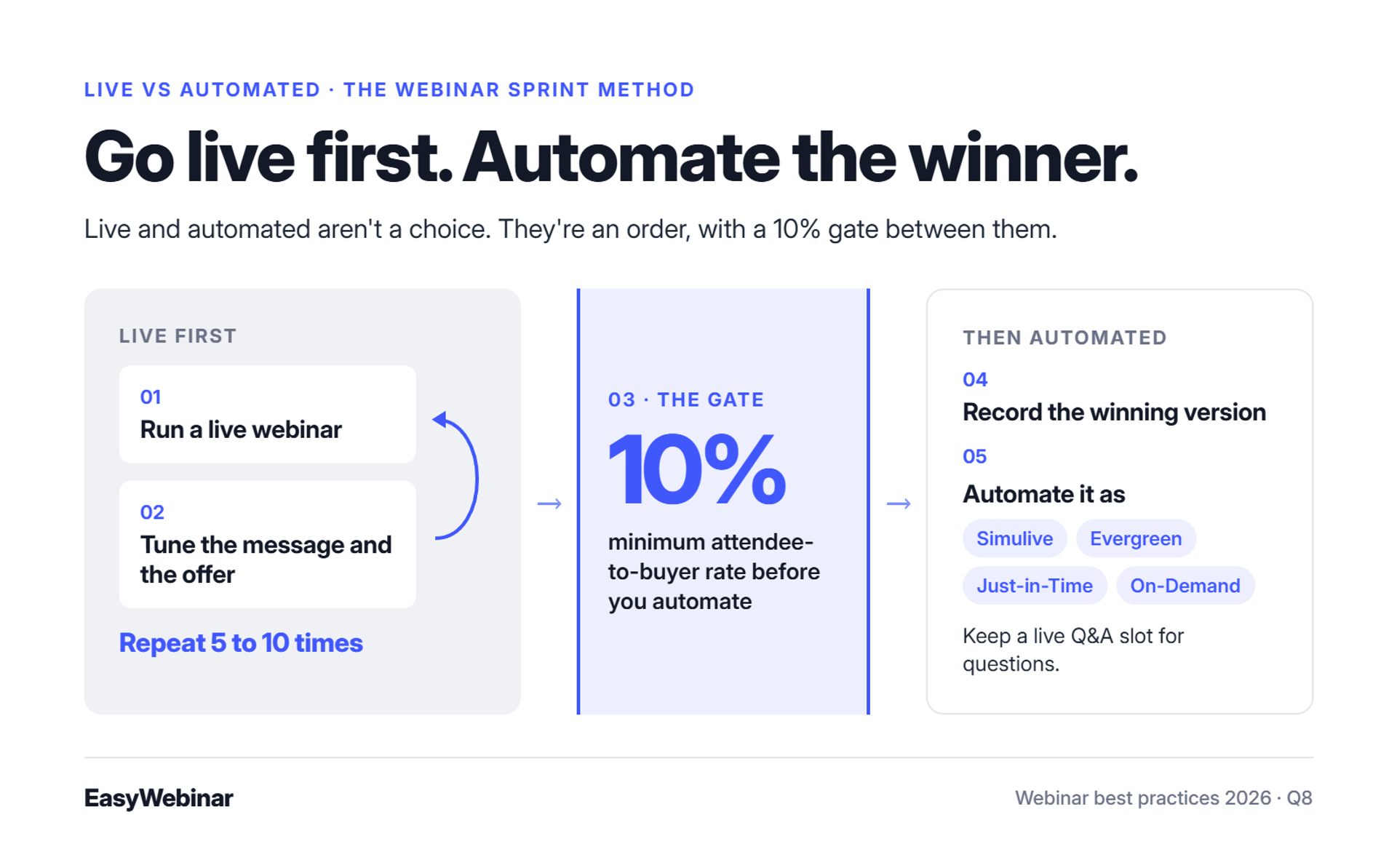
I resolve the debate with a sequence I call the Webinar Sprint Method:
- Run 5 to 10 live webinars.
- Tune the message and the offer after each one.
- Hit at least 10% attendee-to-buyer conversion.
- Record the winning version.
- Automate it, and keep a live Q&A slot for questions.
EasyWebinar records every live session automatically, so step four doesn't need a separate tool. You aren't choosing live or automated. You're choosing the order.
✅ How EasyWebinar Runs the Switch
EasyWebinar turns the proven session into one of four automated formats:
- Simulive: the recording plays on a schedule, with chat alongside.
- Evergreen: the session runs every day.
- Just-in-Time: the session starts minutes after someone registers, in that person's own time zone.
- On-Demand: the recording plays instantly.
Split-product setups handle this differently. WebinarJam hosts live sessions, while automation sits in EverWebinar as a separate product and subscription. See the full EasyWebinar vs WebinarJam and EverWebinar comparison.
"With my live class I used to sell 10-12 courses. With EasyWebinar I sold 25 courses within 3 weeks of my evergreen 'launch'." - Laura C., 5/5 rating, January 28, 2025, EasyWebinar G2 - Verified Review
"The biggest challenge is around setting up automated webinars, and needing the presentation uploaded first in order to set it up." - Ash A., 5/5 rating, March 13, 2026, EasyWebinar G2 - Verified Review
"I love the partner service, everwebinar, (which you have to pay more for) that allows the participant to watch the webinar and feel as though it's a live webinar." - Tara G., 0/5 rating, June 23, 2023, WebinarJam G2 - Verified Review
Ash's point fits the Sprint Method: start live, then convert the recording once it converts.
EasyWebinar switches a proven live session into Simulive, Evergreen, Just-in-Time, or On-Demand, under one login and one subscription. Carla Beisinger built $5 million on one evergreen funnel. Ryan Fenn of ChiirP generated $2 million from one automated funnel.
Q9: Which webinar metrics tell you it's actually working?
To tell whether a webinar is working, track five funnel stages: registration rate, live show-up, stay-to-pitch, CTA clicks, and attendee-to-buyer conversion. In 2026, healthy ranges run about 38% to 44% registration and 38% to 51% live show-up. Around 22% of attendees act on the CTA, and 5% to 20% buy. Reports disagree because some count replay viewers. EasyWebinar records each attendee's watch time, poll answers, offer clicks, and purchases, then attributes revenue back to the webinar.
📊 The Monday Recap Meeting
A marketing director puts one number on the screen: 412 attendees. The room nods. Then the CFO asks how much revenue those 412 people produced, and nobody knows.
Attendance is the easiest number to collect and the weakest one to manage by. EasyWebinar's read is that revenue per registrant (total webinar revenue divided by registrations) tells you more than any headcount. It folds every stage of the funnel into one number you can compare across sessions.
⭐ The 2026 Benchmark Table
| Funnel stage | What it measures | 2026 benchmark |
|---|---|---|
| Registration rate | Page visitors who register | 38% to 44% by form length |
| Live show-up | Registrants who attend live | 38.4% median to 51.3% average |
| Total attendance | Registrants who watch live or on demand | About 60% |
| Stay-to-pitch | Peak attendees still there at the offer | Target about 80% |
| CTA conversion | Attendees who act on the call to action | About 22% |
| Attendee-to-buyer | Attendees who purchase | 5% to 20% |
Wave Connect's Q1 2026 data puts short registration forms at 44% conversion and longer lead-gen forms at 38%. Zoom's roundup reports a 22% CTA conversion rate, or roughly one in five attendees taking the next step.
⚠️ Why 38% and 60% Can Both Be True
One 412-webinar study reports a 38.4% median registration-to-attendance rate for 2026. ON24 reports 60% once live and on-demand viewing are combined. The first counts live viewers only, while the second adds replay viewers. Compare live with live and total with total, or you'll chase a gap that isn't real.
For evergreen webinars, EasyWebinar's analytics report live-session and replay attendees separately, according to one G2 reviewer. That split matters because a replay viewer and a live viewer often buy at different rates.
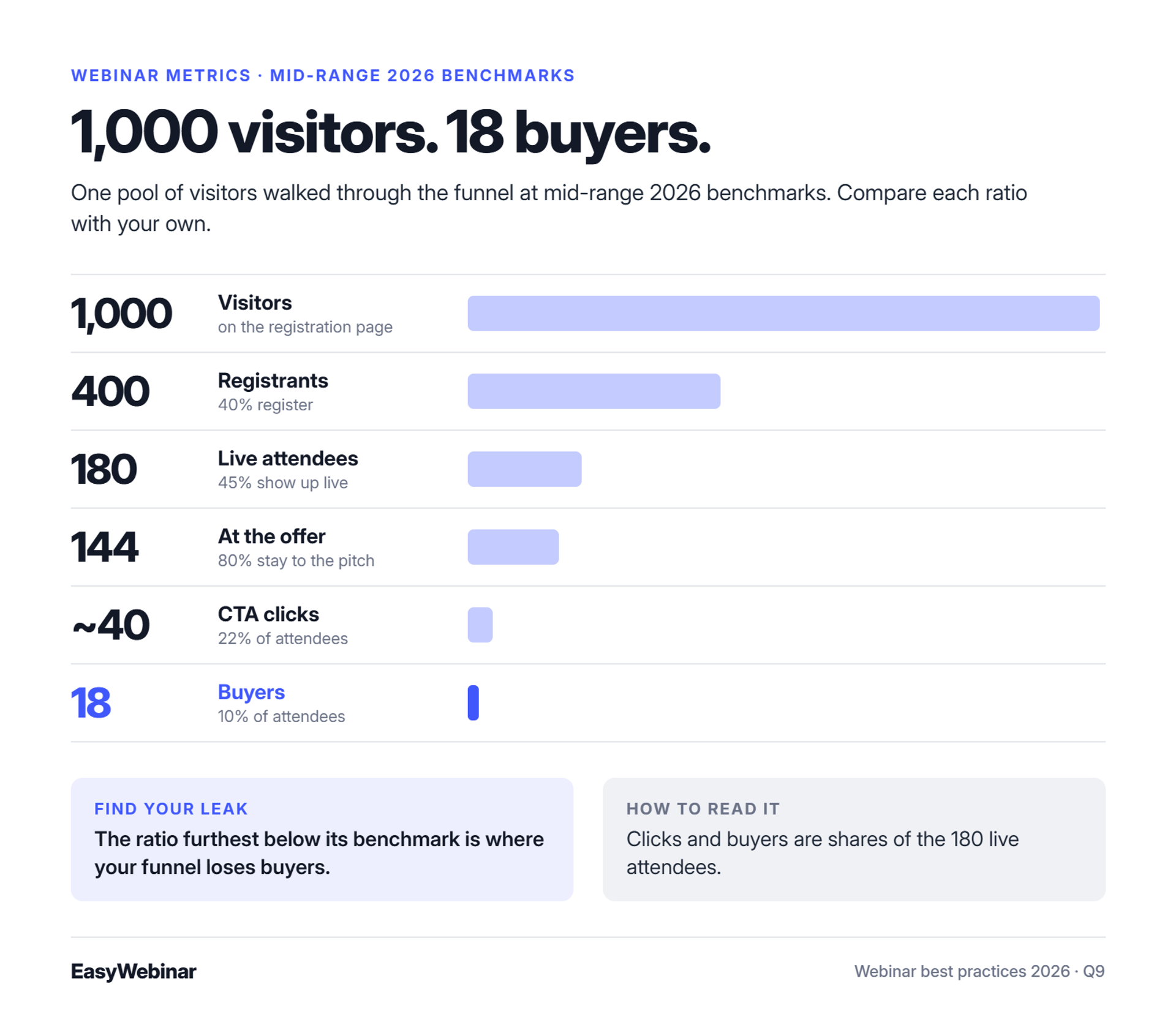
💸 Walk 1,000 Visitors Through the Funnel
Here is the math at mid-range 2026 benchmarks:
- 1,000 visitors at 40% registration gives 400 registrants.
- 400 registrants at 45% live show-up gives 180 attendees.
- 180 attendees at 80% stay-to-pitch leaves 144 people at the offer.
- 22% of attendees clicking the CTA gives about 40 clicks.
- 10% of attendees buying gives 18 buyers.
Find the ratio that sits furthest below its benchmark, because that's your leak. I also treat 10% attendee-to-buyer as the gate before automating anything.
"The detailed analytics are great as they save me the hassle of calculating KPIs... I do use other email systems to send post-webinar email sequences because I can't track open and click rates on EasyWebinar." - Eliza W., 4.5/5 rating, February 11, 2026, EasyWebinar G2 - Verified Review
"It is difficult to make the analytics of the visits." - António J., 4/5 rating, May 4, 2023, Demio G2 - Verified Review
"People who registered and people who attended your webinar are considered the same." - Verified User in Management Consulting, 0/5 rating, June 5, 2020, WebinarNinja G2 - Verified Review
EasyWebinar records each attendee's attendance, watch time, questions, poll answers, offer clicks, and purchases, then attributes revenue back to the webinar. Lead scoring sorts attendees into Hot, Warm, and Nurture. Data flows to CSV, GA4, Meta Pixel, your CRM, or EasyCRM.
Q10: What does your webinar stack need so it doesn't break on launch day?
Your webinar stack needs fewer handoffs and a full dry run before launch day. Each Zapier step between registration, CRM, and dialer is a separate point of failure. One agency caught a Zapier plan cap four hours before a webinar, with a couple hundred opt-ins missing from the CRM. EasyWebinar keeps registration, the live room, checkout, and EasyCRM on one platform, with a 99.9% uptime guarantee. EasyWebinar also integrates natively with HubSpot and Salesforce Pardot.
⏰ Four Hours Before Showtime
Jeremy Haynes' team was preparing a webinar backed by $80,000 in paid ads. Four hours out, someone noticed a couple hundred opt-ins missing from the CRM. Their Zapier plan had hit its cap on automations, so salespeople were dialing an incomplete list.
Most launch-day failures look like this: quiet, upstream, and invisible until someone checks. That's why I run a full dry run before every launch on EasyWebinar:
- Register with a fresh email and phone number.
- Confirm the contact lands in your CRM.
- Receive every email and SMS reminder.
- Join from a phone browser and a laptop.
- Click the offer and complete a test purchase.
- Check that the replay page opens and expires on schedule.
❌ The Tube Map
Jon Penberthy warns that a funnel shouldn't look like the tube map, because every extra connection is another thing that can go wrong. Each tool brings its own login, its own sync, and its own way to fail. Coaches tell me the same story in reviews: "I have usually hard time with all zapier connnections."
I've lived this myself. Before founding EasyWebinar, I stitched funnels together tool by tool. Getting a multi-tool funnel stable took six months to a year.
⚠️ What Changed: Reliability Became a Conversion Issue
The moment that pays is the live pitch. A platform that drops at minute 50 loses the sale, not just the stream. One WebinarNinja user spent two months building to 600+ registrants, then watched nearly 400 fail to log in.
Another host had co-host invite links land on a 404 page during a test run. She migrated platforms six days before her event. Neither problem would have shown up in a feature comparison, which is why an EasyWebinar vs WebinarNinja evaluation should include a test run.
✅ How EasyWebinar Removes the Handoffs
EasyWebinar keeps registration, reminders, the live room, checkout, and EasyCRM on one platform. EasyCRM is native, with lead scoring, an auto-dialer, and call recording. If you'd rather keep your CRM, EasyWebinar integrates natively with HubSpot, Salesforce Pardot, ActiveCampaign, Mailchimp, Kit, and GoHighLevel.
| Setup | Handoffs before sales dials | What to check on launch day |
|---|---|---|
| Webinar tool, forms, Zapier, and CRM | 3 or more | Plan caps, field mapping, sync delays |
| EasyWebinar with a native CRM integration | 1 | One integration in the dry run |
| EasyWebinar with EasyCRM | 0 | No external sync to monitor |
"Their servers failed, sent out 4000+ emails to my registrants and caused my email to be blocked and labeled as spam." - Andrew G., 0/5 rating, January 24, 2021, WebinarNinja G2 - Verified Review
"It's hard to integrate into Hubspot. We use a third party capture form and had to do several zaps to get all data to flow accurately." - Verified User in Education Management, 4/5 rating, April 20, 2023, Demio G2 - Verified Review
"It also seamlessly integrated with our CRM... My only dislike is their can be some bugs at times that can be frustrating but often, they are solved quick." - Darrin B., 5/5 rating, April 29, 2025, EasyWebinar G2 - Verified Review
EasyWebinar carries a 99.9% uptime guarantee and has no hard attendee cutoff, so a session keeps running past your plan limit. Video storage is in-house, and every session records automatically. EasyCRM adds lead scoring and an auto-dialer without middleware, or you keep the CRM you already run.
Frequently Asked Questions

Casey Zeman
Founder of EasyWebinar
About Author
Over the past decade, I've helped thousands of entrepreneurs, coaches, and consultants turn webinars into a predictable, powerful way to grow their audience, build trust, and scale, without the constant hustle. I created EasyWebinar because I couldn't find a system that combined authenticity, engagement, and automation the way I needed. So, I built one.
Related Posts

10 Best Community Engagement Platforms in 2026
Compare the 10 best community engagement platforms in 2026. Course creators, evaluate live hosting, analytics, and replay to pick your winner today.

10 Best Online Coaching Tools in 2026: Live Session Quality, Scheduling, Recording, and Client Engagement Analytics
Compare the 10 best online coaching tools of 2026 on session quality, scheduling, and analytics. Discover the right fit for your coaching revenue model.

10 Best Webinar Hosting Platforms Ranked by Uptime, Streaming Quality & Cost
Compare 10 webinar hosting platforms ranked by uptime, streaming quality, and cost. Discover which tool actually turns attendees into revenue.
Turn every webinar into a revenue stream
Launch your first paid event in just a few clicks - and start monetizing your expertise.
Book a Call