Webex Webinars Reviewed: Security, Scale, and the Learning Curve

Casey Zeman
Published on Sep 7, 2026 • 24 min read

TL;DR
- Webex Webinars holds 4.6/5 across 1,079 G2 reviews, but Capterra's 4.4/5 covers roughly 7,400 Webex Suite reviews, so read the SKU before trusting the star count.
- Cisco documents SOC 2 Type II, SOC 3, the ISO 27001 family, C5, HIPAA and Level 3 EU Cloud Code of Conduct adherence verified against all 80 controls.
- SOC 2, HIPAA, C5 and CAIQ reports sit behind a Cisco Trust Portal login and NDA, which adds real weeks to a security review timeline.
- Ceilings run 1,000 for Meetings, 5,000 for Webinars and 100,000 in webcast view, but webcast view is view-only, so interactivity thins as headcount climbs.
- Pricing starts at $300 per licence per year to 1,000 attendees, then goes quote-only, with onboarding fees and attendee overage charges no aggregator lists.
- Webex ships no in-session checkout, no timed offer overlays, no behavioural tagging and no just-in-time or timezone-detected evergreen scheduling.
Q1. What Do Real Webex Webinars Reviews Actually Say?
Webex Webinars holds 4.6/5 across 1,079 G2 reviews and 4.5/5 across 456 Findstack reviews, while Capterra's 4.4/5 covers roughly 7,400 reviews of Webex Suite rather than Webinars. Reviewers reliably praise security, reliability, and scale. They just as reliably criticise a steep learning curve, non-intuitive setup, and limited customisation. Read the SKU, not just the star count.
⚠️ The screenshot in the procurement deck
Last quarter, a marketing director sent me a slide with four Webex ratings on it. One said 4.6, one said 4.4, one said 4.5, and one said 3.9. She wanted to know which number was the real one.
None of them were wrong. They were measuring four different products. That is the part nobody tells you before you sit in a vendor call.
⭐ What the rating actually measures, by SKU
Here is the same table I gave her, rebuilt from the live review pages. EasyWebinar maintains a hands-on review of 15 webinar platforms, including Webex, which is where this per-SKU habit came from.
The Suite pool is roughly seven times larger than the Webinars pool. It drowns the webinar signal in video-meeting sentiment.
✅ Pros and ❌ cons, as reviewers write them
Pros: enterprise-grade security posture, reliability at large headcounts, translated captions across 100+ languages, native Slido polling, calendar and email integrations.
Cons: steep learning curve, non-intuitive setup, limited branding customisation, bandwidth-sensitive performance, quote-based pricing above 1,000 attendees.
Both lists are honest. They just belong to different readers. If you are weighing the wider field, our best webinar software comparison guide scores platforms on the same criteria.
💬 What operators say in their own words
"It was very secure and allowed for a professional and stable connection overall. It was easy to use in the backend... Additionally, it's interactivity tools for webinars left much to be desired, unfortunately."- Jonathan S., 1/5, Webex Events & Webinars G2 - Verified Review
"The support team is very responsive and takes a step-by-step approach... I dislike the fact that there is no way to have a holistic view of an event agenda while you are creating it. You need to make back and forths between your webEx interface and your live page."- Verified User in Information Technology and Services, 4.5/5, Webex Events & Webinars G2 - Verified Review
"The platform consistently suffers from lag, connectivity problems, and delayed audio or video, even with stable internet."- Verified User in Information Technology and Services, 0/5, Webex Events & Webinars G2 - Verified Review
🎯 How to read an aggregator before the call
My read, after fourteen years of watching operators buy on stars and churn by month three, is that these ratings measure IT satisfaction with uptime. They do not measure marketer satisfaction with revenue. I could be reading that too strongly, but the sub-scores support it.
Do three things before your next vendor call. Filter reviews to your company size, filter to the exact SKU, and read the 3-star reviews first. Then read our customer reviews the same way you read Webex's.
EasyWebinar publishes its own hands-on review of 15 webinar platforms, Webex included, scored on conversion mechanics rather than blended star averages, so operators can see which number applies to which job.
Q2. Is Webex Webinars Secure Enough for Enterprise Procurement?
Yes. Cisco documents SOC 2 Type II and SOC 3 for Webex, plus ISO 27001, 27017, 27018, and 27701, C5, HIPAA, EU Binding Corporate Rules, and Level 3 EU Cloud Code of Conduct adherence verified against all 80 controls. The caveat nobody prints: the SOC 2, HIPAA, C5, and CAIQ reports sit behind a Cisco Trust Portal login and a signed NDA.
🔒 What Cisco actually attests to
SOC 2 Type II means an independent auditor tested the controls over a period of time, not just on one day. Cisco's own Webex security white paper lists SOC 2 Type II alongside SOC 3 and the ISO 27001 family.
The EU Cloud Code of Conduct paper goes further. SCOPE Europe verified Webex against all 80 controls at Level 3, the highest adherence tier.
⏰ The part that costs you three weeks
Certification is not the same as documentation you can hand your security team. The Webex Events compliance page marks SOC 2, HIPAA, C5, CAIQ, and HECVAT Lite as gated items requiring a Cisco.com login.
The HIPAA whitepaper is blunter. The third-party report is available "on request" through the Trust Portal, which in practice means an NDA and an account manager.
⚖️ The honest counterpoint
This gating is normal at enterprise tier, and it is not a defect. Audit reports contain control detail that no vendor should publish openly.
It is still a real line item in your timeline. Corporate suites are built for governed internal broadcast, and their paperwork behaves accordingly.
📋 Three asks for your Cisco account manager
Request the current SOC 2 Type II report with the audit period stated. Request the Privacy Data Sheet for Webex Webinars specifically, not Webex Suite. Request the CAIQ so your team is not rewriting a questionnaire from scratch.
My honest position is that security is table stakes at this price point. It should rarely be the deciding variable, yet buyers over-weight it because it is the easiest choice to defend internally when something goes wrong.
EasyWebinar publishes its GDPR compliance page and data processing addendum openly, so a privacy review can begin the same afternoon rather than waiting on a gated document portal.
Q3. How Many Attendees Can Webex Webinars Actually Handle?
Webex Meetings caps at 1,000 participants, Webex Webinars at 5,000 attendees, and webcast view stretches to 100,000. Up to 100 hosts, cohosts, and panelists sit above your purchased licence capacity. Sessions run to 24 hours, and up to 500 video panelists are supported. The trade-off: webcast view is view-only, so interactivity thins as headcount climbs.
📊 The published ceilings, as of August 2026
Cisco's own site administration page carries the numbers, last updated 5 August 2026.
Note the second row against the third. They are not the same product experience.
⚠️ What you give up at 100,000
Webcast view is a broadcast mode. Attendees watch, and the two-way surface narrows to moderated Q&A and polling.
That is the correct design for an all-hands or a regulatory briefing. It is the wrong design for a session where you need to read the room and respond to objections in chat, which is where interactive webinars that drive engagement earn their keep.
💰 Capacity is a traffic problem in a licensing costume
Here is the uncomfortable part. Almost nobody who buys 100,000-attendee headroom has 100,000-attendee traffic.
An automated webinar without traffic is like a billboard in the desert. On ice-cold paid traffic, show-up rates of 10 to 15 percent are normal, and a $10 cost per lead is a reasonable planning baseline. Do that arithmetic before you buy the tier, and read how to drive webinar attendance before you buy capacity.
🎯 Size the licence off registrations, not ambition
Take your last four sessions. Find the highest concurrent attendance, not the highest registration count, and add 30 percent.
Ask EasyWebinar to stream a live webinar to YouTube Live as the hosting destination, which removes the concurrent-attendee ceiling entirely without an enterprise-tier contract.
EasyWebinar supports YouTube Live as a native hosting option, so a 10,000-viewer live event does not require a capacity upgrade conversation with a sales team.
Q4. Why Does Every Webex Review Mention the Learning Curve?
Because complexity is the price of enterprise governance. G2's aggregated cons cluster on four terms: steep learning curve, setup not intuitive, limited customisation, and overwhelming feature depth. Capterra scores ease of use at 4.3 and customer service at 4.2. The curve is real, and it lands on whoever owns the event, usually marketing rather than IT.
😤 The complaint, in reviewer language
"I dislike the user interface. It is overloaded, over complicated and overly complex. I hate the meeting joining experience."- Verified User in Higher Education, 1/5, Webex Events & Webinars G2 - Verified Review
"I wish there was an option to create an email template. Some features lack customization, I don't feel like I have enough experience within the platform."- Gabriela C., 5/5, Webex Events & Webinars G2 - Verified Review
Notice the second quote carries five stars. Even satisfied users flag the depth problem.
⏰ The setup chain nobody times for you
Every ranking page says "steep learning curve" and stops. Here is what the phrase actually contains.
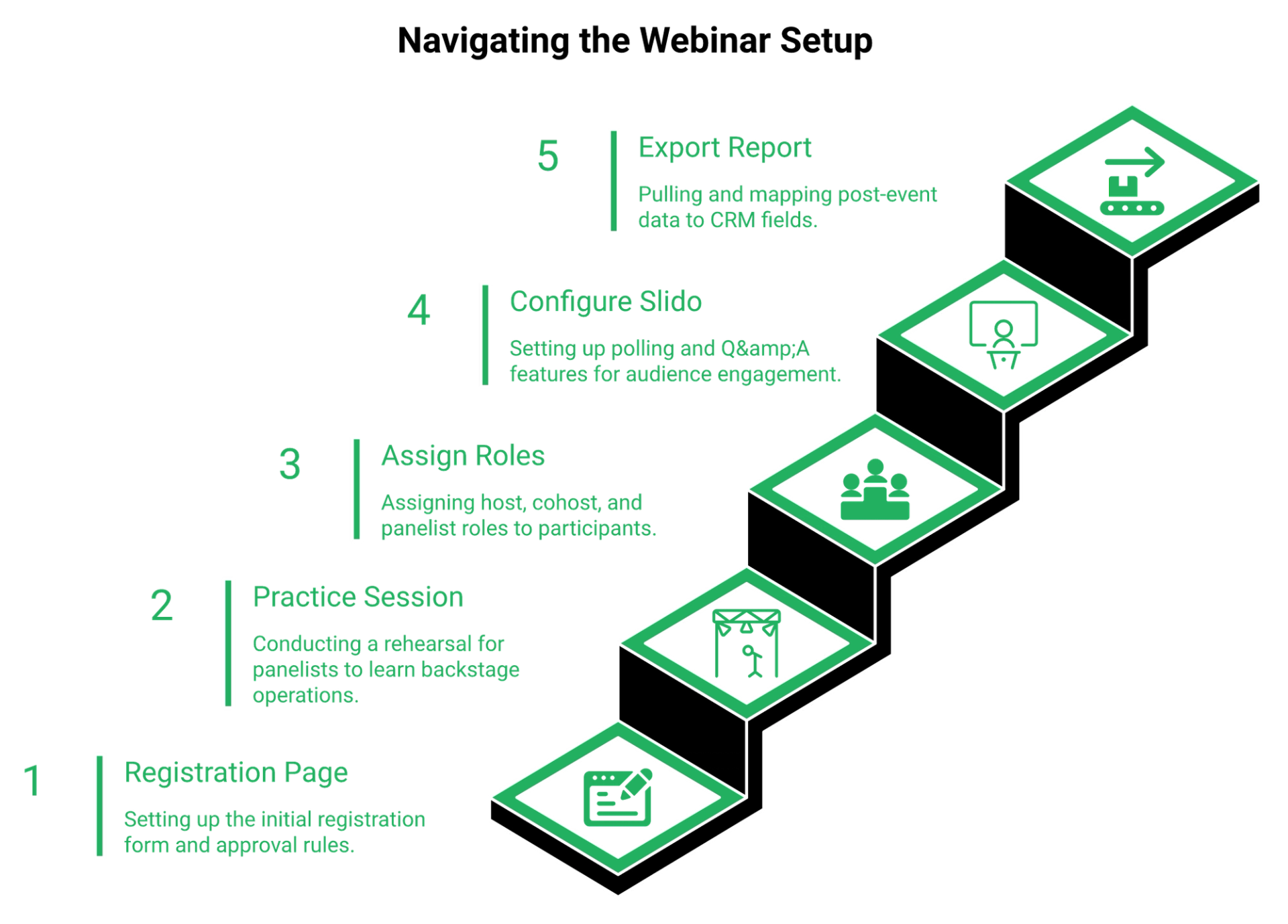
- Build the registration page and set the approval rules.
- Run a practice session so panelists learn backstage before attendees arrive.
- Assign host, cohost, and panelist roles across up to 500 video panelists.
- Configure Slido polling and moderated Q&A separately from the session itself.
- Pull the post-event report and map it to your CRM fields by hand.
Five steps, five interfaces. The tenth webinar is fast. The first one is not. A native sales CRM removes the fifth step entirely.
🔌 Where the time actually leaks
The leak is rarely inside the platform. It is in the bridge you build around it.
"I have to say it felt incredibly gutted and glitchy compared to what zoom and teams can do."- u/CommercialAV commenter, r/CommercialAV Reddit Thread
TrustRadius reviewers add audio echo and a wish for more engagement options to the same pile.
🙈 What I underestimated
I used to think this was a training problem. Run a workshop, write a runbook, done.
It is not. One operator I worked with described his stack hitting a wall: "this was just getting out of hand, getting complicated. Things were breaking. I thought, enough is enough." The competence ramp on a governed enterprise stack runs six months to a year, and your webinar funnel does not wait that long.
✅ The pilot to run before you sign
Book a trial and time three things with a stopwatch. Time from blank screen to published registration page. Time to fire a poll mid-session. Time to export attendance and match it to your CRM.
If any of the three crosses 30 minutes on attempt one, budget for onboarding, not just licences. The AI webinar builder exists because that first-attempt number is the one that decides whether a funnel ever launches.
"I love how easy to use EasyWebinar is. It didn't take long to get set-up. I'm going live with my first webinar in just a few hours."- Verified User in Photography, 4.5/5, EasyWebinar G2 - Verified Review
EasyWebinar auto-generates every funnel page, registration, thank-you, join, and replay, the moment a webinar is created, which is why its setup gets measured in minutes rather than onboarding cycles.
Q5. What Does Webex Webinars Cost Once You Add Overages?
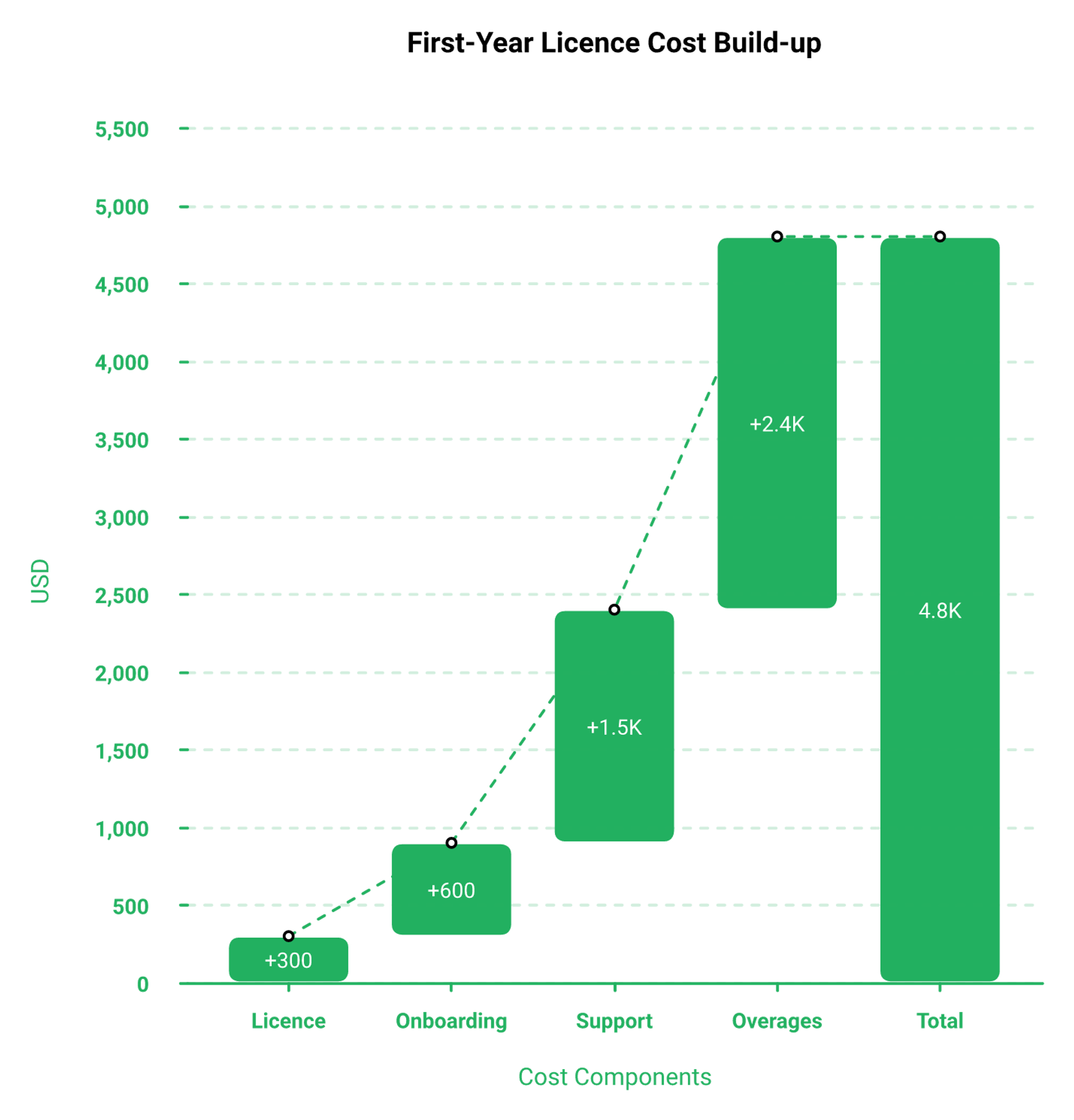
Webex Webinars starts at $300 per licence per year for up to 1,000 attendees, with a 15-day trial and a free tier capped at 100 attendees. Larger capacities are quote-based. ITQlick models 10-user deployments at $150 to $400 per month, with $200 to $1,000 onboarding and first-year totals of $2,000 to $6,800, plus overage fees when you exceed your attendee limit.
💰 The published number, and where it stops
Cisco lists the entry tier plainly. $300 per licence per year, billed annually, up to 1,000 attendees, with a 15-day trial.
Third-party trackers put the monthly equivalent near $68.75 per licence. That is a fair price for governed broadcast at that headcount.
💸 The quote wall above 1,000 attendees
Past 1,000 attendees, the published price disappears. Webex Events and the higher webinar tiers move to custom quotes.
This is the car rental problem. You walk in for the $19 per day vehicle and leave paying $100 per day, because the entry number was never the exit number. Our own webinar pricing page exists so that entry number stays the exit number.
⚠️ The layer reviews never mention
ITQlick's model adds three costs that no aggregator prints: onboarding fees of $200 to $1,000, premium support, and overage charges when attendance passes your licensed cap.
One reviewer describes what a repricing event feels like from inside a business.
"The price went up 7x when they were acquired and forced me to rebuild my entire company."- Verified User in Professional Training & Coaching, 5/5, Webex Events & Webinars G2 - Verified Review
That review is five stars. The person still liked the product.
📊 Three honest scenarios
Model concurrent attendance, not registrations. On cold paid traffic, 10 to 15 percent of registrants actually show up.
The middle row is the one that surprises people. Most operators are paying for headroom they never touch. If you are sizing a big room, our guide to a webinar platform for 1,000 attendees walks the same arithmetic.
⏰ Why evergreen traffic gets punished
Attendee-capped licensing assumes predictable event peaks. Always-on funnels do not behave that way.
Registrations arrive in bursts when ad spend lifts, then flatten. You either overbuy capacity year-round or risk an overage bill on your best week. At a $10 cost per lead, the platform line is rarely your biggest number, but a repricing event still breaks a plan, which is why an evergreen sales funnel needs pricing that does not move with attendance.
"The only downside is that to have the 'just in time' feature you have to pay a premium that is about double the price of the basic subscription. However, it has been worth it for me to invest in that."- Laura C., 5/5, EasyWebinar G2 - Verified Review
Fair criticism, and I would rather it be on the record than buried.
EasyWebinar publishes flat pricing with built-in checkout, paid webinars, and native payment gateways, so the platform cost and the revenue mechanism sit on the same invoice rather than two contracts.
Q6. Webex Webinars or Webex Events, Which One Are You Reviewing?
Webex Webinars handles single-session virtual formats: all-hands, training, and lead generation. Webex Events handles multi-session virtual, in-person, and hybrid programmes, adding a mobile event app, multi-track agendas, exhibitor management, branded event hubs, and monetisation through ticketing and sponsorship. EasyWebinar keeps live, simulive, automated, and paid webinars inside one product instead of splitting them across two SKUs.
🔍 The split, in Cisco's own words
Cisco draws the line by event shape, not by audience size. Webinars means one session, delivered virtually.
Events means a programme. Multiple sessions, multiple tracks, sometimes a physical venue, plus an app attendees download. If that is your shape, read how to choose a virtual event platform for conferences before you compare star ratings.
⚠️ Why the ratings get blended
Aggregators do not respect that line. G2 lists a combined "Webex Events & Webinars" page carrying 1,079 reviews, while SpotSaaS splits them into Webinars at 4.4 from 123 reviews and Events at 3.9 from 140 reviews.
Same vendor, same quarter, a 0.5-star spread. The spread is the product difference, not reviewer noise.
Sources: Cisco pricing and all-features pages.
💰 Where monetisation actually lives
Read the ticketing row again. If you want to charge for attendance, you need the SKU without a published price.
That is my honest read on SKU-splitting across this category. Corporate suites treat selling as an upgrade, because the base product was designed for the produced show, with backstage control and a view-only audience. A creator monetization platform starts from the opposite assumption.
✅ What to confirm before the demo
Ask which SKU your quote covers. Ask whether ticketing is included or an add-on. Ask which SKU the reference customers actually run.
Three questions, and half the confusion in this category disappears.
EasyWebinar keeps live, simulive, automated, and paid webinars inside one product and one plan, so choosing a format never means renegotiating a different contract.
Q7. How Does Webex Webinars Compare to Zoom Webinars?
Webex wins on compliance depth and raw webcast ceiling. Zoom wins on familiarity and time to first webinar. Reviewers describe Webex as heavier and more bandwidth-sensitive, while Zoom's interface needs less training. Neither ships a native conversion layer. EasyWebinar publishes a side-by-side comparison against Zoom scored on funnel criteria rather than meeting-room parity.
⚖️ The four criteria that actually decide it
I am not declaring a winner here. Each column is right for a different job.
✅ Where Webex genuinely wins
Certification breadth is the honest answer. If a security questionnaire gates your purchase, Webex arrives with more paperwork already done.
Raw ceiling is the second. Nothing in the mainstream webinar market matches 100,000 in webcast view, which is why webcast software and webinar platforms are not the same purchase.
❌ Where Zoom genuinely wins
Adoption speed. Attendees already have the client installed, and that shows up in show-up rate.
"We liked that a lot of people have Zoom downloaded to their computer already, so it offers them a familiar interface. It also offer integrations with almost every Marketing automation and CRM tools."- Gabor F., 2/5, Zoom Events and Webinars G2 - Verified Review
"Zoom has been everything we've wanted, and more, for running webinars for our national membership association. It was easy to implement, integrates with our systems well."- Rob K., 4/5, Zoom Events and Webinars G2 - Verified Review
Note that the first quote is a two-star review. Familiarity is real, and so is the frustration underneath it.
⚠️ The blind spot both share
Neither platform was built to close a sale. That is the part the comparison articles skip.
"Zoom is missing a lot of core webinar features that should be table stakes today. There's no pre-webinar waiting room or post-webinar exit page. There's no ability to distribute resources or files. Customization of landing pages, reminders, and calendar invites is almost nonexistent."- Casey S., 1.5/5, Zoom Events and Webinars G2 - Verified Review
Swap the product name and a Webex reviewer says something close: interactivity tools "left much to be desired". My read is that the Webex versus Zoom question is usually the wrong question, asked with real budget behind it, and the Zoom alternative conversation usually starts there.
EasyWebinar maintains a published EasyWebinar vs Zoom comparison, built around registration, offer timing, and follow-up rather than meeting-room feature parity.
Q8. Can a Meeting-First Platform Like Webex Sell a High-Ticket Offer?
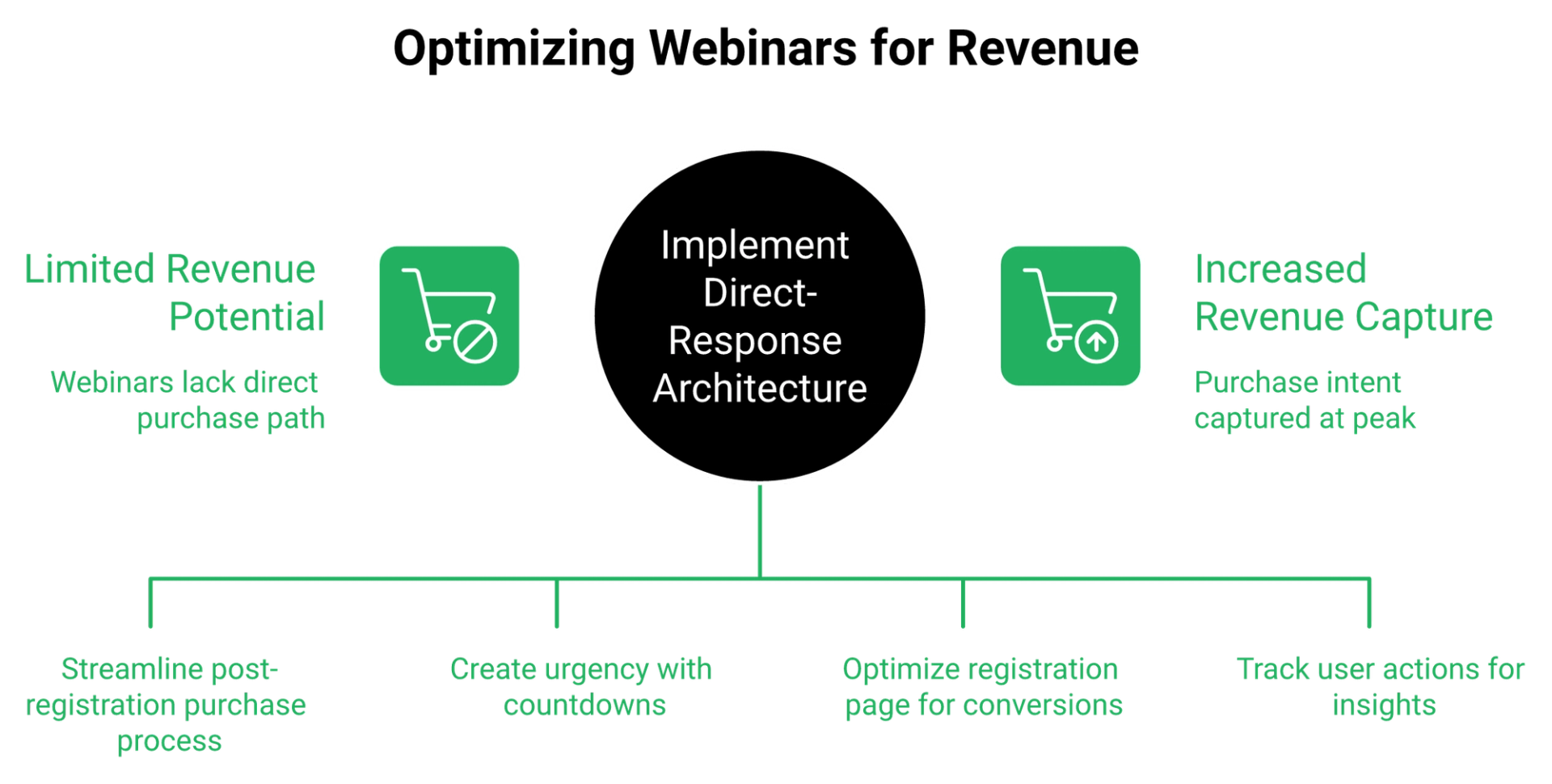
Not natively. Webex Webinars is built for the produced show: backstage control, view-only attendees, and moderated Q&A. It ships no one-click post-registration checkout, no registration-page split tester, no timed in-webinar offer overlays with countdowns, no behavioural tagging, and no timezone-detected or just-in-time evergreen scheduling. You can bolt those on, and inherit every integration failure that comes with them.
🔄 The question worth asking instead
Stop asking whether Webex is good. Ask whether it is a broadcast tool or a revenue tool.
I built a YouTube course once. Six months of work, and crickets on launch day. The only mechanism that ever moved money for me was a webinar, and that mechanism has parts.
❌ Pillar one: the four missing conversion parts
Compare Cisco's feature list against what a direct-response session needs.
- One-click checkout right after registration. Absent.
- A split tester on the registration page, so you can compare two headlines. Absent.
- Timed offer overlays inside the session, with a countdown attached. Absent.
- Behavioural tags that fire on what someone did, not just whether they attended. Absent.
Reviewers reach the same conclusion from the outside. Findstack's cons list flags minimal features for consumer-facing virtual events and a complicated interface. Our own all features page lists the four parts above as defaults rather than add-ons.
🏷️ Why tagging matters more than it sounds
Someone who clicked your offer button and left is a different lead from someone who watched 12 minutes and vanished. Direct-response follow-up depends on knowing which one you have.
EasyWebinar tracks per-attendee actions, including who saw an offer, who clicked it, and who left early, and fires a separate email sequence for each. That is the part corporate broadcast tools are blind to.
⏰ Pillar two: the four missing scheduling parts
Scheduling sounds mundane. It decides your show-up rate.
- Timezone-detected evergreen. A recorded session that plays at a local-friendly hour, 24 hours a day.
- Just-in-time registration. The mechanic where a visitor lands and sees a session starting in the next 15 minutes, so there is no wait to forget about.
- Recurring schedule stacking. Several daily times offered together, plus the near-term session.
- Blackout dates. Holidays removed, with registration rolling to the next available slot.
Cisco's webinar scheduling covers none of these four. Ask EasyWebinar to run Automated Gold, and the session times adjust to each attendee's local clock.
⚖️ The live versus evergreen fight, settled honestly
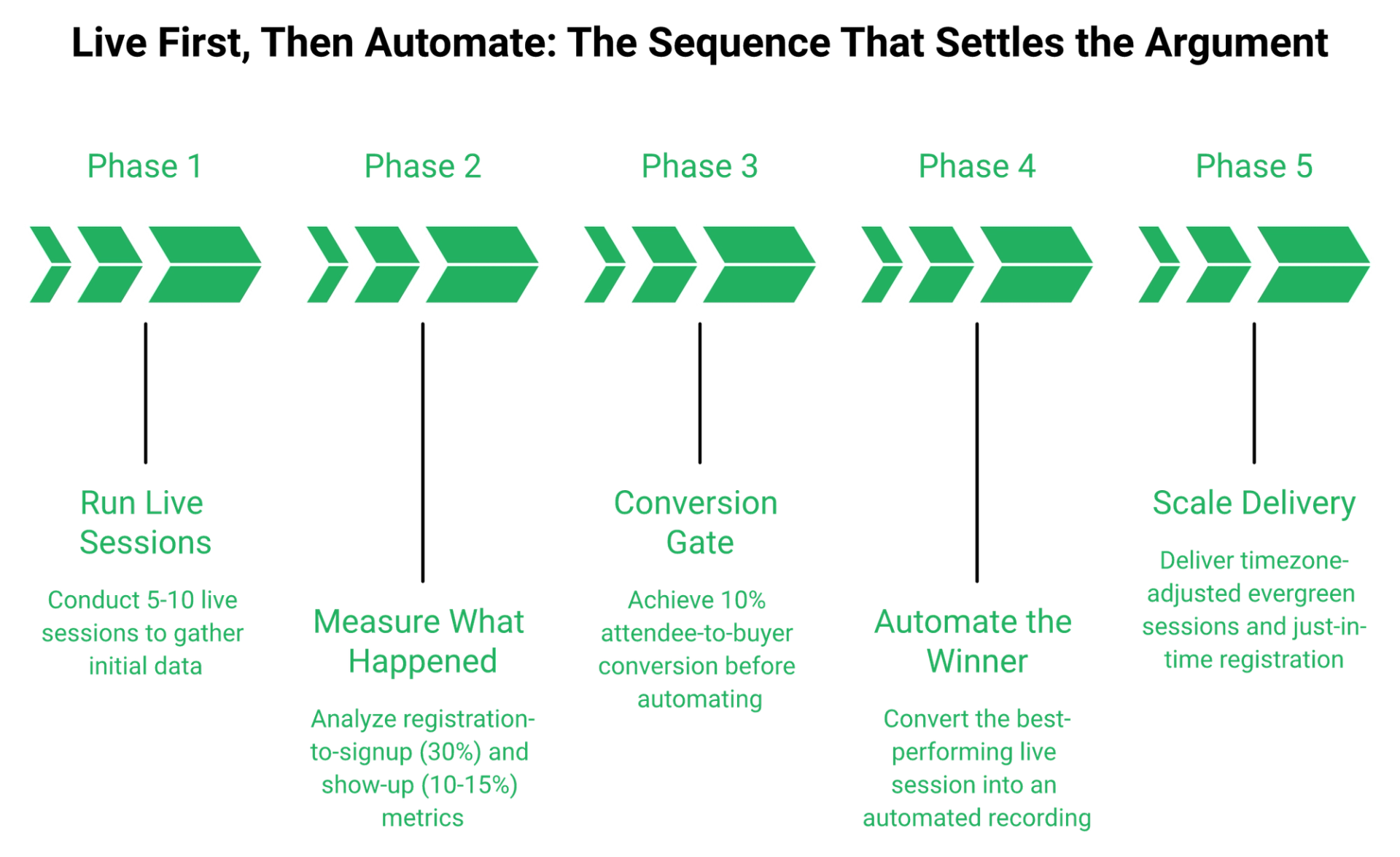
One media buyer I trust argues automated sessions have been nerfed on cold traffic, and that some audiences attend two or three live sessions before buying. An evergreen advocate counters that weekly live shows waste time and that show-up rates are poor anyway.
Both are right, in sequence. Run 5 to 10 live sessions first, hit at least a 10 percent attendee-to-buyer rate, then automate the winner. Never call a recording live, and never pretend it is not one. The full argument sits in our live vs automated webinars breakdown.
🔌 What the bolt-on actually costs
Teams bridge these gaps with a landing page tool, an email platform, a checkout, and a connector. It works until it does not.
One operator caught a Zapier plan limit four hours before a session. A few hundred opt-ins were missing from the CRM, and the sales team was dialling a short list without knowing it. The fix was a billing upgrade. The near-miss was a revenue event. Native integrations remove one whole failure surface from that chain.
EasyWebinar ships timed CTA overlays with countdown timers, Automated Gold timezone-adjusted sessions, just-in-time registration, and Power Follow-Ups triggered by whether someone saw the offer, clicked it, or left early.
Q9. What Are the Best Webex Webinars Alternatives for Revenue-Focused Teams?
Choose by job, not by rating. EasyWebinar fits operators selling live or evergreen with built-in checkout, a native CRM, and timed offers in one plan. Zoom Webinars fits familiarity-first teams. GoToWebinar fits established B2B lead generation. ON24 fits enterprise demand generation with deep analytics. Demio fits lightweight browser-based sessions. Webex stays the pick when a security review, not a conversion rate, is the gating constraint.
⭐ The shortlist, scored on the job it does
1. ✅ EasyWebinar, for operators selling from the session
EasyWebinar combines live, simulive, and evergreen delivery with in-platform checkout and behaviour-triggered follow-up under one plan. That single-invoice structure is the reason it sits first in this list.
"EasyWebinar is hands-down THE webinar platform for evergreen webinars, no contest... This is especially important for solo entrepreneurs wearing 800 different hats."- Ash A., 5/5, EasyWebinar G2 - Verified Review
The honest limitation, from a five-star reviewer: landing page design flexibility "sometimes feels a bit limited". Our own webinar landing page examples exist partly because of that feedback.
2. ⚠️ Zoom Webinars, for familiarity over customisation
Zoom's advantage is attendance friction. People already have the client, and that lifts show-up rate.
"Zoom Webinars almost completely lacks customization options to the look&feel, so it gives you as a company a minimal chance to stand out."- Gabor F., 2/5, Zoom Events and Webinars G2 - Verified Review
If that trade-off is where you land, the EasyWebinar vs Zoom comparison sets the two side by side on funnel criteria.
3. ❌ GoToWebinar, for simple B2B lead generation
GoToWebinar suits rookie presenters because the controls are shallow. That shallowness is also the ceiling.
"In a large group setting it has reliability issues that I feel have been left unaddressed... people were continually dropped from the call and the audio was very spotty."- Richard (Ric) Hazel, Senior Business Application Analyst, GoToWebinar TrustRadius - Verified Review
Teams outgrowing it usually start with GoToWebinar alternatives for small businesses.
4. 💰 ON24 and Demio, at opposite ends
ON24 belongs in enterprise demand generation, where analytics depth justifies the setup weight. Demio belongs where a browser-based session with no download matters more than scale. If Demio is on your list, read the Demio alternatives breakdown first.
EasyWebinar publishes a hands-on review of 15 platforms, including both, so the trade-offs are on record rather than implied.
🎯 Score your own shortlist in ten minutes
Rate each candidate one to five on these five lines, then total the scores.
- Can it collect payment inside the session, without a second tool?
- Can it run a recorded session at a time local to the viewer?
- Does it tag people by what they clicked, not just whether they attended?
- Is the price published, including the tier you actually need?
- Will your security team clear it without a six-week detour?
You do not need a complicated funnel. You need a faster, simpler sales process. Simple scales, and fancy usually fails. If you want the wider field scored the same way, our compare webinar platforms hub holds every head-to-head.
EasyWebinar sits first here because it is the only option in this list combining live, simulive, and evergreen delivery with a built-in CRM, in-platform checkout, and behaviour-triggered follow-up in a single plan.
Q10. Who Should Buy Webex Webinars, and Who Should Walk Away?
Buy Webex Webinars if compliance and reliability gate your purchase, your audience runs into the thousands, and IT owns the platform. Walk away if you are selling a high-ticket offer, running evergreen funnels, or needing registration-to-checkout in one system. EasyWebinar publishes named customer case studies for that second group, including K21 Academy's move to a 47 percent show-up rate.
✅ The three buyers Webex genuinely serves
First, regulated organisations. SOC 2 Type II, the ISO 27001 family, and Level 3 EU Cloud Code of Conduct adherence clear procurement faster than a feature list ever will.
Second, very large single-session broadcasts. Webcast view reaching 100,000 attendees has no real equivalent in the marketing-webinar tier.
Third, internal training and onboarding at scale. TrustRadius reviewers recommend it there specifically, and our guide to webinar training for team leaders covers the same use case.
❌ The three buyers it fails
Reviewers say it plainly. SpotSaaS places Webex with IT departments in large enterprises, and one operator thread calls it built for "larger corporate-level virtual events, not casual webinars". Operators in that first group usually end up reading about Webex alternatives within a quarter.
💬 The same split, in reviewer voices
"It was very secure and allowed for a professional and stable connection overall... Additionally, it's interactivity tools for webinars left much to be desired."- Jonathan S., 1/5, Webex Events & Webinars G2 - Verified Review
"With my live class I used to sell 10-12 courses. With EasyWebinar I sold 25 courses within 3 weeks of my evergreen launch."- Laura C., 5/5, EasyWebinar G2 - Verified Review
Two different jobs, two different tools, both reviews honest.
📋 The five-item demo checklist
Run this on any platform before you sign, Webex included.
- Publish a registration page from scratch and time it.
- Fire a timed offer mid-session, with a countdown attached.
- Export attendance and match it to your CRM fields.
- Confirm which SKU your quote covers, and whether ticketing is inside it.
- Ask for the SOC 2 report and note how many days it takes to arrive.
Benchmarks to judge against: roughly 30 percent registration-to-signup on cold paid traffic, a 10 to 15 percent show-up rate on ice-cold traffic, and 10 percent attendee-to-buyer before you automate anything. Track them inside webinar analytics rather than a spreadsheet you update on Fridays.
⏰ What I am still sitting with
I will not tell you webinars are dead. That line is a marketing tactic dressed as insight, and the numbers do not support it.
What I am less sure about is the next 18 months. My read is that creators get over-AI'd, live workshops come back into fashion, and the platforms that win are the ones where the recorded version still sells while you sleep. If your team is testing that, I would like to hear what your show-up rate is doing, and the show-up rate playbook is where I would start.
EasyWebinar exists for the operators in the second table, whose session has to close revenue rather than only broadcast reliably, and its published K21 Academy case study documents that shift instead of asserting it.
Frequently Asked Questions

Casey Zeman
Founder of EasyWebinar
About Author
Over the past decade, I've helped thousands of entrepreneurs, coaches, and consultants turn webinars into a predictable, powerful way to grow their audience, build trust, and scale, without the constant hustle. I created EasyWebinar because I couldn't find a system that combined authenticity, engagement, and automation the way I needed. So, I built one.
Related Posts

10 Best Community Engagement Platforms in 2026
Compare the 10 best community engagement platforms in 2026. Course creators, evaluate live hosting, analytics, and replay to pick your winner today.

10 Best Online Coaching Tools in 2026: Live Session Quality, Scheduling, Recording, and Client Engagement Analytics
Compare the 10 best online coaching tools of 2026 on session quality, scheduling, and analytics. Discover the right fit for your coaching revenue model.

10 Best Webinar Hosting Platforms Ranked by Uptime, Streaming Quality & Cost
Compare 10 webinar hosting platforms ranked by uptime, streaming quality, and cost. Discover which tool actually turns attendees into revenue.
Turn every webinar into a revenue stream
Launch your first paid event in just a few clicks - and start monetizing your expertise.
Book a Call