Livestorm Reviewed: Pricing, Customization Limits, and HubSpot Integration Depth

Casey Zeman
Published on Sep 7, 2026 • 29 min read

TL;DR
- Livestorm holds 4.4 out of 5 across 1,734 G2 reviews, but independent hands-on testing scores it 3.3, with a 2.7 community average and 27% would-recommend rate.
- Livestorm Pro bills in attendee credit packs at roughly 2.50 euros per credit. One credit equals one unique participant per session, so cadence drives cost more than audience size.
- Two pricing systems still circulate publicly: annual credit packs on the pricing page and older monthly active-contact tiers in support documentation.
- The HubSpot connector is deeper than most review posts claim, covering Marketing Events, timeline events, and attendance-rate mapping, but moment-level watch and CTA-click data still needs middleware.
- Livestorm does run on-demand and simulive sessions, yet its documentation describes no just-in-time scheduling, which is the mechanic cold paid traffic depends on.
- Three contract items decide whether the deal is survivable: cancellation notice length, credit rollover, and the written remedy when an acknowledged platform incident hits your event.
Q1. Is Livestorm Actually Worth It in 2026?
Livestorm holds 4.4 out of 5 across 1,734 G2 reviews, yet independent hands on testing scored it 3.3 out of 5, with a 2.7 community average and a 27% would recommend rate. Praise concentrates almost entirely on browser based joining with no download. Criticism concentrates on three things operators actually pay for: per attendee pricing, a hard customization ceiling, and CRM depth that stops at contact push.
Years ago, I built a YouTube course. Six months of work, and the launch sold nothing. Crickets. The only thing that ever moved that course was a webinar, so I stopped judging platforms by feature lists.
⚠️ The Fear Underneath the Search
Nobody types "Livestorm reviews" because they want a feature tour. They want to know if this thing survives contact with ad spend.
The real question is whether the platform helps build a predictable sales engine, or becomes a fragile setup that leaks leads. EasyWebinar's support team fields that exact question weekly from coaches mid funnel build, and the panic is always about time, not price.
⭐ Why Two Ratings Disagree So Badly
A 4.4 aggregate is a volume number. It pools thousands of reviews across many years and many jobs.
A 2.7 community score is recency weighted and skewed toward operators who pushed the platform hard. Both numbers are honest. They just describe different work.
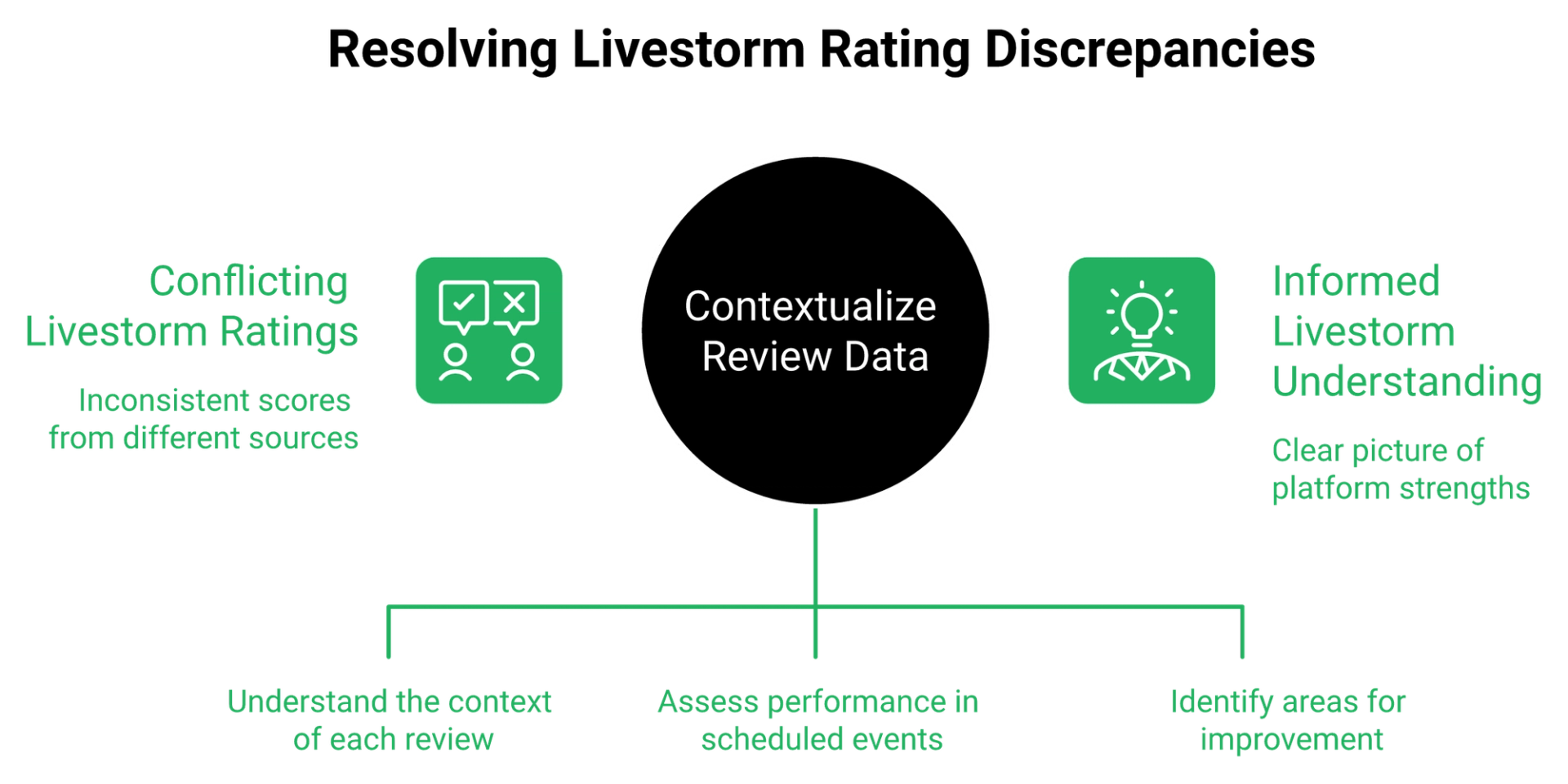
"The platform is reliable and interface is clean." "Strange pricing model (contacts per month over registrants or attendees. Seems like a way to charge more and deliver less)... CTAs are byzantine... Poor analytics/metrics."- Verified reviewer, 1 star, Livestorm G2 - Verified Review
"What I like most about Livestorm is how intuitive and dependable it is for hosting webinars and virtual events."- Verified reviewer, 4 stars, Livestorm G2 - Verified Review
Read those two together and the pattern shows up fast. Scheduled event hosting scores well. Revenue mechanics score badly.
💰 The Three Decisions This Resolves
Here is what you can actually settle before Monday.
- Cost: whether attendee credits stay affordable at your real attendance, not your hoped for attendance.
- Customization: whether the ceiling blocks branding you do not need, or funnel logic you do.
- CRM depth: whether your HubSpot sync carries behavior, or just names and email addresses.
EasyWebinar measures platform fit by a single test before anything else: can one recorded session run live, just in time, and on demand without a rebuild? That question sorts hosting tools from revenue systems in about five minutes.
✅ The Monday Test
Open a trial. Build one registration page, then try to branch the form by segment and restyle the reminder email.
If both fail, you have your answer, and you have it in twenty minutes instead of six weeks. My read is that most operators discover this ceiling in month four, after the ad budget is already committed.
"EasyWebinar is hands down THE webinar platform for evergreen webinars, no contest... The biggest challenge is around setting up automated webinars, and needing the presentation uploaded first in order to set it up."- Ash A., 5 stars, EasyWebinar G2 - Verified Review
I include that second half deliberately. Every platform has a shape, including ours, and pretending otherwise wastes your time.
EasyWebinar was built from the opposite starting point, running one recording as live, just in time, and on demand from a single setup, on flat plan pricing rather than per attendee metering. If you want the honest side by side against the platforms in this article, the comparison hub lays out where each one wins.
Q2. What Do Livestorm Reviewers Actually Report, Including the One Star Ones?
Positive Livestorm reviews cluster on one trait: browser based joining with no download, plus clean all in one event management. Negatives cluster on five: email and branding limits, pricing that scales badly, integration gaps, rigid reporting, and mid session disconnections on stable networks. The harshest review documents an enterprise webinar with complete audio loss and an acknowledged email incident that Livestorm refused to refund.
I have watched a child throw ketchup on a presenter's face mid webinar. Live events are chaotic by nature. A platform incident on top of that chaos is what turns a launch into a loss.
✅ What Reviewers Genuinely Praise
The browser story is real, and it repeats across almost every positive review. No download means fewer support tickets at minute zero.
Reviewers also like that all speakers can control slides and video playback themselves, and that registration, reminders, and analytics sit in one place. EasyWebinar's own reviewers name the same consolidation benefit, which tells you this is a category expectation now, not a differentiator.
⚠️ Five Complaint Clusters, In Reviewers' Words
The negatives are not scattered. They repeat with unusual consistency.
"The email functionality is very limited. I wish they had more range in terms of creative creation, design, and options."- Verified reviewer, 4 stars, Livestorm G2 - Verified Review
"When we tried to use a powerpoint file so that we can be more professional and have some animations, the presentation was lagging terribly bad. This forced us to export a PDF and lose all work we did on animations."- Verified reviewer, 3 stars, Livestorm G2 - Verified Review
"I experience occasional and recurring disconnections during webinars, even though my network remains stable."- Verified reviewer, 3.5 stars, Livestorm G2 - Verified Review
Note the star ratings. These are not angry churn reviews. They are working customers naming friction.
❌ The Incident That Reveals Policy, Not Bugs
One June 2026 review runs long, and it is worth reading in full. An enterprise webinar with external partners lost audio entirely for part of the session.
Livestorm later confirmed a platform incident affecting registration confirmation and reminder emails. The team then had to contact registrants manually.
"Although Livestorm acknowledged the email incident, they refused any form of refund and provided limited compensation to additional attendee credits. Since our original package already included more credits than we needed, this did not address the actual impact."- Verified reviewer, 1.5 stars, Livestorm G2 - Verified Review
Bugs are forgivable. Compensating an acknowledged failure in the currency the customer already had too much of is a policy choice.
⭐ How to Read a 4 Star and a 1 Star Review of the Same Tool
Do not average them. Ask what job each reviewer was doing.
Scheduled internal training and partner webinars go well. High stakes external events with paid traffic behind them go badly, and that gap is the whole story. If you are still shortlisting, our roundup of the best webinar software applies the same job based lens across the category.
"Intergration is somewhat limited, but if you are comfortable with Zapier you can easily update that. Customer support really efficient, even occassionally after hours!"- Verified User in Professional Training & Coaching, 4.5 stars, EasyWebinar G2 - Verified Review
EasyWebinar's G2 reviewers name the opposite failure mode, with repeated mentions of support staff joining a live call to fix setup, including one operator whose issue was resolved within three hours of contact. You can read those unedited on the customer reviews page.
Q3. How Does Livestorm's Pricing Work, and What Will It Actually Cost You?
Livestorm Pro now bills in attendee credit packs at roughly €2.50 per credit. One credit equals one unique participant per session. Attending two sessions costs two credits. Replaying the same session costs nothing extra, and no shows are free. EasyWebinar bills by plan rather than per attendee, so attendance spikes change revenue without changing the invoice.
Most operators I talk to model best case attendance, then get invoiced for it. That is backwards, and it is expensive.
💸 Why Per Attendee Billing Fights Paid Traffic
Run cold traffic and your baselines are unforgiving. Expect a 10% to 15% show up rate on ice cold audiences, around $10 cost per lead, and roughly 30% registration to sign up on a tuned page.
Now succeed. Your best month, the one where the ads finally work, is also your most expensive invoice. The platform takes a cut of your win.
⏰ Two Pricing Systems Are Live at Once
This is the part no review page mentions. Livestorm announced its attendee based model publicly, framing it as paying only for people who show up.
Yet older documentation and third party listings still describe monthly active contact tiers, with Pro capped at four hour sessions. Buyers get quoted two different systems depending on which page they land on. Screenshot whichever one your rep quotes, with the date.
"Their new pricing model charges per 'active contact' which means they charge for registrants, not just attendees. I had to purchase additional active contacts in a package of 1,500 contacts for $1,875. That is $1.25 per new registrant."- Verified customer of 3 years, Livestorm Findstack - Verified Review
"We're rethinking webinar pricing... Now, plans are based on real attendance, not on registrations. One attendee equals one credit, nothing more."- Livestorm team, r/livestorm Reddit Thread
Both are true. They are just eighteen months apart, and the older terms are still circulating. Our full breakdown of Livestorm pricing tracks each change with retrieval dates.
💰 What the Credit Math Actually Produces
Here is the arithmetic on the current credit model, at €2.50 per credit.
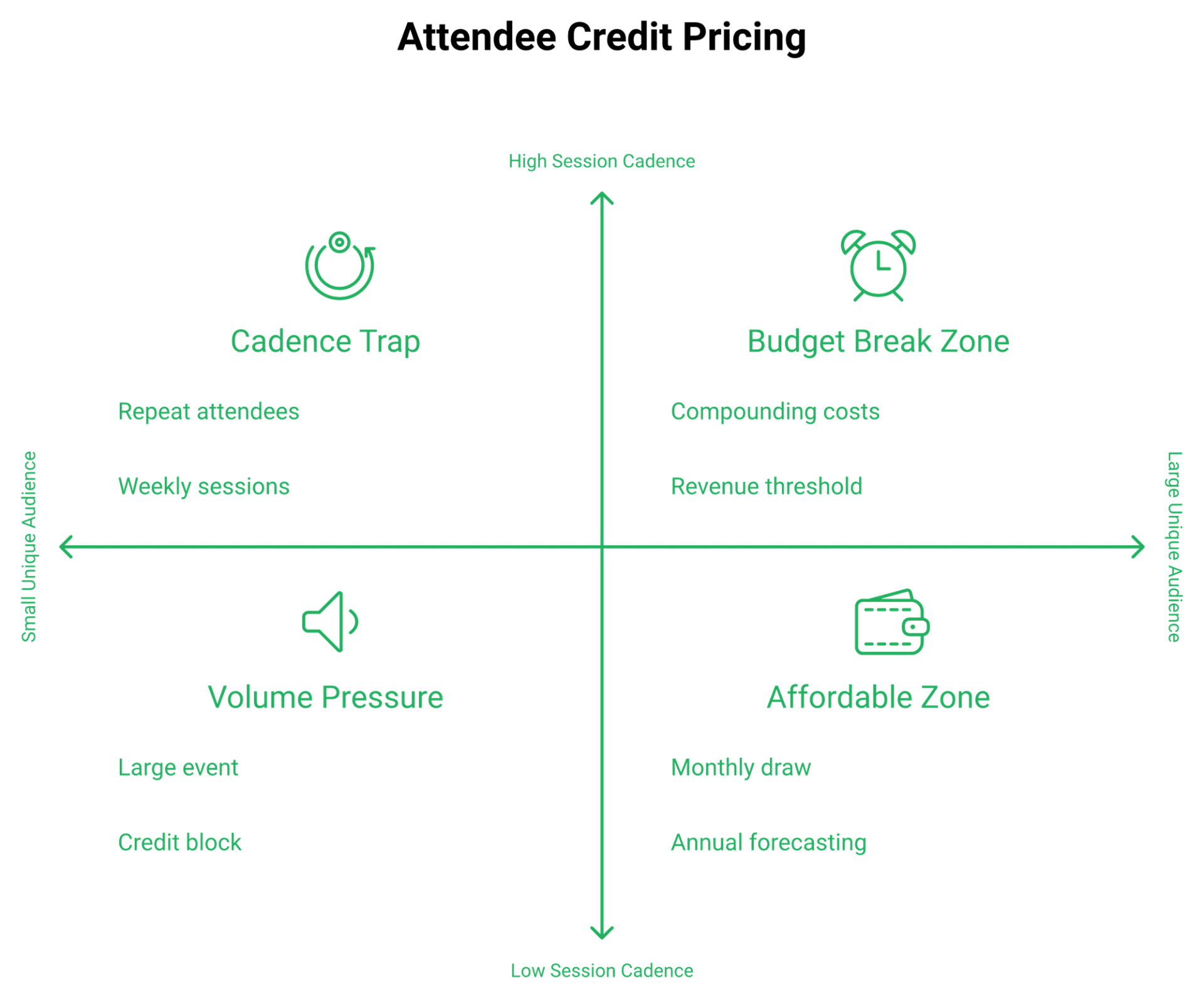
Cadence, not audience size, is what breaks the budget. A weekly evergreen style session bills four times, because each session is a fresh credit event per person.
⚠️ Build the Worst Case Before You Sign
Take your real cost per lead, your real show up rate, and your planned cadence. Multiply attendees by sessions, then by credit price.
Compare that to your gross margin per sale. If platform cost crosses roughly 10% of webinar sourced revenue, the model is fighting you. One reviewer flagged the same pressure plainly.
"Overall, their pricing might feel slightly high for smaller teams, startups and companies that host webinars only very occasionally."- Verified reviewer, 4 stars, Livestorm G2 - Verified Review
EasyWebinar prices by plan rather than per attendee, so a webinar that suddenly triples registrations moves your revenue line without moving your bill. The full tier breakdown sits on the pricing page, and the Livestorm alternatives guide scores eleven platforms on cost transparency.
Q4. Where Do Livestorm's Customization Limits Actually Bite?
Livestorm's customization ceiling is real, but usually misdiagnosed. Reviewers most often want email template design, registration form conditional logic, event layout control, deeper white labelling, and flexible analytics export. The cosmetic complaints barely move conversion. The functional ones limit what funnel you can build at all. EasyWebinar's AI Webinar Builder drafts script, presentation flow, and funnel structure from a brief, which shifts the bottleneck to the offer.
Ask me to pick a registration template and I will tell you they all look a bit ugly. They are also all finished, which is the point.
❌ The Complaint That Costs You Nothing
Brand compliance on a registration page is where first time presenters go to procrastinate. I have watched operators spend three weeks on a header while their offer stayed unfinished.
Think about someone dying of thirst in a desert. You grab the first container that holds water, skip the logo, and run. The offer carries the weight, not the container.
⭐ Where the Ceiling Genuinely Costs Money
Four limits actually constrain revenue, and they are worth naming precisely.
- Conditional logic: you cannot branch a registration form by segment, so coaches and enterprise buyers get identical questions.
- Sequence control: limited email design means your reminders look nothing like your nurture stream.
- Layout control: the room is the room, which matters for paid and ticketed sessions.
- Export and segmentation: rigid analytics export blocks the cohort views your CRM needs.
EasyWebinar measures this differently, tracking watch duration, CTA clicks, and offer views per attendee, then firing follow up from those events rather than from attendance alone. The webinar analytics walkthrough shows what those cohorts look like in practice.
⚠️ What Reviewers Say on Both Sides
The evidence here genuinely splits, and I am not going to flatten it.
"I've also run into times when customization feels somewhat limited, especially when I'm trying to tailor registration pages or emails to align with specific brand guidelines. The analytics are useful, but I'd like more flexibility when it comes to exporting and segmenting the data."- Verified reviewer, 4 stars, Livestorm G2 - Verified Review
"Livestorm has truly transformed our experience, particularly in terms of branding and customization capabilities."- Reddit user, r/b2bmarketing Reddit Thread
"One area where we've experienced challenges is with the customization options for webinar landing pages. Sometimes it feels a bit limited in terms of design flexibility."- Jo K., 5 stars, EasyWebinar G2 - Verified Review
That last one is our own review, unedited. Landing page flexibility is a live complaint on our side too, and hiding it would make the rest of this article worth less.
✅ The Counter Priority for Monday
Roughly 60% of visitors never scroll past your page header. All of them see it.
So spend your effort there. Rewrite one headline instead of chasing brand guidelines, then judge the platform on whether it can branch a form, not on whether it can match your hex codes.
EasyWebinar ships pre built funnel templates alongside the AI funnel builder, so the setup bottleneck becomes your offer rather than your page. If headline work is the higher leverage task this week, our teardown of webinar landing pages that convert has the patterns.
Q5. How Deep Is Livestorm's HubSpot Integration, Sync or Substance?
Livestorm ships an officially certified native HubSpot connector. It creates HubSpot Marketing Events, pushes registrants as contacts, writes timeline events for registration and replay views, and maps attendance rate plus questions asked. For on-demand sessions, Livestorm gates HubSpot, Marketo, and Pardot marketing automation to the Enterprise plan. EasyWebinar fires follow up from watch duration, CTA clicks, and offer views per attendee.
This is the section where I have to correct the internet a little. The connector is deeper than most review posts claim.
⭐ Three Tiers of CRM Depth
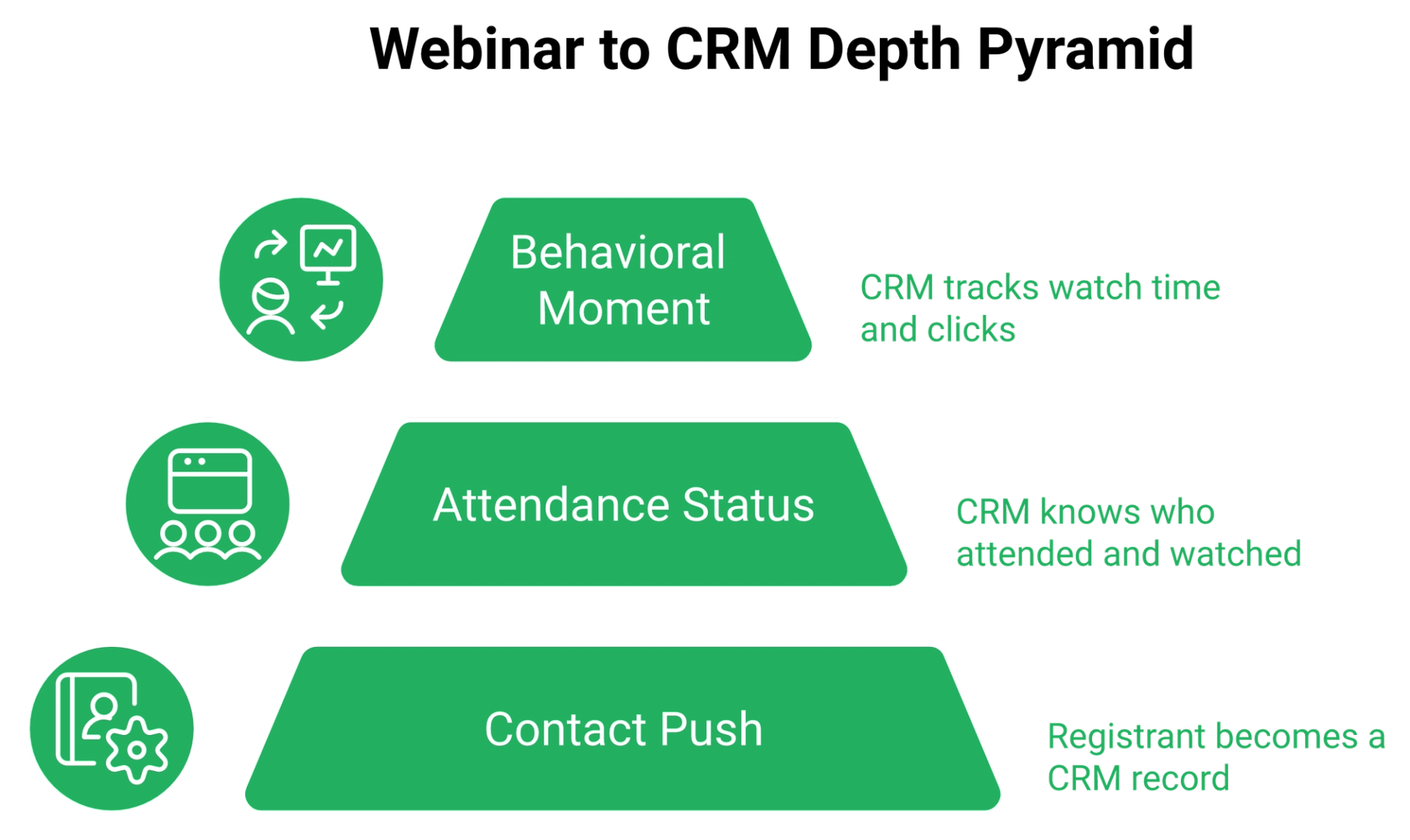
Think of webinar to CRM sync as three levels, not one switch.
Tier one is contact push, meaning a registrant becomes a CRM record. Tier two is attendance status, meaning the CRM knows they showed up or watched a replay. Tier three is behavioral, meaning the CRM knows what they did inside the room.
✅ What Livestorm Actually Delivers
Livestorm covers tiers one and two properly, and part of tier three. Its documentation lists timeline events called "People Registered" and "People Watched Recording," with event ID, session ID, and session start time.
Field mapping goes further than people expect. You can map aggregated attendance data, including attendance rate and the number of questions a participant asked. For a wider look at how this data gets used, our guide to webinar CRM workflows maps each field to a follow up action.
"The CRM integration with HubSpot is fantastic and super easy to configure. It's really easy to see Livestorm event activity at the contact level."- Verified reviewer, Technology and Software, 51 to 200 employees, Livestorm HubSpot App Marketplace - Verified Review
"They also provide a HubSpot certification, and you can transfer over 40 data points to data properties."- Reddit user, r/productivity Reddit Thread
⚠️ Where the Depth Actually Stops
Here is the honest gap, and it is narrower than competitors pretend.
Livestorm's synced behavior is aggregate and event level. Attendance rate, questions asked, replay viewed. What it does not push is the moment level signal: who was still watching at minute forty two when the offer appeared, and who clicked it.
EasyWebinar measures that layer directly, tagging on watch duration, CTA clicks, and whether the attendee saw the offer at all. That distinction decides whether your follow up is a broadcast or a sequence, and our webinar marketing automation walkthrough shows both versions side by side.
💸 Why Middleware Is Not a Free Fix
Operators patch tier three with Zapier or webhooks. That works until it does not.
I know an operator whose Zapier account hit its task limit four hours before a webinar. A couple of hundred opt ins never reached the CRM, and the sales team was dialing an incomplete list. The fix was a billing upgrade, caught by luck.
"Some of the integrations are not intuitive, but Rakesh was able to help me with them."- Ajarae C., 5 stars, EasyWebinar G2 - Verified Review
I include that because integration friction is not a Livestorm exclusive. Ours gets flagged too.
⏰ The Five Question Audit
Run this on a trial account before you commit.
- Does a registrant appear in HubSpot without a CSV export?
- Does attendance status write back automatically?
- Can you build a HubSpot list of people who attended but did not click?
- Which of these needs the Enterprise plan?
- What breaks if your middleware plan hits its cap?
Question three is the one that separates the tiers. If you cannot answer it inside the platform, your CRM is a mailing list with extra steps.
EasyWebinar fires behavioral triggers on watch duration, CTA clicks, and offer views, then pushes those events to HubSpot, Keap, ActiveCampaign, or a custom endpoint through the API. The full connector list sits on the integrations page, and the built in sales CRM covers teams who would rather not run two systems.
Q6. Can Livestorm Run Evergreen, Just-in-Time, or On-Demand Webinars?
Livestorm does support on-demand and simulive sessions, where a recording plays automatically for an experience close to live. What its documentation does not describe is just-in-time scheduling, meaning a session that starts a few minutes after someone registers, detected in their timezone. EasyWebinar runs live, simulated live, just-in-time, and on-demand from one recording. Each Livestorm session also bills a fresh credit per attendee.
Let me define the four formats plainly, because vendors use these words loosely and it costs buyers money.
⭐ The Four Formats, In Plain Language
Live is you, presenting in real time. Simulive is a recording that plays on a schedule, with chat and Q and A running alongside it.
On-demand means the recording starts the moment someone registers. Just-in-time means the next session begins in ten or fifteen minutes, in the viewer's own timezone, so registration and attendance almost merge. Our explainer on the simulated live webinar format covers the mechanics in detail.
⏰ Why Just-in-Time Is the One That Matters
Cold paid traffic decays fast. Someone clicks your ad, registers for next Thursday, and forgets you exist by Tuesday.
Just-in-time collapses that gap. EasyWebinar was built around this mechanic because show up rate, not registration rate, is what determines whether ad spend returns anything, which is the same argument we make in how to improve webinar attendance.
💸 What Recurring Sessions Do to Your Bill
This is where format and pricing collide.
A weekly session on Livestorm bills four times a month per unique attendee, because each session is its own credit event. An evergreen style cadence is exactly the pattern that inflates credit burn fastest.
⚠️ Automation Is Not a Shortcut
Here is where I break with the automation crowd. An automated webinar with no traffic is a billboard in the desert.
Run five to ten live sessions first. Hit roughly 10% attendee to buyer, then automate the winner. Automating a webinar that never converted live just scales a bad result.
"Would be great to have more automation and be able to connect the tool with our CRM platform of choice."- Verified reviewer, 0.5 stars, Livestorm G2 - Verified Review
"I used to do live webinars to sell my online course. With EasyWebinar I sold 25 courses within 3 weeks of my evergreen launch. The only downside is that to have the 'just in time' feature you have to pay a premium."- Laura C., 5 stars, EasyWebinar G2 - Verified Review
That second quote names a real cost on our side. Just-in-time sits on a higher tier, and she says so plainly.
EasyWebinar runs live, simulated live, just-in-time, and on-demand from the same recorded asset, so moving a proven live session into automation is a toggle rather than a rebuild. Our breakdown of the best automated webinar platforms shows how the category compares.
Q7. Is Livestorm Reliable and Supported Enough for a High-Stakes Webinar?
Livestorm's browser based architecture removes download friction for attendees, which is its most praised trait. The tradeoff lands on the presenter side. Chrome is effectively required, screen sharing handles one window at a time, and PowerPoint animations lag badly enough that reviewers export to PDF. Support runs Monday to Friday only, from 10:00 to 02:00 CET.
A live launch is the one hour of the year where a platform failure costs you the quarter.
⚠️ The Browser Tradeoff, Explained Honestly
Browser based streaming uses WebRTC, a standard that runs video inside a tab with no install. Attendees love it, and rightly so.
Native apps like Zoom's ask for an install, and that friction buys stability. Neither choice is wrong. You are picking which side of the event absorbs the risk, a tradeoff we unpack further in our Zoom alternative comparison.
❌ The Presenter Side Constraints
Reviewers name three specific limits, and all three hit guest expert webinars hardest.
"During the event, the screen sharing only allows you to share one window so if you need to switch windows you have to unshare then reshare. You must use it in browser and it must be in Chrome."- Verified reviewer, 0 stars, Livestorm G2 - Verified Review
Independent testing found a Firefox presenter simply invisible to the audience. If your co-host is a partner or a client, you cannot police their browser choice.
⚠️ The Incident Pattern
One enterprise review documents the full sequence. Speaker access problems, inconsistent email delivery, then severe audio degradation and complete audio loss mid session.
Livestorm later confirmed a platform incident affecting registration confirmation and reminder emails. Another reviewer reports the smaller version of the same problem.
"I experience occasional and recurring disconnections during webinars, even though my network remains stable."- Verified reviewer, 3.5 stars, Livestorm G2 - Verified Review
⏰ How the Vendor Responded, and When You Can Reach Them
Response policy matters more than uptime, because every platform has bad days.
In that enterprise case, Livestorm acknowledged the email incident, refused a refund, and offered extra attendee credits to a customer who already had surplus credits. Support hours are also weekday only, in English, French, and Spanish. A Sunday evening launch in the US has no live coverage.
"The video quality came and went when I switched from the slides as the main screen back to me. It was pixelated and then cleared. I have a Canon R6 and Google Fiber internet."- Verified reviewer in Photography, 4.5 stars, EasyWebinar G2 - Verified Review
That is our review, not theirs. Streaming quality complaints exist on our side too, and pretending otherwise would make this section worthless.
✅ Your Pre-Launch Stress Test
Do these five things a week before, not the morning of.
- Have every presenter join in their actual browser, on their actual laptop.
- Share your real deck, then switch windows once.
- Send test reminder emails to three different email providers.
- Check whether support is awake at your event time.
- Record a backup of the presentation you can fall back on.
If your equipment is the variable you are least sure about, our webinar equipment guide covers what actually affects stream quality.
EasyWebinar streams in HD at low latency and holds SOC 2 Type II attestation, and its simulated live sessions remove the risk of presenting a launch pitch in real time at all. The live features page covers what stays under your control when you do go live.
Q8. What Should You Check Before You Sign a Livestorm Contract?
Four clauses decide whether a Livestorm contract is survivable. Get the cancellation notice period in writing, since independent testing documented a 90 day renewal window discovered only after it closed. Confirm whether unused attendee credits roll over. Confirm the refund policy when an acknowledged platform incident affects your event. Confirm whether deleted registration pages and registrant lists can be restored.
Risk comes from not knowing what you are doing. In software procurement, that usually means not reading the exit clause.
❌ Three Documented Contract Failures
These are not hypotheticals. Reviewers wrote them down.
"I had a poor account management experience with Livestorm. They have made it extremely hard to cancel the subscription by burying crucial information in fine print."- Verified reviewer, 0.5 stars, Livestorm G2 - Verified Review
"No archive section or deleted folder where you can restore something that was accidentally removed at all. I tried contacting customer service, but all I got was an AI chatbot."- Verified reviewer, 2 stars, Livestorm G2 - Verified Review
⚠️ Why Compensation Currency Matters
The third failure is the most instructive. After the acknowledged email incident, compensation arrived as additional attendee credits.
That customer already had more credits than they needed. Being paid in the thing you have too much of is not compensation, and EasyWebinar's read is that this is a design choice, not an oversight.
💰 The Eight Questions to Send Your Rep
Paste these into an email before you sign anything. Each one has an answer you want to hear.
- What is the cancellation notice period in days? You want 30 or less.
- Where in the contract does that appear? You want a clause number.
- Do unused credits roll over at renewal? You want yes.
- Do credits expire mid term? You want no.
- What is the refund policy for a confirmed platform incident? You want a written remedy, not credits.
- Can deleted events or registrant lists be restored? You want a recovery window.
- Which features are gated to Enterprise? You want the list in writing.
- What are support hours in my timezone? You want coverage during your launch window.
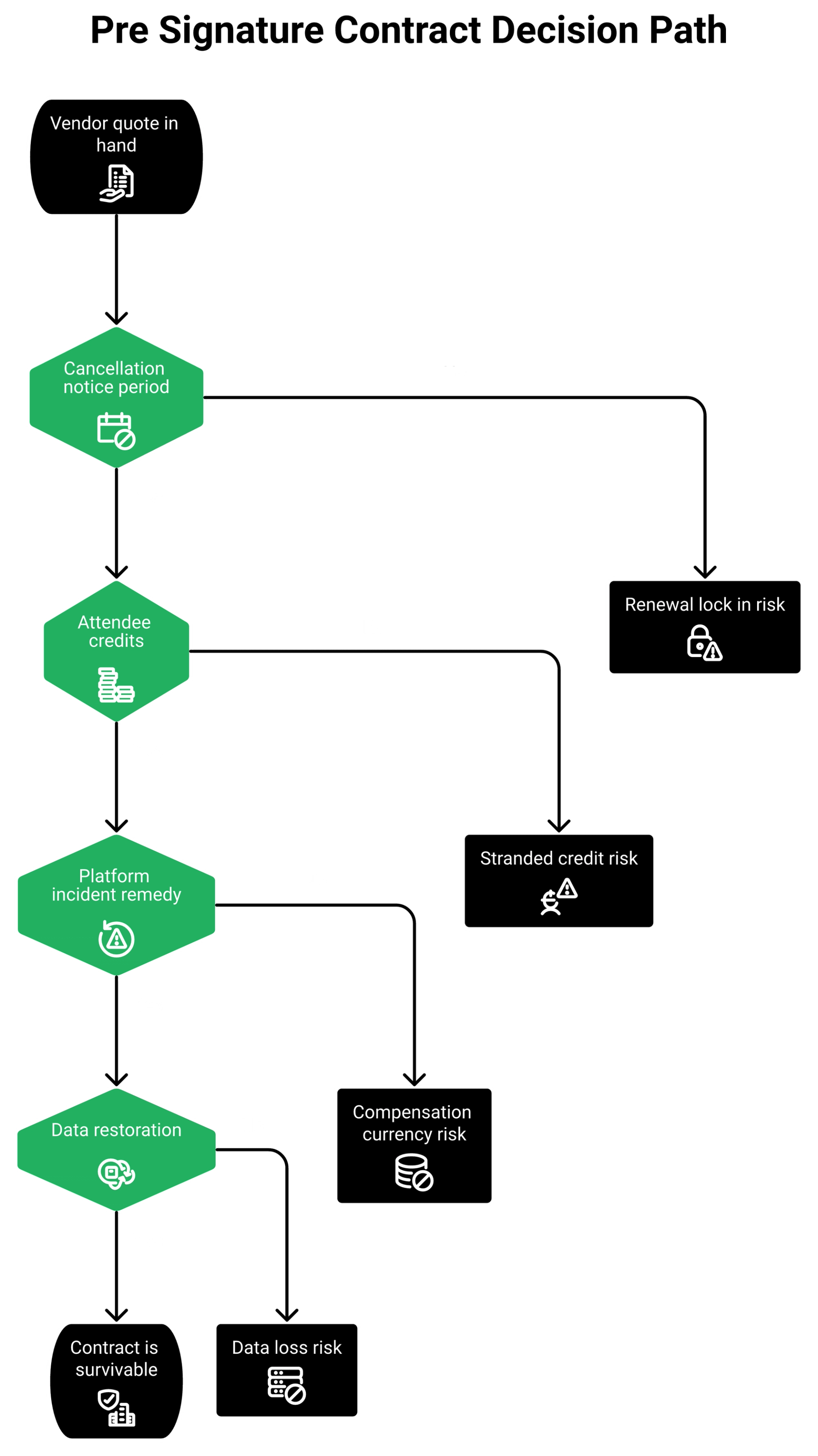
Question five is the one nobody asks. It is also the one that decided how that enterprise customer felt about the whole vendor relationship. If credit metering is the clause worrying you most, the Livestorm alternatives roundup scores every platform on pricing transparency.
✅ What Flexibility Looks Like Instead
Clarity beats negotiation. I would rather a vendor charge me more and tell me the terms upfront.
"We needed a solution that we could just pick and put down as and when we needed it and this is perfect for one off webinars without having to be locked into a contract or subscription and it very affordable."- Annette S., 5 stars, EasyWebinar G2 - Verified Review
"Intergration is somewhat limited, but if you are comfortable with Zapier you can easily update that."- Verified reviewer in Professional Training and Coaching, 4.5 stars, EasyWebinar G2 - Verified Review
Both are our reviews, and I am running them together on purpose. Flexible terms and an integration gap can be true at the same time.
EasyWebinar reviewers on G2 name the opposite experience from buried cancellation terms, with one specifically calling out one off webinars without contract lock in. Current tiers and terms sit on the webinar pricing page, and the full terms and conditions are public rather than paraphrased by a rep.
Q9. Livestorm vs EasyWebinar vs Demio vs Zoom Webinars: Which Fits Your Funnel?
Pick by job, not by score. EasyWebinar runs live, simulated live, just-in-time, and on-demand formats on flat plan pricing, and holds 4.5 out of 5 across 112 G2 reviews. Livestorm fits B2B teams running scheduled events for browser first attendees. Demio fits simplicity first marketers. Zoom Webinars fits large broadcasts where stability outranks conversion tooling.
Ratings alone will mislead you here. All four platforms sit between 4.4 and 4.6 on G2, which tells you almost nothing about fit.
⭐ The Five Criteria That Actually Decide
Feature counts are noise. These five determine whether a platform returns your ad spend.
Pricing model, automation depth, CRM behavioral depth, customization ceiling, and reliability profile. Every disagreement in this article traces back to one of those five, which is the same rubric we apply across our top webinar platforms roundup.
💰 The Honest Comparison Table
That first "not recommended for" row is ours. EasyWebinar is the wrong choice for a 20,000 seat company all-hands, and saying so is what makes the rest of the table worth reading.
✅ What Reviewers Say About Each
The verbatims line up with the table more cleanly than I expected.
"The platform is reliable and interface is clean. Strange pricing model (contacts per month over registrants or attendees. Seems like a way to charge more and deliver less)."- Verified reviewer, 1 star, Livestorm G2 - Verified Review
"Demio Makes Client Webinars Effortless with Reliable Performance and Helpful Metrics."- Venkat R., 4 stars, Demio G2 - Verified Review
"The ease of use and setup. Pretty much once I have run one webinar, I can clone and setup multiple in a breeze. It also seamlessly integrated with our CRM."- Darrin B., 5 stars, EasyWebinar G2 - Verified Review
⚠️ Four Scenarios, Four Answers
Here is the short version, mapped to the work you actually do.
- Coach or course creator selling evergreen: EasyWebinar, because just-in-time and simulive run from one recording.
- B2B SaaS demand gen with scheduled live events: Livestorm, provided attendance stays predictable.
- Small marketing team that wants simple and clean: Demio, until funnel logic becomes the constraint.
- Enterprise training or internal broadcast: Zoom Webinars, where install friction buys stability.
Simple scales. Fancy fails. If your platform choice starts requiring three connectors and a spreadsheet to explain, back up. Our head to head on Demio versus Livestorm shows how narrow the real differences get once you strip out the feature lists.
"We transitioned to Livestorm for precisely that reason. It offers a stronger emphasis on marketing features, such as lead capture forms."- Reddit user, r/smallbusiness Reddit Thread
EasyWebinar holds row one in that table for one reason: it is the only platform there running all five formats on flat pricing with per attendee behavioral triggers. The full matrix lives on the comparison hub, including the direct EasyWebinar versus Demio and EasyWebinar versus Zoom breakdowns.
Q10. Who Should Buy Livestorm, and When Should You Migrate?
Buy Livestorm if you run scheduled live B2B webinars, value zero download attendance, keep volume predictable, and treat HubSpot as a contact destination. Migrate when your credit invoice grows faster than webinar revenue, when you need conditional registration logic, or when follow up needs in-session behavior. EasyWebinar customer Carla Biesinger built a $5M evergreen funnel on the format Livestorm does not schedule.
In my first year running live webinars, I built a 14,000 person email list and sold $245,000 of one course. That number is why I care about format, not polish.
✅ Three Profiles Livestorm Serves Well
Livestorm is genuinely good at a specific job. Three operator types fit it cleanly.
Enterprise marketing teams running partner and analyst webinars where attendees must not install anything. B2B demand gen teams with steady monthly cadence and known audience size. Customer education teams pushing registration data into HubSpot for lifecycle scoring.
❌ Three Profiles That Should Look Elsewhere
The anti-fits are just as specific, and all three involve paid traffic.
Coaches and course creators running cold ads to a session that must start within minutes. Agencies managing many client funnels who need conditional registration forms. Anyone whose follow up sequence depends on who was still watching when the offer appeared. If you sit in the first group, our guide to building a coaching sales funnel covers the format sequence in detail.
"Overall, their pricing might feel slightly high for smaller teams, startups and companies that host webinars only very occasionally."- Verified reviewer, 4 stars, Livestorm G2 - Verified Review
💸 Three Migration Triggers, Stated as Numbers
Do not migrate on vibes. Migrate on thresholds.
- Platform cost crosses 10% of webinar sourced revenue.
- Your cadence goes past twice monthly, since each session bills fresh credits.
- You need marketing automation on on-demand sessions but are not on Enterprise.
EasyWebinar's read is that trigger two catches most operators by surprise. Cadence, not audience size, is what turns a reasonable invoice into an unreasonable one, and our Livestorm pricing breakdown models each cadence scenario.
⏰ The Sequence I Would Actually Run
Do not automate first. That is the mistake I see most often.
Run five to ten live sessions. Hit at least a 10% attendee to buyer rate. Only then turn your best performing session into an automated one, a sequence we walk through in live versus automated webinars.
"I used to do live webinars to sell my online course. With EasyWebinar I sold 25 courses within 3 weeks of my evergreen launch. With my live class I used to sell 10-12 courses."- Laura C., 5 stars, EasyWebinar G2 - Verified Review
"I do use other email systems to send post-webinar email sequences because I can't track open and click rates on EasyWebinar, and also, I can't unsubscribe someone from the email campaign once the client has joined my program."- Eliza W., 4.5 stars, EasyWebinar G2 - Verified Review
That second review is a real gap on our side. Email open and click tracking is not where it needs to be, and she is right to say so.
⚠️ What I Think Changes by 2027
Here is the thing I am genuinely uncertain about. Per attendee billing may not survive the next two years.
As AI built funnels drop launch time from six weeks to an afternoon, cadence goes up sharply. Metered attendance models get punished by exactly the behavior the category is about to normalize. I could be reading that too strongly, and I would like to be argued with on it. Our AI webinar builder is the part of the stack driving that cadence shift.
EasyWebinar exists for the operator at step three of that sprint, the one with a proven live webinar who now needs it running around the clock without presenting again. The Carla Biesinger story and K21 Academy's 47% show-up rate show what that looks like at two very different scales.
So which trigger are you closest to right now: the invoice, the form logic, or the follow up data? Tell me where your funnel is leaking and I will tell you honestly whether starting a free trial fixes it.
Frequently Asked Questions

Casey Zeman
Founder of EasyWebinar
About Author
Over the past decade, I've helped thousands of entrepreneurs, coaches, and consultants turn webinars into a predictable, powerful way to grow their audience, build trust, and scale, without the constant hustle. I created EasyWebinar because I couldn't find a system that combined authenticity, engagement, and automation the way I needed. So, I built one.
Related Posts

10 Best Community Engagement Platforms in 2026
Compare the 10 best community engagement platforms in 2026. Course creators, evaluate live hosting, analytics, and replay to pick your winner today.

10 Best Online Coaching Tools in 2026: Live Session Quality, Scheduling, Recording, and Client Engagement Analytics
Compare the 10 best online coaching tools of 2026 on session quality, scheduling, and analytics. Discover the right fit for your coaching revenue model.

10 Best Webinar Hosting Platforms Ranked by Uptime, Streaming Quality & Cost
Compare 10 webinar hosting platforms ranked by uptime, streaming quality, and cost. Discover which tool actually turns attendees into revenue.
Turn every webinar into a revenue stream
Launch your first paid event in just a few clicks - and start monetizing your expertise.
Book a Call