Live vs. Automated vs. Evergreen Webinars: Which Should You Run?

Casey Zeman
Published on May 4, 2026 • 23 min read

TL;DR
- Live, automated, and evergreen webinars are stages, not rivals. Live is where you prove the offer, and automated and evergreen are where you scale it across time zones.
- Live usually converts better per session, but ON24's 2026 benchmarks show 43% of attendees choose on-demand viewing, so live-only programs miss much of their audience.
- Run 5 to 10 live sessions and reach about 10% attendee-to-buyer conversion before automating. Automating an unproven offer just automates failure.
- Just-in-Time sessions start minutes after registration in the attendee's own time zone, which suits cold ad traffic where intent fades fast.
- An automated webinar is honest as long as it is never presented as live. Skip fake attendee counts, scripted chat, and countdown timers that reset.
- Running live and automated on one platform keeps attendee data, checkout, and CRM sync in one record instead of split across two tools.
Q1: What is the difference between live, automated and evergreen webinars?
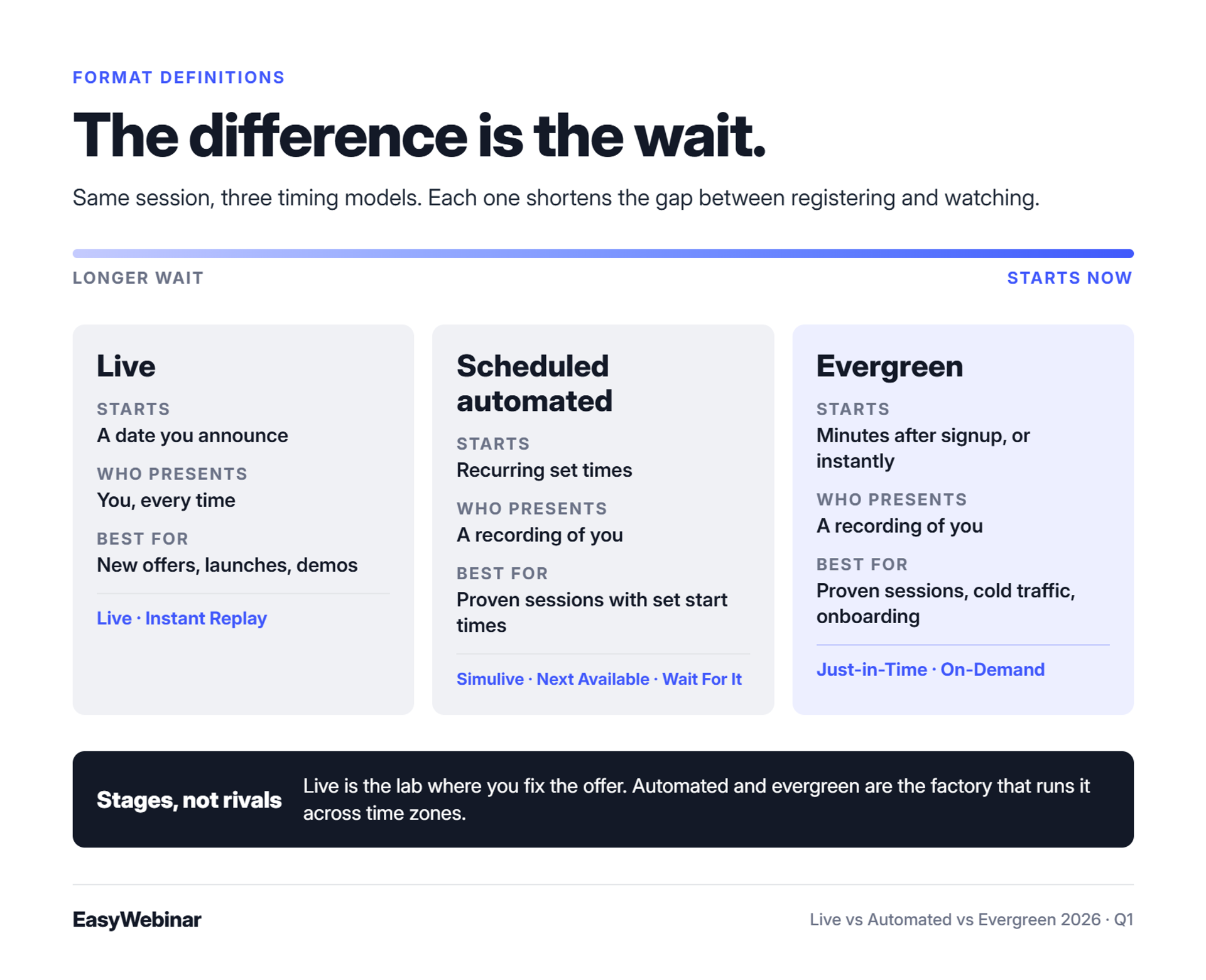
A live webinar is presented in real time to people who registered for a set date. An automated webinar plays a recorded session at a scheduled time, such as Simulive, which broadcasts a recording on a fixed calendar. An evergreen webinar is always available. Just-in-Time sessions start minutes after someone registers, and On-Demand sessions start instantly. Most teams run live first, then automate the session that converts.
My first course took six months to build. I launched it to a quiet inbox and sold nothing. The only thing that moved it was a weekly live webinar, which built a 14,000-person email list and $245,000 in course sales in year one. What I didn't see then was that the session I kept repeating could have run without me.
That's the real question behind this search. You're not choosing a technology. You're choosing how much of your calendar each sale costs.
What each format actually means
⏰ Live: one time, one room, you in it
A live webinar happens once, at a set time, with you presenting. Attendees ask questions, answer polls, and react while you talk. EasyWebinar records every live session automatically, so each one can become the raw material for an automated version later.
✅ Automated and evergreen: one recording, two timing models
An automated webinar plays a recording at a scheduled time. Registrants pick a slot and come back for it, like a TV show with a set airtime. An evergreen webinar removes the wait. EasyWebinar's Just-in-Time format starts a session minutes after someone registers, in their own time zone, and On-Demand starts it the moment they click.
Live vs automated vs evergreen at a glance
| - | Live | Automated (scheduled) | Evergreen |
|---|---|---|---|
| When it starts | A date you announce | Recurring set times | Minutes after registration, or instantly |
| Who presents | You, every time | A recording of you | A recording of you |
| Real-time interaction | Built in | Depends on platform settings | Depends on platform settings |
| Your effort per session | A full presentation | Set up once, then monitor | Set up once, then monitor |
| Reach | One time zone per session | Several time zones | Any time zone, any hour |
| Best for | New offers, launches, demos | Proven sessions with set start times | Proven sessions, cold traffic, onboarding |
| EasyWebinar formats | Live, Instant Replay | Simulive, Next Available, Wait For It | Just-in-Time, On-Demand |
Why guides blur "automated" and "evergreen"
⚠️ Two definitions on page one
Search results don't agree on these words. Contrast's guide treats automated and evergreen webinars as the same thing. LearnyBox's help center describes automated webinars as scheduled recordings without real-time interaction.
The split matters because of the wait. A registrant who waits three days for a slot has three days to forget. EasyWebinar keeps scheduled and Just-in-Time as separate settings, so you choose the timing model on purpose.
⭐ My working rule: stages, not rivals
EasyWebinar's read is that these formats are stages, not competitors. Live gives you engagement and the feedback to fix your offer. Automated and evergreen give you reach across time zones while you sleep. I treat live as the lab and automated as the factory.
EasyWebinar runs live, Simulive, Just-in-Time, and On-Demand webinars on one platform, with one login and one subscription. Attendees join from any browser with nothing to download. When a live session proves itself, you switch that same session to an automated schedule instead of rebuilding it in a second tool.
Q2: Do live webinars convert better than automated ones?
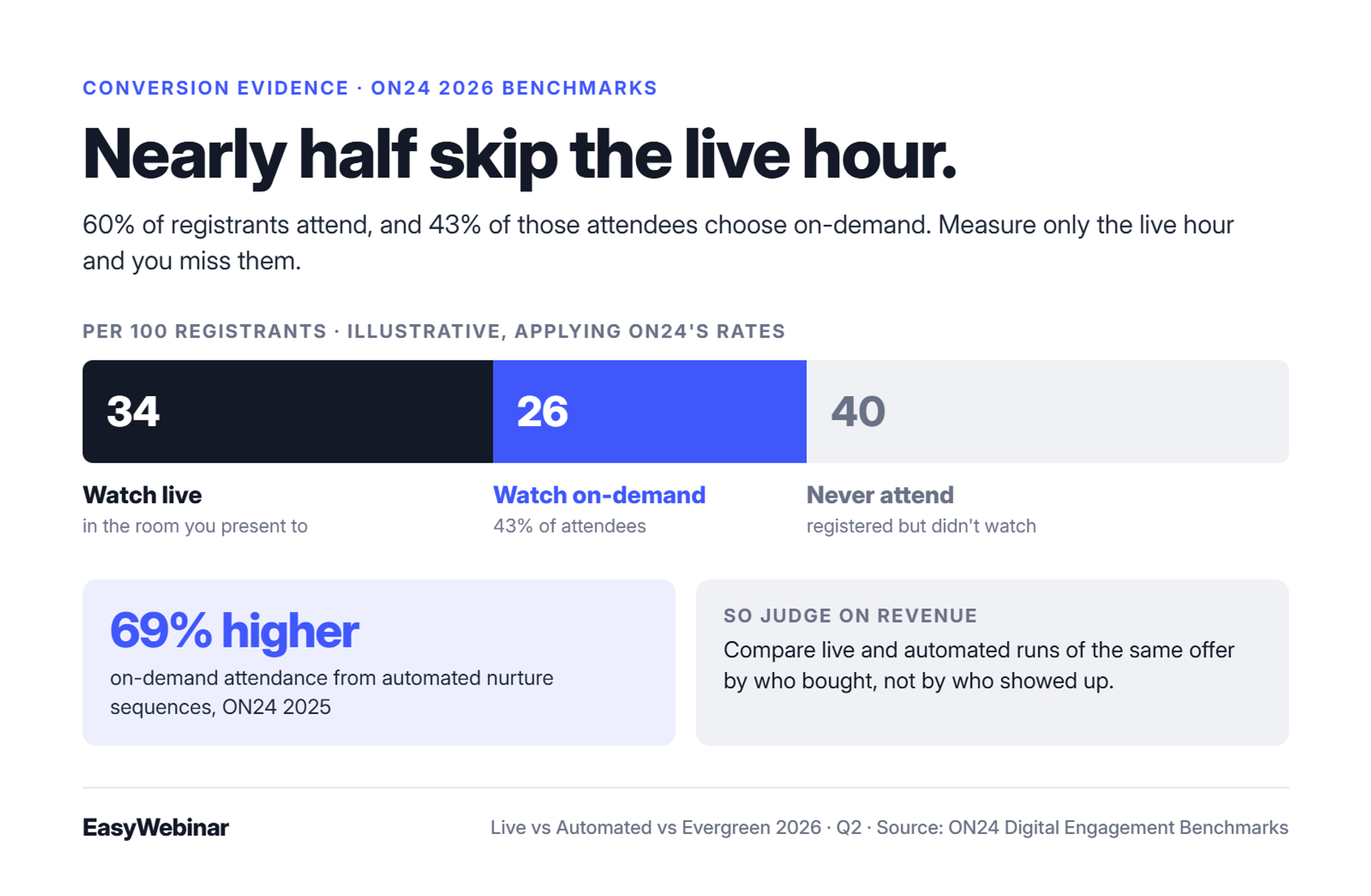
Per session, live webinars usually convert better. Several operators running cold paid traffic report that automated versions of strong live webinars underperform. ON24's 2026 benchmarks also show 43% of attendees chose on-demand viewing, so a live-only program misses a large share of its audience. The useful question is not which format wins. It is the order you use them in.
Two operators I respect gave opposite answers to this question. Jeremy Haynes, who runs paid ads for high-ticket offers, says his team runs webinars live because automated versions "have been nerfed" on his traffic. Yuri Elkaim argues the reverse: record once, run it around the clock, and skip weekly sessions with poor show-up.
Both have receipts. So which one is right for your next launch?
The old way: pick a camp and defend it
❌ What each camp costs you
Pick live only, and every sale needs your calendar. You repeat the same deck weekly, carry the tech risk, and cap revenue at your energy. Pick evergreen only, and you may automate an offer nobody has tested in front of a real audience.
Haynes is talking about cold paid traffic, where buyers know nothing about you. Elkaim is talking about time and attendance across months. Both can be true at once.
The shift: attention moved off the live hour
💰 The benchmark that reframes the debate
ON24's 2026 benchmarks report 60% registration-to-attendee conversion across live and on-demand viewing, with 43% of attendees choosing on-demand. Its 2025 report found automated nurture sequences drove 69% higher on-demand attendance. In plain terms, nearly half your audience may never be in the live room.
That changes what "convert better" means. If you only measure the live hour, you are grading half the class.
⭐ What operators say in reviews
"Scale our laborious, live webinar schedule to an automated one." - Verified reviewer, eWebinar Capterra - Verified Review
That same reviewer reports attendance rising from 31% to 68% after the switch.
"You can create live and evergreen events by the click of a button." - Verified reviewer, EasyWebinar Capterra - Verified Review
Measuring formats the way revenue does
✅ Attendee-level data, not headcounts
EasyWebinar records attendee-level data for every session: attendance, watch time, questions, poll responses, offer clicks, and purchases. This is first-party intent data, meaning signals that come straight from your own attendees. A drop-off heatmap shows the exact minute people leave. Live and automated runs of the same offer then sit side by side, judged on revenue.
⚠️ Where I'm still unsure
My read, and I could be off for your niche, is that Haynes and Elkaim are both right about different traffic. Warm lists forgive a recording. Cold ads often don't, at least until the offer is proven. The fix is sequence, which the switch point section covers.
EasyWebinar attributes revenue back to the webinar that produced it, so you see which format made money, not just who showed up. Engagement data syncs to HubSpot, Salesforce Pardot (Account Engagement), or EasyCRM. Sales gets the warmest leads first, and your next session is tuned on purchases instead of attendance.
Q3: When should you run a webinar live?
Run a webinar live when the offer is unproven, the launch date matters, or buyers need more than one touch. Agency owner Jeremy Haynes reports that close to half the buyers of one client's $10,000 offer attended two or three live sessions first. EasyWebinar lets attendees join live sessions from any browser with nothing to download, streaming at sub-500ms latency on Dolby OptiView WebRTC.
Live earns its place in four situations: a new offer, a dated launch, a product demo, and a high-ticket program. In those moments, the live room does selling a recording can't. Haynes's $10,000 client is the sharpest example. Those buyers come back for a second and third session because each one answers new questions.
Where live used to break
❌ Three failure points in the live hour
- Friction: every app install or plugin between the link and the room costs you attendees.
- Lag: when the stream trails behind you, your poll or offer lands after the moment has passed.
- Drops: a session that fails during the pitch loses the sale outright.
⚠️ And the risk you bring yourself
I used to joke that live means your kid might throw ketchup at you mid-pitch. The bigger risk is self-inflicted. Haynes describes a real estate client who netted $40,000 from a 90-minute deck on $20,000 of ad spend. On the next webinar, the client presented an untested three-hour deck and made one sale.
What attendees expect now
⏰ One click from the link to the room
Buyers now expect to click a link and be inside. One reviewer comparing tools named the deciding factor plainly:
"No software required for viewers (only browser)" - Verified reviewer, LiveWebinar Capterra - Verified Review
Friction, latency, and reliability now decide whether the live hour converts. A presenter can't out-sell a stream that lags or a join link that fails.
How EasyWebinar runs the live room
✅ One click in, real time once they're there
EasyWebinar attendees join from any browser on desktop or mobile, with no app, plugin, or account. Polls, offers, and answers land in real time on Dolby OptiView WebRTC, sub-500ms. Dolby Voice with spatial audio keeps several speakers clear, and you can bring on a co-host or promote an attendee to presenter.
⚠️ The honest trade-off
"EasyWebinar was not easy." - Reviewer who switched tools, eWebinar Capterra - Verified Review
That's fair feedback, and I'd rather you hear it from me. Live has more moving parts than any recording. That's why I tell operators to rehearse the room, not just the slides.
EasyWebinar backs the live hour with a 99.9% uptime guarantee and never cuts a webinar off at your plan limit; extra attendees are billed as overage under the terms. Every session is recorded automatically, so the live webinar that converts is already captured when you're ready to automate it.
Q4: When is a scheduled automated webinar the right call?
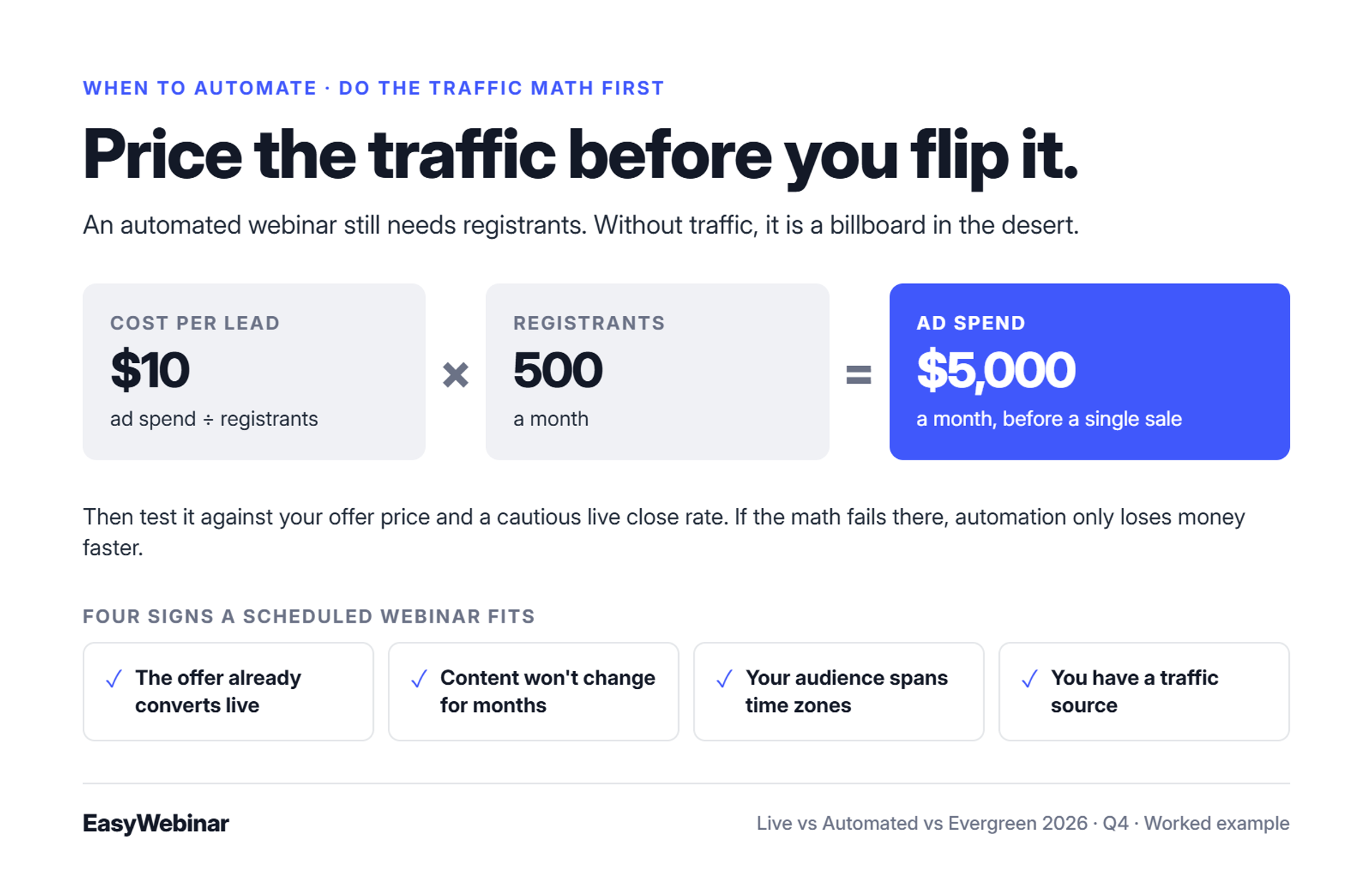
Automate a webinar after it has converted live and you need it in more time zones than you can present in. A scheduled automated webinar keeps a fixed start time, which gives registrants a reason to show up. It still needs traffic. An automated webinar with no ads or list behind it is a billboard in the desert.
I've watched operators flip a webinar to automated, then wait for sales that never came. The session was fine. Nobody was driving past it.
Four signs a scheduled webinar fits
✅ Check these before you switch
- The offer already converts live. You've presented it enough times to trust the deck and the close. The switch point section covers the exact threshold.
- The content won't change for months. Pricing, bonuses, and examples stay current without re-recording.
- Your audience spans time zones. One live slot can't serve Sydney and Chicago in the same week.
- You have a traffic source. Paid ads, an email list, or partner promotions keep registrations flowing.
❌ Signs it doesn't fit yet
If your offer changes every month, stay live. If you have no list and no ad budget, build traffic first. Automating either situation only makes the problem quieter.
Scheduling options compared
| EasyWebinar schedule option | How it works | Best for |
|---|---|---|
| Simulive | A recording broadcast at times you set, such as Tuesdays at 2pm | Audiences who like a fixed appointment |
| Next Available | A recurring schedule that offers registrants the next upcoming session | Steady daily or weekly traffic |
| Wait For It | Sessions open only on block dates you choose | Launch windows with a real deadline |
If registrants shouldn't wait at all, evergreen is the better fit. That's the next section.
Do the traffic math first
💸 What leads actually cost
Rick Mulready drives cold Facebook ads into automated EasyWebinar funnels at $8 to $12 cost per lead, a 30% registration rate, and 166% ROI. Cost per lead (CPL) is ad spend divided by the number of registrants. At a $10 CPL, 500 registrants a month means $5,000 in ad spend.
Run that number against your offer price and your live close rate before you switch. If the math fails at a cautious close rate, automation only loses money faster.
⭐ Why I call automation a 24/7 closer
EasyWebinar's view is that a proven automated webinar works like a closer who never sleeps. It sells, educates, or books calls while you travel or run the next launch. But even the best closer needs leads walking in the door.
EasyWebinar runs automated sessions on Simulive, Next Available, and Wait For It schedules, starting from the same session you presented live. Automation, checkout, and EasyCRM start on the Growth plan; the Launch plan is live only. Rick Mulready's 166% ROI on cold paid traffic came from automated EasyWebinar funnels.
Q5: How does an evergreen webinar work, and why does Just-in-Time matter?
An evergreen webinar removes the wait between registering and watching. EasyWebinar's Just-in-Time format starts a session minutes after someone registers, in that attendee's own time zone. EasyWebinar's On-Demand format starts the session the moment the registrant clicks. Teams use evergreen webinars to sell a proven offer, and to run customer onboarding or product education that would otherwise take live hours.
Picture a registration page at 11:40 on a Thursday night. A prospect clicks your ad, fills in the form, and sees "Next session: Tuesday, 2pm." By Tuesday, they've forgotten your name. Evergreen exists to close that gap.
Three ways an evergreen session can start
⏰ Just-in-Time, On-Demand, and Instant Replay
| Delivery mode | How it starts | Best use |
|---|---|---|
| Just-in-Time | The next session begins minutes after registration, shown in the attendee's local time | Cold ad traffic, where intent fades fast |
| On-Demand | The session plays the instant the registrant clicks | Onboarding, product education, and warm lists |
| Instant Replay | A recording becomes available right after a session ends | People who registered but missed the slot |
Your audience already watches on its own clock. ON24's 2026 benchmarks found 43% of attendees chose on-demand viewing. Evergreen meets that habit instead of fighting it.
Setting up an evergreen webinar
✅ Five steps that keep intent high
- Start with a proven recording. Use a session that already converted live. The switch point section covers the threshold.
- Pick the delivery mode. For Just-in-Time, a common setup shows a start time every 15 minutes, so the next slot is always close.
- Show local times. Display session times in each registrant's time zone, so "2pm" means their 2pm.
- Set a replay window. Three days is enough to drive action without dragging on.
- Map follow-up by behavior. Attendees, no-shows, and replay viewers need different next messages.
Replay windows and onboarding
💰 A 72-hour replay window that's real
The cadence I use is simple. Send one email on day one, one on day two ("the replay comes down tomorrow"), and two on day three. Day three gets a morning reminder and a final-hours note at night.
The deadline only works if it's true. EasyWebinar's expiring replay pages close when you say they close, so the email and the page tell the same story.
⭐ Evergreen isn't only for selling
EasyWebinar's read is that the most underused evergreen webinar is the onboarding session. Customer success teams that repeat the same walkthrough every week can run it on demand and get those hours back. ON24's 2025 report found automated nurture sequences drove 69% higher on-demand attendance.
"...allow the attendees to choose their time and work towards automation." - Verified reviewer, EasyWebinar G2 - Verified Review
"Good for automated evergreen webinars" - Verified reviewer, EasyWebinar Trustpilot - Verified Review
EasyWebinar sends no-shows, early leavers, offer-clickers, and replay viewers their own follow-up sequences automatically. It uses the built-in email engine and SMS via Twilio. You can also run follow-up through the Mailchimp, ActiveCampaign, or Kit (formerly ConvertKit) account you already use. Each registrant gets the next message their behavior earned.
Q6: How do you know a live webinar is ready to automate?
Run 5 to 10 live webinars, fix the offer against real objections, and reach about 10% attendee-to-buyer conversion consistently before automating. Attendee-to-buyer conversion is the share of people who watched and then bought. Automating below that threshold automates an unproven offer. EasyWebinar turns that exact live session into an automated webinar on the same platform, with one login and one subscription.
The switch point is a number, not a feeling. My rule has always been 5 to 10 live sessions, then 10% of attendees buying, then automation. My own first year was all live. Those weekly sessions taught me which slide made people buy and which one made them leave.
The old way: automate first, learn later
❌ What that costs
The old playbook was simple. Record a polished deck, connect the ad account, and wait for sales. Jeremy Haynes describes operators putting $10,000 to $20,000 into cold ads without modeling worst-case numbers first.
The damage goes beyond the ad bill. You lose money and learn nothing about why. Nobody argued with the deck, so you don't know which objection killed the sale.
💸 Fund the testing with "house money"
Haynes calls the fix "house money". Earn profit first from warm audiences, like your email list or partner promotions. Then use that cushion to fund the riskier work of dialing in cold traffic.
What changed: live became the test lab
⏰ The Webinar Sprint, step by step
- Run 5 to 10 live sessions on the same offer.
- Track attendee-to-buyer conversion for each session.
- Fix the slide, objection, or offer that drags the number down.
- Repeat until you hit about 10% consistently.
- Record the winning session and switch it to automated or evergreen.
Each live run hands you objections you can hear and polls you can read. Ten sessions give you a script that real buyers have pushed back on.
How EasyWebinar handles the switch
✅ The same session, not a rebuild
EasyWebinar turns the live session that converted into Simulive, Evergreen, Just-in-Time, or On-Demand delivery with one switch. There's no export, re-upload, or second product. EasyWebinar's drop-off heatmap shows the exact minute attendees leave, so you fix that minute live before you lock the recording.
"Everwebinar allows to use recordings from WebinarJam and launch an evergreen webinar." - Verified reviewer, EverWebinar G2 - Verified Review
"...easier to review participant activity and webinar performance from the dashboard itself." - Verified reviewer, EasyWebinar G2 - Verified Review
⚠️ Where I could be wrong
That second review is fair, and when the dashboard view isn't enough, EasyWebinar exports attendee data to CSV. I could also be off on the 10% line for your price point. A $5,000 program may pay well below it, so model your own math.
EasyWebinar's drop-off heatmap shows the exact minute to fix before you automate, and the session you fixed becomes the automated one. Carla Beisinger built $5M from one evergreen funnel. Ryan Fenn of ChiirP built $2M from one automated funnel.
Q7: Is running an automated webinar dishonest?
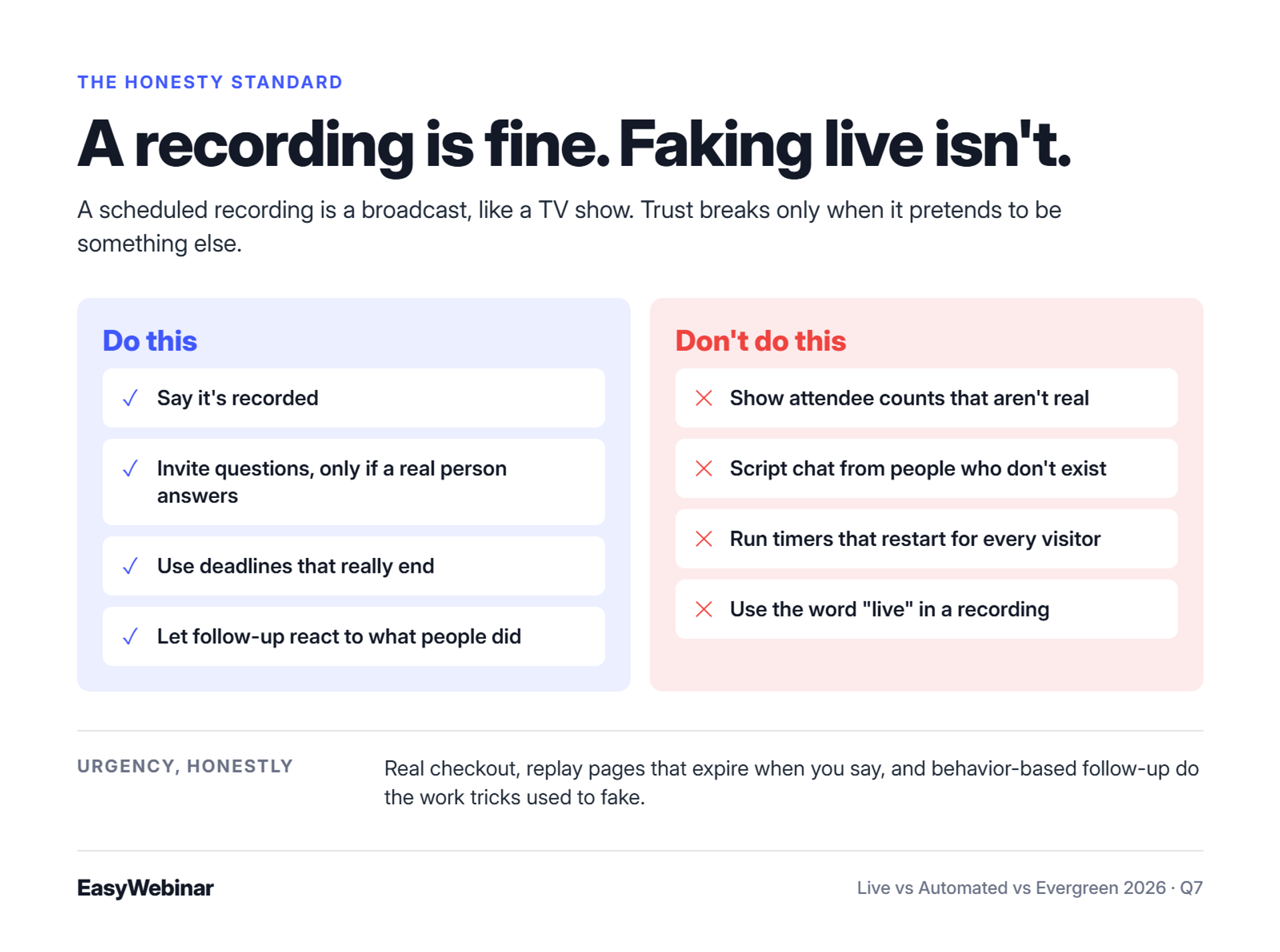
An automated webinar is not dishonest unless it is presented as live. A recording played on a schedule is a broadcast, like a TV show. Trust breaks when hosts add fake attendee counts, fabricated chat, countdown timers that reset, or claims of answering questions in real time. Present the recording honestly, and keep the offer and the deadline real.
Thinkific's guide to evergreen webinars names the biggest obstacle plainly. Buyers often see automated webinars as "fake" or "canned." That reputation was earned, and not by the format itself.
Where the "fake" reputation came from
⚠️ The tricks that earned it
- Inflated attendee counters that show 1,200 people watching at 3am.
- Scripted chat made to look like real attendees reacting.
- Countdown timers that reset every time the page reloads.
- Hosts who say "I'm here with you live" inside a recording.
Each trick borrows trust it never earned. Sophisticated buyers notice. In my experience, the buyers who notice are often the ones with the budget.
💸 The rules are tightening around fake signals
In August 2024, the FTC finalized a rule banning the purchase or sale of fake social media indicators, such as bot-generated views. It targets commercial misrepresentation of influence, not webinars directly. Still, a fabricated attendee count sits close to the same idea, so run any such feature past a lawyer.
The honesty standard I use
✅ Do this
- Say it's recorded. "This is my best session, recorded for you" works fine.
- Invite questions honestly. Thinkific notes many creators disclose the recording upfront and still invite questions. Do this only if a real person answers them.
- Use real deadlines. A replay page that actually expires, or a bonus that actually ends.
- Let follow-up do the personal work. A reply to what someone did beats a staged chat.
❌ Don't do this
- Show attendee numbers that aren't real.
- Script chat messages from people who don't exist.
- Run timers that restart for every visitor.
- Use the word "live" anywhere in a recording.
⭐ Why I'd rather lose the sale
EasyWebinar's rule for its own content is simple: an automated webinar is never presented as live. I'd rather lose a sale to honesty than win one I have to explain later. The offer and the presentation carry the sale anyway.
EasyWebinar keeps the honest version persuasive with real mechanics, not tricks. Built-in checkout runs through Stripe, PayPal, or PayU. Replay pages expire when you say they do. Follow-up responds to what each attendee actually did, so urgency comes from the offer, not a staged room.
Q8: Which format should you run? A decision rule by goal and business
Choose live if the offer is new, the date matters, or buyers need repeat contact. Choose a scheduled automated webinar if a proven session needs to run across more time zones. Choose evergreen if buyers should start right away, or customers need onboarding on demand. Cohort classes and accredited courses with certificates belong on a course platform, not a webinar platform.
Most format debates end the moment you name the outcome. HeyStream's decision guide puts it well. Pick automated when the topic is stable and viewers can succeed without a live conversation. Pick live when timing, a guest, or a launch moment matters.
Decision rule by goal
✅ If this is your goal, run this
| Your goal | Format | Why |
|---|---|---|
| Test a new offer | Live | You hear objections in real time |
| Launch with a real date | Live | The moment itself creates urgency |
| Close high-ticket buyers who need several touches | Live, repeated | Buyers return for new questions |
| Run a proven pitch across time zones | Scheduled automated | One recording serves many regions |
| Convert cold ad traffic quickly | Evergreen, Just-in-Time | Sessions start minutes after signup |
| Onboard customers every week | Evergreen, On-Demand | Customers start when they're ready |
Decision rule by business
⏰ What each motion usually needs
| Business | What the webinar does | Format path | EasyWebinar format |
|---|---|---|---|
| Course creators and coaches | Sell on autopilot | Live to prove, then evergreen | Live, then Just-in-Time |
| High-ticket coaches and consultants | Sell a program from a live session | Mostly live, replay for misses | Live, Instant Replay |
| Trainers and fitness practitioners | Sell seats to a paid workshop | Live paid session, then replays | Live, paid registration |
| SaaS and product teams | Turn the best demo into a 24/7 demo | Live demo, then on-demand | Live, then On-Demand |
| B2B marketing teams | Fill the CRM with pipeline | Live, then on-demand | Live, On-Demand |
| Customer success teams | Onboard customers on demand | Evergreen | On-Demand, Next Available |
Where a webinar isn't the answer
❌ Pick a different tool for these
EasyWebinar isn't the right fit for free hosting, open-source or self-hosted setups, podcast studios, accredited courses with certificates, internal all-hands, or investor-relations calls. Cohort classes belong on a cohort or course platform. EasyWebinar is not an LMS (learning management system, the software that tracks lessons and grades).
⭐ Pick by outcome, not identity
EasyWebinar's read is that buyers often choose a format by identity: "I'm a coach, so I go live." Outcome is the better filter. A coach onboarding new clients needs evergreen, while a coach launching a new program needs live.
EasyWebinar works as the conversion layer in front of your course platform. Host the course on Kajabi, Teachable, or Thinkific, then run the sales webinar in EasyWebinar and take payment inside the room. Jason Caruso made $14,000 from his first webinar.
Q9: Why run live and automated on one platform?
Running live and automated webinars in separate tools splits the handoff between them. WebinarJam hosts live webinars, while automated webinars run in its sister product, EverWebinar, which is sold as a separate product. EasyWebinar runs live, Simulive, Just-in-Time, and On-Demand webinars on one login and one subscription. Checkout happens inside the room, and attendee data flows into your CRM or EasyCRM.
Picture the night before a launch. A marketing lead has a webinar tab, an email tab, a CRM tab, and a Zapier dashboard open. One launch team caught a Zapier usage cap four hours before showtime. Their landing page showed 200 more registrants than the sales team's CRM did.
Every tool worked. The connections between them didn't.
The old way: one tool per job
❌ How the spaghetti funnel gets built
I've watched operators wire one funnel into the next until the whole thing becomes what I call a spaghetti funnel. It's a heavy lift, and dialing it in can take more than two months. Jon Penberthy puts the warning simply: "you don't want your sales funnels to look like the tube map."
The split-product version has the same problem. WebinarJam handles live sessions, and EverWebinar handles automated ones, on separate subscriptions. Moving a webinar from one to the other means exporting it between products. Bundles exist, but you still configure, connect, and report across two tools.
💸 What the split costs you
The bill is the visible cost. The hidden cost is data. Live attendees and automated attendees end up in different places, with different analytics, and each outside checkout redirect breaks the trail again.
What changed: the data has to stay whole
⏰ Revenue now lives in the handoff
Buyers now judge a webinar by what it produced afterward: who watched, who clicked, and who bought. That story only holds if one system sees every step. When live and automated viewers sit in different tools, you lose the comparison that tells you which format made money.
How EasyWebinar keeps the handoff in one place
✅ One session, one subscription, your CRM or ours
EasyWebinar turns the live session that converted into an automated webinar on the same platform. Built-in checkout through Stripe, PayPal, or PayU keeps the sale inside the room, so funnel data stays unified. Attendee engagement syncs to HubSpot, Salesforce Pardot (Account Engagement), ActiveCampaign, Mailchimp, Kit (formerly ConvertKit), or GoHighLevel. Teams without a CRM use EasyCRM natively.
| - | WebinarJam + EverWebinar | EasyWebinar |
|---|---|---|
| Live webinars | WebinarJam | Included |
| Automated webinars | EverWebinar | Simulive, Evergreen, Just-in-Time, On-Demand |
| Products to manage | Two (bundles available) | One |
| Live to automated | Export the recording between products | Switch the same session |
| Best for | One-off live launches (WebinarJam), or fully pre-recorded sessions (EverWebinar) | Running a session live, then automating it |
For a deeper side-by-side, see our EasyWebinar vs WebinarJam comparison.
⭐ What reviewers say on both sides
"The integration with my email service provider was seamless, and the automation just works." - Verified reviewer, April 15, 2025, EasyWebinar G2 - Verified Review
"We don't run webinars that often so the price of WebinarJam was very attractive." - Verified reviewer, WebinarJam TrustRadius - Verified Review
That second review is the honest case for a lighter setup. If you run occasional live launches and never plan to automate, WebinarJam alone may be enough.
⚠️ Check the plan before you switch
EasyWebinar's Launch plan is live only. Automation, EasyCRM, checkout, and EasyCast start on the Growth plan. If automating is the goal, compare platforms at that tier, not at the entry plan.
EasyWebinar keeps live, automated, checkout, and follow-up on one platform. The attendee who watched live and the one who watched at 3am land in the same record. Keep HubSpot, Salesforce Pardot (Account Engagement), or Kit (formerly ConvertKit), or use EasyCRM with lead scoring built in. Either way, you don't pay twice or migrate.
Frequently Asked Questions

Casey Zeman
Founder of EasyWebinar
About Author
Over the past decade, I've helped thousands of entrepreneurs, coaches, and consultants turn webinars into a predictable, powerful way to grow their audience, build trust, and scale, without the constant hustle. I created EasyWebinar because I couldn't find a system that combined authenticity, engagement, and automation the way I needed. So, I built one.
Related Posts

10 Best Community Engagement Platforms in 2026
Compare the 10 best community engagement platforms in 2026. Course creators, evaluate live hosting, analytics, and replay to pick your winner today.

10 Best Online Coaching Tools in 2026: Live Session Quality, Scheduling, Recording, and Client Engagement Analytics
Compare the 10 best online coaching tools of 2026 on session quality, scheduling, and analytics. Discover the right fit for your coaching revenue model.

10 Best Webinar Hosting Platforms Ranked by Uptime, Streaming Quality & Cost
Compare 10 webinar hosting platforms ranked by uptime, streaming quality, and cost. Discover which tool actually turns attendees into revenue.
Turn every webinar into a revenue stream
Launch your first paid event in just a few clicks - and start monetizing your expertise.
Book a Call