EverWebinar vs EasyWebinar: Comparing Evergreen Webinar Automation and Conversion Optimization Features

Casey Zeman
Published on Jul 3, 2026 • 28 min read

TL;DR
- EverWebinar plays pre-recorded webinars on a schedule, and live hosting needs WebinarJam, a separate product. EasyWebinar runs live and automated webinars on one login and one subscription.
- Prove the offer live first. Run 5 to 10 live webinars and reach about a 10% attendee-to-buyer rate before you automate the winning session.
- Just-in-Time scheduling is close on both platforms. The real difference is what surrounds the session: in-room checkout, behavior-based follow-up, and your CRM or EasyCRM.
- Never present a recording as live. Simulated chat and fake counters cost trust, while real chat, honest disclosure, and captions build it.
- Price the whole stack, not the sticker. Check live hosting, automation, pages, email, CRM, and checkout on each vendor's own pricing page on the same day.
- On G2 in October 2026, EasyWebinar rated 4.4 from 92 reviews and EverWebinar 3.9 from 21. Check scores live and read the 3-star and 4-star reviews first.
Q1. EverWebinar vs EasyWebinar: which should you actually choose?
Choose based on where your webinar is today. EverWebinar plays a pre-recorded session on a schedule and cannot host a live webinar on its own. Live hosting comes from WebinarJam, a separate Genesis Digital product. EasyWebinar runs the webinar live, then converts that recording into an automated series on the same platform, with one login and one subscription. If you will never run live, EverWebinar covers the job.
⏰ The question behind the question
EasyWebinar customers usually reach this comparison at the same moment. A coach has a recording of a session that sold, a calendar full of client calls, and an ad account ready to spend. The real question is not which tool is better. It is whether that recording has earned the right to run without them.
I put it to founders this way. An unproven offer needs a live room. A proven offer needs a machine that repeats it.
❌ The two-product path
The traditional route splits the job across two products. Operators prove the pitch live in WebinarJam, then load the winning recording into EverWebinar to replay on a schedule. Venture Harbour, which used EverWebinar for its own webinars, recommends exactly this sequence.
It works, but it means two dashboards, two setups, and two products to keep in sync. Some WebinarJam plans bundle EverWebinar access, so check which plan you hold before you buy anything.
"I love the partner service, everwebinar, (which you have to pay more for) that allows the participant to watch the webinar and feel as though it's a live webinar." - Tara G., June 2023, WebinarJam G2 - Verified Review
✅ What buyers judge a webinar on now
The scoreboard changed. Buyers now judge a webinar by what it produces after the live hour: replay sales, routed leads, and sessions running while the host sleeps.
EasyWebinar's read is that the live room and the automated room should share one setup. As I tell operators, EverWebinar, WebinarJam, and Demio all exist, but EasyWebinar was built to do both live and automated webinars in one place.
⭐ One platform from first test to daily replay
EasyWebinar runs both halves on one platform. Attendees join live sessions from a browser. When a session converts, EasyWebinar turns the recording into an automated series with more than nine scheduling options. Those include Just-in-Time sessions, which start at the next clock interval after someone registers.
"I can't be everywhere at once. EasyWebinar gives me the ability to multiply my efforts and offer a human touch, without having to be everywhere at once." - Ash A., March 2026, EasyWebinar G2 - Verified Review
"I'll be using this monthly for live webinars with the goal to move towards a completely automated funnel, which I'll be using it every day!" - Verified User in Photography, August 2025, EasyWebinar G2 - Verified Review
💰 Choose EverWebinar if, choose EasyWebinar if
| Choose EverWebinar if | Choose EasyWebinar if |
|---|---|
| Every session is pre-recorded and live is never in the plan | You want to test the offer live before you automate it |
| You already run WebinarJam for live events | You want live and automated webinars on one login and one subscription |
| Your CRM and checkout stack is settled | You want checkout inside the webinar and your CRM or EasyCRM |
EasyWebinar is built for the webinar that already works. Run it in every time zone, score and route the leads it brings in, and scale it without moving platforms. Carla Beisinger built $5M with one evergreen funnel on EasyWebinar.
Q2. What is the real architectural difference between the two platforms?
EverWebinar is a standalone automation engine. It schedules a pre-recorded video, recreates the format of a scheduled event, and shows timed offers, but it cannot host a live webinar without WebinarJam. EasyWebinar is one platform for live, simulive, evergreen, Just-in-Time, and on-demand webinars. A live session and its automated version share one login and one subscription on EasyWebinar.
⚠️ Three terms to pin down first
- Simulive: a pre-recorded video that plays at a scheduled time, using the same scheduling options as a live webinar.
- Evergreen: a pre-recorded webinar that plays in each attendee's local time zone, with Just-in-Time or Instant Replay options.
- Just-in-Time: a session that starts at the next clock interval after a visitor lands on the registration page.
EverWebinar's design is narrow on purpose. It takes an MP4 file or a past WebinarJam session and turns it into a scheduled event. WebinarJam users can import a replay in one click. For teams that never go live, that focus is a genuine strength.
✅ The side-by-side
| Capability | EverWebinar | EasyWebinar |
|---|---|---|
| Live webinar hosting | Not included; needs WebinarJam | Included; attendees join from a browser |
| Live to automated | One-click import of a WebinarJam replay | Converts a live recording into an automated series on the same platform |
| Automated formats | Recurring, Just-in-Time, and on-demand | Simulive, Evergreen, Just-in-Time, On-Demand, and Instant Replay |
| Time zones | Auto-detects each registrant's time zone | Recurring sessions adjust to each attendee's local time |
| Engagement layer | Chat simulation and dynamic attendee counters | Chat options set per evergreen webinar |
| Selling in the session | Timed offers and paid webinar support | Built-in checkout through Stripe, PayPal, or PayU, without leaving the webinar |
| Reminders | Built-in email and SMS reminders | Built-in email follow-up and reminders |
| CRM | Integrates with the WebinarJam ecosystem and standard CRMs | HubSpot and Salesforce Pardot (Account Engagement) sync, or built-in EasyCRM with lead scoring |
| Products for live plus automated | Two, unless your WebinarJam plan bundles EverWebinar | One |
⭐ Where the handoff actually costs you
EasyWebinar's experience with operators is that the expensive part is not either tool. It is the handoff between them. Every time a recording moves to a new product, the pages, offers, emails, and tracking have to be rebuilt or reconnected.
I have watched that handoff stall a launch for weeks. Nothing breaks loudly. A registration page points to the old session, or a follow-up email never fires, and the numbers quietly drop.
💸 What the split means for your stack
The two-product model asks you to manage the live product, the automation product, and whatever CRM and checkout sit behind them. Riverside's review sums it up: EverWebinar suits automated sales funnels but falls short if you need to host live events. Fitgap reaches the same conclusion for teams that need both formats.
That trade-off is fine if live is never in your plan. It gets expensive the day you want to test a new offer, price, or angle live. The test and the rollout then sit in different products.
EasyWebinar's difference is structural. A live run converts into Simulive, Evergreen, Just-in-Time, or On-Demand delivery on the same platform. The pages, offers, and data stay where they were built. Checkout and CRM sit beside the webinar instead of behind a connector.
Q3. Should you automate a webinar before you have proven it live?
No. Run 5 to 10 live webinars and reach about a 10% attendee-to-buyer rate before automating. Live sessions show which objections come up and which offers sell. EverWebinar and EasyWebinar both automate a recording, so the difference is where validation happens. EasyWebinar hosts the live runs and the automated version on one platform, so the winning session becomes the one that runs every day.
⏰ The course that sold nothing
EasyWebinar exists because of a webinar I almost did not run. I spent six months building a YouTube course, launched it, and heard crickets. The only thing that started sales was a webinar.
In my first year of live webinars, I built an email list of 14,000 people and sold $245,000 of that course. None of that would have happened if I had recorded a polished pitch on day one and walked away.
❌ The record-first habit
The common playbook runs backwards. Founders script a presentation, record it in one take, buy cold traffic, and switch on automation before a single live audience has pushed back. When it flops, they blame the tool, the ads, or the time slot.
At EasyWebinar, I call an automated webinar without traffic a billboard in the desert. An automated webinar with traffic and an unproven offer is worse. It is a billboard that burns ad spend every hour it runs.
⚠️ Where the experts split
Operators disagree here, and both sides have a point.
- Live first: Jeremy Haynes, who runs paid traffic for large webinar funnels, says automated webinars have recently underperformed live ones on cold paid traffic.
- Evergreen first: Yuri Elkaim argues that weekly live webinars become a time trap, and that one recorded webinar running daily scales further.
EasyWebinar's read is that they are describing different stages of the same webinar. Haynes is right about unproven offers on cold traffic. Elkaim is right about proven offers that you no longer need to present.
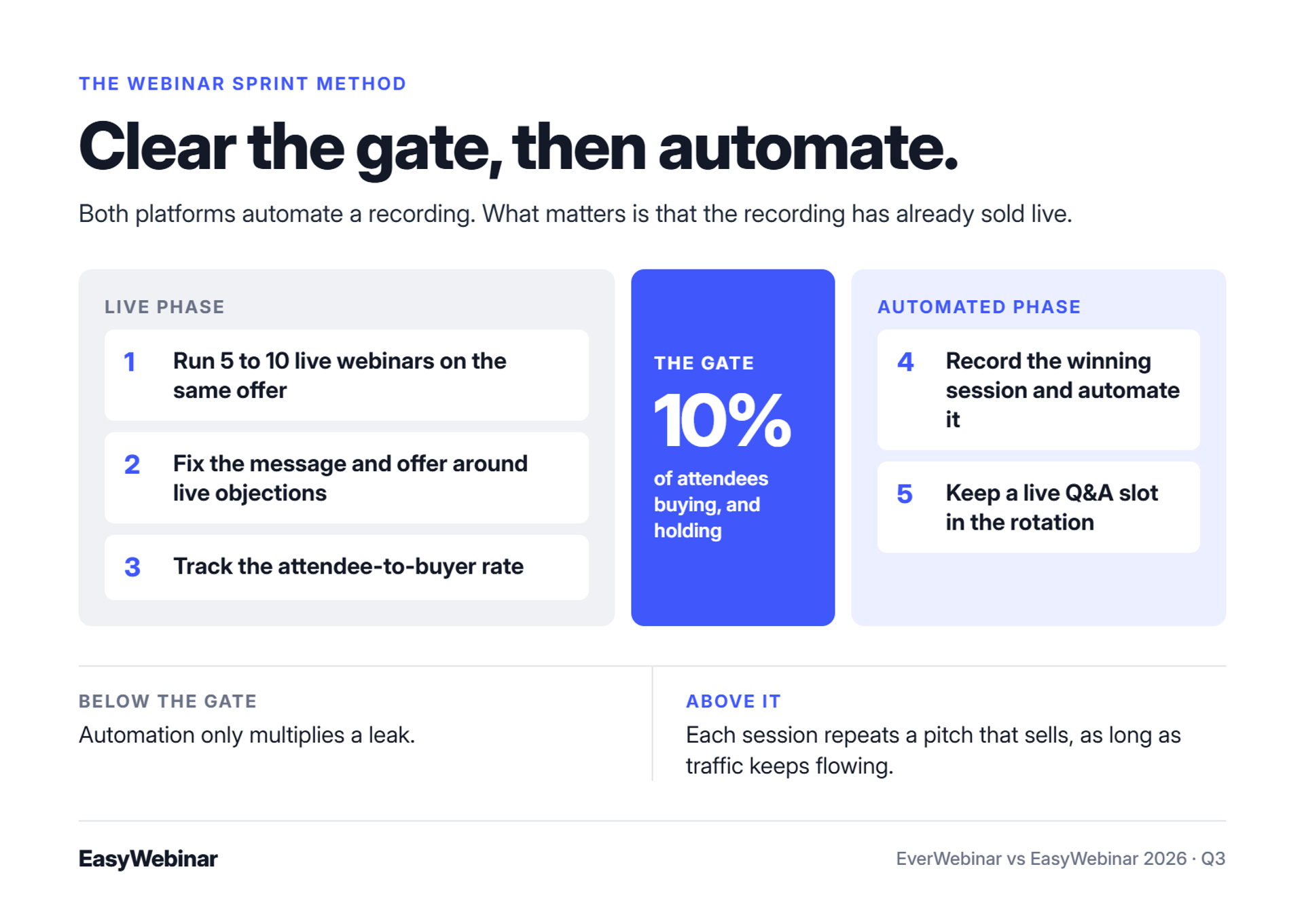
✅ The Webinar Sprint Method
At EasyWebinar, I reconcile both views with a simple sequence I call the Webinar Sprint Method.
- Run 5 to 10 live webinars on the same offer.
- Fix the message and the offer around the objections you hear live.
- Track the attendee-to-buyer rate until it holds at 10% or higher.
- Record the winning session and automate it.
- Keep a live Q&A slot in the rotation so the pitch stays fresh.
The 10% gate matters most. Below it, automation only multiplies a leak. Above it, each extra session repeats a pitch that already sells, as long as traffic keeps flowing.
⭐ What happens when the gate is cleared
EasyWebinar customer Laura C. ran live classes before switching to an evergreen version of the same course pitch. Her review describes the before and after in plain numbers.
"With my live class I used to sell 10-12 courses. With EasyWebinar I sold 25 courses within 3 weeks of my evergreen 'launch'." - Laura C., January 2025, EasyWebinar G2 - Verified Review
EasyWebinar lets you run the sprint live, then promote the winning recording to an Evergreen series without moving platforms. The same account converts a live recording into an automated series with more than nine scheduling options. Nothing gets exported, and nothing gets rebuilt in a second product.
Q4. How do just-in-time and evergreen scheduling compare?
Both platforms offer Just-in-Time sessions, which start at the next clock interval after a visitor lands on the registration page. Sessions display in the visitor's local time zone. EverWebinar also schedules recurring sessions every 15 minutes, every hour, or on specific days. EasyWebinar offers 15, 30, 45, or 60-minute Just-in-Time intervals, Instant Replay, "Next Available" sessions, and "Wait For It" block dates.
⏰ How Just-in-Time actually works
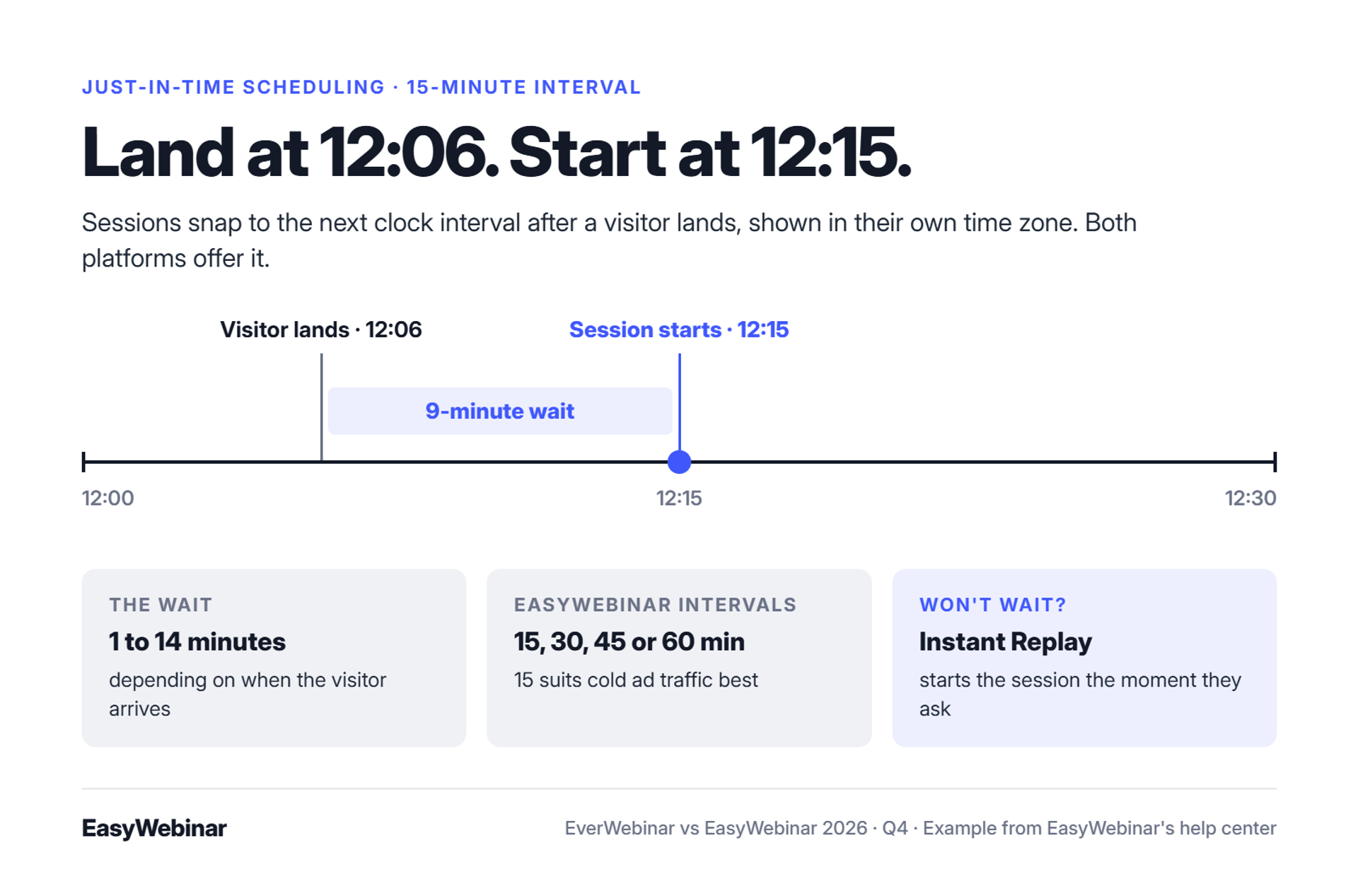
Just-in-Time scheduling shows a session that starts minutes after someone registers. EasyWebinar's support documentation gives a worked example. With a 15-minute interval, sessions align to :15, :30, :45, and the top of the hour.
A visitor who lands at 12:06 sees a 12:15 start, nine minutes away. Depending on arrival time, the wait runs from 1 to 14 minutes. That short gap captures people at peak intent, before an inbox or a meeting pulls them away.
✅ Scheduling options side by side
| Scheduling option | EverWebinar | EasyWebinar |
|---|---|---|
| Just-in-Time | Yes | Yes, at 15, 30, 45, or 60-minute intervals |
| Recurring sessions | Every 15 minutes, hourly, or specific days | Recurring schedules |
| Watch right away | On-demand access | Instant Replay and On-Demand access |
| Local time zone | Auto-detected per registrant | Recurring sessions adjust to local time |
| Scarcity dates | Not listed in current public sources | "Wait For It" block dates and "Next Available" sessions |
| Blackout days | Not listed in current public sources | Blackout dates for holidays or days off |
⚠️ Three settings worth getting right
EasyWebinar's support documentation covers each of these settings.
- Turn on Just-in-Time at the 15-minute interval. For cold ad traffic, shorter waits keep more registrants from drifting off. Showing only Just-in-Time times, with no future dates, keeps the choice simple.
- Limit the schedule options shown. Settings, then Number of Schedules Available, controls how many times a registrant sees.
- Add Instant Replay for people who will not wait. It lets a visitor start watching at once instead of waiting for the next slot.
I treat this like scheduled TV programming. A show that starts in nine minutes gets watched. A show that starts Thursday gets forgotten.
💸 What reviewers flag
Scheduling depth is close between the two, and reviewers on both sides want more from it. One EverWebinar fan still asked for Just-in-Time schedule code. A 2021 EverWebinar review reported problems after changing a webinar's schedule.
"We would love to have schedule code for Just in Time webinar." - GetApp reviewer, "So Glad We Bought EverWebinar (from WebinarJam)," EverWebinar GetApp - Verified Review
"We were told that we should not have cloned webinars or changed their schedule, as there are known issues with this feature." - Kaylen M., August 2021, EverWebinar G2 - Verified Review
Kaylen's review is from 2021, so test cloning and schedule changes on the current version before you rely on them.
"The only downside is that to have the 'just in time' feature you have to pay a premium that is about double the price of the basic subscription." - Laura C., January 2025, EasyWebinar G2 - Verified Review
EasyWebinar runs Just-in-Time sessions in each attendee's own time zone, with Instant Replay for people who will not wait. Automation, including Just-in-Time, starts on the Growth plan, because Launch is live only. The scheduling is close to EverWebinar's. The difference sits around the session: the live test, the automated rollout, and the follow-up share one platform.
Q5. Should an automated webinar pretend to be live, and is it accessible?
An automated webinar should never claim to be live. Simulated chat and attendee counters can create urgency, but they cost trust once viewers notice. Some industries and ad channels restrict simulated live events. The University of Bath reports that EverWebinar does not natively caption pre-recorded evergreen webinars. EasyWebinar's Simulive format plays a pre-recorded video on schedule with live chat and Q&A, so a real person can answer questions.
⏰ The question that repeats every session
At EasyWebinar, operators ask me about this tactic more than almost any other. Picture a recording at minute 22. A chat message pops up asking about pricing, from the same "attendee" who asked it yesterday and the day before.
Most viewers never notice. The one who watches twice does, and that viewer is often your most interested buyer. You lose the person you most wanted to keep.
❌ The old playbook: manufactured activity
Automation tools grew up copying the feel of a live room. EverWebinar's feature set includes chat simulation and dynamic attendee counters, which show a number of "people watching" that the host sets. The goal is social proof: the sense that others are in the room and buying.
One independent review of EverWebinar put it bluntly. The machinery works, but its default theater costs trust the moment it is noticed. Fake activity buys urgency on the first viewing and spends credibility on every viewing after.
⚠️ What changed: trust, policy, and access
Three things now make the old playbook riskier:
- Trust: buyers have seen enough automated funnels to spot repeated chat lines.
- Policy: Fitgap notes that some industries and advertising channels may restrict or prohibit simulated live events.
- Access: closed captions (on-screen text of what the presenter says) help deaf and hard-of-hearing viewers, and anyone watching on mute.
The University of Bath, which runs "as-live" sessions on EverWebinar, publishes a plain disclosure page. It says the sessions are pre-recorded, that simulated chat questions are sometimes added, and that native captions are not available. Bath points viewers to Chrome's Live Captions instead.
✅ Keep a real person in the room
EasyWebinar's rule, and mine, is simple: never call a recording live. The format can still be interactive. EasyWebinar's Simulive webinars pair a pre-recorded video with live chat and Q&A, so a moderator can answer real questions as they arrive.
EasyWebinar's evergreen settings also let you control chat options and visibility for each webinar. That puts the choice where it belongs, with you. My advice is to use chat for real answers, not staged ones.
Captioning is worth checking on every platform you shortlist, EasyWebinar included. Ask the vendor how captions work for pre-recorded sessions before you commit.
⭐ A disclosure line that costs you nothing
Bath's page shows that honesty and engagement can coexist. It answers "Is it live?" plainly, then explains that real-time help is still available through chat. A single line on your registration page does the same job: "This session is pre-recorded. Questions in chat go to our team."
EasyWebinar's Simulive format keeps a person in the chat while the recording plays, so questions get real answers instead of scripted ones. Evergreen chat settings are set per webinar, so you decide how much interaction each session shows. The session sells on the strength of the offer, not on a counter that someone can catch.
Q6. What happens to your leads after the webinar ends?
Much of a webinar's revenue arrives after the session, through follow-up emails and sales calls. Stacks that pass registrants through middleware (connector tools such as Zapier) can break without warning. One ad agency found a few hundred missing opt-ins four hours before a webinar, after its Zapier plan hit its limit. EasyWebinar sends behavior-based follow-up from inside the platform and syncs attendees to an outside CRM or to EasyCRM, which includes lead scoring and an auto-dialer.
⏰ The four-hour discrepancy
Jeremy Haynes runs paid traffic for large webinar funnels, with ad budgets around $80,000 for a single webinar. Before one event, his team compared opt-ins on the landing page with contacts in the CRM. A couple of hundred people were missing.
The cause was not the webinar tool. Their Zapier plan had hit its cap, so registrations stopped flowing to the CRM that sales reps were dialing from. They caught it four hours before showtime. Most teams would not have.
❌ The monster funnel
The old instinct is to fix follow-up with more branches. Jon Penberthy describes mapping a "monster funnel" across his office floor, with dozens of conditional email paths. It took months to build, broke often, and sold less than a simple sequence.
EasyWebinar's read is that this is the most expensive mistake in post-webinar work. Every branch adds a link that can fail and a tool that can disconnect. Simple scales; fancy fails.
✅ What works now: short, linear, and deadline-driven
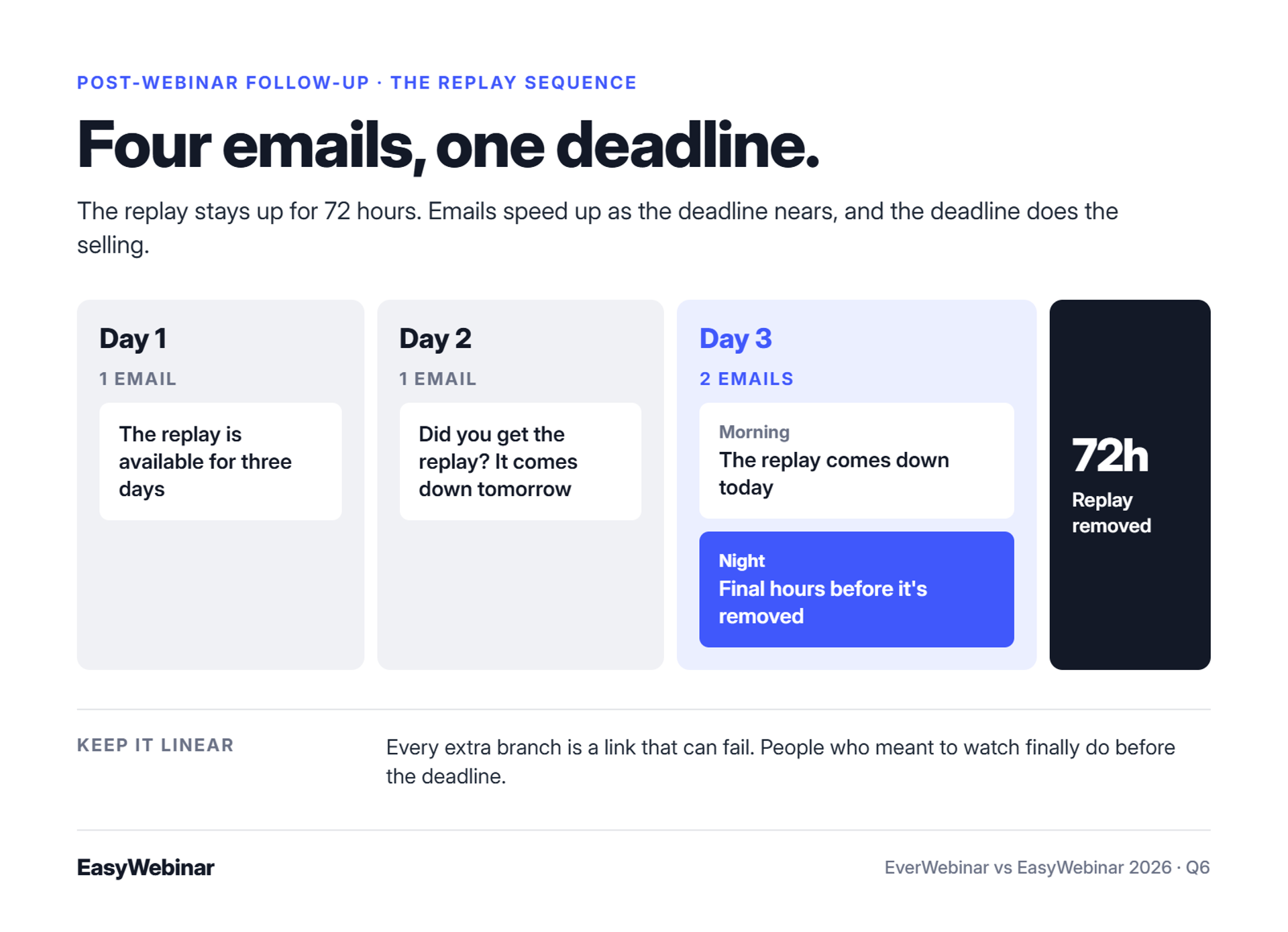
At EasyWebinar, the follow-up I recommend most is a 72-hour replay window with four emails:
- Day 1: one email. The replay is available for three days.
- Day 2: one email. Checking you got the replay, and it comes down tomorrow.
- Day 3, morning: the replay comes down today.
- Day 3, night: final hours before the replay is removed.
The deadline does the selling. People who meant to watch finally do.
⭐ Follow-up that reacts to behavior
EasyWebinar sends each attendee the next message their behavior earned. No-shows, early leavers, offer-clickers, and replay viewers can each get a separate sequence. Contacts sync to HubSpot or Salesforce Pardot (Account Engagement) on Pro, or stay in EasyCRM.
"The integration with my email service provider was seamless, allowing me to automate a follow-up sales sequence once someone watches the webinar." - Jennifer B., April 2025, EasyWebinar G2 - Verified Review
"I do use other email systems to send post-webinar email sequences because I can't track open and click rates on EasyWebinar." - Eliza W., February 2026, EasyWebinar G2 - Verified Review
"The integrations with 3rd party software such as mailchimp is inconsistent on both the pushing the registrants over and the custom form field population." - Tara G., June 2023, WebinarJam G2 - Verified Review
Eliza's point is fair. If open and click tracking matters to you, keep your email platform and let EasyWebinar pass it the attendee data.
EasyWebinar keeps follow-up beside the webinar instead of behind a connector. Built-in sequences cover no-shows, early leavers, offer-clickers, and replay viewers, while EasyCRM adds lead scoring and an auto-dialer for teams without a CRM. Teams that already run HubSpot or Salesforce Pardot (Account Engagement) can sync there instead. Fewer handoffs mean fewer places for a lead to disappear.
Q7. Which converts better inside the room: timed offers or in-room checkout?
Both platforms show timed offers, which are buttons that appear at a set minute of the presentation. The difference to check is where the buyer pays. A redirect to an outside checkout adds a step at peak intent and splits funnel data across tools. EasyWebinar takes payment inside the webinar through Stripe, PayPal, or PayU, so the sale, the attendee, and the data stay in one place.
⏰ Minute 47
At EasyWebinar, I think of the pitch as one minute that pays for the whole hour. The story has landed, the objections are answered, and the offer appears. Everything before that minute is setup.
What happens next decides the sale. If the buyer clicks into a new tab, waits for a page, and re-enters their email, some of them stop. They did not decide against you. They just got interrupted.
❌ The old way: interruptions at the worst moment
Many automated funnels still send buyers away from the room to pay. One EverWebinar review from 2018 described a worse problem: the platform added its own rating screen and a WebinarJam link at the end of the session.
"They ask people to rate the webinar (not information I want - and it distracts from my message and the action I'm paying Everwebinar to get across)." - Verified User in Health, Wellness and Fitness, July 2018, EverWebinar G2 - Verified Review
That review is eight years old, so check how EverWebinar handles the end screen today. The lesson still holds. Anything that competes with your offer at the close costs sales.
✅ What changed: the room has to hold until the offer
Buyers now judge a webinar on revenue, not clicks. That means two jobs: keep people watching until the offer, then let them buy without leaving.
At EasyWebinar, my target is 80% of peak attendance still watching when the pitch starts. The simplest way to get there is a bonus download announced early and given only to people who stay to the end. It costs nothing and holds the room.
⭐ Sell inside the room
EasyWebinar's built-in checkout and offer overlays let attendees pay without leaving the webinar window. Payments run through Stripe, PayPal, or PayU, and you can keep a checkout you already use, such as SamCart or ThriveCart. Paid and ticketed webinars run on the same checkout.
| In-session selling | EverWebinar | EasyWebinar |
|---|---|---|
| Timed offers | Yes | Yes, timed CTAs and offer overlays |
| Payment | Paid webinar support; one review site lists integrated payment processing | Built-in checkout via Stripe, PayPal, or PayU |
| Paid webinars | Supported | Supported, with ticketing |
"I love that we can have a poll, offer and countdown right in the event! That's going to be so great for sales and interactions." - Verified User in Photography, August 2025, EasyWebinar G2 - Verified Review
"I love the built-in countdown offers and polls as well." - Annette S., October 2024, EasyWebinar G2 - Verified Review
💰 Why the data matters as much as the sale
EasyWebinar keeps the purchase in the same record as the attendee's watch time and offer clicks. When checkout lives elsewhere, that link breaks, and you cannot tell which minute of the webinar produced the buyer.
EasyWebinar's checkout keeps the buyer in the webinar at the moment they decide, through Stripe, PayPal, or PayU. Because the sale stays beside the attendee record, you can see which session, offer, and minute produced it. That is the difference between knowing your webinar sells and knowing why it sells.
Q8. How do you know your evergreen webinar is actually converting?
Track revenue per attendee, not attendance. Two useful cold-traffic benchmarks are a 30% registration rate and an $8 to $12 cost per lead. Rick Mulready hit both running daily Facebook ads into an automated EasyWebinar funnel, for a 166% ROI. EasyWebinar reports attendee-level watch time, offer clicks, and purchases, with revenue attributed to each webinar.
⏰ The dashboard that looks fine
At EasyWebinar, I see the same report every week. Registrations are up, attendance looks healthy, and nobody can say what the webinar earned. The team is measuring the room, not the result.
Registrations and show-up rate matter, but they are inputs. Revenue per attendee (total webinar sales divided by people who attended) is the number that tells you whether to buy more traffic.
❌ The old way: exports and guesswork
Most operators still stitch analytics together by hand. They export attendance from the webinar tool, pull sales from the checkout, and match them in a spreadsheet. By the time it is done, the next session has already run.
EverWebinar does give automated webinar owners useful detail, including per-minute drop-off markers and registration page split testing, according to one review site. The gap appears when the sale happens in another tool and never meets that data.
⚠️ What changed: replays and on-demand now carry the weight
On-demand viewing is no longer a side channel. ON24's 2025 benchmarks found that 45% of attendees chose to watch on demand. The same report found that automated nurture sequences drove 69% higher on-demand attendance.
That means replay viewers belong in the same report as live attendees. EasyWebinar splits live and replay attendee data for evergreen webinars, so you can compare the two groups.
✅ What EasyWebinar measures
EasyWebinar tracks each attendee's watch time, questions, poll answers, offer clicks, and purchases, then attributes revenue to the webinar. Leads are scored Hot, Warm, or Nurture, so sales calls the warmest people first.
The use case I teach most is drop-off threshold work. Set a watch-time threshold, find the minute where people leave, and fix that segment of the presentation. Then rerun and compare.
For example, if a large share of viewers leave during a long origin story, cut it in half. If they leave right after the price appears, the offer needs work, not the slides.
"Analytics splits out live and replay attendee insights for evergreen webinars." - Verified User in Professional Training & Coaching, November 2024, EasyWebinar G2 - Verified Review
"Replay insights aren't currently captured on live webinars (not sure why?)." - Verified User in Professional Training & Coaching, November 2024, EasyWebinar G2 - Verified Review
"The detailed analytics are great as they save me the hassle of calculating KPIs." - Eliza W., February 2026, EasyWebinar G2 - Verified Review
💰 Proof from cold traffic
Rick Mulready ran Facebook ads every day into an automated EasyWebinar funnel. He held a 30% registration rate at $8 to $12 per lead and reached a 166% ROI on cold paid traffic. Those are the numbers I would hold any cold-traffic funnel against.
EasyWebinar scores leads Hot, Warm, or Nurture and separates live attendee data from replay data, so sales knows who to call first. Revenue is attributed back to the webinar that produced it. That turns the question "is it working?" into a number you can check every Monday.
Q9. What does each platform cost once you price the whole stack?
Compare the stack, not the sticker price. EverWebinar is sold as one standalone automation product with one feature set and several billing terms, including annual and two-year plans. Live hosting comes from WebinarJam, a separate product. EasyWebinar uses flat monthly pricing with no per-attendee fees. Automated webinars, checkout, and EasyCRM start on its Growth plan. Prices change, so check both live pricing pages on the day you decide.
⚠️ Why the sticker price misleads
A webinar platform is only one line on the bill. A selling webinar also needs registration pages, reminder emails, and a way to take payment. It needs a CRM (customer relationship manager) to track leads and deals. Each extra tool adds a subscription, a connector, and a place for data to get lost.
Public price data for EverWebinar also disagrees across sources. Two review sites list different annual figures for the same product. That is the strongest reason to price from each vendor's own page, on the same day.
✅ The stack, job by job
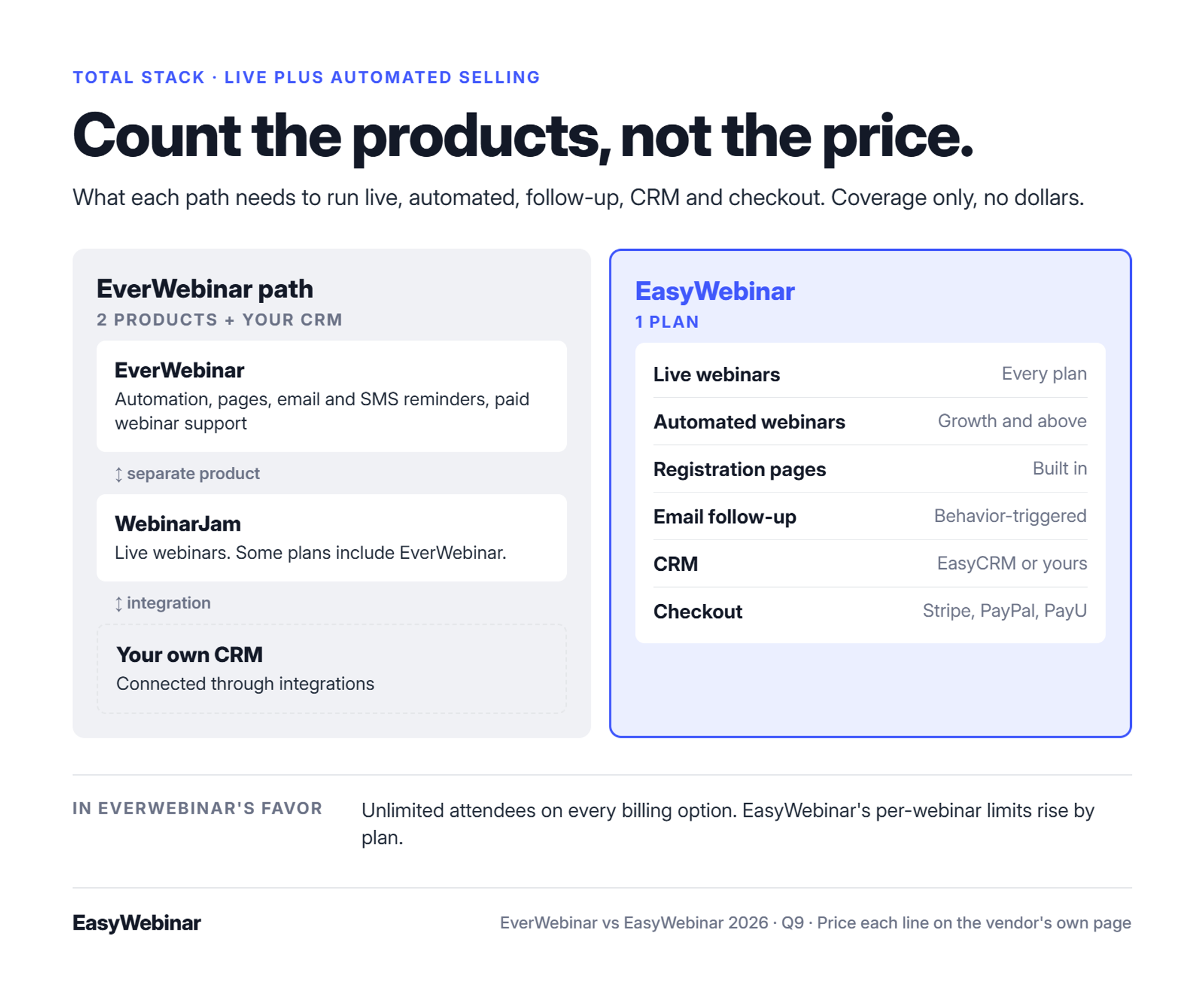
The table maps each job in a selling webinar to the product that covers it. It shows coverage, not dollars.
| Job in the funnel | EverWebinar path | EasyWebinar |
|---|---|---|
| Automated webinars | EverWebinar | Growth plan and above |
| Live webinars | WebinarJam, a separate product; some WebinarJam plans include EverWebinar | Every plan, including the live-only Launch plan |
| Registration pages | Built in | Built in |
| Reminders and follow-up | Built-in email and SMS reminders | Built-in email follow-up and behavior-triggered sequences |
| CRM | Your own CRM through integrations | Your CRM, or built-in EasyCRM with lead scoring |
| Checkout | Paid webinar support | Built-in checkout via Stripe, PayPal, or PayU |
| Attendee limits | Unlimited attendees on every billing option | Per-webinar limits that rise by plan |
EverWebinar's unlimited-attendee model is a real advantage for high-volume replay funnels. Weigh it against what you add on top.
💰 How to price your own stack in five steps
- List every job. Live hosting, automation, pages, email, CRM, and checkout.
- Price each job from the vendor's own pricing page, on the same day.
- Add the hidden lines. Payment processing fees, connector plans such as Zapier, and any per-attendee charges.
- Price at your real volume. Run the numbers at 100, 500, and 1,000 attendees per webinar.
- Read the billing terms. Check monthly versus annual options and how cancellation works.
At EasyWebinar, I push operators to do step three before anything else. The connector plan is the line most teams forget, and it is the one that failed Jeremy Haynes four hours before a webinar.
💸 The premium question
EasyWebinar is priced as a broader platform than a standalone automation player, because it covers more jobs. My honest answer to "is it worth it?" is that it depends on whether your webinars produce revenue or pipeline. If they do, compare total cost of the stack. If they do not yet, start with the live-only plan and prove the offer first.
EasyWebinar never cuts a webinar off at the plan limit. Extra attendees are billed as overage under its terms. Automation starts at Growth, while Launch covers live webinars only. Pages, email, checkout, and EasyCRM sit on that one bill instead of four.
Q10. What do real users say about each platform?
On G2's comparison page, checked in October 2026, EasyWebinar held 4.4 out of 5 from 92 reviews and EverWebinar held 3.9 from 21. G2 reviewers preferred EasyWebinar on meeting business needs, ongoing support, and product direction. EverWebinar reviewers credit how easily it turns a recording into an automated event. Several also say it has not added major features in years. Findstack shows different scores for both tools.
✅ The ratings, side by side
| Source (checked October 2026) | EasyWebinar | EverWebinar |
|---|---|---|
| G2 comparison page | 4.4 from 92 reviews | 3.9 from 21 reviews |
| Findstack | 3.8 from 24 reviews | 4.0 from 20 reviews |
| Capterra feature score | Not shown on this page | 3.9 for features |
Two notes before you lean on these numbers. Small review counts swing easily, so a few new reviews can move a score. Ratings also change weekly, so pull them live on the day you decide.
EasyWebinar's own site shows a G2 badge with a different count than the comparison page, because the figures were captured at different times. That is normal, and it is why dated numbers matter.
⭐ What EverWebinar users praise and criticize
EverWebinar's strongest reviews come from operators who already had a proven webinar. They describe connecting a recording and letting it run on a schedule, and some report earning back the subscription on high-ticket products.
"We've been able to easily make back the money that EverWebinar costs with selling $300 products up to $2000 products." - EverWebinar user, EverWebinar TrustRadius - Verified Review
"They haven't added big features for a long time, and they are lagging many other providers." - Reviewer, "From one of the best to just average," 4.0/5, EverWebinar Software Advice - Verified Review
Older G2 reviews from 2018 and 2021 also describe setup bugs, cloning problems, and slow email support. Weight those by date.
⚠️ How to read reviews before you buy
At EasyWebinar, I tell operators to read reviews in a set order before trusting any score:
- Sort by most recent. Software changes fast, and a 2018 complaint may describe a product that no longer exists.
- Read the 3-star and 4-star reviews first. They usually name the real trade-offs.
- Match the reviewer's use case. An evergreen seller and a live trainer need different things.
⭐ What EasyWebinar users praise and criticize
EasyWebinar reviews return to support again and again, especially during evergreen setup. Reviewers name individual support staff who walked them through their first automated webinar.
"Every time I hit a snag as I was creating my first webinar, he was there to help me so swiftly." - Ajarae C., December 2024, EasyWebinar G2 - Verified Review
"The biggest challenge is around setting up automated webinars, and needing the presentation uploaded first in order to set it up." - Ash A., March 2026, EasyWebinar G2 - Verified Review
Other EasyWebinar reviewers flag limits worth knowing: no open and click tracking on built-in emails, and time zone display tied to plan level. At EasyWebinar, I would rather you read those before you buy than after.
EasyWebinar reviewers most often credit responsive, hands-on support during evergreen setup. The G2 comparison favors EasyWebinar on support and roadmap, based on reviews checked in October 2026. Read the critical reviews too, then decide which trade-offs you can live with.
Frequently Asked Questions

Casey Zeman
Founder of EasyWebinar
About Author
Over the past decade, I've helped thousands of entrepreneurs, coaches, and consultants turn webinars into a predictable, powerful way to grow their audience, build trust, and scale, without the constant hustle. I created EasyWebinar because I couldn't find a system that combined authenticity, engagement, and automation the way I needed. So, I built one.
Related Posts

10 Best Community Engagement Platforms in 2026
Compare the 10 best community engagement platforms in 2026. Course creators, evaluate live hosting, analytics, and replay to pick your winner today.

10 Best Online Coaching Tools in 2026: Live Session Quality, Scheduling, Recording, and Client Engagement Analytics
Compare the 10 best online coaching tools of 2026 on session quality, scheduling, and analytics. Discover the right fit for your coaching revenue model.

10 Best Webinar Hosting Platforms Ranked by Uptime, Streaming Quality & Cost
Compare 10 webinar hosting platforms ranked by uptime, streaming quality, and cost. Discover which tool actually turns attendees into revenue.
Turn every webinar into a revenue stream
Launch your first paid event in just a few clicks - and start monetizing your expertise.
Book a Call