Everwebinar Platform Review: Based on Reviews across G2, Capterra and Reddit

Casey Zeman
Published on Sep 4, 2026 • 29 min read
TL;DR
- EverWebinar holds roughly 3.9 out of 5 on both G2 and Capterra, with ease of use at 4.0 but customer service at only 3.3 and 60% recommending it.
- Public pricing contradicts itself across six figures, from 499 dollars yearly and 799 dollars biennially to 199, 99, and 79 dollar monthly equivalents, with no permanent free plan.
- EverWebinar cannot run live sessions, so operators needing both formats buy WebinarJam separately, pushing a realistic funnel toward 998 dollars yearly across two logins.
- The dealbreakers are support depth and a documented clone-and-reschedule bug that duplicates chat, stops registrant emails, and disables pop-ups mid-series.
- Automation multiplies whatever conversion you already have, so validate live to a 10% attendee-to-buyer rate across five to ten sessions before automating anything.
- Reviews miss stack failures, including low email deliverability that forces manual SMTP, automation quota ceilings dropping opt-ins, and unique-link errors across IP addresses.
Q1. What do EverWebinar reviews on G2, Capterra and Reddit actually say in 2026?
I built a YouTube course once. It took six months. When I launched it, nobody bought. Crickets.
The only thing that ever moved that product was a webinar. That memory is why I read review pages a certain way. I skip the average and hunt for the sentence describing 4pm the day before a launch.
EverWebinar holds roughly 3.9 out of 5 on G2 across 21 reviews, and 3.9 out of 5 on Capterra across 8 reviews. A cross-platform weighted aggregate lands near 3.85 from 47 reviews. The sub-ratings repeat the same shape: ease of use 4.0, customer service 3.3, and value for money 3.6. Only 60% of Capterra reviewers would recommend it. Reddit discussion is thin, and the main indexed thread predates 2023.
1.1 The numbers across all three platforms
📊 What each surface actually reports
Small samples make averages fragile. Eight Capterra reviews is not a verdict, it is a signal. EasyWebinar publishes hands-on ratings for 15 webinar platforms with each tool's known limitation listed beside it, which is the same disclosure standard I am applying to EverWebinar here.
1.2 Why the ease-of-use versus support split is the whole story
⚠️ Easy until something breaks
A 4.0 ease-of-use score next to a 3.3 support score tells you exactly one thing. Setup is genuinely simple. Recovery is not.
"It's quite easy to use. Interface is simple and you can get an evergreen webinar running in under 15 minutes."- Andrés J G., EverWebinar Capterra - Verified Review
That same reviewer rated customer service 2.0 and value for money 2.0. One reviewer's praise and complaint sitting in the same entry is the honest picture. My read is that this platform rewards operators who never need help.
1.3 The Reddit evidence gap, stated plainly
🔍 What is genuinely missing
I went looking for current operator threads and did not find them. The most substantive indexed Reddit discussion is a 2022 post asking whether EverWebinar was still worth paying for.
"EverWebinar Review: Is it Still Worth Paying for in 2022?"- Thread title, r/systeme_io Reddit Thread
I could be wrong about how much that silence means. Four-year-old community evidence is not the same as no evidence. It does mean any 2026 article claiming fresh Reddit consensus is inventing it.
EasyWebinar's published platform review set names every tool's weakness alongside its strength, including its own, because a review page that only surfaces praise is a sales page wearing a lab coat. Operators comparing the field can start with our webinar platform comparison hub.
Q2. What do EverWebinar users consistently praise?
Three strengths show up again and again in verified reviews. Setup speed. Simulated-live interaction. Behaviour-based tagging.
Reviewers report getting an evergreen webinar running in under 15 minutes, with step-by-step setup pages and grouped settings tabs. They praise simulated-live chat, polls, and Q&A that make a recording feel like a real event. Several highlight attendee tagging that triggers different follow-up sequences based on behaviour. One G2 reviewer runs sessions "ready to join for anyone every 15 minutes."
2.1 Setup speed is the real product
⏰ Fifteen minutes to a running funnel
"Configuring a pre-recorded webinar is quick and easy thanks to the step-by-step setup pages. The interface stays simple and intuitive by grouping features and settings into clear main tabs."- Verified Reviewer, EverWebinar G2 - Verified Review
The operator job here is time-to-launch. Every week a funnel sits unbuilt is a week of no data. EasyWebinar's AI webinar builder attacks the same job from a different angle, generating the script, registration pages, reminder emails, polls, and follow-up from a roughly 12-question flow.
2.2 Simulated live solves a problem I lived
🎥 Why recordings beat repetition
Live webinars take time. You show up, you fight the tech, and you repeat the same presentation until you can recite it in your sleep. Someone can also walk behind you undressed, or your kid can throw ketchup on your face mid-pitch.
"You can run automated webinars and at the same time add interaction with live chat and Q&A, to simulate real live events. Hosting is done for you, so there's nothing technical you need to think about."- Verified Reviewer, EverWebinar Capterra - Verified Review
That reviewer rated the product 5 out of 5 across every sub-score. The instinct behind simulated live is correct. I have never once seen the category get punished for automating delivery, which is the same case we make for live versus automated webinars.
2.3 Tagging turns attendance into follow-up
🏷️ The feature reviewers name unprompted
"I can 'tag' every participant based on activity and then send them different email auto responders based upon their activity. I haven't seen this in other webinar software."- Verified Reviewer, EverWebinar G2 - Verified Review
Behaviour data is the difference between a list and a pipeline. EasyWebinar measures this at attendee level, tracking watch time, poll responses, offer clicks, and drop-off, then feeds those signals to lead scoring inside our built-in sales CRM.
EasyWebinar runs the same simulated-live model across nine webinar formats, including Simulive, Evergreen, Just-in-Time, On-Demand, Instant Replay, and Recurring "Next Available," inside one account rather than two.
Q3. Which EverWebinar complaints are cosmetic and which are dealbreakers?
Two complaints are dealbreakers. EverWebinar's Capterra customer service score sits at 3.3 out of 5, and one G2 reviewer needed 18 emails across two escalations before receiving any resolution, with no restitution offered. The clone-and-reschedule bug duplicates chat messages, stops registrant emails, and disables pop-ups, while the clone button sits prominently on every dashboard. A clunky, aging interface is cosmetic by comparison.
3.1 Support is the failure that compounds
💸 What 18 emails actually costs
"It took 10 emails to get the above issue even figured out... We were then told after another 8 email escalation there was no refund policy or restitution for lost attendees, poor user experience, or the time lost by our team having to manually recreate and re-invite all attendees to 5 events."- Kaylen M., EverWebinar G2 - Verified Review
Five events rebuilt by hand. That is not a support ticket, that is a fortnight. EasyWebinar's own reviewers name support as the reason they stay, including one who values being able to get a real human on a Zoom call.
"It's rare to find a platform where you can actually hop on a Zoom call with a real human. Their team is responsive, helpful, and genuinely invested in my success."- Jennifer B., EasyWebinar G2 - Verified Review
3.2 The clone bug is a data-integrity problem
❌ A button that should not be there
The mechanics matter here. Cloning a webinar and changing its schedule creates known errors, and that warning lives buried in documentation rather than on the button.
I want to be fair about this. That review is from 2021 and the bug may be fixed. Nobody at the company has published a public changelog entry saying so, which is its own answer.
3.3 Live-day support has no real-time channel
🚨 Email is not a launch-day channel
"When things don't work or participants log in late there is no way to get help or reach support except via email which obviously is not an ideal scenario in a live event."- Verified User in Market Research, EverWebinar G2 - Verified Review
Judge a platform by its worst day, not its demo. That standard is why our live webinar software is built around a real-time production room rather than a scheduled playback engine.
3.4 The honest counterweight
✅ Reviewers who stayed for years
Plenty of operators report years of trouble-free use, calling it "constantly tweaked and still the most reliable tool on the market" for pre-recorded events. Both things are true at once. Stable for the operator who never changes anything, and brittle for the one who iterates weekly.
EasyWebinar hosts video on in-house storage rather than a third-party dependency, so sessions do not break when an external service changes its behaviour.
Q4. What does EverWebinar really cost once you add live webinars?
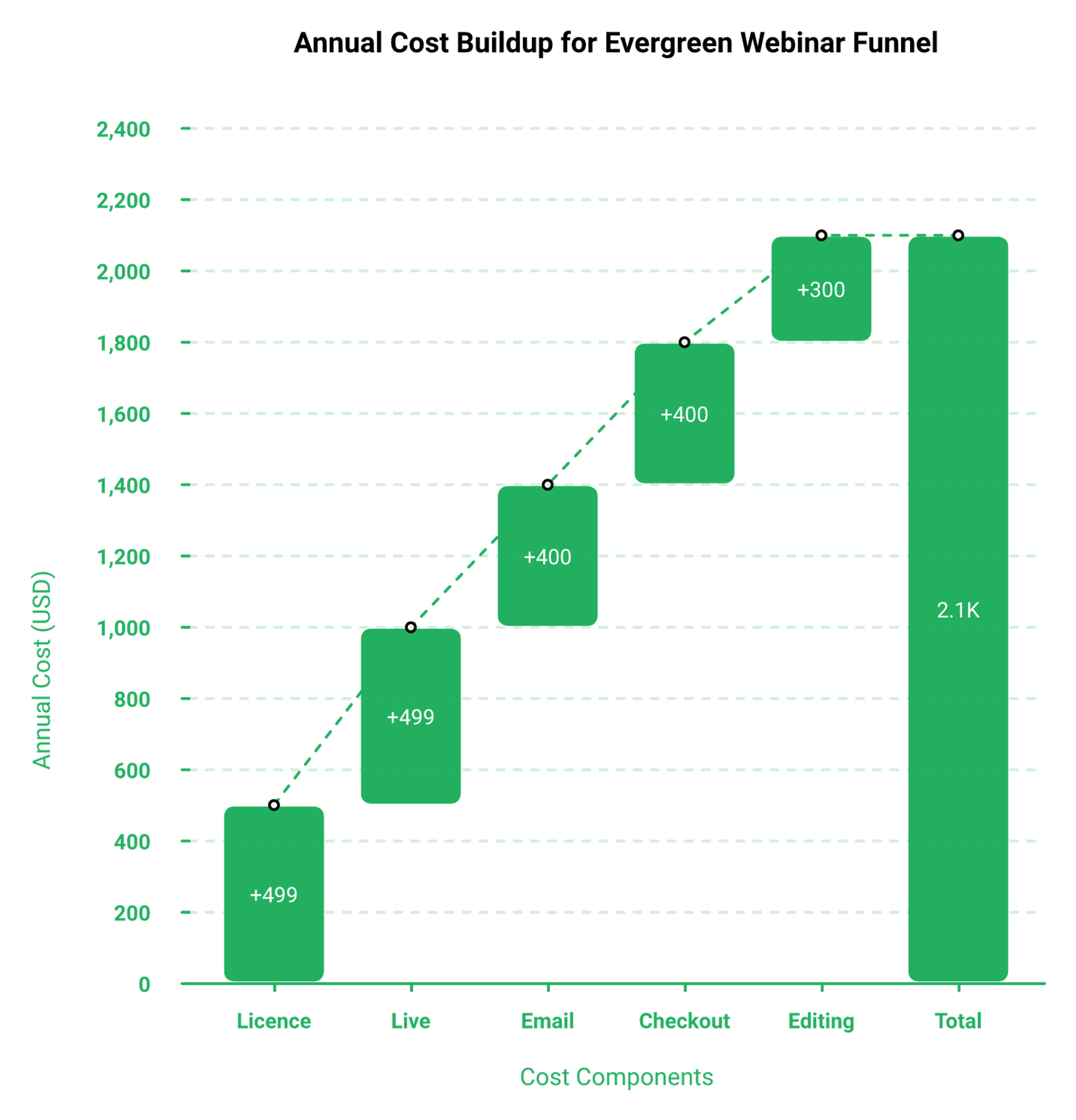
EverWebinar's public pricing contradicts itself. Its G2 pricing tab lists $499 per year, $799 per two years, and a three-payment $199 instalment plan. Independent trackers quote $199 monthly, $99 annual, and $79 biennial monthly-equivalents with a 30-day guarantee. Capterra Australia lists $874 biennial. There is no permanent free plan. Because EverWebinar cannot run live, adding WebinarJam takes a realistic operator to roughly $998 per year across two logins.
4.1 The pricing contradiction, dated and sourced
💰 Six numbers, one product
Reviewers feel this ambiguity as expense rather than confusion. One long-time user wrote that it became "a basic and expensive solution," rating value for money 2.0. Anyone benchmarking against a single-subscription model can check our webinar pricing in the same sitting.
4.2 Does EverWebinar do live webinars?
⚠️ The vendor answers this itself
No. Genesis Digital's own comparison page states WebinarJam is for genuine live webinars, EverWebinar is for automated, and that most sellers run both.
"Is expensive and if you want a live solution, you'll have to buy an additional membership to their other product, Webinarjam."- Andrés J G., EverWebinar Capterra - Verified Review
A WebinarJam reviewer describes the same arrangement from the other side, noting EverWebinar is the partner service "which you have to pay more for."
"I love the partner service, everwebinar, (which you have to pay more for) that allows the participant to watch the webinar and feel as though it's a live webinar."- Tara G., WebinarJam G2 - Verified Review
4.3 Total cost of an evergreen funnel
💸 Two logins is the start, not the total
Sabri Suby's point applies here. An automated webinar funnel produces the highest cost per lead of any call-booking funnel, so if you have more time than money, you lose. Cost-per-launch is the number that matters, not cost-per-year.
Add email, checkout, and editing on top of two subscriptions and a working operator lands near $2,100 a year. That is before a single ad dollar.
EasyWebinar replaces seven to eight tools in one subscription, covering registration pages, native email and SMS, EasyCRM, in-house video storage, EasyCast multistreaming, and in-webinar payments for paid webinars.
If you are weighing one account against two, the line-by-line comparison is worth ten minutes before you commit to an annual term.
Q5. Does simulated live still convert, or have automated webinars been nerfed?
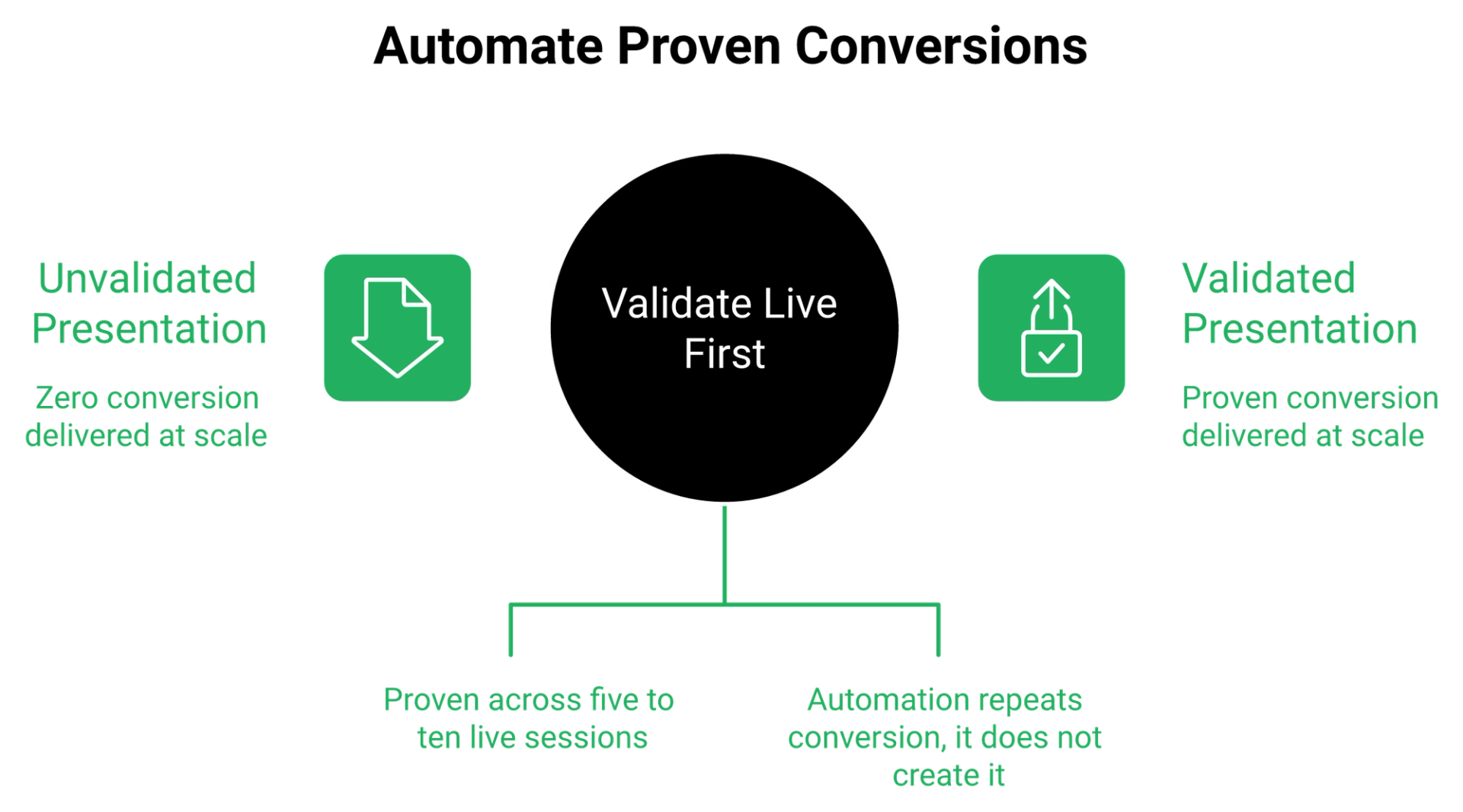
It depends on traffic temperature and capital. Media buyers running heavy cold spend report automated sessions badly underperforming live ones right now, and some high-ticket audiences attend two or three live sessions before buying. Evergreen operators counter that weekly live shows have poor show-up rates. The resolution is sequencing. EasyWebinar's guidance to operators is to validate live to a 10% attendee-to-buyer rate first, then automate the proven version.
5.1 The promise the category oversells
⏰ "Passive" is doing a lot of work in that sentence
The pitch is seductive. Record once, run forever, and wake up to Stripe notifications. I sold a version of that story myself for years, and I was partly wrong.
Automation does not create conversion. It repeats whatever conversion you already had. If your live session converts at zero, automation gives you zero at scale. That is the honest reading of live versus automated webinars.
5.2 What cold traffic is actually showing
❌ The nerf argument, stated fairly
One media buyer who has spent heavily on both formats put it bluntly. Automated webinars are performing "absolutely terrible in direct comparison" to live for his cold-traffic clients.
He also flagged something more specific. Close to half of one client's high-ticket buyers attended two or three live sessions before purchasing. EasyWebinar sees the same pattern in coaching funnels where the offer sits above roughly $3,000, though I might be reading that sample too strongly.
5.3 The evergreen defence is not weak
✅ Why operators automate anyway
The counter-position is real. Running a live workshop every single week produces exhausted hosts and thin rooms. Cold-traffic show-up rates commonly sit between 10% and 15%, which is why so many teams study how to improve webinar attendance before they touch automation.
Reviewers of automated platforms describe the relief plainly.
"EverWebinar saves me hours and days because now I do not need to host all webinars live. I just need a nice recording which I can set up ready to join for anyone every 15 minutes."- Verified Reviewer, EverWebinar G2 - Verified Review
5.4 The real axis is validated versus unvalidated
⭐ The twist nobody sells
Live versus evergreen is the wrong question. The question is whether the presentation has been proven in front of humans who can talk back.
I ran ten live sessions on my own offer before I automated a single one. The first four were bad. By session seven, I knew which slide lost the room.
"I convert really well with live webinars, but I can't be everywhere at once. EasyWebinar gives me the ability to multiply my efforts and offer a human touch, without having to be everywhere at once."- Ash A., EasyWebinar G2 - Verified Review
5.5 The Webinar Sprint
📋 What to do this week
Run five to ten live sessions. Track attendee-to-buyer, not registrations. Hit 10% before you touch an automation toggle.
Then clone the winner. That is the whole method, and it is boring on purpose. EasyWebinar customers who follow this order include Carla Biesinger, whose single evergreen funnel went on to produce $5M after the live version was proven.
The integrity rule matters here too. Never tell an attendee a recorded session is live, and never pretend a simulated-live room is something it is not.
EasyWebinar runs live and automated inside the same account, so a proven live session clones into Simulive or Just-in-Time with one switch, with no second subscription and no rebuild.
Q6. Is EverWebinar's just-in-time scheduling worth building your funnel around?
Just-in-time scheduling means a session starts roughly 15 minutes after someone registers, instead of on a fixed calendar date. It is EverWebinar's strongest feature and the one reviewers rate highest. The ceiling is flexibility. One Capterra reviewer found it "impossible to create hourly schedules for the next X days, as other providers are enabling," and called the API "too basic." EasyWebinar ships the same just-in-time mechanic alongside local-timezone streaming, webhooks, and a REST API.
6.1 Why the 15-minute window converts
⏰ Curiosity has a half-life
A registrant is hottest in the 90 seconds after they click. Give them a session next Tuesday at 2pm, and you are betting against their calendar, their inbox, and their memory.
Give them one starting in 15 minutes and you are betting on the emotion that just made them opt in. That is the entire mechanic. EasyWebinar's Just-in-Time sessions inside our automated webinar engine open in roughly 10 to 15 minutes for exactly this reason.
6.2 The exact configuration
✅ Toggle one thing, not five
Here is the setup discipline I give operators:
- Open the registration settings for the session.
- Select just-in-time only. Do not also enable fixed dates.
- Turn off the "next available session" fallback while testing.
- Confirm the local timezone display for the registrant.
- Run one test registration from a phone, not a desktop.
Offering four scheduling choices splits your traffic and muddies your data. Pick one and read the numbers cleanly, then check the results in your webinar analytics.
6.3 Where the ceiling sits
⚠️ Scheduling depth and API limits
"It's impossible to create hourly schedules for the next X days, as other providers are enabling, and which has become the norm for recorded webinars. Also, the API is too basic."- Andrés J G., EverWebinar Capterra - Verified Review
That reviewer had been a fan for years before writing this. Scheduling density matters most for global audiences and for teams pushing registrations through their own systems.
6.4 The rule that decides whether any of this works
📱 Above the fold, or invisible
None of the scheduling logic matters if the registration page buries the button. Roughly 60% of visitors never scroll past the first screen, while 100% see it.
Headline and opt-in button above the fold. Everything else is decoration. I have watched coaches spend six weeks on page polish and lose to an ugly template that put the button where thumbs are, which is the whole argument behind our webinar landing page examples.
"The ease of use and setup. Pretty much once I have run one webinar, I can clone and setup multiple in a breeze. We have run close to 30 since we started running it this new year."- Darrin B., EasyWebinar G2 - Verified Review
EasyWebinar's nine webinar formats include Just-in-Time, On-Demand, Instant Replay, and Recurring "Next Available," so operators can test scheduling density without buying a second product.
Q7. What breaks between EverWebinar and the rest of your stack?
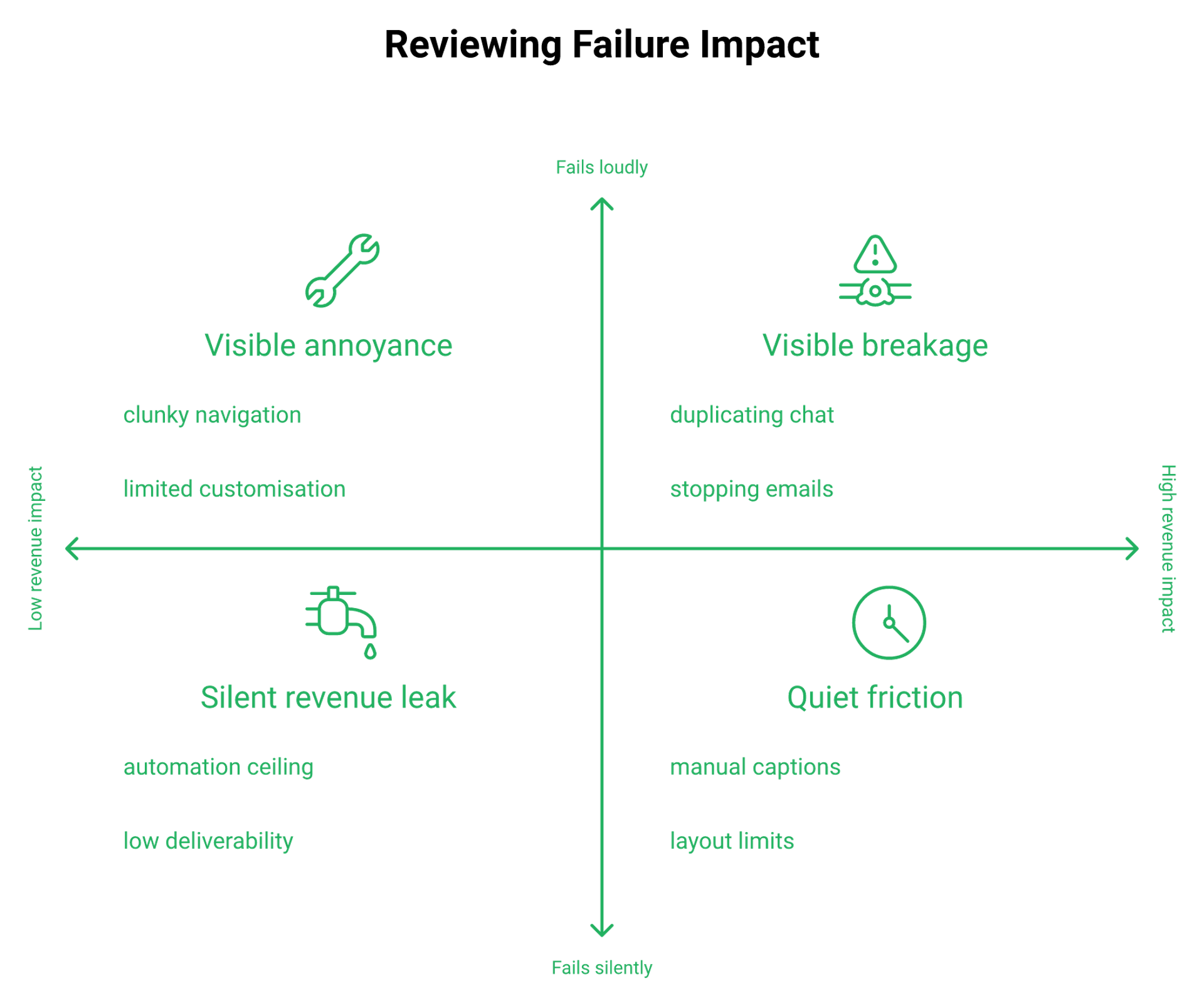
Reviews capture product bugs. They miss stack failures. Three cost real money: low native email deliverability that forces manual SMTP setup, integration quota ceilings that silently drop opt-ins before they reach your CRM, and unique-link errors when an attendee opens a session from a different IP address. All three fail quietly. EasyWebinar keeps registration, email, SMS, CRM, and video storage in one data path to remove those hand-off points.
7.1 The situation: everything looks fine
✅ Green dashboards, missing people
Registrations are climbing. The session is scheduled. The reminder emails show as sent.
Nothing on the screen tells you that 200 people never reached your CRM. That is the shape of a seam failure, and no star rating captures it. Mapping your webinar funnel end to end is how you find those gaps before a launch does.
7.2 The complication: a quota ceiling, four hours out
⚠️ The automation-limit crash
One operator caught this with four hours to spare. His automation account had hit its monthly task limit, so opt-ins stopped syncing to the CRM his sales team was dialing from.
The discrepancy was a couple of hundred people. The fix was a billing upgrade, which is almost funny. EasyWebinar removes that specific failure by writing registrations straight into EasyCRM instead of routing them through a metered third party.
7.3 Deliverability is the quietest leak
💸 When your reminders never arrive
"The email notifications that get sent from Everwebinar have a very low deliverability rate. I had to set up SMTP to send out the notifications. I'm a lay-person, not a tech person so this was all supposed to be easily included with the service."- Verified Reviewer, EverWebinar G2 - Verified Review
SMTP means routing email through your own sending server. A coach should not need to configure one to get a reminder delivered.
Show-up rate lives or dies on those reminders. On session day, six touches is not aggressive, it is standard, and that cadence sits at the centre of webinar marketing automation.
7.4 Unique-link fragility
❌ Two failure modes worth testing today
"If someone clicks their unique link to watch the webinar from a different IP address, they will get errors. If you make changes to the webinar after someone has registered, it creates bugs and you have to recreate the whole thing."- Verified Reviewer, EverWebinar G2 - Verified Review
People register on desktop and attend on their phone. That is a different IP address, which is a normal human behavior, not an edge case.
I will be honest about our own trade-offs here too. One EasyWebinar reviewer hit attendee-side loading trouble when screen sharing a browser tab, and solved it by presenting PDFs instead.
"I would love to have more screen display options, like where I place my screen compared to my slides. It also didn't seem to like me screen sharing another tab."- Verified User in Photography, EasyWebinar G2 - Verified Review
7.5 The resolution: a pre-launch integrity check
📋 Twenty minutes, every launch
- Reconcile registration count against CRM record count.
- Send one test registration and open the link on mobile data.
- Check the reminder email landed in a Gmail inbox, not spam.
- Confirm your automation account is under its task limit.
- Freeze session edits once registrations open.
The review you actually need is not about features. It is about how many places a lead can vanish between opt-in and dial. Consolidating integrations is the cheapest way to shrink that number.
EasyWebinar routes registration, native email broadcasting, Twilio SMS, EasyCRM, and in-house video storage through one system, which cuts the number of seams where evergreen funnels lose leads.
Q8. Where does EverWebinar fall short on accessibility, compliance, and ad tracking?
Three absences go unaddressed by every ranking review. EverWebinar cannot generate captions automatically, so accessibility work is manual. Independent comparisons list no native Meta CAPI support, which weakens server-side ad attribution. Its public surfaces make no clear statement on SOC 2 or SSO. EasyWebinar holds SOC 2 Type II attestation and GDPR compliance with a data processing addendum.
8.1 Captions are a procurement blocker
⚠️ Manual accessibility is not accessibility
"It's not possible to generate captions automatically, so we have to create them ourselves and embed them into the video to meet the accessibility needs of our audience."- Verified Reviewer, EverWebinar G2 - Verified Review
That is a 4.5-star reviewer, not a detractor. Education companies, public-sector buyers, and healthcare trainers cannot ship uncaptioned sessions, which is a recurring theme in webinars for edtech.
Baking captions into the video file also breaks your ability to update a slide later. You re-render everything.
8.2 Server-side ad tracking is missing
💸 What CAPI actually does for your ad spend
CAPI stands for Conversions API. It sends conversion events from your server to the ad platform instead of relying only on a browser pixel.
Independent alternative comparisons list EverWebinar without native CAPI support. For an operator spending on Meta, that means noisier optimization signal and worse cost-per-registrant over time. EasyWebinar ships GA4 and Meta Pixel tracking on registration and attendance events, which is honest but not the same thing as server-side CAPI.
8.3 The compliance silence
⚠️ Absence of evidence, stated as absence
I want to be careful here. I did not find a public EverWebinar statement claiming SOC 2 Type II, SSO, or granular admin roles. I also did not find one denying it.
SOC 2 Type II is an audited report against the AICPA Trust Services Criteria, covering security controls over a period of time. Procurement teams ask for the report, not a marketing sentence.
EasyWebinar's attestation was completed with Scrut Automation as the audit partner, and the platform operates under GDPR with a signed data processing addendum available to customers. We claim those two and nothing beyond them, because inflating a certification is the fastest way to lose an enterprise deal.
8.4 The rule I apply in reverse
⭐ Silence is an answer
Specificity is the tell. A vendor that runs real infrastructure names the audit, the auditor, and the period.
When the certification page does not exist, treat the silence as the answer until a report is produced. I have been on the buyer side of that conversation, and it ends fast.
Our own gaps deserve the same treatment.
"I do use other email systems to send post-webinar email sequences because I can't track open and click rates on EasyWebinar, and also, I can't unsubscribe someone from the email campaign once the client has joined my program."- Eliza W., EasyWebinar G2 - Verified Review
EasyWebinar publishes SOC 2 Type II and GDPR as its only compliance claims, with a public GDPR page and DPA, and states no ISO 27001, PCI-DSS, or HIPAA coverage. Buyers weighing the full feature set can review all features before a procurement call.
Q9. Who is EverWebinar genuinely right for, and who should skip it?
EverWebinar fits operators with one already-validated webinar, a stable offer, and no need for live sessions. Education companies serving on-demand content rate it highly. Skip it if you need live events without a second subscription, if captions are mandatory, if you run multi-session series that require cloning, or if you depend on fast support during a paid-traffic launch. EasyWebinar's approved customer proof includes Carla Biesinger's $5M from a single evergreen funnel.
9.1 The three profiles it serves well
✅ Where reviewers are genuinely happy
"This tool has helped us automate our educational content. With EverWebinar, we can offer multiple webinars to potential clients, who can register for specific session dates or watch them on demand."- Verified Reviewer, EverWebinar G2 - Verified Review
Three fits show up repeatedly. Education businesses running on-demand content. Solo operators with one proven offer. Teams already inside the Kartra or Genesis Digital ecosystem. Anyone in the first group should also look at how an on-demand webinar platform handles replays.
9.2 The four anti-fit profiles
❌ Buy something else if this is you
- You need genuine live events, since that requires a separate WebinarJam subscription.
- Accessibility captions are a requirement, because generation is manual.
- You run webinar series and rely on cloning, which has documented failure modes.
- Your launches run on paid traffic and cannot absorb a slow support queue.
One reviewer bought it purely for a single integration and regretted it.
"I bought it because of the seamless integration with Kartra. That was about it... In hindsight I should have dispensed with the 'luxury' of the direct integration and gone for a different solution."- Paul L., EverWebinar Capterra - Verified Review
9.3 Fit matrix
⭐ Match the tool to the job
I will say the unpopular half out loud. EasyWebinar is the wrong choice for casual internal meetings, for pure live enterprise events with no funnel intent, and for offers under roughly $200 where the math does not justify a webinar. Teams that do need ticketed sessions should read how paid webinars are structured first.
9.4 What the top end actually looks like
💰 Named outcomes, not category averages
Be careful with any tool promising to be your webinar, your community, your CRM, and your email service at once. Stretch a product that far, and it usually gets thin everywhere.
EasyWebinar's approved proof list is short on purpose: Carla Biesinger at $5M from one evergreen funnel, Ryan Fenn at $2M from one automated funnel, Kim Constable at $750K, and Rick Mulready at 166% ROI on cold paid traffic with a 30% registration rate. Every one of those started with a live session that already converted, and the full set sits in our customer reviews.
"It's rare to find a platform where you can actually hop on a Zoom call with a real human. Their team is responsive, helpful, and genuinely invested in my success."- Jennifer B., EasyWebinar G2 - Verified Review
EasyWebinar is built for operators who need live and evergreen from one account, including coaches, course creators, B2B SaaS teams, and enterprise training leads, and it openly declares casual one-off meetings out of scope.
Q10. Which EverWebinar alternatives are worth evaluating in 2026?
I own one of the products on this list, so read it accordingly. Rank alternatives on the four things EverWebinar reviewers actually flag: live capability in the same account, support responsiveness, scheduling and API flexibility, and total cost across the stack. On those criteria the shortlist is EasyWebinar, WebinarJam, Demio, eWebinar, StealthSeminar, WebinarNinja, Livestorm, and Zoom Webinars. EasyWebinar combines live, automated, and evergreen formats in one subscription.
10.1 The scoring rubric
📋 Four criteria, nothing else
Your offer carries the weight. The platform is the container, and the only job of a container is to not leak.
Score each option on live capability, support depth, scheduling and API flexibility, and stack consolidation. Ignore interface beauty. Simple scales, fancy fails. Our longer EverWebinar alternatives breakdown uses the same four tests.
10.2 The shortlist
⭐ Ranked for evergreen operators
- EasyWebinar. Live, simulated live, evergreen, just-in-time, and on-demand in one account, with EasyCRM, native email and SMS, in-webinar checkout, EasyCast multistreaming, and Dolby OptiView streaming at sub-500ms latency. Known limitation: no open and click tracking inside the native email tool.
- WebinarJam. Genuine live at a low entry price. Reviewers report inconsistent third-party integrations and unreliable email sending.
- Demio. Clean interface, hybrid live plus automated. Reviewers cite slow media uploads and no shared asset library.
- eWebinar. Purpose-built automation with strong interaction timing. No live capability at all.
- StealthSeminar. Deep evergreen scheduling for veterans. Dated interface.
- WebinarNinja. Fast setup for solo creators. Thinner analytics.
- Livestorm. Browser-based and tidy for B2B marketing teams. Automation depth is limited.
- Zoom Webinars. Reliable infrastructure at scale. No registration funnel, no offers, and no real conversion analytics.
Operators shortlisting two or three of these can go deeper through our WebinarJam alternatives and Demio alternatives comparisons.
10.3 The comparison table
✅ What each one actually includes
10.4 What reviewers say about the runners-up
⚠️ Two honest quotes
"It takes way too long to upload the presentation material. It does not appear to have a notion of a library of material whereby I can upload and share material across multiple webinars."- Verified User in Construction, Demio G2 - Verified Review
"Their email service is clunky, hard to edit, doesn't have html options, and their own form fields don't populate correctly. Their email service doesn't consistently send to registrants."- Tara G., WebinarJam G2 - Verified Review
10.5 Scoring my own product honestly
❌ Where EasyWebinar loses points
Same rubric, no thumb on the scale. EasyWebinar reviewers report occasional bugs and want more presenter screen-layout options.
"I love that there are options for live webinars AND automated so you have options. Having built in emails is great so you can send immediately to those who attended and those who didn't."- Verified User in Photography, EasyWebinar G2 - Verified Review
You are really choosing between one account and two. If that decision is the sticking point, the side-by-side is worth ten minutes before you sign an annual term.
Still deciding between one platform and two
See EasyWebinar next to EverWebinar and WebinarJam, feature by feature
Live and evergreen in one account, nine webinar formats, in-webinar payments and attendee-level analytics, compared line by line against running EverWebinar and WebinarJam side by side.
Compare the platforms Or see automated webinars →
EasyWebinar leads this list because it is the only option here pairing live and automated formats with an AI webinar builder, in-webinar payments, EasyCast multistreaming, EasyCRM, and Dolby-grade streaming in one platform.
Q11. How should you pressure-test any evergreen webinar platform before you commit?
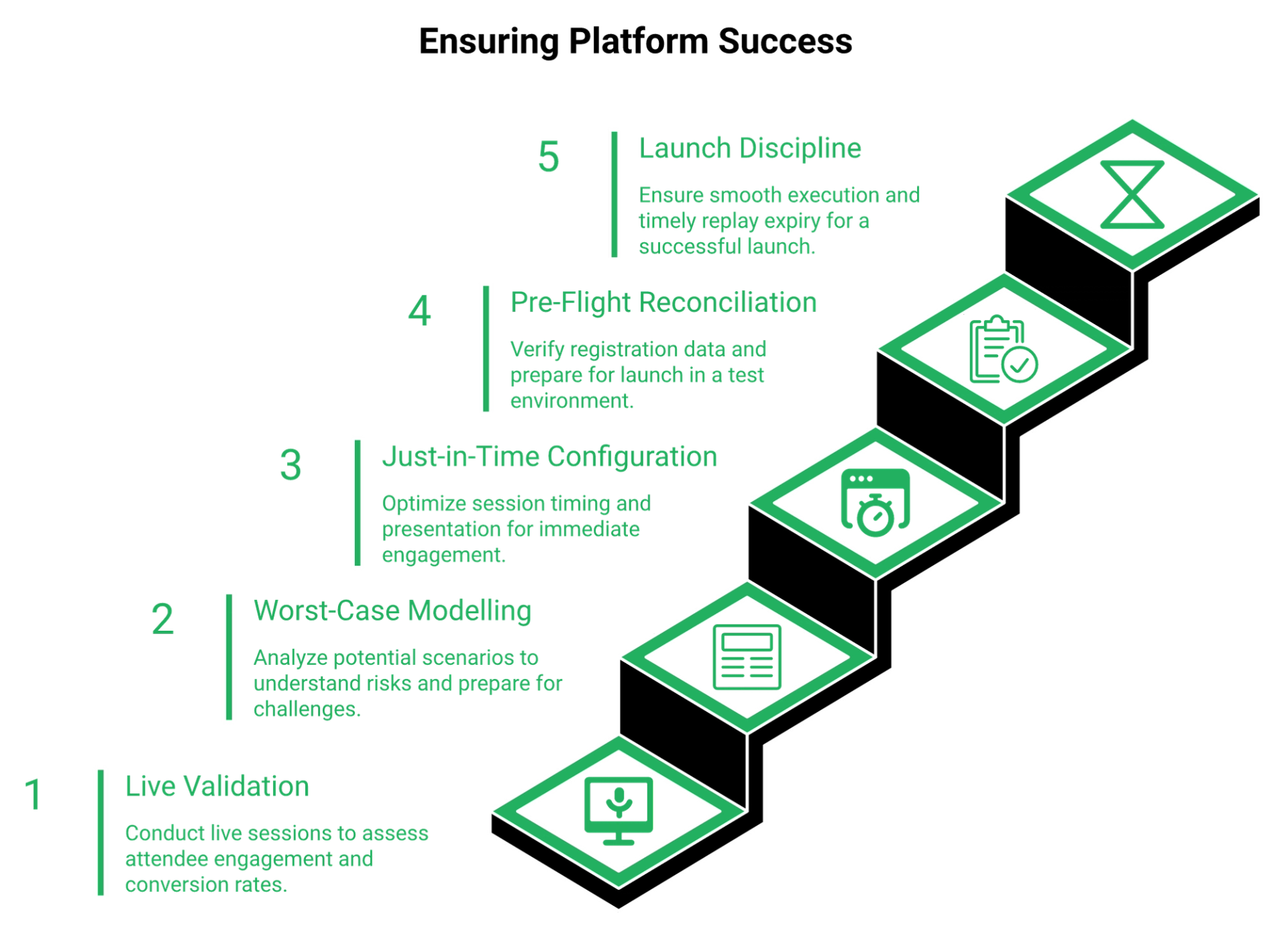
Run this order. Validate live to a 10% attendee-to-buyer rate across five to ten sessions. Model your worst case at a 10% to 15% cold-traffic show-up rate. Then clone one proven session to just-in-time only. Before every launch, reconcile opt-in counts against your CRM, test the clone in a sandbox, verify email deliverability, and expire the replay in 72 hours. EasyWebinar's AI Webinar Builder assembles that funnel from a roughly 12-question flow.
11.1 Steps one to four: prove it before you pay
⏰ Validation comes first
- Run five to ten live sessions on the same offer. Track attendee-to-buyer, not registrations.
- Model the worst case. At a 12% show-up rate and a 5% close rate, how many registrants do you need?
- Clone the winning session to just-in-time only, meaning it starts about 15 minutes after signup.
- Put the headline and opt-in button above the fold, because most visitors never scroll.
Prove the presentation, then buy the software. Every operator I have watched reverse that order paid for it in ad spend, which is the same discipline behind our evergreen sales funnel guidance.
11.2 Steps five to seven: launch-day integrity
✅ The 20-minute pre-flight
- Send about six emails on session day. Inbox noise is the enemy of show-up rate.
- Reconcile registration count against CRM record count before the room opens.
- Clone the session in a test environment and confirm chat, emails, and pop-ups still fire.
EasyWebinar customers run this check inside one system, since registrations write directly to EasyCRM instead of passing through a metered connector. Teams that want the reasoning behind that design can read our webinar CRM breakdown.
"It's quite easy to use. Interface is simple and you can get an evergreen webinar running in under 15 minutes."- Andrés J G., EverWebinar Capterra - Verified Review
Fast setup is not the same as verified setup. Fifteen minutes gets you a live URL, not a working funnel.
11.3 Steps eight and nine: deliverability and scarcity
💸 The two places money leaks
- Send a test registration to a Gmail address and confirm the reminder lands in the primary inbox.
- Expire the replay in 72 hours, with two emails on day three: a morning heads-up and a final-hours notice.
Scarcity is not a trick when it is honest. A replay that never comes down teaches people that nothing you say has a deadline. Our webinar best practices for registrations and sales cover the full cadence.
"I would like my registrants to be able to see their own time zone when they register on the plan that I am paying for. I think it's important in improving the 'show-up' rate."- Jennifer B., EasyWebinar G2 - Verified Review
That is a fair request from a happy customer, and it is exactly the kind of detail you should test before buying anything.
11.4 What I am watching next
⚠️ A hypothesis I am still holding loosely
My read right now is that automated-only funnels get harder through 2027, not easier. As AI-generated presentations flood every inbox, the live room becomes the scarce thing again.
EasyWebinar's data points toward hybrid sequences outperforming pure evergreen on cold traffic, though I might be reading a small sample too strongly. If you are running both formats this quarter, I genuinely want to know what your numbers say, and you can start testing on a free EasyWebinar signup.
EasyWebinar's AI funnel builder generates the script, registration and thank-you pages, reminder emails, polls, and follow-up from a roughly 12-question flow, so this checklist runs inside one working session rather than a six-week build.
Frequently Asked Questions

Casey Zeman
Founder of EasyWebinar
About Author
Over the past decade, I've helped thousands of entrepreneurs, coaches, and consultants turn webinars into a predictable, powerful way to grow their audience, build trust, and scale, without the constant hustle. I created EasyWebinar because I couldn't find a system that combined authenticity, engagement, and automation the way I needed. So, I built one.
Related Posts

10 Best Community Engagement Platforms in 2026
Compare the 10 best community engagement platforms in 2026. Course creators, evaluate live hosting, analytics, and replay to pick your winner today.

10 Best Online Coaching Tools in 2026: Live Session Quality, Scheduling, Recording, and Client Engagement Analytics
Compare the 10 best online coaching tools of 2026 on session quality, scheduling, and analytics. Discover the right fit for your coaching revenue model.

10 Best Webinar Hosting Platforms Ranked by Uptime, Streaming Quality & Cost
Compare 10 webinar hosting platforms ranked by uptime, streaming quality, and cost. Discover which tool actually turns attendees into revenue.
Turn every webinar into a revenue stream
Launch your first paid event in just a few clicks - and start monetizing your expertise.
Book a Call