Demio vs EverWebinar: Comparing Webinar Automation, Engagement, and Funnel Performance
Published on Jul 1, 2026 • 25 min read

TL;DR
- EverWebinar runs pre-recorded webinars only. Live hosting happens in WebinarJam, which now includes EverWebinar on its Basic plan and above (checked October 17, 2026).
- Demio is live-first with a clean browser room. Its Starter plan excludes automated webinars, and Growth and Premium are billed per host.
- For pure evergreen scheduling, EverWebinar goes deeper with just-in-time sessions, while Demio's automation is lighter.
- Both tools rely on integrations, often Zapier, to sync CRMs. Test the lead handoff and data export terms during any trial.
- Validate live first: run 5 to 10 sessions, reach roughly 10% conversion, then automate the winning session.
- EasyWebinar runs live and automated webinars on one subscription, with in-room checkout and your CRM or EasyCRM.
Q1. Can EverWebinar run live webinars, and how does its architecture differ from Demio's?
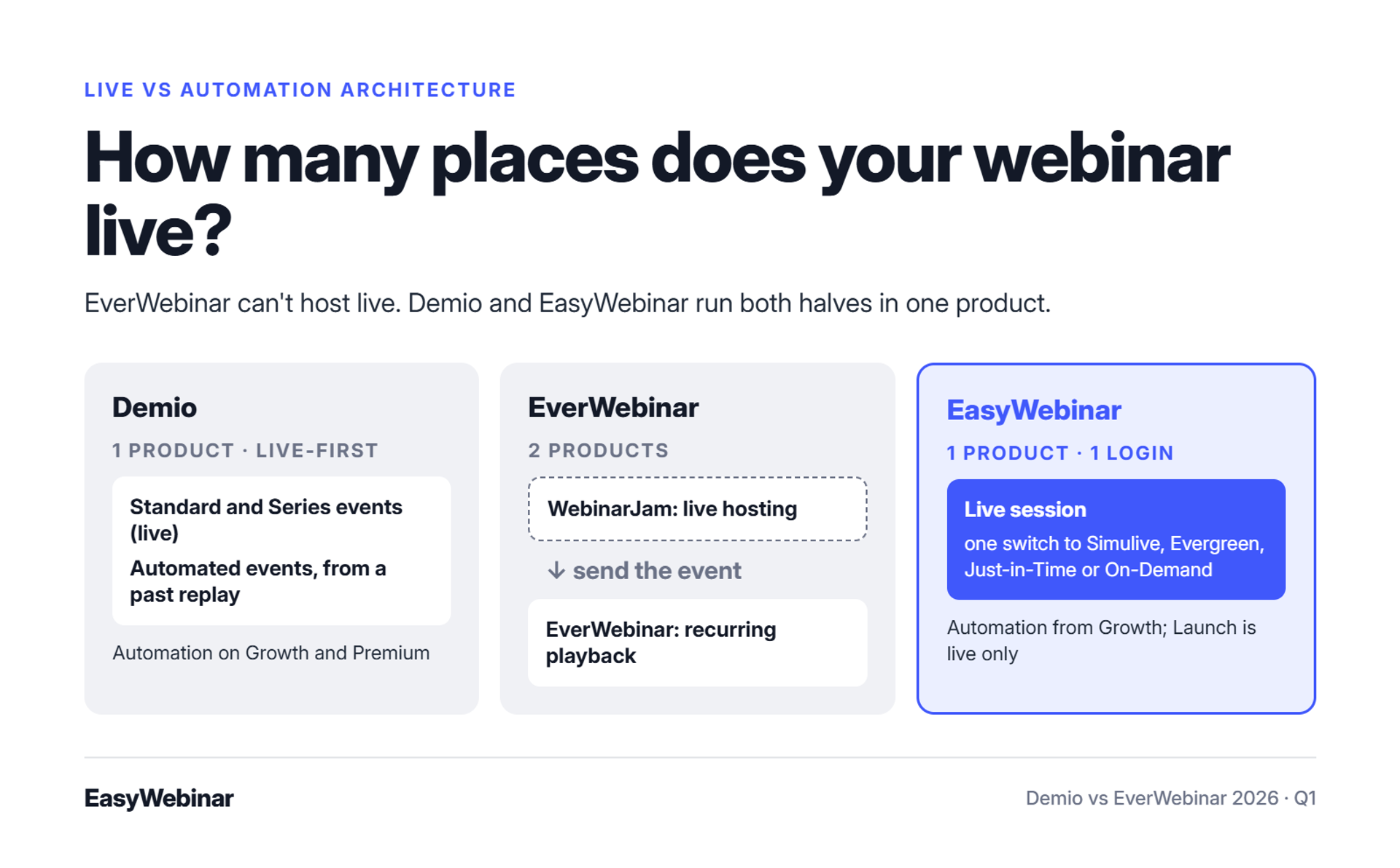
No. EverWebinar is an automation engine for pre-recorded webinars that play on a schedule. Its own sales page frames it as the place WebinarJam users send a live event to make it recurring. Live hosting happens in WebinarJam, a separate product. Demio is live-first, with three event types (Standard, Series, and Automated), and an automated event can be built from a past live replay. EasyWebinar runs live and automated sessions on one platform, with one login and one subscription.
The two-tab problem
Picture a coach at 9 p.m. on a Sunday with two tabs open. One holds last week's live replay in WebinarJam. The other holds EverWebinar's schedule screen, where she is re-entering offer timestamps by hand. One wrong minute, and the buy button appears before the pitch does.
That is what architecture means in practice. The question is not which tool has more features. It is how many places your webinar has to live before it can run every day.
⚠️ Where the split costs you
The old way treats live and automated as two jobs. You run live in one product, then rebuild the funnel in a second one: pages, reminders, offers, and integrations. Each rebuild is a new chance for something to break.
In EasyWebinar's client work, I call this the spaghetti funnel. Connecting each stage to the next is "such a heavy lift," and my honest estimate is six months to a year before it runs cleanly.
| Architecture question | Demio | EverWebinar | EasyWebinar |
|---|---|---|---|
| Hosts live webinars | Yes (Standard, Series) | No, needs WebinarJam | Yes |
| Runs automated sessions | Yes (Automated events) | Yes, core product | Yes |
| Products to manage | One | Two | One |
✅ What buyers judge now
Buyers no longer judge a webinar by the live hour alone. They judge what it keeps doing afterward: selling, educating, and booking calls in every time zone. That makes the handoff from live to automated the most important seam in your stack.
How EasyWebinar closes the seam
EasyWebinar turns a live session into Simulive, Evergreen, Just-in-Time, or On-Demand with one switch, on the same subscription. EasyWebinar's scheduling screen holds just-in-time, instant replay, and recurring options side by side, so nothing is rebuilt in a second tool.
The honest caveat: on EasyWebinar, automation starts at the Growth plan. The entry Launch plan is live only.
⭐ What operators say
"EasyWebinar gives me the ability to multiply my efforts and offer a human touch, without having to be everywhere at once." - Ash A., March 13, 2026, EasyWebinar G2 - Verified Review
"I am trying to solve the challenge of hosting webinars, especially a combination of live and automated webinars. Demio has allowed me to do so." - Verified User in Construction, 4/5, April 28, 2021, Demio G2 - Verified Review
"We originally were excited to find a webinar software that didn't require live events." - Kaylen M., 0/5, August 24, 2021, EverWebinar G2 - Verified Review
EasyWebinar was built for the operator who should not have to pick a half. Run the session live, find the version that converts, then switch that exact session into Simulive, Evergreen, Just-in-Time, or On-Demand. The offers, pages, and data stay where they were, under one login and one subscription.
Q2. How do Demio and EverWebinar compare on automation and scheduling depth?
For pure evergreen scheduling, EverWebinar goes deeper. Its sales page lists just-in-time sessions, recurring schedules, and specific calendar dates, with time zones set per audience. Demio's Automated event lets registrants pick from scheduled sessions, offers on-demand availability, and can reuse a past live replay. A just-in-time session is one that starts a few minutes after someone lands on the registration page. Avoid replacing scheduled sessions with instant on-demand playback, because it removes the commitment of choosing a time.
Scheduling modes side by side
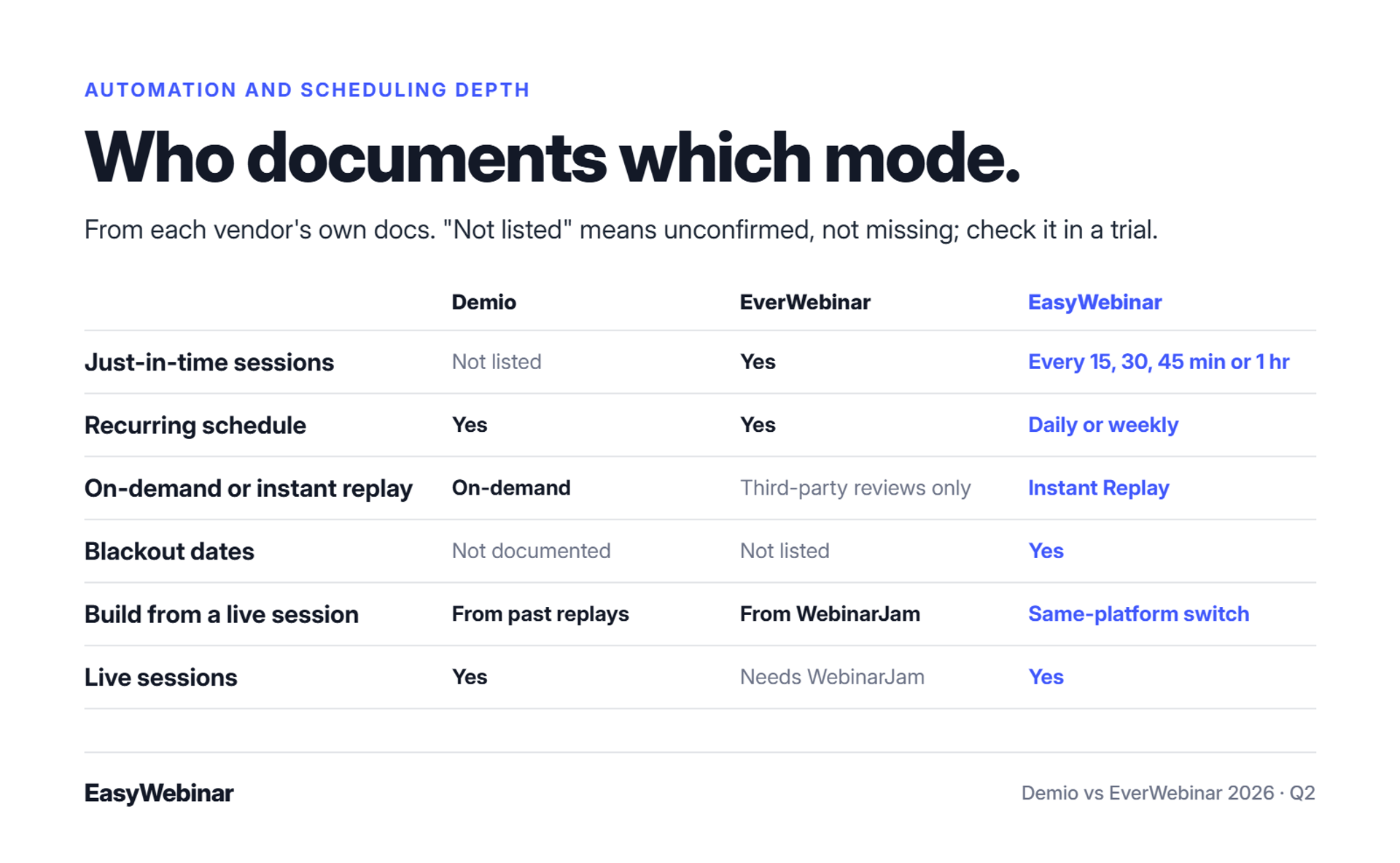
The table below uses each vendor's own documentation. Where a mode is not documented, it says so instead of guessing.
| Scheduling mode | Demio | EverWebinar | EasyWebinar |
|---|---|---|---|
| Just-in-time sessions | Not listed in Demio's event-creation guide; confirm in trial | Yes | Yes, every 15, 30, or 45 minutes, or 1 hour |
| Recurring schedule | Recurring times set from the Event Summary | Yes, flexible days and times | Daily or weekly |
| On-demand or instant replay | On-demand availability | Listed in third-party reviews | Instant Replay |
| Blackout dates | Not documented | Not listed on sales page | Yes |
| Build from a live session | From past replays | From WebinarJam events | Same platform switch |
| Live sessions | Yes | Needs WebinarJam | Yes |
⏰ How just-in-time actually works
Jon Penberthy has run just-in-time registration across large funnels. He says it mimics the feeling of landing just as a session is about to start. The registration dropdown always shows a session minutes away, so peak intent turns straight into attendance.
Here is how EasyWebinar's support documentation lays out the setup:
- Turn on just-in-time registration.
- Pick the interval between sessions.
- Exclude hours you do not want, such as overnight.
- Keep a recurring schedule on as well, for people who want to plan ahead.
⚠️ The on-demand trap
Jeremy Haynes, an agency owner who has scaled evergreen webinars, warns that switching a working webinar to on-demand means reworking the whole thing. In EasyWebinar's experience, the reason is commitment. A person who picks 2 p.m. Thursday has made a small promise. A person who can watch "whenever" often never does.
What users report about scheduling
"I also had many people connecting with me asking what time zone the event was in. The drop down feature didnt specify that the times were shown in their time zone which caused some confusion." - Trina P., 3.5/5, January 22, 2023, Demio G2 - Verified Review
"The only downside is that to have the "just in time" feature you have to pay a premium that is about double the price of the basic subscription. However, it has been worth it for me to invest in that." - Laura C., January 28, 2025, EasyWebinar G2 - Verified Review
"I'm blown away with how easy it was to setup a sequence of 10 webinars and have all the steps done that I need." - David L., February 27, 2025, EasyWebinar G2 - Verified Review
EasyWebinar runs Just-in-Time sessions in the attendee's own time zone, alongside recurring schedules, Instant Replay, and blackout dates on one scheduling screen. For scarcity, EasyWebinar adds recurring "Next Available" dates and "Wait For It" block dates.
Q3. Which keeps attendees engaged, and where does 'simulated live' cross a line?
Demio's engagement happens in real time: polls, handouts, featured actions, and chat in a browser room. One G2 reviewer found Demio replays did not show the live polls and CTAs (calls to action). EverWebinar replicates live behavior in recorded sessions, including attendees joining and leaving the room. EasyWebinar's live room delivers polls and offers in real time on Dolby OptiView WebRTC, at sub-500ms latency. Recorded sessions hold attention when the content earns it, not when the room is staged.
The "is this live?" message
Picture minute 14 of an automated session. A registrant types "is this live?" into the chat box. The presenter is asleep in another time zone. Whatever happens next decides whether that person trusts the pitch at minute 50.
That single message is the engagement question in miniature. Interaction either comes from real people in real time, or it is replayed. Both can work. Only one survives being questioned.
❌ The staged-room playbook
The old automated playbook leaned on staging: attendee counters that rise and fall, scripted chat, and urgency cues. It worked while audiences were new to webinars. It also made the session fragile, because any glitch exposes the set.
G2 reviews show how that fragility looks. One EverWebinar team reported duplicate chat messages after cloning a webinar. A 2018 reviewer said EverWebinar's rating prompt and WebinarJam link appeared on screen after the pitch. That review is old, so test current behavior in a trial.
✅ What changed for audiences
Audiences have now sat through hundreds of webinars. They spot staging fast, and suspicion kills a pitch. Retention, not theater, is the metric that matters.
Jeremy Haynes targets 80% retention from peak attendance to the pitch. His lever is a bonus resource announced at the start and given only to people who stay. That is engagement earned by value.
How EasyWebinar handles both rooms
EasyWebinar runs the live room for real-time work: chat, polls, Q&A, and timed offers, with attendees joining from any browser and nothing to download. For evergreen sessions, EasyWebinar's support library documents exporting the chat from a real live session, so replayed questions come from real attendees.
EasyWebinar's rule is simple: an automated session is never presented as live. I would rather lose a few clicks than lose the room's trust.
⭐ What reviewers say about engagement
"It is easy to set up call to actions and polls and easy to use them in both types of webinars. The analytics also show how many saw or clicked your offer." - Verified User in Professional Training & Coaching, November 1, 2024, EasyWebinar G2 - Verified Review
"It didn't fuly integrated with my CRM (Highlevel) and the replay didn't show the live polls and CTAs." - Ivanhoe S., 4/5, August 5, 2024, Demio G2 - Verified Review
"I like the polls, resources, and handouts you can upload to get the room ready for you as well." - Saana K., 4/5, August 6, 2024, Demio G2 - Verified Review
EasyWebinar's live room delivers polls and offers in real time on Dolby OptiView WebRTC, at sub-500ms latency. The poll lands while the audience is still on that slide. When the winning session goes evergreen, EasyWebinar keeps the questions real and the format honest.
Q4. Which delivers better funnel performance: offers, checkout, and replay urgency?
Funnel performance depends on three mechanics more than on the platform's name. They are the offer at the peak of the pitch, a payment step that keeps the buyer, and a firm replay deadline. Demio and EverWebinar both display offers inside the room. EasyWebinar takes payment inside the webinar through Stripe, PayPal, or PayU, so the purchase and the attendee record stay together. Test every tool's checkout path during a trial before you buy.
Minute 52, one new tab
Picture the pitch landing at minute 52. A buyer clicks the offer, a new tab opens, and a card form loads. The presenter keeps talking to a room the buyer has already left. Some come back. Some get a text and forget.
That moment is where funnel performance is won or lost. Attendance gets the buyer to minute 52. Checkout decides whether minute 52 becomes revenue.
💸 The redirect tax
The old way sends buyers off the webinar to a separate checkout page. Each extra step is a chance to drop off. It also splits the data: the attendee record lives in the webinar tool, and the purchase lives somewhere else.
When those records live apart, you cannot easily answer which session produced a sale. You end up optimizing what you can see, which is attendance, not what pays you.
💰 From attendance to revenue per registrant
The metric has moved from show-up rate to revenue per registrant. Attendance numbers can mislead. eWebinar reports 83% average on-demand attendance against a 40% live average, which is a vendor-reported figure about its own platform. Higher attendance only matters if more of those people buy.
How EasyWebinar keeps the sale in the room
EasyWebinar puts the checkout inside the webinar with in-room offer overlays, through Stripe, PayPal, or PayU, so the buyer never leaves the session. EasyWebinar also tags viewers by watch time, such as "watched full" or "left early," on scheduled sessions. That tag decides who gets which follow-up email.
⏰ The 72-hour replay window
In EasyWebinar's client funnels, the replay sequence I trust most is Jon Penberthy's:
- Day 1: one email, "Replay available for 3 days."
- Day 2: one email, a check-in that the replay comes down tomorrow.
- Day 3, morning: "Replay coming down today."
- Day 3, night: "Final hours before removal."
What the numbers show
"With my live class I used to sell 10-12 courses. With EasyWebinar I sold 25 courses within 3 weeks of my evergreen "launch"." - Laura C., January 28, 2025, EasyWebinar G2 - Verified Review
"You can prepare your webinar with links, slides and resources and then when you are ready to share it with the room - a convenient opt in button pops on the screen." - Trina P., 3.5/5, January 22, 2023, Demio G2 - Verified Review
"It allows me to automate my entire sales sequence." - Jennifer B., April 15, 2025, EasyWebinar G2 - Verified Review
EasyWebinar takes payment inside the webinar through Stripe, PayPal, or PayU, with no redirect. The sale, the watch time, and the offer click land on one attendee record. That is how EasyWebinar ties a webinar to revenue, not just to a seat count.
Q5. What happens to your leads after the webinar: CRM, Zapier, and follow-up?
Demio and EverWebinar both rely on integrations, and often Zapier, to move attendee data into a CRM (customer relationship management system). Demio's pricing page lists its HubSpot, Salesforce, Marketo, and Pardot integrations as Premium-plan features. G2 reviewers describe needing several zaps for HubSpot sync and losing list access after cancelling. EasyWebinar syncs to HubSpot, Salesforce Pardot, ActiveCampaign, or Kit (formerly ConvertKit), or runs its built-in EasyCRM.
Four hours before showtime
Jeremy Haynes runs an ad agency that has scaled evergreen webinars. Four hours before one webinar, his team spotted a couple hundred missing opt-ins in the CRM. The sales reps dialing registrants to lift show-up rates were working from a short list.
The cause was not a bug. Their Zapier plan had hit its limit on how many zaps could fire, and the fix was simply upgrading the billing. Nobody had been watching the middleware.
⚠️ The middleware chain
The old way stitches tools together. The registration page feeds Zapier, Zapier feeds the CRM, and the CRM feeds the dialer and email tool. Each link has its own limits, logins, and failure modes. EasyWebinar supports Zapier too, with 1,500+ apps, so Zapier is not the villain. An unwatched chain carrying every lead is.
Every attendee then gets the same follow-up, because the chain carries names and emails, not behavior. So the replay viewer and the person who left at minute 8 get the identical email.
✅ Same-day follow-up on intent
The job is now judged on speed to the right lead. Sales wants to know who stayed for the pitch, who clicked the offer, and who left early. That means behavior has to reach the CRM, not just contact details.
Simple beats clever here. Jon Penberthy mapped a branching "monster funnel" across his office floor, and it underperformed a plain linear replay sequence.
How EasyWebinar hands off the lead
EasyWebinar tags viewers by watch time, such as "watched full" or "left early," on scheduled sessions. Those tags drive separate sequences for no-shows, early leavers, offer-clickers, and replay viewers. EasyWebinar sends email natively and SMS through Twilio.
EasyWebinar's rule is "your CRM or ours." Teams with HubSpot or Salesforce Pardot keep it. Teams without a CRM can use EasyCRM, which adds lead scoring (Hot, Warm, Nurture) and an auto-dialer.
⭐ What reviewers say about the handoff
"It's hard to integrate into Hubspot. We use a third party capture form and had to do several zaps to get all data to flow accurately from our form to Hubspot to Demio." - Verified User in Education Management, 4/5, April 20, 2023, Demio G2 - Verified Review
"After canceling, I was shocked to find out I couldn't export the list unless I subscribed again." - Sheida M., 0/5, May 12, 2025, Demio G2 - Verified Review
"I do use other email systems to send post-webinar email sequences because I can't track open and click rates on EasyWebinar." - Eliza W., February 11, 2026, EasyWebinar G2 - Verified Review
EasyWebinar syncs attendee activity to HubSpot, Salesforce Pardot, ActiveCampaign, or Kit (formerly ConvertKit), or runs EasyCRM with lead scoring and an auto-dialer. No-shows, early leavers, and offer-clickers each get their own sequence. Fewer links in the chain mean fewer places for a lead to disappear four hours before showtime.
Q6. What do Demio and EverWebinar actually cost once you add hosts and WebinarJam?
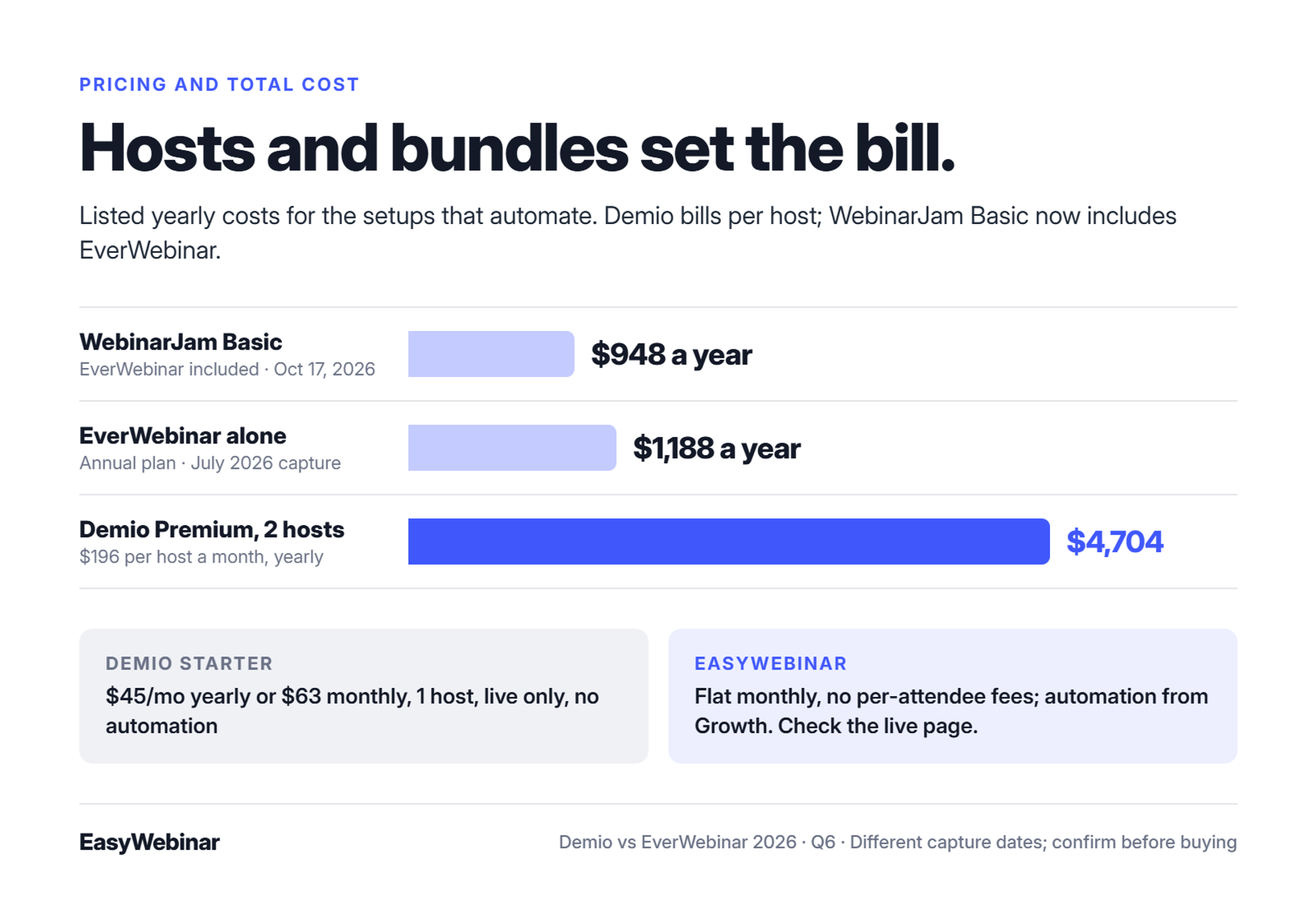
Published prices for both tools conflict across the web, so check each vendor's live page on the day you buy. On October 17, 2026, Demio Starter listed $45 per month billed yearly or $63 monthly, for one host and a 50-person room. Starter excludes automated webinars. EverWebinar was captured in July 2026 at $199 monthly, $99 per month annually, or $79 per month on a two-year term. WebinarJam's Basic plan and above now include EverWebinar at no extra cost.
Prices checked against vendor pages
| Item | Demio | EverWebinar | EasyWebinar |
|---|---|---|---|
| Entry price | Starter $45/mo yearly, $63/mo monthly | $199/mo monthly; $99/mo yearly ($1,188); $79/mo two-year ($1,896) | Flat monthly pricing; check the live pricing page |
| Automated webinars | Growth and Premium only | Core product | Growth plan and above |
| Live webinars | All plans | Not included; needs WebinarJam | All plans |
| Billing unit | Per host, by room size | Flat; no feature tiers | Flat; no per-attendee fees |
| Trial | 14 days, Growth features, 20 attendees, 1 hour | $1 trial | 7-day trial, no free plan |
Demio's Growth card showed no price until a room size was chosen. Premium listed $196 per month per host, billed yearly.
💸 The per-host multiplier
A Demio host is the person who can start and stop a session. Running two sessions at the same time needs two hosts. At the Premium rate shown, two hosts cost $392 per month, or $4,704 a year, before any room upgrade.
That matters if you plan to run automated sessions while a teammate runs live demos. Count your simultaneous sessions before you count features. Also note that Demio's FAQ requires 30 days' notice for Premium plan changes.
💰 The WebinarJam twist
Many comparisons still say EverWebinar needs a second subscription. WebinarJam's pricing page, checked October 17, 2026, says EverWebinar is included in Basic, Professional, and Enterprise. Basic listed $99 monthly or $79 per month billed yearly, with two hosts and 500 attendees.
On those listed prices, WebinarJam Basic ($948 a year) costs less than EverWebinar alone on its annual plan ($1,188). The two figures come from different capture dates, so confirm both before buying.
Why the numbers disagree online
- Hidden prices: Demio's Growth price loads only after you pick a room size.
- Old plans: Capterra still lists an EverWebinar plan at $499 a year.
- Integration tiers: Demio's HubSpot and Salesforce integrations sit on Premium, so CRM needs can move you up a plan.
- Bundles: WebinarJam's inclusion of EverWebinar changes the math for anyone who also runs live.
"The pricing model makes it difficult for smaller organizations to adopt it and pay up as they increase their usage." - Verified User in Construction, 4/5, April 28, 2021, Demio G2 - Verified Review
EasyWebinar uses flat monthly pricing with no per-attendee fees, and a webinar never stops at the plan limit. Live webinars are on every plan, and automation starts at Growth. EasyWebinar's honest advice is to compare the total cost of the stack, meaning webinar, pages, email, CRM, and checkout, not the entry price.
Q7. What do real users say about Demio and EverWebinar, including support?
As of this writing, Demio rates 4.6 out of 5 on G2 from 171 reviews, and EverWebinar 3.9 from 21. G2 reviewers rated Demio ahead on business fit, support quality, and product direction. On Capterra, Demio holds 4.7 from 244 reviews and EverWebinar 3.9 from 8. Demio complaints center on audio, browser issues, and data access after cancelling. EverWebinar complaints center on cloning bugs and slow, email-only support, though most date from 2018 to 2021.
Ratings at a glance
| Platform | G2 rating | Capterra rating | Most recent complaint in our sample |
|---|---|---|---|
| Demio | 4.6 (171) | 4.7 (244) | May 2025 |
| EverWebinar | 3.9 (21) | 3.9 (8) | August 2021 |
| EasyWebinar | See G2 profile | See Capterra profile | February 2026 (email tracking) |
Review counts change weekly, so check the live pages before you quote them. A small review base, like EverWebinar's 8 on Capterra, can swing on a single post.
❌ What Demio users report
G2's own summary of Demio reviews flags streaming delays and frustration over data access after cancellation. Individual reviews add detail:
- A May 2025 reviewer could not export registrant emails after cancelling.
- A December 2024 reviewer reported Safari and microphone problems that ended a session.
- A November 2023 reviewer described echoes, delays, and attendees stuck on mute.
⚠️ What EverWebinar users report
EverWebinar's public reviews are fewer and older. One 2021 team hit duplicate chat messages and missing emails after cloning a webinar. A 2018 reviewer said live-day support was available only by email.
Older reviews may not reflect today's product. In EasyWebinar's view, they are still a fair checklist of what to test.
What to test in your trial
Use the trial to run these checks on whichever platform you shortlist, EasyWebinar included:
- Join as an attendee from Safari and from a phone.
- Clone a webinar, change its schedule, and confirm emails still send.
- Push a test registrant into your CRM and time how long it takes.
- Contact support during a test session and note the channel and response time.
- Read the cancellation terms, including data export.
⭐ Voices from three platforms
"The interactive items sometimes go haywire on my machine. Screen goes blank and have to rejoin the event." - Verified User in Industrial Automation, 3.5/5, November 17, 2023, Demio G2 - Verified Review
"When things don't work or participants log in late there is no way to get help or reach support except via email which obviously is not an ideal scenario in a live event." - Verified User in Market Research, 1/5, January 2, 2018, EverWebinar G2 - Verified Review
"My only dislike is their can be some bugs at times that can be frustrating but often, they are solved quick and this is to be expected with technology." - Darrin B., April 29, 2025, EasyWebinar G2 - Verified Review
EasyWebinar reviewers in our G2 sample most often credit hands-on onboarding support and running live and evergreen on one platform. Darrin B. named a support rep by name and reported close to 30 webinars run since the new year.
Q8. Should you automate a webinar before it converts live?
No. Automating an unproven presentation automates its failure. Run 5 to 10 live sessions, refine the offer, and reach roughly 10% attendee-to-buyer conversion before going evergreen. That turns the tool decision into a sequence: live first, then automation. EasyWebinar runs both steps on one platform, so the session that proves the offer becomes the automated session without a rebuild. This is why the live-to-automated handoff matters more than either Demio's or EverWebinar's half.
Crickets, then a webinar
Before EasyWebinar existed, I spent six months building a YouTube course. I launched it, and nobody bought. Crickets. The only thing that finally produced sales was a webinar.
In my first year of running live webinars for that course, I built a 14,000-person email list and sold $245,000 of that course. Every one of those sales came from a session I had presented, fixed, and presented again.
❌ Record once and hope
The old playbook says record your best attempt, load it into an automation tool, and buy traffic. It sounds efficient. In practice, it locks in every weak slide, unclear offer, and objection you never heard.
Jeremy Haynes, whose agency has scaled evergreen webinars, says automated webinars have been "nerfed" on cold traffic compared with live ones. Cold traffic means people who have never heard of you. They give a recording far less patience than a person in the room.
⚠️ The honest counterpoint
Yuri Elkaim takes the other side. He argues weekly live webinars are a time trap, and reports more than $217 million from evergreen webinars recorded once. Both can be true.
EasyWebinar's read is that the disagreement is about timing, not format. Evergreen works on an offer already proven live. It struggles when automation is asked to do the proving.
The Webinar Sprint, step by step
EasyWebinar's founder method, which I call the Webinar Sprint, runs in this order:
- Go live 5 to 10 times. Get comfortable presenting and hear real objections.
- Tune the offer. Change the price, the bonus, or the close based on what the chat tells you.
- Hit 10%. Wait until roughly 1 in 10 attendees buys, consistently.
- Record the winner. Pick the session that converted, not the one that looked best.
- Automate and keep refining. Turn that exact session into Evergreen or Just-in-Time, then keep watching the numbers.
✅ What EasyWebinar does at step 5
EasyWebinar switches the winning live session into Simulive, Evergreen, Just-in-Time, or On-Demand on the same subscription. EasyWebinar can also carry the real chat from that live session into the evergreen version, so the questions stay authentic.
⭐ Proof and operator voices
Carla Beisinger, an EasyWebinar customer, has generated $5 million from one evergreen funnel.
"I'm going to use it, once my webinar is perfected, to put the presentation on autopilot for more consistent sales." - Micaela S. B., September 13, 2024, EasyWebinar G2 - Verified Review
"I've been going live every month since 2020 and I'm exhausted." - Verified User in Photography, August 26, 2025, EasyWebinar G2 - Verified Review
EasyWebinar is built for the webinar that already works. Prove it live, then turn that exact session into Evergreen or Just-in-Time, with the offers, pages, and data still in place. The proving happens in the room, and the scaling happens on schedule.
Q9. Which platform fits your situation: Demio, EverWebinar, or one that does both?
Choose Demio for occasional live marketing webinars in a clean browser room. Demio Starter covers live sessions for one host, while automated webinars start on Growth. Choose EverWebinar for fully pre-recorded sessions where live is never needed. WebinarJam's Basic plan and above include EverWebinar for teams that also run live launches. EasyWebinar runs live and automated webinars on one subscription, with checkout inside the room and your CRM or EasyCRM.
Start with the job, not the feature list
"It depends" is only useful if you name what it depends on: whether you will ever present live, whether one session must run every day, and where the sale and the lead should land.
✅ Six situations, matched honestly
EasyWebinar's rule for comparisons is to give each rival a true strength, and to say where EasyWebinar is not the right call.
| Your situation | Best fit | Why | Watch out for |
|---|---|---|---|
| Occasional live marketing webinars, solo host | Demio | Clean browser room; Starter covers live for one host | Starter excludes automated webinars |
| Marketing team running live demos on HubSpot | Demio Premium | HubSpot and Salesforce integrations sit on Premium | Billed per host; two simultaneous sessions need two hosts |
| A proven webinar that never needs live | EverWebinar | Automation is the core product | Most public reviews are older; test cloning and support in the trial |
| Live launches plus a replay engine from one vendor | WebinarJam Basic with EverWebinar | EverWebinar included at no extra cost | Two products and two dashboards to manage |
| Prove it live, then scale it evergreen with in-room checkout | EasyWebinar | One switch from live to Evergreen or Just-in-Time, same subscription | Automation starts at the Growth plan |
| Courses with lessons, progress tracking, and certificates | A course platform | None of these three is an LMS (learning management system) | Pair it with EasyWebinar if you sell the course with a webinar |
⚠️ The row most buyers skip
EasyWebinar is not a course platform, and I would rather say so than win a sale that turns into a refund. Host the course on Kajabi, Teachable, or Thinkific, and use the webinar to sell it.
The same honesty applies to Demio. If you run a live webinar once a month and never automate, EasyWebinar's evergreen tools are features you would pay for and never use.
A quick self-test
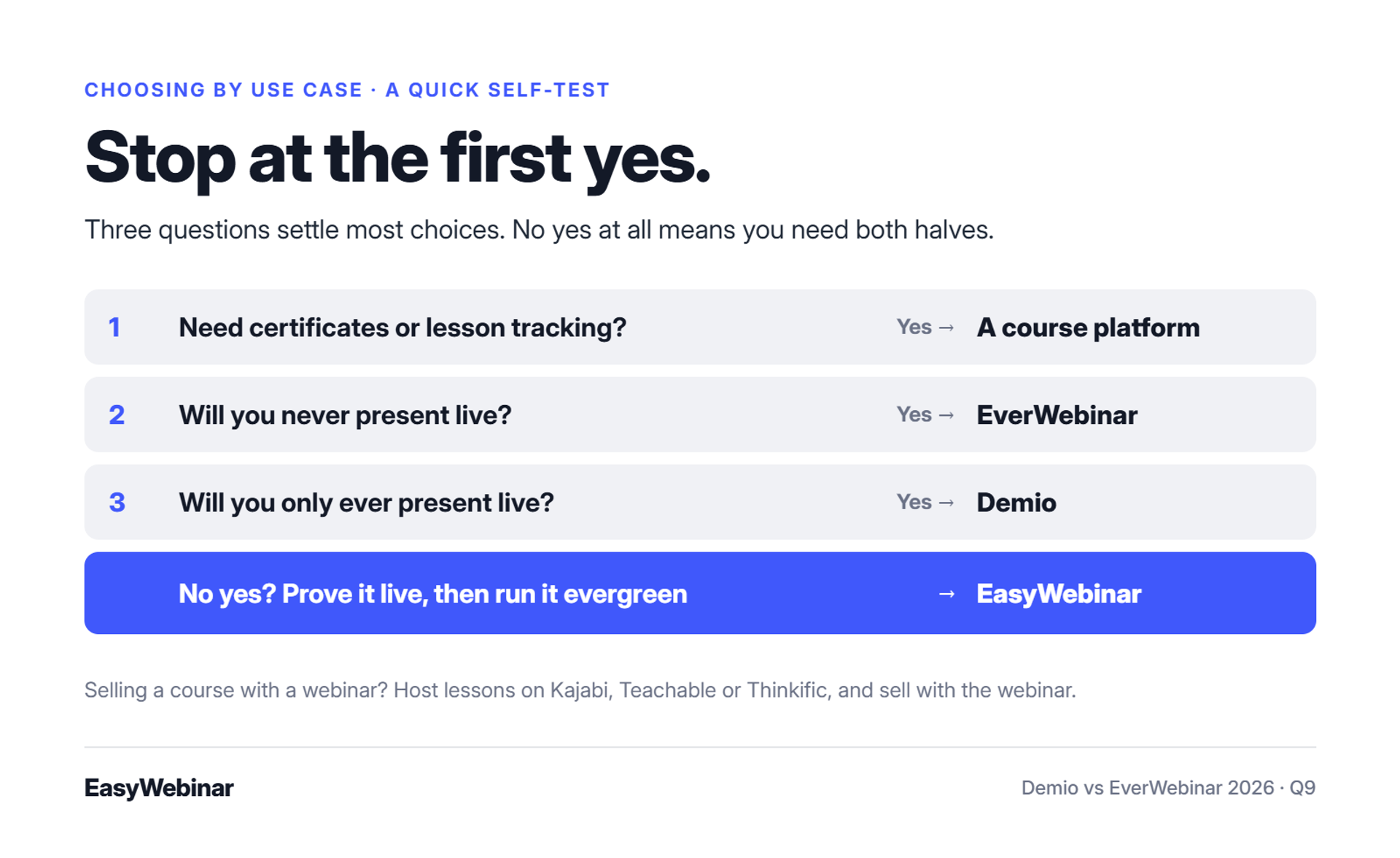
Stop at the first "yes."
- Do you need certificates or lesson tracking? Use a course platform.
- Will you never present live? EverWebinar fits.
- Will you only ever present live? Demio fits.
If you reach the end with no "yes," you need both halves. That is the case EasyWebinar was built for, and it is common among coaches.
⭐ What users of each say
"Compared to some other ones I have used, I like the user interface, it's simple." - Saana K., 4/5, August 6, 2024, Demio G2 - Verified Review
"Easy to set up live or evergreen webinars, including replay options. Analytics splits out live and replay attendee insights for evergreen webinars." - Verified User in Professional Training & Coaching, November 1, 2024, EasyWebinar G2 - Verified Review
EasyWebinar is the fit when the webinar has to keep working. Run it live, prove the offer, then let that exact session run every day as Evergreen or Just-in-Time. Checkout, follow-up, and lead data stay on one subscription.
Frequently Asked Questions
Related Posts

10 Best Community Engagement Platforms in 2026
Compare the 10 best community engagement platforms in 2026. Course creators, evaluate live hosting, analytics, and replay to pick your winner today.

10 Best Online Coaching Tools in 2026: Live Session Quality, Scheduling, Recording, and Client Engagement Analytics
Compare the 10 best online coaching tools of 2026 on session quality, scheduling, and analytics. Discover the right fit for your coaching revenue model.

10 Best Webinar Hosting Platforms Ranked by Uptime, Streaming Quality & Cost
Compare 10 webinar hosting platforms ranked by uptime, streaming quality, and cost. Discover which tool actually turns attendees into revenue.
Turn every webinar into a revenue stream
Launch your first paid event in just a few clicks - and start monetizing your expertise.
Book a Call