Demio vs EasyWebinar: Comparing Registration, Automation, and Audience Engagement Capabilities

Casey Zeman
Published on Jul 1, 2026 • 30 min read

TL;DR
- Demio is a clean, live-first webinar room. EasyWebinar is built for webinars that keep working, turning a proven live session into an automated webinar on one subscription.
- Both platforms gate automation above the entry plan. EasyWebinar adds just-in-time, simulive, evergreen, and scarcity-dated formats, while Demio's timeline makes automated interactions quicker to set up.
- Automate only after the live version converts, ideally around 10% of attendees buying. An automated webinar repeats whatever the live one does, so prove the pitch first.
- EasyWebinar keeps checkout inside the room and offers EasyCRM with an auto-dialer. Demio sends data to your existing CRM, with native HubSpot, Salesforce, Marketo, and Pardot on Premium.
- Demio prices per host and by room size, while EasyWebinar uses flat monthly pricing with no per-attendee fees. Price the full stack, and check vendor pages on the day you buy.
- G2 reviewers praise Demio's simplicity and EasyWebinar's hands-on support. Choose Demio for occasional live marketing webinars, and EasyWebinar when a webinar is how you sell.
Q1: What is the core difference between Demio and EasyWebinar?
Demio is a live-first webinar platform with browser-based rooms. Its automated sessions require a Growth or Premium plan. EasyWebinar is a webinar platform built for conversions. EasyWebinar lets a host run a session live. The host can then turn that exact session into a simulive, evergreen, just-in-time, or on-demand webinar on the same subscription. Checkout runs inside the room, and attendee data flows into your CRM or into EasyCRM, the CRM built into EasyWebinar.
⏰ The question behind the comparison
On EasyWebinar onboarding calls, I hear the same scene every month. A coach has run her sales webinar live for the fourth Tuesday in a row. She is exporting a registrant spreadsheet from one tool so she can upload it into another before the replay email goes out.
That is the real Demio vs EasyWebinar question. It is not which room looks cleaner. EasyWebinar's view is that the choice is between a webinar room and a webinar that keeps working after the live hour.
❌ The old way: one tool for every job
For years, the standard setup looked like this. You hosted live in one product. You bought a second product, or a higher plan, to replay it on a schedule. Then you stitched pages, email, CRM, and checkout together with integrations.
Each handoff cost something. Leads went missing between tools, the presentation got rebuilt, and you paid twice for jobs one platform could do. EasyWebinar was built to remove this "tool sprawl" and the cost of paying twice.
✅ What changed: webinars are judged on revenue
Buyers now judge a webinar by what it produced, not by how many people showed up. Did it sell, book calls, or keep producing leads while you slept?
That shift favors platforms built around the whole funnel. EasyWebinar was built around one mechanism: run it live, find the version that converts, then let that version run every day.
💰 How the formats compare
Here is what each platform documents. "Just-in-time" means the session-time picker offers a start time a few minutes after someone registers. "Simulive" means a recording that plays on a schedule, presented as a scheduled session and never as live.
| Format | Demio | EasyWebinar |
|---|---|---|
| Live, browser join | Yes | Yes, nothing to download |
| Automated or scheduled replays | Yes, Growth or Premium plan | Yes, Growth plan and up |
| On-demand | Yes | Yes, plus Instant Replay |
| Simulive | Hybrid sessions reported by users | Yes |
| Just-in-time | Not documented in sources reviewed | Yes, in the attendee's time zone |
| Scarcity dates | Not documented in sources reviewed | "Next Available" and "Wait For It" |
| Live to automated, same session | Not documented in sources reviewed | Yes, one subscription |
⭐ Why I built it this way
EasyWebinar exists because I kept watching operators choose between live and automated. I put it this way to our community. "There are other tools out there, Webinar Jam, Ever Webinar, Demio, but Easy Webinar gives you a holistic approach and does both live and automated webinars."
Demio deserves credit for a simple live room. If live is all you need, that simplicity is a fair reason to pick it. If the webinar has to sell next month too, the architecture matters more than the interface.
EasyWebinar turns a live session you have already proven into an automated webinar on the same platform. You choose from nine formats, including simulive, evergreen, just-in-time, and on-demand. The presentation is never rebuilt, and the registrants, checkout, and attendee data stay in one place. One login and one subscription cover both halves of the funnel.
Q2: How do registration pages and opt-in tools compare?
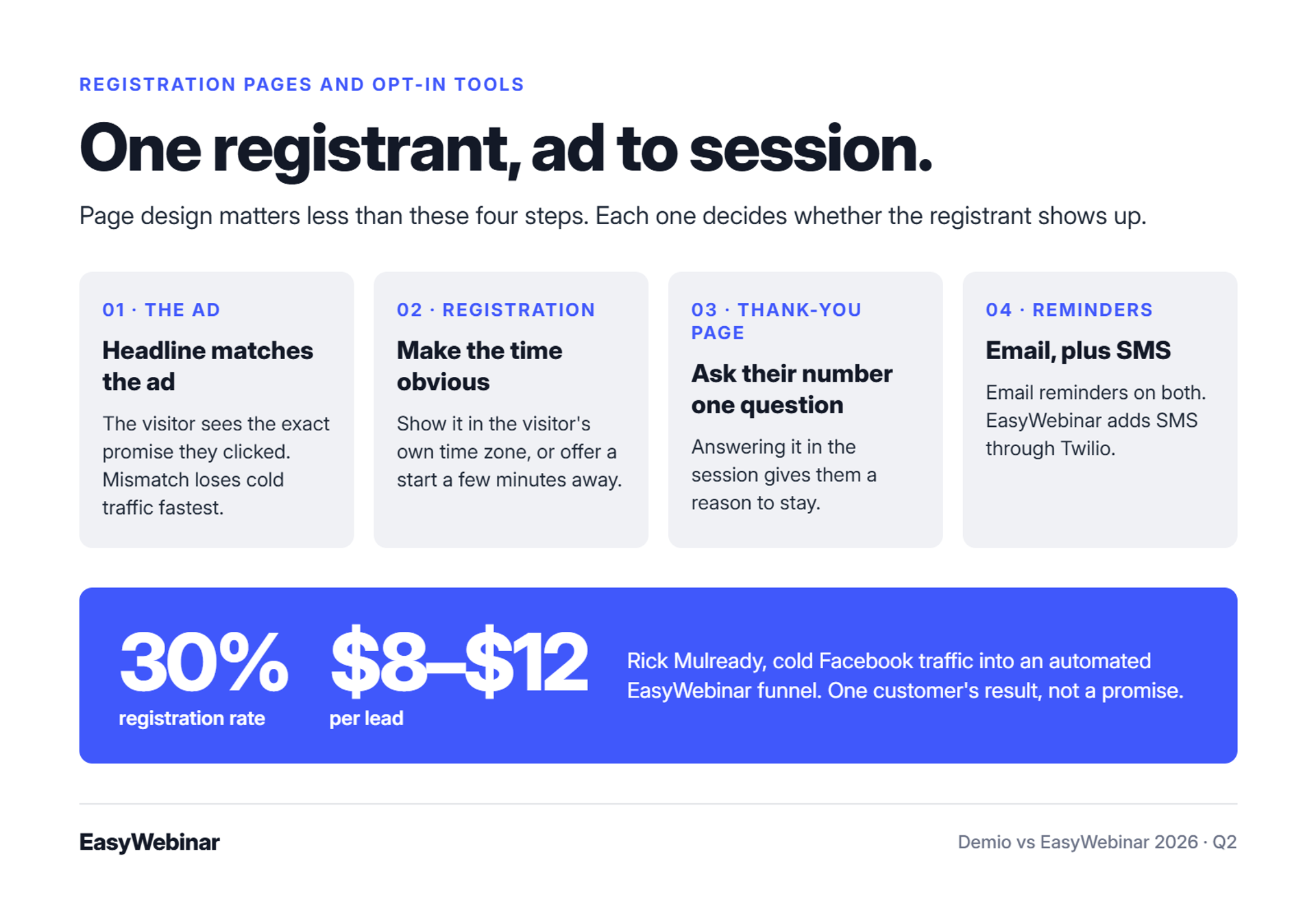
Demio and EasyWebinar both let hosts edit registration pages, collect registrant details, and send reminder emails. EasyWebinar adds just-in-time scheduling, where the session-time picker offers a start a few minutes after sign-up, in the registrant's own time zone. EasyWebinar's AI Webinar Builder writes registration and thank-you pages from about a dozen questions. EasyWebinar customer Rick Mulready reports a 30% registration rate on cold Facebook traffic at $8 to $12 per lead.
⚠️ The redesign that never ships
A marketing director and a designer are on the third round of hero images. The ad budget sits idle while they argue about fonts. EasyWebinar's view, after years of watching funnels, is that this argument is mostly wasted.
Jason Fladlien showed the page behind his record launch and called it ugly. "It was ugly and it was done," he said, because the presentation carries the weight. The opt-in rate is set mostly by the headline match, the time picker, and the thank-you page.
✅ What each platform gives you
| Registration element | Demio | EasyWebinar |
|---|---|---|
| Page editing | Editable landing page and fonts | Drag-and-drop pages and templates |
| AI-written pages | Not documented in sources reviewed | AI Webinar Builder writes pages and emails |
| Session-time picker | Dropdown of scheduled times | Scheduled times or just-in-time starts |
| Time zone shown | Reviewer reports confusion | Local-time-zone streaming |
| Reminders | Email reminders | Email, plus SMS through Twilio |
| Custom domain | Not documented in sources reviewed | Custom CNAME domain |
⏰ Three tactics that lift opt-ins and show-up
- Match the headline to the ad. The registrant should see the exact promise they clicked on. Mismatch is the fastest way to lose a cold visitor.
- Make the time obvious. Show times in the visitor's own time zone, or offer a start time a few minutes away. A vague dropdown creates no-shows.
- Put a question on the thank-you page. Ask registrants for their number one question. Answering those questions during the session gives people a reason to stay.
EasyWebinar pages support all three tactics. The time-zone point matters most, because it decides whether a registrant arrives at all.
⭐ What users report
Reviews on both sides show the same pattern. Setup is easy, and the friction shows up in the details.
"Easy to get set up and spin up registration pages." - Amanda P., Demio user (1.5/5), November 16, 2023, Demio G2 - Verified Review
"The drop down feature didnt specify that the times were shown in their time zone which caused some confusion." - Trina P., Demio user (3.5/5), January 22, 2023, Demio G2 - Verified Review
"One area where we've experienced challenges is with the customization options for webinar landing pages." - Jo K., EasyWebinar user, March 26, 2025, EasyWebinar G2 - Verified Review
Amanda's review praised setup but rated the platform 1.5 for audio problems, not for the pages. Jo's point is fair. EasyWebinar's pages favor ready templates over full design freedom.
💰 A benchmark from cold traffic
Rick Mulready runs Facebook ads every day into an automated EasyWebinar funnel. He reports a 30% registration rate on cold traffic and a cost of $8 to $12 per lead. He also tags each registrant in Keap (formerly Infusionsoft) by what they did in the webinar.
I use his 30% as a working target for cold traffic, not a promise. In my experience, warm lists register higher, and offers vary.
EasyWebinar's AI Webinar Builder asks about a dozen questions, then writes the registration page, thank-you page, reminder emails, and follow-up. Just-in-time scheduling gives each registrant a start time minutes away, in their own time zone. The page is done fast, so your time goes into the headline and the offer.
Q3: How do Demio and EasyWebinar handle automated and evergreen webinars?
Demio runs automated webinars on its Growth and Premium plans. EasyWebinar converts a session the host has already run live into a simulive, evergreen, just-in-time, or on-demand webinar on the same platform. EasyWebinar's automation starts at its Growth plan, so both platforms gate automation above the entry tier. The useful comparison is what the automation does once it runs.
⏰ The host who stopped going live
One EasyWebinar reviewer had gone live every month since 2020 and wrote that they were exhausted. They switched so attendees could pick their own time and the webinar could move toward automation. That is the moment most operators reach this comparison.
An "evergreen" webinar is a recorded presentation that runs on a repeating schedule, with registration, reminders, and follow-up attached. It sells while you sleep or travel. EasyWebinar's word for that role is your 24/7 closer.
❌ The old way: record it, then rebuild it
The old path to evergreen started over. You recorded the live session, opened a second product or a new event type, and re-uploaded the video. Then you rebuilt the pages and the email sequence around it.
That rebuild is where funnels break. A Demio user who runs both live and automated sessions praised the hybrid option but flagged the upload step.
"It takes way too long to upload the presentation material." - Verified User in Construction, Demio user (4/5), April 28, 2021, Demio G2 - Verified Review
✅ What changed: the proven session becomes the product
Operators stopped treating automation as a separate project. The session that already converted is the asset, and the job is to run that exact session in every time zone. EasyWebinar was built around that idea, so the switch from live to automated happens inside one platform.
EasyWebinar offers these automated formats:
- Simulive: a recording that plays at a set time, with chat running alongside.
- Evergreen: the same session on a repeating schedule.
- Just-in-time: a session that starts minutes after someone registers, in their own time zone.
- On-demand and Instant Replay: the session starts the moment someone asks for it.
- Scarcity dates: "Next Available" and "Wait For It" limit sessions to set dates.
⚠️ The trade-offs I won't hide
EasyWebinar has two real costs here. You must upload the presentation before you configure an automated session. One reviewer also reports that just-in-time cost about double the basic plan.
EasyWebinar also never presents an automated session as live. I explain the rule this way: "We never say that it's live but we also don't say it's not live... we make sure that people don't feel like they're being duped."
💰 What the switch produced for one creator
Laura C. sold her online course through live classes before moving to an EasyWebinar evergreen funnel. Her numbers changed fast.
"With my live class I used to sell 10-12 courses. With EasyWebinar I sold 25 courses within 3 weeks of my evergreen 'launch'." - Laura C., EasyWebinar user, January 28, 2025, EasyWebinar G2 - Verified Review
She judged the higher plan worth it. One creator's result is not a benchmark, but it shows what removing the rebuild can do.
EasyWebinar converts the exact live run into simulive, evergreen, just-in-time, or on-demand on one subscription, with scarcity dates when you want them. The presentation, registration pages, and follow-up carry over, so nothing is rebuilt. Automation starts at the Growth plan.
Q4: When should you move a webinar from live to automated?
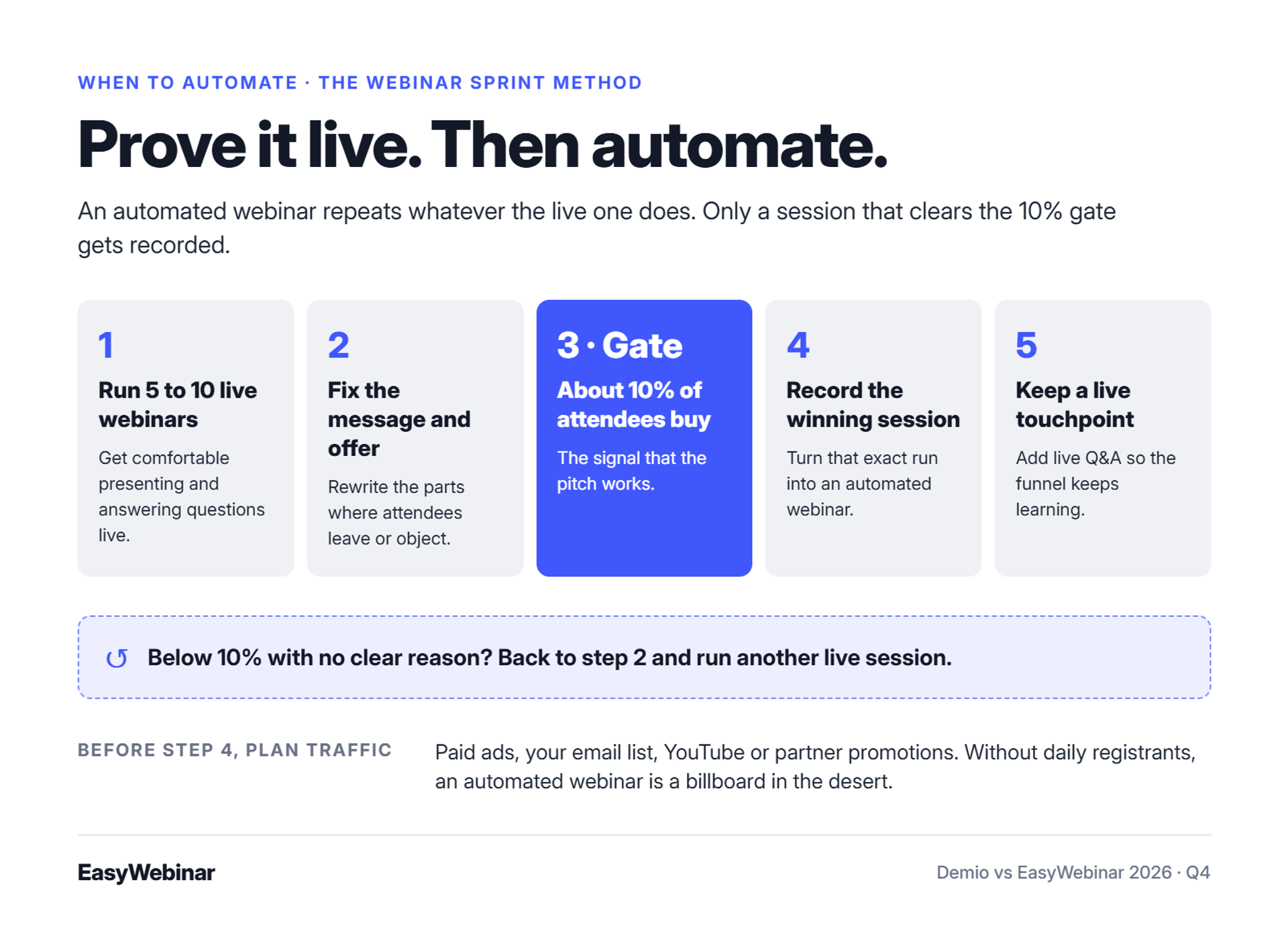
Automate a webinar only after the live version converts. A working benchmark is about 10% of live attendees buying. Run 5 to 10 live sessions, refine the offer using real objections, then automate the best recording. An automated webinar repeats whatever the live version does, so an unproven pitch simply fails on a schedule.
⏰ The course that sold nothing
Years before EasyWebinar existed, I spent six months building a YouTube course. I launched it, and nobody bought. Crickets.
The only thing that started sales was a webinar. In my first year of live webinars, I built an email list of 14,000 people and sold $245,000 of that course. My weekly baseline was roughly 60 registrants, 30 attendees, and 3 buyers.
❌ Two loud camps, both partly right
Operators argue about this constantly, and both sides have real evidence. Jeremy Haynes, who runs large paid-ad webinar campaigns, says automated webinars on cold paid traffic underperform live ones. His word for them was "nerfed."
Yuri Elkaim argues the opposite. He says weekly live webinars are a time trap, and that evergreen webinars recorded once drove his business past $217 million. EasyWebinar's read is that both are describing different stages of the same webinar.
✅ What changed: validate live, then scale
Live sessions teach you things a recording cannot. You hear objections in the chat, see where people drop off, and watch which offer line makes buyers move. Automation cannot learn those things for you.
So the question is no longer live or automated. It is when to switch. EasyWebinar's answer is the Webinar Sprint Method, a five-step sequence I use myself:
- Run 5 to 10 live webinars. Get comfortable presenting and answering questions in real time.
- Fix the message and the offer. Rewrite the parts where attendees leave or object.
- Hit about 10% of attendees buying. That is the signal the pitch works.
- Record the winning session. Turn that exact run into an automated webinar.
- Keep a live touchpoint. Add live Q&A sessions so the funnel keeps learning.
I might be too strict about 10% for low-priced offers. For a high-ticket coaching program, I would not automate below it.
⚠️ The billboard in the desert
Automation does not create demand. On EasyWebinar onboarding calls, my warning is short: "An automated webinar without traffic is like a billboard in the desert."
Before you automate, decide where daily registrants will come from. Paid ads, your email list, YouTube, and partner promotions all work. A funnel with no source of new registrants is the billboard, however good the pitch is. EasyWebinar can run the session every hour, but only your traffic plan fills it.
💸 Signs you are not ready yet
EasyWebinar customers who automate too early, in my experience, show the same signs:
- Fewer than five live runs of the current offer.
- Attendees leaving before the pitch, with no fix tested.
- Conversion below 10% with no clear reason.
- No paid or organic traffic plan for the automated version.
If two of these apply, run another live session first. The recording will be better for it, and the automated version will carry those gains forward.
EasyWebinar is built for the webinar that already works. Run it live on EasyWebinar until it converts, then turn that exact session into an automated webinar that runs every day. The presentation, pages, and follow-up stay in place, so the proven version is the one that scales.
Q5: How do audience engagement tools compare in live and automated sessions?
Demio and EasyWebinar both run chat, polls, Q&A, handouts, and timed calls to action in live sessions. Demio includes chats, polls, featured actions, and handouts on every plan. EasyWebinar adds in-room checkout, where buyers pay through Stripe, PayPal, or PayU without leaving the webinar. The differences show up in what carries into replays and automated sessions, and in how a buyer completes a purchase.
⏰ Minute 47 of the pitch
A coach reaches her offer at minute 47. Chat is moving, and a poll just showed most of the room wants the program. She clicks the offer button, and the attendee lands on a separate checkout page in a new tab.
EasyWebinar was built to remove that handoff. Attendees who leave the room to pay stop hearing the close, and the purchase data ends up in another system.
✅ What each platform offers
| Engagement element | Demio | EasyWebinar |
|---|---|---|
| Chat, polls, Q&A | Yes, all plans | Yes |
| Handouts and resources | Yes, all plans | Yes |
| Calls to action | Featured actions | Timed offers, overlays, and countdowns |
| Payment | Featured action points to your offer | In-room checkout (Growth plan and up) |
| AI answers to on-demand chat | Demio AI, Premium plan | Not documented |
| Setting automated interactions | Timeline view | Manual timestamp entry |
Demio's timeline is a real advantage for automated sessions. You drag interactions into place instead of typing timestamps. EasyWebinar's manual entry takes longer to set up for each automated session.
⭐ What users report
Replays and stability come up most in reviews. One EasyWebinar user also points to how calls to action and polls work across both webinar types.
"The replay didn't show the live polls and CTAs." - Ivanhoe S., Demio user (4/5), August 5, 2024, Demio G2 - Verified Review
"The interactive items sometimes go haywire on my machine. Screen goes blank and have to rejoin the event." - Verified User in Industrial Automation, Demio user (3.5/5), November 17, 2023, Demio G2 - Verified Review
"It is easy to set up call to actions and polls and easy to use them in both types of webinars." - Verified User in Professional Training & Coaching, EasyWebinar user, November 1, 2024, EasyWebinar G2 - Verified Review
The same EasyWebinar reviewer flagged a gap. Replay insights were not captured on live webinars at the time of the review.
💸 Why in-room checkout changes the math
Selling inside the room keeps the offer at the peak of the pitch. The attendee buys while the presenter is still answering objections. EasyWebinar keeps the sale, the attendee, and the purchase data in one record, so you can see who bought at which minute.
I would not call this a small feature for anyone selling a course or program. It decides whether the purchase data lives with your webinar data or somewhere else.
⚠️ A Q&A tactic that holds the room
Questions keep people in the session longer than slides do. The EasyWebinar playbook I teach is simple. Collect questions on the thank-you page, then answer them by name during the session.
Attendees stay to hear their own question answered. In my experience, this works on both platforms, so save the best question for just before the offer.
EasyWebinar keeps the offer, the sale, and the attendee data in one place. Buyers pay inside the room through Stripe, PayPal, or PayU, with SamCart, ThriveCart, and Braintree also supported. Timed offers and countdowns land while the attendee is still watching.
Q6: How do analytics compare: attendance reports or revenue attribution?
Demio includes engagement analytics on every plan and adds registration source tracking from its Growth plan. Third-party reviewers report that Demio surfaces per-attendee engagement scores and drop-off by slide. EasyWebinar records what each attendee watched, asked, clicked, and bought, and attributes revenue back to the webinar. EasyWebinar also shows a drop-off heatmap and adds custom lead scoring on its Pro plan.
⏰ The Monday report that answers the wrong question
A marketing director opens Monday's webinar report. It says 412 registered, 168 attended, and average watch time was 38 minutes. Her CEO asks one question: which of those people bought?
EasyWebinar's view is that attendance reports answer a question nobody asked. The number that matters is revenue per registrant, which needs purchase data tied to each attendee.
✅ What each platform measures
| Metric | Demio | EasyWebinar |
|---|---|---|
| Attendance and watch time | Yes, all plans | Yes, per attendee |
| Engagement score | Per attendee | Lead scoring (Hot, Warm, Nurture), custom on Pro |
| Drop-off view | By slide | Drop-off heatmap by minute |
| Registration source | Growth plan and up | UTMs, GA4, and Meta Pixel |
| Offer clicks and purchases | Not documented in sources reviewed | Offer clicks and in-room purchases |
| Revenue attribution | Not documented in sources reviewed | Yes, tied to each attendee |
| Export | Not documented in sources reviewed | CSV export |
Demio's slide-level drop-off is a real strength. Knowing which slide lost people is easier to act on than a minute marker.
⭐ What users report
Analytics reviews on both sides are mixed. The gaps tend to sit at the edges, in email tracking and visit reporting.
"It is difficult to make the analytics of the visits." - António J., Demio user (4/5), May 4, 2023, Demio G2 - Verified Review
"I do use other email systems to send post-webinar email sequences because I can't track open and click rates on EasyWebinar." - Eliza W., EasyWebinar user, February 11, 2026, EasyWebinar G2 - Verified Review
"I was having a hard time finding a webinar platform that could do everything I wanted... all the tagging to understand viewing metrics." - Verified User in Accounting, EasyWebinar user, May 7, 2024, EasyWebinar G2 - Verified Review
Eliza's point is a fair limit. If email opens and clicks matter to you, run follow-up from your own email platform. EasyWebinar connects with Mailchimp, ActiveCampaign, and Kit (formerly ConvertKit) for that job.
💰 The drop-off threshold tactic
A drop-off threshold is the watch time an attendee must pass before you treat them as engaged. Setting one turns a vague report into a fix list. EasyWebinar supports this with the heatmap and segmentation:
- Set the threshold. Pick the minute just before your offer.
- Find the cliff. Look for the minute where the heatmap drops hardest.
- Fix that segment. Rewrite the two minutes before the cliff, then run the session again.
- Split follow-up. Send people who passed the threshold a different sequence from those who left early. EasyWebinar can trigger both from the same session.
I have watched one rewritten transition move more revenue than a new headline. I might be overweighting it, but I would test it first.
EasyWebinar turns every attendee into first-party intent data: what they watched, asked, clicked, and bought. Revenue is attributed back to the webinar, and the data syncs to your CRM or EasyCRM. You see what made money, not just who showed up.
Q7: How do CRM integrations, APIs, and follow-up compare?
Demio connects natively to HubSpot, Salesforce, Marketo, and Pardot on its Premium plan, with Zapier on other plans. Demio also offers a public API and webhooks. EasyWebinar offers webhooks, a REST API, and Zapier, plus native HubSpot and Salesforce Pardot (Account Engagement) sync from its Pro plan. EasyWebinar also includes EasyCRM, a built-in CRM with lead scoring and an auto-dialer, from its Growth plan.
⏰ Four hours before showtime
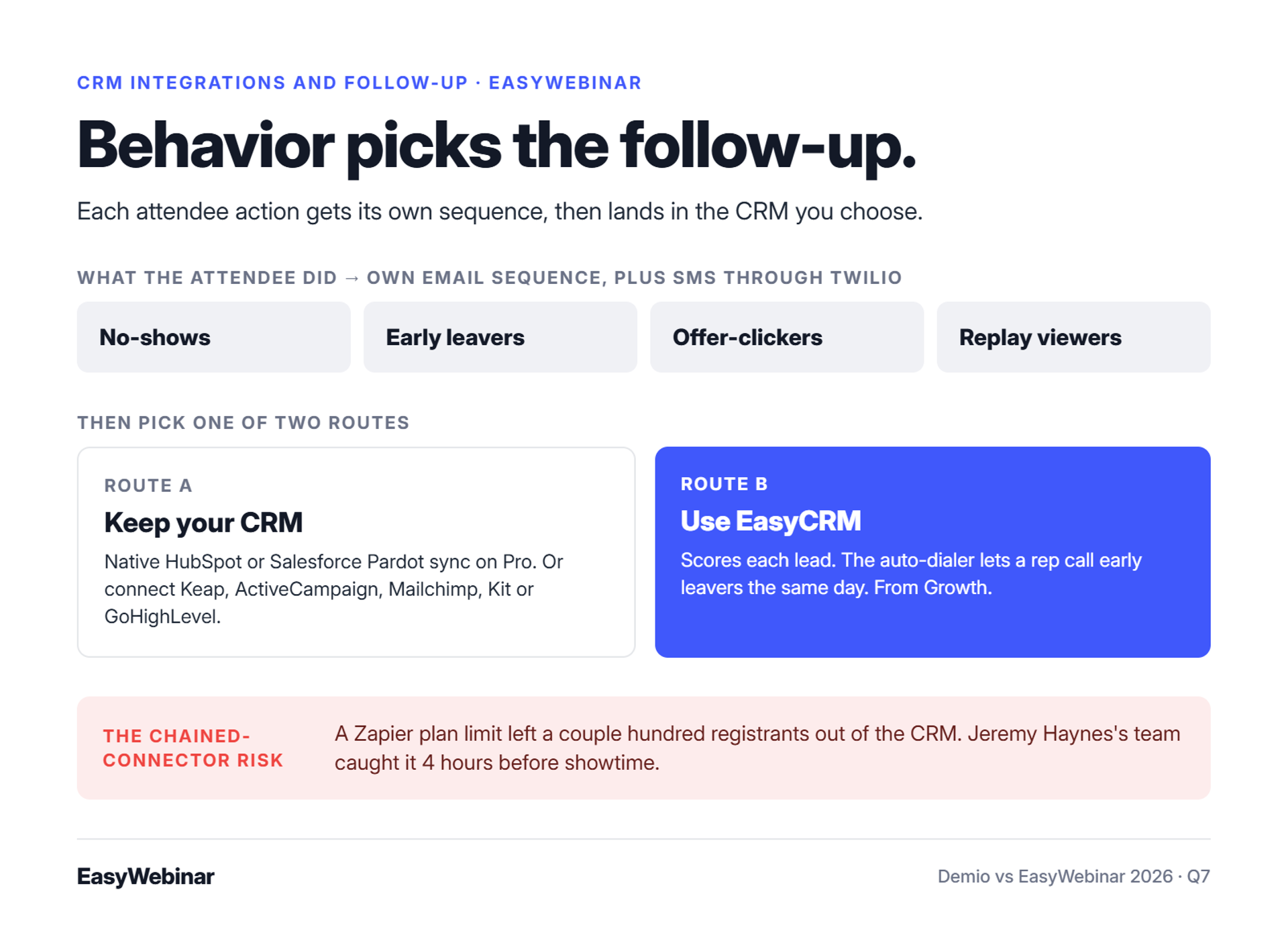
Jeremy Haynes runs webinar campaigns with large ad budgets. Four hours before one webinar, his team found a couple hundred registrants missing from the CRM. Their Zapier account had hit its plan limit, so the sales team was dialing an incomplete list.
That story is not about Demio or EasyWebinar. It is about what happens when registrant data travels through a chain of tools. The data your webinar collects is the asset, and every link in the chain is a place to lose it.
❌ The old way: a funnel held together with connectors
The standard build connects a webinar tool to a form tool, a CRM, an email platform, and a dialer. Each connection needs its own trigger and its own field mapping. EasyWebinar sees the same complaint from operators who arrive from these stacks: the setup never really ends.
I've said it on camera before. Connecting each funnel to the next stage turns it into a "complex spaghetti funnel," and getting it right can take six months to a year. Users on both platforms describe the same friction.
"It's hard to integrate into Hubspot. We use a third party capture form and had to do several zaps to get all data to flow accurately." - Verified User in Education Management, Demio user (4/5), April 20, 2023, Demio G2 - Verified Review
"Some of the integrations are not intuitive, but Rakesh was able to help me with them." - Ajarae C., EasyWebinar user, December 16, 2024, EasyWebinar G2 - Verified Review
✅ What changed: follow-up is judged by the same day
Buyers now expect sales to call while the webinar is still fresh. A lead who clicked the offer at minute 50 is warmest that afternoon. Data ownership matters too. EasyWebinar includes CSV export of attendee data, and one Demio reviewer learned why that matters after cancelling.
"After canceling, I was shocked to find out I couldn't export the list unless I subscribed again." - Sheida M., Demio user (0/5), May 12, 2025, Demio G2 - Verified Review
💰 How EasyWebinar handles it
EasyWebinar takes one of two routes, and you pick:
- Keep your CRM. Sync to HubSpot or Salesforce Pardot natively on Pro, or connect Keap, ActiveCampaign, Mailchimp, Kit (formerly ConvertKit), or GoHighLevel.
- Use ours. EasyCRM scores each lead, and its auto-dialer lets a rep call early leavers the same day.
Follow-up then reacts to behavior. No-shows, early leavers, offer-clickers, and replay viewers each get their own email sequence, with SMS through Twilio.
Native HubSpot and Pardot sync sits on a higher plan on both platforms. Check that line before you compare entry prices.
⭐ What tagging looks like in practice
Rick Mulready connects EasyWebinar to Keap (formerly Infusionsoft). Each registrant is tagged by what they did, such as clicking the buy button, staying past 70%, or leaving early. Each tag triggers a different sequence and a different retargeting ad.
EasyWebinar lets you keep your CRM or use ours. Attendee behavior flows into HubSpot, Salesforce Pardot, Keap, or EasyCRM, and EasyCRM's auto-dialer puts the warmest leads in front of a rep the same day. Fewer chained connectors means fewer places for a registrant to go missing.
Q8: What does each platform cost at 50, 500, and 3,000 attendees?
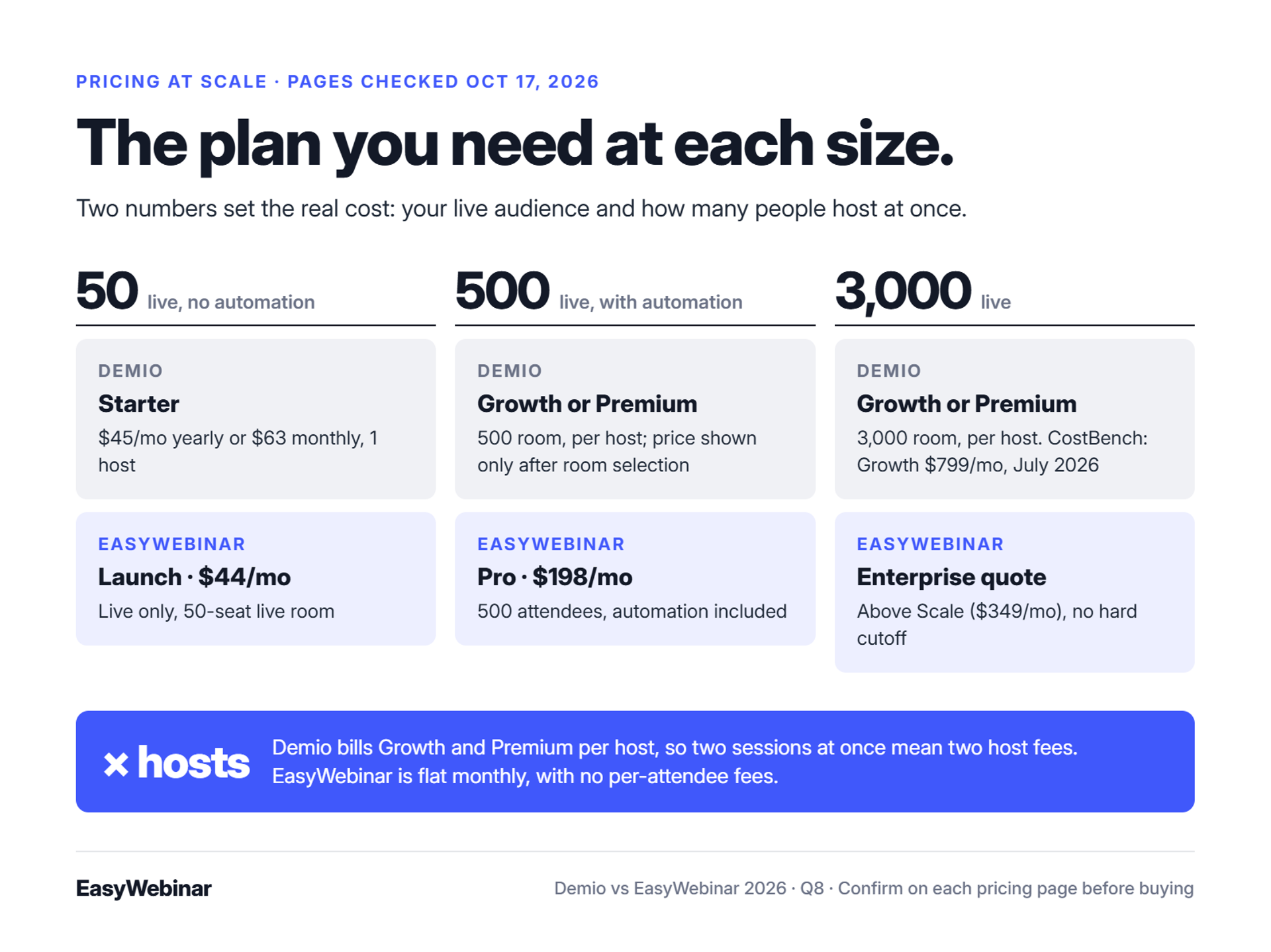
Demio prices its Growth and Premium plans per host and by attendee room size, from 150 to 3,000 seats. Its Starter plan covers one host and a 50-attendee room. EasyWebinar uses flat monthly pricing with no per-attendee fees across four plans: Launch, Growth, Pro, and Scale. An EasyWebinar session keeps running past the plan limit, and extra attendees are billed as overage under EasyWebinar's terms. Both pricing pages were checked on October 17, 2026.
⚠️ The invoice nobody planned for
A marketing director books a 3,000-seat launch in March. Two colleagues need to run sessions at the same time, so the team needs three hosts. The renewal arrives at a number nobody budgeted for.
EasyWebinar's view is that the entry price tells you almost nothing. Two numbers decide the real cost: your audience size and how many people host at once.
❌ Why published prices disagree
Demio's pricing page shows Growth and Premium prices only after you choose a room size. That makes the numbers hard to quote, and third-party sites disagree. CostBench recorded Demio's top published tier dropping from $799 to $196 a month on February 4, 2026. It recorded a return to $799 on April 21, 2026.
So check the vendor page on the day you buy. EasyWebinar publishes one price per plan on its pricing page, with no room-size selector.
💰 Cost at three audience sizes
| Audience | Demio | EasyWebinar |
|---|---|---|
| 50 live, no automation | Starter: $45/mo billed yearly or $63 monthly, one host | Launch: $44/mo, live only |
| 500 live, with automation | Growth or Premium with a 500 room, priced per host after room selection | Pro: $198/mo, 500 attendees, with automation |
| 3,000 live | Growth or Premium with a 3,000 room, per host. CostBench recorded Growth at $799/mo in July 2026 | Above Scale ($349/mo). Enterprise quote , with no hard cutoff |
Two notes keep this table honest. Demio's Growth and Premium prices multiply by host, so two simultaneous sessions mean two host fees. EasyWebinar's Launch plan allows up to 250 replay viewers, but its live room is capped at 50.
✅ What each plan actually includes
Plan names hide the features that matter. Here is where the key features start on each platform:
- Automated webinars: Demio Growth and up. EasyWebinar Growth and up, with 1,000 automated attendees.
- Native HubSpot and Salesforce sync: Demio Premium. EasyWebinar Pro and up.
- Custom domain: Demio Premium. EasyWebinar includes a custom CNAME domain.
- Built-in CRM and in-room checkout: Not documented for Demio. EasyWebinar Growth and up.
- Free trial: Demio offers 14 days, limited to 20 attendees and 1-hour sessions. EasyWebinar offers 7 days.
💸 The total cost of the stack
The webinar plan is rarely the whole bill. Demio's featured actions point attendees to an offer page, so a Demio funnel also needs a checkout tool, and often a separate CRM. EasyWebinar puts pages, email, CRM, and checkout on one bill from Growth.
I would price your full stack line by line before comparing plans. Take each number from the vendor's own pricing page, and date it.
EasyWebinar uses flat monthly pricing with no per-attendee fees. Every plan includes live webinars with browser join. Automation, EasyCRM, checkout, and EasyCast multistreaming start at Growth. A session never stops at the plan limit, and extra attendees are billed as overage under EasyWebinar's terms. There is no free plan.
Q9: What do G2 reviewers praise and criticize about each platform?
G2 reviewers credit Demio with a clean, simple interface and an attendee view that keeps participants anonymous. Demio's lowest ratings cite audio problems, browser issues, and blocked data export after cancelling. G2 reviewers credit EasyWebinar with responsive human support and evergreen automation. EasyWebinar's critics cite limited page customization, pricing for multi-account setups, and the need to upload a video before configuring an automated session.
⭐ The ratings, with a date on them
On October 17, 2026, G2's head-to-head page showed Demio at 4.6 out of 5 from 171 reviews. The same page showed EasyWebinar at 4.4 from 94 reviews. EasyWebinar's own G2 review pages showed a newer snapshot of 4.5 from 119 reviewers.
Treat a 0.2 gap as noise at these review counts. The themes inside the reviews tell you more than the stars do.
✅ Where Demio earns its rating
Demio reviewers keep returning to simplicity. Setup is quick, the room is clean, and attendees find it easy to join.
"Compared to some other ones I have used, I like the user interface, it's simple." - Saana K., Demio user (4/5), August 6, 2024, Demio G2 - Verified Review
The same coach liked that participants cannot see each other, which suits sensitive topics. That is a real reason to choose Demio over a meeting tool.
❌ Where Demio loses points
The low Demio scores cluster around live-session stability. One reviewer described two webinars "littered with audio issues," including echoes and people stuck on mute. Another could not get a microphone recognized and reported problems in Safari.
Both reviews date from 2023 and 2024, and a 4.6 average says most sessions run fine. Still, test audio on the exact browsers your audience uses before a launch.
✅ Where EasyWebinar earns its rating
EasyWebinar's strongest theme is support. On G2's comparison data, EasyWebinar scores 9.5 out of 10 for quality of support, with "Customer Support" and "Easy Setup" as its most-cited pros. Several reviewers name the support rep who helped them build their first funnel.
"Pretty much once I have run one webinar, I can clone and setup multiple in a breeze. We have run close to 30 since we started running it this new year." - Darrin B., EasyWebinar user, April 29, 2025, EasyWebinar G2 - Verified Review
⚠️ Where EasyWebinar loses points
EasyWebinar's criticism is specific, and I would rather you hear it from me. Reviewers cite limited customization, pricing, and the upload-first rule for automated sessions. Darrin, quoted above, also mentioned occasional bugs that support fixed quickly.
"The main downside for us is the pricing. It feels quite high, especially when each account/sub-account needs its own EasyWebinar account." - Verified User in E-Learning, EasyWebinar user (5/5), EasyWebinar G2 - Verified Review
That reviewer manages several HighLevel sub-accounts, so the cost multiplies. Agencies with many client accounts should price that carefully.
💸 How to read reviews before you buy
Star averages hide the details that will affect you. Read reviews this way:
- Filter by your use case. A coach's review of live polish says little about evergreen funnels.
- Read the 2- and 3-star reviews first. They name the failure modes.
- Check the date. A 2021 complaint may describe a product that has since changed.
- Match complaints to your plan. Many gaps close on higher tiers.
EasyWebinar reviewers repeatedly name the support staff who walked them through their first setup, including screen-shares and follow-up calls during the trial. G2 data places support among EasyWebinar's highest-rated areas. For a team launching its first automated funnel, that hands-on help often decides how fast the first webinar goes out.
Q10: Which platform fits your webinar model?
Demio fits occasional live marketing webinars, especially for teams whose CRM already lives elsewhere. Demio's Premium plan includes native HubSpot, Salesforce, Marketo, and Pardot integrations. EasyWebinar fits sellers who run a course, coaching program, or product demo as a webinar that should run every day. EasyWebinar takes payment inside the room and feeds your CRM or EasyCRM. EasyWebinar is not built for accredited courses or internal all-hands meetings.
⏰ The question to ask before the demo call
A consultant books demos with both vendors on the same afternoon. Both walkthroughs look polished, and both reps say yes to every question. By 5pm, she still cannot tell which one fits.
EasyWebinar's advice is to skip the feature list and answer one question first. Does your webinar need to produce revenue after the live hour ends? If yes, automation, checkout, and follow-up matter more than the room.
✅ Fit by buyer situation
| Your situation | Better fit | Why |
|---|---|---|
| Coach selling a high-ticket program | EasyWebinar | Prove the pitch live, then automate it, with checkout in the room |
| Course creator running a weekly sales webinar | EasyWebinar | Just-in-time sessions start minutes after sign-up, and the course stays on Kajabi, Teachable, or Thinkific |
| SaaS team running product demos | Either | Demio offers a clean live room; EasyWebinar turns your best demo into an on-demand demo |
| Consultant running a monthly lead-gen session | Either | Both handle registration and reminders; EasyWebinar adds EasyCRM if you have no CRM |
| Marketing team running occasional live webinars | Demio | Simple setup and a clean attendee experience |
| B2B team whose stack runs on Marketo | Demio | Demio lists native Marketo on Premium ; EasyWebinar has no native Marketo integration |
| Accredited course with lessons and certificates | Neither | Use a course platform such as Thinkific or Teachable |
💰 Where each platform is the wrong pick
Every honest comparison needs a "not ideal for" line. Here is how I would write both entries.
Demio
- Best for: occasional live marketing webinars.
- Not ideal for: a daily automated sales funnel that needs just-in-time scheduling and in-room checkout, neither of which appears in the Demio sources reviewed here.
- Standout: a clean browser-based live room with anonymous attendees.
EasyWebinar
- Best for: webinars built for conversions, live and automated on one subscription.
- Not ideal for: courses with lessons and certificates, internal all-hands meetings, and investor-relations calls.
- Standout: a proven live session becomes an automated webinar on the same platform.
⚠️ Three checks before you sign
EasyWebinar recommends checking these against each vendor's pricing page on the day you buy:
- Host count. Demio bills Growth and Premium per host, so simultaneous sessions mean extra host fees.
- Integration tier. Native HubSpot sync sits on Demio Premium and on EasyWebinar Pro.
- Live room cap. EasyWebinar's Launch plan caps live attendance at 50, and Demio's Starter room is also 50.
💸 My honest recommendation
EasyWebinar is the platform I built, so weigh my view with that in mind. If you run a few live webinars a year, Demio is a sensible, simple choice. If a webinar is how you sell, the question becomes how many days a week it can sell without you.
Run both trials with the same webinar. Demio's trial covers 14 days with 20 attendees, and EasyWebinar's covers 7 days. Judge each by what happened after the session ended.
EasyWebinar is built for webinars that keep working after the live hour. Run a session live, then turn that exact session into an automated webinar on one login and one subscription. Checkout runs inside the room, and attendee data flows to your CRM or EasyCRM.
Frequently Asked Questions

Casey Zeman
Founder of EasyWebinar
About Author
Over the past decade, I've helped thousands of entrepreneurs, coaches, and consultants turn webinars into a predictable, powerful way to grow their audience, build trust, and scale, without the constant hustle. I created EasyWebinar because I couldn't find a system that combined authenticity, engagement, and automation the way I needed. So, I built one.
Related Posts

10 Best Community Engagement Platforms in 2026
Compare the 10 best community engagement platforms in 2026. Course creators, evaluate live hosting, analytics, and replay to pick your winner today.

10 Best Online Coaching Tools in 2026: Live Session Quality, Scheduling, Recording, and Client Engagement Analytics
Compare the 10 best online coaching tools of 2026 on session quality, scheduling, and analytics. Discover the right fit for your coaching revenue model.

10 Best Webinar Hosting Platforms Ranked by Uptime, Streaming Quality & Cost
Compare 10 webinar hosting platforms ranked by uptime, streaming quality, and cost. Discover which tool actually turns attendees into revenue.
Turn every webinar into a revenue stream
Launch your first paid event in just a few clicks - and start monetizing your expertise.
Book a Call