
Powerful features
to run your business
Learn how you can use EasyWebinar as the backbone of your business.

Live Webinars
That Make You Look Great
No Delay Streaming
No more long wait times between asking a question and getting a response. Our no-delay, no latency is the most real time streaming you'll ever get.
High Quality Picture
Your audience gets to see you in pixel perfect, high definition quality using our proprietary EasyWebinar Live Engine. Experience no delays, no buffering and no frustration!
Real-Time Chat
Super easy live chat makes engaging with your community a breeze. And of course, emojis are fully supported! Send links and any communications you'd like in real time.
Multiple Presenters
You can have up to 5 presenters in a live webinar presenting to your audience. Each can use camera and microphone as well as share their screen to present.
Record and Archive
Record and archive any and all webinar sessions. Download them, or use previous live sessions as automated webinars.
Run HD ScreenSharing
No more blurry screen presentations! Share everything in perfect HD including presentations, documents, browser windows and more. Each presenter can share while their thumbnails are pushed to the bottom for a full screen experience.
Make Any Attendee A Presenter
Turn any attendee in the room into a presenter with the click of a button! Select the attendee and EasyWebinar's software will automatically locate their camera and audio; allowing them to start presenting on the spot.
Amazing Audio with TrueVoice Technology
TrueVoice technology allows for noise reduction plus high bandwidth streaming with no delay, even with 5 people speaking at the same time.
Security you can rely on.
EasyWebinar Live engine is powered by DOLBY technologies. DOLBY services is encrypted using Industry standard protocols.
Automated Webinars
Look, feel and work just like a live event.
Evergreen Webinars are pre-recorded, automated webinar funnels that work to generate leads and customers daily, while leveraging your time. Our customers use their Evergreen Webinars to onboard customers, create courses, run automated sales funnels and more.
Pre-Evergreen Webinars
Evergreen webinars stream in real time and leave the impression you are there right now. You never lose the live feel from the stream as began; but if data issues occur, the stream recovers gracefully. Pre-record your webinar with EasyWebinar or edit it, and it will be ready to play live. Your attendees will see a real time streaming stream or ongoing and commitment to come to the webinar; a commitment that is rapidly when simply isn't replayed.
Reach a Larger Audience
Reach a larger audience by spreading to your live events in your timezone. This feature allows automated webinars to really shine. EasyWebinar's system allows you to register leads at the time to give them the feeling they're signing up for a real live event, and find it at the event. Your event, or your audience, grows immediately more - than scheduling farther relationships!
Repurpose Your Live Webinars
Repurpose your live webinars by saving them from a live event in an automated format. Collect more leads and create more sales when you take your live webinars and convert them from being only live to being on an automated and regular run for any of your options. Don't waste, you also have the option to create automated webinars from the beginning.
Right-On-Time Registration
Unlike the right-on-time feature in action, webinars at specific time slots don't always convert best, whether it comes to your page. For example, if your audience registers late at or night or 2:00p, they would see a 2:00p time, they would see that next time slot. By implementing this strategy, increases your opportunity to engage every lead is a few hours that would be fixed!
In-depth Analytics and Reporting
With EasyWebinar's in-tapped analytics, you can get performance data you need that you want so much during your webinar. Use tools live and afterwards. See if your audience showed up, how long they stayed how far they made it through the funnel and deeper understanding of your audience members' actions will help you webinars your event.
'Wait For It' Block Days
Create a custom journey for your customer and gate certain blocks only after certain engagement and commitment at before your webinar begins. Build a sense of demand for your webinar when you automatically scheduled it to start. By only unblocking a set number of days before the real webinar is open for registration.
"I personally use EasyWebinar and they are the best. I moved from using other platforms and nothing compares to their reliability and customer support!"

Amy Porterfield
Online Marketing Expert
Types of Events
That work for your campaign
EasyWebinar's dynamic scheduling will allow you to dominate every and any type of event that will grow your business.
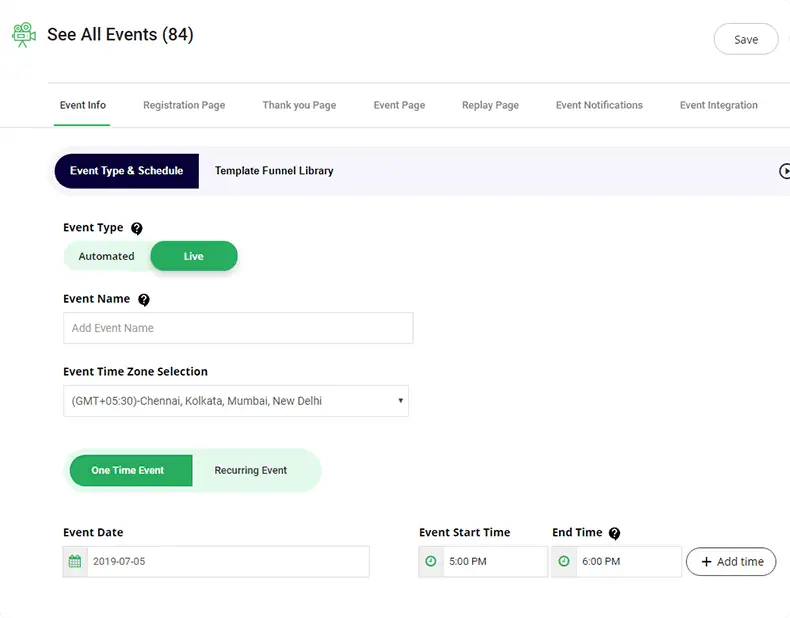
One-Time Webinars
Run either live one-time webinars or leverage your time by running automated webinars done as one-time events.
Recurring Webinars
Duplicate your time by running consistently occurring evergreen webinars that sell daily/consistently for you... can be live or automated to your sales promotion.
Evergreen Webinars
Evergreen webinars are the way to is all, train! No consistency be close. Evergreen webinars allow you to do so.
Advanced Analytics and Reporting
Review your webinar performance and get actionable information that will help you improve your events.
Overall Stats
Quickly see how many registrants showed up to your event, how many attendees completed the webinar, and how many left early.
Individual Attendee Engagement
View specific attendees from your event and see all the chat messages they sent during the webinar.
Export All your data
Click one button to export all of your webinar reporting data into a simple, easy to read CSV report with more more specific attendee information.
Collaborate with your audience
Review your webinar performance and get actionable information that will help you improve your events.
Send Offers
Send Offers in real time for live and time based for automated. Track and segment those who clicked offer vs those who didn't.
Invite People
Invite people on the fly and bring up to 5 additional presenters in a live webinar to connect with your audience.
Question and answer
Answer questions and chat in real time with absolutely no delay.
Make Any Event Attendee A Presenter
Bring in any attendee and turn them into a presenter. You have full control of being able to activate their video, audio and you can also let people at any moment if needed.
Send Email Notifications Before and After the Webinar
EasyWebinar is a one stop shop. We have an entire built in email system for creating notifications before the event and after for both live or evergreen webinars. Our email system, is dynamic and can send evergreen emails based on a specific registrants time registered.
Increase Engagement by Polling Your Audience
Engage with your audience on the spot by utilizing EasyWebinar's polling feature. Ask questions, get real time responses and the insights you need all with the click of a button!
Customizable
For your business
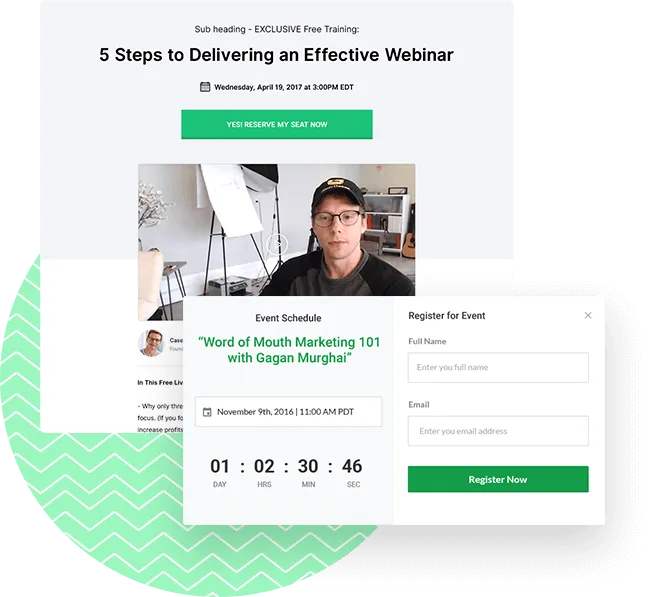
EasyWebinar webinar pages can be easily customized to your brand. Or use our out-of-the-box templates.
Registration Embed Form
Use our registration embed option to host a registration form on your own websites, with landing page builders (ClickFunnels, Leadpages, OptimizePress, Thrive Themes, and more), or in your own member's areas.
Replays from Registration Page
Customize your registration page logo, colors, and text to remain consistent with your brand. Along with schedule replays to go out right from the registration page.
Custom "Thank You" Page
Use our standard thank you page, or set any custom URL as the post-registration thank you page.
Integrate with CRM marketing automation,
& everything else
You'll be able to easily add webinar registrants to your email provider. Plus, with these email providers you can also easily trigger specific campaigns based on a user's actions. For example, send specific emails if someone registered but didn't show up, saw an offer but didn't click, asked a question or more.

Get Response
Add registrants automatically to your Get Response list and add action triggers based on actions performed during the webinar.

Active Campaign
Add registrants automatically to your Active Campaign list and add action triggers based on actions performed during the webinar.

Drip
Add registrants automatically to your Get Drip list and add action triggers based on actions performed during the webinar.

Keap (Infusionsoft)
Add registrants automatically to your Infusionsoft list and add action triggers based on actions performed during the webinar.

Aweber
Add registrants automatically to your Aweber list and add action triggers based on actions performed during the webinar.

Mailchimp
Add registrants automatically to your Mail Chimp list.

Constant Contact
Add registrants automatically to your Constant Contact list.

Ontraport
Add registrants automatically to your Ontraport list and add action triggers based on actions performed during the webinar.

ConvertKit
Add registrants automatically to your Convertkit list and add action triggers based on actions performed during the webinar.